---
title: "Web Pages: HTML and CSS"
book: "Primary & Middle School Computer Science"
subject: computer-science
language: en
chapter: 31
exercises: 12
source: https://one-course.com/books/computer-science/1/en/chapter/31-web-pages-html-and-css
license: CC-BY-NC-SA-4.0
credit: "One Computer Science Book, One Course (one-course.com)"
---
# Chapter 31 — Web Pages: HTML and CSS
Lina saves the library’s [web page](https://one-course.com/books/computer-science/1/en/chapter/13-networks-and-the-internet-a-first-look#def-g5-networks-first-look-page) on her laptop and opens the [file](https://one-course.com/books/computer-science/1/en/chapter/7-files-and-folders#def-g3-files-and-folders-file) in a [text editor](https://one-course.com/books/computer-science/1/en/chapter/4-using-a-computer#def-g2-using-a-computer-word-processor) instead of the [browser](https://one-course.com/books/computer-science/1/en/chapter/13-networks-and-the-internet-a-first-look#def-g5-networks-first-look-page). There is no picture of the page: only words, and many small words between angle brackets, such as `
` and ``. Those small words tell the [browser](https://one-course.com/books/computer-science/1/en/chapter/13-networks-and-the-internet-a-first-look#def-g5-networks-first-look-page) what each part of the page is. This chapter reads them.
**You already know.**
A [web page](https://one-course.com/books/computer-science/1/en/chapter/13-networks-and-the-internet-a-first-look#def-g5-networks-first-look-page) is a [file](https://one-course.com/books/computer-science/1/en/chapter/7-files-and-folders#def-g3-files-and-folders-file) kept by a [server](https://one-course.com/books/computer-science/1/en/chapter/13-networks-and-the-internet-a-first-look#def-g5-networks-first-look-server); a [browser](https://one-course.com/books/computer-science/1/en/chapter/13-networks-and-the-internet-a-first-look#def-g5-networks-first-look-page) asks for it and shows it; a [link](https://one-course.com/books/computer-science/1/en/chapter/13-networks-and-the-internet-a-first-look#def-g5-networks-first-look-web) holds the address of another page ([Chapter 13](https://one-course.com/books/computer-science/1/en/chapter/13-networks-and-the-internet-a-first-look#ch-g5-networks-first-look)). A [file](https://one-course.com/books/computer-science/1/en/chapter/7-files-and-folders#def-g3-files-and-folders-file) has a name and an [extension](https://one-course.com/books/computer-science/1/en/chapter/7-files-and-folders#def-g3-files-and-folders-extension) that tells what it holds ([Chapter 7](https://one-course.com/books/computer-science/1/en/chapter/7-files-and-folders#ch-g3-files-and-folders)). A colour can be written `#RRGGBB`, three [bytes](https://one-course.com/books/computer-science/1/en/chapter/8-memory-and-storage#def-g4-memory-and-storage-byte) in [hexadecimal](https://one-course.com/books/computer-science/1/en/chapter/25-binary-and-hexadecimal#def-g8-binary-and-hexadecimal-hexadecimal) ([Chapter 25](https://one-course.com/books/computer-science/1/en/chapter/25-binary-and-hexadecimal#ch-g8-binary-and-hexadecimal)).
## 31.1 A web page is a text file
**Definition 31.1 (HTML).**
*HTML* (HyperText Markup Language) is the language in which [web pages](https://one-course.com/books/computer-science/1/en/chapter/13-networks-and-the-internet-a-first-look#def-g5-networks-first-look-page) are written. An HTML [file](https://one-course.com/books/computer-science/1/en/chapter/7-files-and-folders#def-g3-files-and-folders-file) is a [text file](https://one-course.com/books/computer-science/1/en/chapter/27-files-and-data-tables#def-g8-files-and-data-tables-text-file), with the [extension](https://one-course.com/books/computer-science/1/en/chapter/7-files-and-folders#def-g3-files-and-folders-extension) `.html`, in which marks around the text say what each part is: a heading, a paragraph, a [list](https://one-course.com/books/computer-science/1/en/chapter/20-lists#def-g7-lists-list), a [link](https://one-course.com/books/computer-science/1/en/chapter/13-networks-and-the-internet-a-first-look#def-g5-networks-first-look-web).
Here is the whole page Lina opened:
```html
Brenmoor Library
```
***Listing 31.1.** The library’s page, as text. code/grade-9/01-html-and-css/listings/first_page.html*
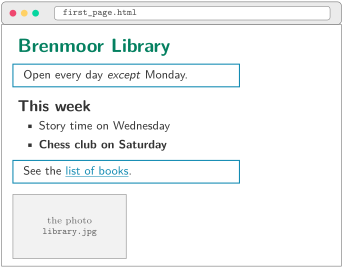
*The same [file](https://one-course.com/books/computer-science/1/en/chapter/7-files-and-folders#def-g3-files-and-folders-file) in a [browser](https://one-course.com/books/computer-science/1/en/chapter/13-networks-and-the-internet-a-first-look#def-g5-networks-first-look-page) window, drawn from the [HTML](#def-g9-html-and-css-html) and its style sheet: the marks have disappeared, and the text is laid out as headings, a [list](https://one-course.com/books/computer-science/1/en/chapter/20-lists#def-g7-lists-list), a [link](https://one-course.com/books/computer-science/1/en/chapter/13-networks-and-the-internet-a-first-look#def-g5-networks-first-look-web) and an image.*
## 31.2 Elements and tags
**Definition 31.2 (Element, tag).**
An *element* is one part of a page. It is written as a *start tag* such as `
`, then its content, then an *end tag* such as `
`, with a slash. A few elements, such as an image, have no content and no end tag.
**Definition 31.3 (Attribute).**
An *attribute* is a name and a [value](https://one-course.com/books/computer-science/1/en/chapter/15-variables-and-input#def-g6-variables-and-input-value) written inside a [start tag](#def-g9-html-and-css-element), such as `href="books.html"`; it gives more information about the [element](#def-g9-html-and-css-element).
The [elements](#def-g9-html-and-css-element) of the library page are among the most used:
| [Element](#def-g9-html-and-css-element) | What it is |
| --- | --- |
| `h1`, `h2` | a heading, then a smaller heading (down to `h6`) |
| `p` | a paragraph |
| `em` | words to stress, usually shown in italics |
| `ul`, `li` | a [list](https://one-course.com/books/computer-science/1/en/chapter/20-lists#def-g7-lists-list) with bullets, and one [item](https://one-course.com/books/computer-science/1/en/chapter/20-lists#def-g7-lists-list) of it |
| `a` | a [link](https://one-course.com/books/computer-science/1/en/chapter/13-networks-and-the-internet-a-first-look#def-g5-networks-first-look-web); its [attribute](#def-g9-html-and-css-attribute) `href` gives the address |
| `img` | an image; `src` names the [file](https://one-course.com/books/computer-science/1/en/chapter/7-files-and-folders#def-g3-files-and-folders-file), `alt` describes it |
| `table`, `tr`, `th`, `td` | a table, a row, a header cell, a cell |
| `html`, `head`, `body` | the whole page, its information, what is shown |
The `head` holds information about the page: its `title`, shown on the [browser](https://one-course.com/books/computer-science/1/en/chapter/13-networks-and-the-internet-a-first-look#def-g5-networks-first-look-page)’s tab, and a `link` to its style sheet. The `body` holds everything shown in the window. The first line, ``, only tells the [browser](https://one-course.com/books/computer-science/1/en/chapter/13-networks-and-the-internet-a-first-look#def-g5-networks-first-look-page) that the [file](https://one-course.com/books/computer-science/1/en/chapter/7-files-and-folders#def-g3-files-and-folders-file) is [HTML](#def-g9-html-and-css-html). A table is written row by row:
```html
Place
Kind
Library
library
Museum
museum
```
***Listing 31.2.** A small table of the town’s places. code/grade-9/01-html-and-css/listings/table.html*
The `alt` text of an image is read aloud to people who cannot see the screen, and shown when the image does not load: a page should always have one.
## 31.3 The page as a tree
**Definition 31.4 (Document tree).**
The [elements](#def-g9-html-and-css-element) of a page sit inside one another: `html` holds `head` and `body`, `body` holds the paragraphs, a paragraph holds a [link](https://one-course.com/books/computer-science/1/en/chapter/13-networks-and-the-internet-a-first-look#def-g5-networks-first-look-web). Drawn with each [element](#def-g9-html-and-css-element) below the one that holds it, they make the *document tree* of the page.
A [program](https://one-course.com/books/computer-science/1/en/chapter/9-programs-and-the-operating-system#def-g4-programs-and-operating-system-program) can find the tree. It looks for every `<`, cuts out the tag up to the next `>`, and keeps a count of the open [elements](#def-g9-html-and-css-element), the `depth`: a [start tag](#def-g9-html-and-css-element) opens one more, an end tag closes one. Each [element](#def-g9-html-and-css-element) name is printed with two spaces per open [element](#def-g9-html-and-css-element) in front of it.
```python
VOID = ["area", "base", "br", "col", "embed", "hr", "img", "input", "link",
"meta", "source", "track", "wbr"] # elements without an end tag
def tags(text):
"""The tags of an HTML text, in order, each without its angle brackets."""
found = []
start = text.find("<")
while start != -1:
end = text.find(">", start)
found.append(text[start + 1:end])
start = text.find("<", end)
return found
def name_of(tag):
"""The element name of a tag: 'li class="new"' gives 'li', '/li' gives 'li'."""
return tag.strip("/").split(" ")[0].lower()
def show_tree(text):
"""Print the element names, indented by their depth in the tree."""
depth = 0
for tag in tags(text):
if tag.startswith("!"):
continue # the DOCTYPE line is not an element
if tag.startswith("/"):
depth = depth - 1 # an end tag closes the open element
else:
print(" " * depth + name_of(tag))
if name_of(tag) not in VOID:
depth = depth + 1 # what follows is inside this element
return depth
```
***Listing 31.3.** Tags, [element](#def-g9-html-and-css-element) names and the tree. code/grade-9/01-html-and-css/listings/html_tree.py*
```python
from html_tree import show_tree
with open("first_page.html", encoding="utf-8") as f:
page = f.read()
left_open = show_tree(page)
print("open at the end:", left_open)
```
***Listing 31.4.** The tree of the library page. code/grade-9/01-html-and-css/listings/show_tree.py*
```
$ python show_tree.py
html
head
title
link
body
h1
p
em
h2
ul
li
li
p
a
img
open at the end: 0
```
***Output 31.1.** Indentation shows what is inside what; at the end, no [element](#def-g9-html-and-css-element) is left open.*
`find` returns the position of a text inside another, or $-1$ when it is not there; `find("<", end)` starts looking at position `end`. `continue` skips the rest of the [loop](https://one-course.com/books/computer-science/1/en/chapter/10-algorithms-repeat-and-decide#def-g4-algorithms-repeat-and-decide-loop)’s body and goes on with the next tag. `link` and `img` are void [elements](#def-g9-html-and-css-element), with no end tag, so they do not open anything.
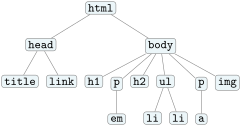
*The [document tree](#def-g9-html-and-css-tree) of the library page: the same 15 [elements](#def-g9-html-and-css-element) as the indented [output](https://one-course.com/books/computer-science/1/en/chapter/1-what-is-a-computer#def-g1-what-is-a-computer-input) of the [program](https://one-course.com/books/computer-science/1/en/chapter/9-programs-and-the-operating-system#def-g4-programs-and-operating-system-program).*
The tree only comes out right if every end tag closes the [element](#def-g9-html-and-css-element) opened last. A missing end tag shifts everything after it:
```python
from html_tree import show_tree
page = """
Open every day except Monday.
This week
Chess club on Saturday.
"""
print("open at the end:", show_tree(page))
```
***Listing 31.5.** A page where `em` is never closed. code/grade-9/01-html-and-css/listings/unclosed.py*
```
$ python unclosed.py
body
p
em
h2
p
open at the end: 1
```
***Output 31.2.** The heading and the second paragraph end up inside the first paragraph.*
The `` closes `em` instead of `p`, so the paragraph stays open, and the heading lands inside it. [Browsers](https://one-course.com/books/computer-science/1/en/chapter/13-networks-and-the-internet-a-first-look#def-g5-networks-first-look-page) try hard to guess what was meant, but a page whose tags pair up properly leaves nothing to guess. The [program](https://one-course.com/books/computer-science/1/en/chapter/9-programs-and-the-operating-system#def-g4-programs-and-operating-system-program) can also count the [elements](#def-g9-html-and-css-element) of each kind:
```python
from html_tree import name_of, tags
with open("first_page.html", encoding="utf-8") as f:
page = f.read()
counts = {}
for tag in tags(page):
if not tag.startswith("/") and not tag.startswith("!"):
name = name_of(tag)
counts[name] = counts.get(name, 0) + 1
for name in counts:
print(name, counts[name])
print("elements:", sum(counts.values()))
```
***Listing 31.6.** Counting the [elements](#def-g9-html-and-css-element). code/grade-9/01-html-and-css/listings/count_tags.py*
```
$ python count_tags.py
html 1
head 1
title 1
link 1
a 1
img 1
elements: 15
```
***Output 31.3.** 15 [elements](#def-g9-html-and-css-element). Some lines are left out.*
**History — The first web page.**
The first web [server](https://one-course.com/books/computer-science/1/en/chapter/13-networks-and-the-internet-a-first-look#def-g5-networks-first-look-server) ran at CERN at the end of 1990 ([Chapter 13](https://one-course.com/books/computer-science/1/en/chapter/13-networks-and-the-internet-a-first-look#ch-g5-networks-first-look)). Its address was `info.cern.ch`, and its first page described the [World Wide Web](https://one-course.com/books/computer-science/1/en/chapter/13-networks-and-the-internet-a-first-look#def-g5-networks-first-look-web) project itself, with [links](https://one-course.com/books/computer-science/1/en/chapter/13-networks-and-the-internet-a-first-look#def-g5-networks-first-look-web) to pages on how to set up a [server](https://one-course.com/books/computer-science/1/en/chapter/13-networks-and-the-internet-a-first-look#def-g5-networks-first-look-server) of one’s own.
## 31.4 Content apart from appearance
**Definition 31.5 (CSS, CSS rule, selector).**
*CSS* (Cascading Style Sheets) is the language that says how the [elements](#def-g9-html-and-css-element) of a page look. A *CSS rule* is a *selector*, which says which [elements](#def-g9-html-and-css-element) it applies to, followed by properties and [values](https://one-course.com/books/computer-science/1/en/chapter/15-variables-and-input#def-g6-variables-and-input-value) between curly brackets.
**Definition 31.6 (Class of an element).**
The [attribute](#def-g9-html-and-css-attribute) `class` gives an [element](#def-g9-html-and-css-element) a name chosen by the author, its *class*; the [selector](#def-g9-html-and-css-css) `li.new` applies only to the `li` [elements](#def-g9-html-and-css-element) of class `new`.
The [HTML](#def-g9-html-and-css-html) says what each part is; a separate [CSS](#def-g9-html-and-css-css) [file](https://one-course.com/books/computer-science/1/en/chapter/7-files-and-folders#def-g3-files-and-folders-file), the style sheet, says how it looks. The `link` in the `head` of the library page names `style.css`:
```text
body {
font-family: sans-serif;
color: #333333;
}
h1 {
color: #2E8B57;
font-size: 32px;
}
li.new {
font-weight: bold;
}
p {
width: 300px;
padding: 10px;
border: 2px solid #4169E1;
margin: 20px;
}
```
***Listing 31.7.** The style sheet of the library page. code/grade-9/01-html-and-css/listings/style.css*
The [selector](#def-g9-html-and-css-css) `body` applies to the body and, unless a rule says otherwise, to everything inside it: hence the font of the whole page. The colours are the [hexadecimal](https://one-course.com/books/computer-science/1/en/chapter/25-binary-and-hexadecimal#def-g8-binary-and-hexadecimal-hexadecimal) colours of [Chapter 25](https://one-course.com/books/computer-science/1/en/chapter/25-binary-and-hexadecimal#ch-g8-binary-and-hexadecimal); sizes are in `px`, [pixels](https://one-course.com/books/computer-science/1/en/chapter/12-text-pictures-and-sound-as-numbers#def-g5-text-pictures-sound-as-numbers-pixel) of the screen.
## 31.5 Boxes
**Definition 31.7 (Box model).**
In the *box model*, the [browser](https://one-course.com/books/computer-science/1/en/chapter/13-networks-and-the-internet-a-first-look#def-g5-networks-first-look-page) draws every [element](#def-g9-html-and-css-element) as a rectangle: its content, surrounded by an inner space, the *padding*; then a *border*; then an outer space, the *margin*, that keeps other boxes away.
In `style.css`, a paragraph has content 300 [pixels](https://one-course.com/books/computer-science/1/en/chapter/12-text-pictures-and-sound-as-numbers#def-g5-text-pictures-sound-as-numbers-pixel) wide, 10 [pixels](https://one-course.com/books/computer-science/1/en/chapter/12-text-pictures-and-sound-as-numbers#def-g5-text-pictures-sound-as-numbers-pixel) of padding and a border of 2 [pixels](https://one-course.com/books/computer-science/1/en/chapter/12-text-pictures-and-sound-as-numbers#def-g5-text-pictures-sound-as-numbers-pixel) on each side: the box is $300 + 2 \times 10 + 2 \times 2 = 324$ [pixels](https://one-course.com/books/computer-science/1/en/chapter/12-text-pictures-and-sound-as-numbers#def-g5-text-pictures-sound-as-numbers-pixel) wide, and its margin of 20 [pixels](https://one-course.com/books/computer-science/1/en/chapter/12-text-pictures-and-sound-as-numbers#def-g5-text-pictures-sound-as-numbers-pixel) keeps the next box at a distance.
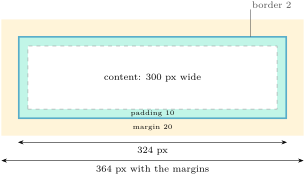
*The box of a paragraph with `style.css`: the content, the padding, the border (blue) and the margin, to scale.*
Changing the style sheet changes the look of the page without touching the [HTML](#def-g9-html-and-css-html). Here is a second one, dark, with no border around paragraphs:
```text
body {
font-family: serif;
background-color: #222222;
color: #FFFFFF;
}
h1 {
color: #FF8800;
text-align: center;
}
li.new {
color: #FF8800;
}
p {
width: 300px;
padding: 0px;
border: none;
margin: 10px;
}
```
***Listing 31.8.** A second style sheet for the same page. code/grade-9/01-html-and-css/listings/two_styles.css*
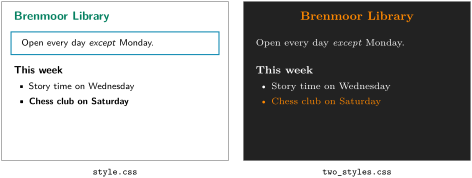
*The top of the same [HTML](#def-g9-html-and-css-html) page with the two style sheets: only the [CSS](#def-g9-html-and-css-css) changed.*
## 31.6 Exercises
**Exercise 31.1 ★.**
What does `show_tree` print for this [HTML](#def-g9-html-and-css-html)?
`
`
**Solution of Exercise 31.1.**
`ul`, then `li` indented once, `a` indented twice (inside the first [item](https://one-course.com/books/computer-science/1/en/chapter/20-lists#def-g7-lists-list)), and the second `li` indented once. At the end, nothing is left open.
**Exercise 31.2 ★.**
In the library page, which [elements](#def-g9-html-and-css-element) does each rule of `style.css` apply to?
**Solution of Exercise 31.2.**
`body` applies to the body, and so to the whole page shown; `h1` to the main heading; `li.new` to the second [item](https://one-course.com/books/computer-science/1/en/chapter/20-lists#def-g7-lists-list) only, Chess club; `p` to the two paragraphs.
**Exercise 31.3 ★.**
With `two_styles.css`, how wide is the box of a paragraph, border included? And with its margins?
**Solution of Exercise 31.3.**
No padding and no border: the box is 300 [pixels](https://one-course.com/books/computer-science/1/en/chapter/12-text-pictures-and-sound-as-numbers#def-g5-text-pictures-sound-as-numbers-pixel) wide, and $300 + 2 \times 10 = 320$ with its margins.
**Exercise 31.4 ★.**
Write a page with a title, a heading, a [list](https://one-course.com/books/computer-science/1/en/chapter/20-lists#def-g7-lists-list) of two of your favourite places and a [link](https://one-course.com/books/computer-science/1/en/chapter/13-networks-and-the-internet-a-first-look#def-g5-networks-first-look-web) to `https://www.example.org`.
**Solution of Exercise 31.4.**
```html
My favourite places
```
*A page of one’s own. code/grade-9/01-html-and-css/exercises/my_page.html*
A test of the chapter checks that its tags pair up.
**Exercise 31.5 ★★.**
`
An important
day` closes its tags in the wrong order. Draw the tree it should have, and fix it.
**Solution of Exercise 31.5.**
`em` is inside `p`, so it must close first: `
An important day
`, with the tree `p`, then `em` below it. `show_tree` does not notice the mistake: it only counts the open [elements](#def-g9-html-and-css-element), and two [start tags](#def-g9-html-and-css-element) followed by two end tags bring the count back to 0, whatever their names. [Exercise 31.11](#exo-g9-html-and-css-11) looks at the names.
**Exercise 31.6 ★★.**
A page shows a map with ``. What is missing, who needs it, and how do you fix it?
**Solution of Exercise 31.6.**
The `alt` text is missing. People who listen to the page with a screen reader hear nothing about the map, and everyone sees an empty frame when the image does not load. The fix describes it: ``.
**Exercise 31.7 ★★.**
Write an [HTML](#def-g9-html-and-css-html) table with two columns, the name and the kind of four of the town’s places: Library, Market Hall, River Park and one more of your choice.
**Solution of Exercise 31.7.**
```html
Place
Kind
Library
library
Market Hall
market
River Park
park
Station
station
```
*Four places; the fourth, the Station, is one choice among the others of the town. code/grade-9/01-html-and-css/exercises/places.html*
**Exercise 31.8 ★★.**
Write a style sheet that colours every `h2` heading in royal blue, `#4169E1`.
**Solution of Exercise 31.8.**
```text
h2 {
color: #4169E1;
}
```
*Every `h2` in royal blue. code/grade-9/01-html-and-css/exercises/h2.css*
**Exercise 31.9 ★★.**
How many [elements](#def-g9-html-and-css-element) does `table.html` have, and what is the depth of its tree (the number of levels, the top one counted as 1)?
**Solution of Exercise 31.9.**
10 [elements](#def-g9-html-and-css-element): `table`, three `tr`, two `th` and four `td`. Depth 3: `table`, then `tr`, then the cells.
**Exercise 31.10 ★★★.**
Write a [function](https://one-course.com/books/computer-science/1/en/chapter/19-functions#def-g7-functions-function) `links(text)` that returns the address of every [link](https://one-course.com/books/computer-science/1/en/chapter/13-networks-and-the-internet-a-first-look#def-g5-networks-first-look-web) of a page, using `tags` and `name_of` from [Listing 31.3](#lst-g9-html-and-css-html-tree).
**Solution of Exercise 31.10.**
Keep the [start tags](#def-g9-html-and-css-element) named `a`, and cut out the text between `href="` and the next quote. The [file](https://one-course.com/books/computer-science/1/en/chapter/7-files-and-folders#def-g3-files-and-folders-file) sits next to `html_tree.py` ([Listing 31.3](#lst-g9-html-and-css-html-tree)), whose `tags` and `name_of` it imports:
```python
from html_tree import name_of, tags
def links(text):
"""The address of every link (the href of every a element) of an HTML text."""
found = []
for tag in tags(text):
if name_of(tag) == "a" and not tag.startswith("/"):
start = tag.find('href="') + len('href="')
found.append(tag[start:tag.find('"', start)])
return found
```
*The addresses of the [links](https://one-course.com/books/computer-science/1/en/chapter/13-networks-and-the-internet-a-first-look#def-g5-networks-first-look-web). code/grade-9/01-html-and-css/exercises/links.py*
On the library page it returns `['books.html']`.
**Exercise 31.11 ★★★.**
Show that in a page whose tags pair up properly, every end tag closes the [element](#def-g9-html-and-css-element) opened most recently and still open, as closing brackets do in $(\,[\,]\,(\,)\,)$. Give a page where this fails, and say what `show_tree` does with it.
**Solution of Exercise 31.11.**
Suppose an end tag `` comes while an [element](#def-g9-html-and-css-element) `b`, opened after `a`, is still open. Then `b` started inside `a`, so all of its content, end tag included, belongs inside `a`, before ``. But `b` is still open at ``: its end comes after, outside `a`. That is impossible in a page whose [elements](#def-g9-html-and-css-element) sit inside one another; so every end tag closes the [element](#def-g9-html-and-css-element) opened most recently and still open, exactly as a closing bracket closes the last open bracket. The page of [Exercise 31.5](#exo-g9-html-and-css-5) breaks the rule: `` comes while `em` is still open. To catch it, a [program](https://one-course.com/books/computer-science/1/en/chapter/9-programs-and-the-operating-system#def-g4-programs-and-operating-system-program) would keep the [list](https://one-course.com/books/computer-science/1/en/chapter/20-lists#def-g7-lists-list) of the names still open, check that each end tag has the name at the end of that [list](https://one-course.com/books/computer-science/1/en/chapter/20-lists#def-g7-lists-list), then remove it.
**Exercise 31.12 ★★★.**
Write a [function](https://one-course.com/books/computer-science/1/en/chapter/19-functions#def-g7-functions-function) `html_table(filename)` that reads a [CSV file](https://one-course.com/books/computer-science/1/en/chapter/27-files-and-data-tables#def-g8-files-and-data-tables-table) ([Chapter 27](https://one-course.com/books/computer-science/1/en/chapter/27-files-and-data-tables#ch-g8-files-and-data-tables)) and returns the text of an [HTML](#def-g9-html-and-css-html) table, with the [header row](https://one-course.com/books/computer-science/1/en/chapter/27-files-and-data-tables#def-g8-files-and-data-tables-table) in `th` cells.
**Solution of Exercise 31.12.**
```python
import csv
def html_table(filename):
"""The rows of a CSV file as the text of an HTML table, header row in th cells."""
with open(filename, encoding="utf-8") as f:
rows = list(csv.reader(f))
text = "
\n"
for i in range(len(rows)):
cell = "td"
if i == 0:
cell = "th"
text = text + "
"
for value in rows[i]:
text = text + "<" + cell + ">" + value + ""
text = text + "
\n"
return text + "
\n"
```
*A CSV table turned into [HTML](#def-g9-html-and-css-html). code/grade-9/01-html-and-css/exercises/csv_to_html.py*
A test turns the town’s `places.csv` into a table and checks that its tags pair up and that it has one row per line of the [file](https://one-course.com/books/computer-science/1/en/chapter/7-files-and-folders#def-g3-files-and-folders-file).
## 31.7 Problem: The Tree of a Page
**Problem 31.1.**
Weekend problem — the tree of a page
The weather station of Hilltop publishes a small page:
```html
Hilltop weather
Hilltop weather
Readings of 2025.
Month
Rain
March
84.4 mm
```
***Listing 31.9.** The weather page. code/grade-9/01-html-and-css/listings/weather_page.html*
**Part I — By hand.**
1. Draw the tree of the page.
2. How many [elements](#def-g9-html-and-css-element) does it have?
3. What is the depth of its tree, the top level counted as 1? Which [elements](#def-g9-html-and-css-element) are the deepest?
**Part II — By program.**
```python
from html_tree import VOID, name_of, tags
def stats(text):
"""The number of elements of an HTML text, and the depth of its tree."""
count = 0
depth = 0 # how many elements are open
deepest = 0
for tag in tags(text):
if tag.startswith("!"):
continue
if tag.startswith("/"):
depth = depth - 1
else:
count = count + 1
if depth + 1 > deepest:
deepest = depth + 1 # this element's level in the tree
if name_of(tag) not in VOID:
depth = depth + 1
return count, deepest
def list_page(n):
"""A page whose body holds a heading and a list of n items."""
items = ""
for i in range(1, n + 1):
items = items + "
item " + str(i) + "
"
return ("List"
"
List
" + items + "
")
for name in ["first_page.html", "table.html", "weather_page.html"]:
with open(name, encoding="utf-8") as f:
count, depth = stats(f.read())
print(f"{name:<18} {count:>3} elements, depth {depth}")
for n in range(1, 11):
count, depth = stats(list_page(n))
print(f"list of {n:>2}: {count:>2} elements, depth {depth}")
```
***Listing 31.10.** The number of [elements](#def-g9-html-and-css-element) and the depth of a page. code/grade-9/01-html-and-css/listings/page_stats.py*
4. Why is `deepest` updated with `depth + 1` before `depth` itself changes?
5. Why does an `img` count as an [element](#def-g9-html-and-css-element) , but never change `depth` ?
6. Run the [program](https://one-course.com/books/computer-science/1/en/chapter/9-programs-and-the-operating-system#def-g4-programs-and-operating-system-program) . Do its numbers for the weather page agree with Part I?
7. What does `list_page(3)` return? Write its tree.
**Part III — A growing list.**
8. How do the count and the depth change from a [list](https://one-course.com/books/computer-science/1/en/chapter/20-lists#def-g7-lists-list) of 1 [item](https://one-course.com/books/computer-science/1/en/chapter/20-lists#def-g7-lists-list) to a [list](https://one-course.com/books/computer-science/1/en/chapter/20-lists#def-g7-lists-list) of 10?
9. Write the count as a formula in $n$ , the number of [items](https://one-course.com/books/computer-science/1/en/chapter/20-lists#def-g7-lists-list) .
10. Why does the depth not change?
11. State the result.
**Solution of Problem 31.1.**
**1.** `html` holds `head` (with `title`) and `body`; `body` holds `h1`, `p` (with `strong`) and `table`; `table` holds two `tr`; the first holds two `th`, the second two `td`.
**2.** 14 [elements](#def-g9-html-and-css-element).
**3.** Depth 5: `html`, `body`, `table`, `tr`, then the cells. The two `th` and the two `td` are the deepest.
**4.** The [element](#def-g9-html-and-css-element) being opened sits one level below the [elements](#def-g9-html-and-css-element) already open: its level is `depth + 1`.
**5.** An `img` is an [element](#def-g9-html-and-css-element) of the tree, but has no end tag: raising `depth` for it would leave the count one too high for the rest of the page.
**6.** Yes: 14 [elements](#def-g9-html-and-css-element) and depth 5.
```
$ python page_stats.py
first_page.html 15 elements, depth 4
table.html 10 elements, depth 3
weather_page.html 14 elements, depth 5
list of 1: 7 elements, depth 4
list of 2: 8 elements, depth 4
list of 3: 9 elements, depth 4
list of 4: 10 elements, depth 4
list of 5: 11 elements, depth 4
list of 6: 12 elements, depth 4
list of 7: 13 elements, depth 4
list of 8: 14 elements, depth 4
list of 9: 15 elements, depth 4
list of 10: 16 elements, depth 4
```
***Output 31.4.** Three pages, then [lists](https://one-course.com/books/computer-science/1/en/chapter/20-lists#def-g7-lists-list) of 1 to 10 [items](https://one-course.com/books/computer-science/1/en/chapter/20-lists#def-g7-lists-list).*
**7.** The text of a page with `html`, `head`, `title`, `body`, `h1`, `ul` and three `li`, all on one line: 9 [elements](#def-g9-html-and-css-element), the three [items](https://one-course.com/books/computer-science/1/en/chapter/20-lists#def-g7-lists-list) side by side under `ul`.
**8.** The count goes up by one with each [item](https://one-course.com/books/computer-science/1/en/chapter/20-lists#def-g7-lists-list), from 7 to 16; the depth stays 4.
**9.** $n + 6$: the six [elements](#def-g9-html-and-css-element) `html`, `head`, `title`, `body`, `h1` and `ul`, plus one `li` per [item](https://one-course.com/books/computer-science/1/en/chapter/20-lists#def-g7-lists-list).
**10.** The [items](https://one-course.com/books/computer-science/1/en/chapter/20-lists#def-g7-lists-list) sit side by side in the same `ul`: a longer [list](https://one-course.com/books/computer-science/1/en/chapter/20-lists#def-g7-lists-list) makes the tree wider, not deeper.
**11.** **Result.** A page with a [list](https://one-course.com/books/computer-science/1/en/chapter/20-lists#def-g7-lists-list) of $n$ [items](https://one-course.com/books/computer-science/1/en/chapter/20-lists#def-g7-lists-list) has $n + 6$ [elements](#def-g9-html-and-css-element), and its tree has depth 4 whatever $n$: the six [elements](#def-g9-html-and-css-element) of the skeleton are fixed, and each [item](https://one-course.com/books/computer-science/1/en/chapter/20-lists#def-g7-lists-list) adds one [element](#def-g9-html-and-css-element) beside the others, never below them.
 ```
***Listing 31.1.** The library’s page, as text. code/grade-9/01-html-and-css/listings/first_page.html*

*The same [file](https://one-course.com/books/computer-science/1/en/chapter/7-files-and-folders#def-g3-files-and-folders-file) in a [browser](https://one-course.com/books/computer-science/1/en/chapter/13-networks-and-the-internet-a-first-look#def-g5-networks-first-look-page) window, drawn from the [HTML](#def-g9-html-and-css-html) and its style sheet: the marks have disappeared, and the text is laid out as headings, a [list](https://one-course.com/books/computer-science/1/en/chapter/20-lists#def-g7-lists-list), a [link](https://one-course.com/books/computer-science/1/en/chapter/13-networks-and-the-internet-a-first-look#def-g5-networks-first-look-web) and an image.*
## 31.2 Elements and tags
**Definition 31.2 (Element, tag).**
An *element* is one part of a page. It is written as a *start tag* such as `
 `. What is missing, who needs it, and how do you fix it?
**Solution of Exercise 31.6.**
The `alt` text is missing. People who listen to the page with a screen reader hear nothing about the map, and everyone sees an empty frame when the image does not load. The fix describes it: `