---
title: "The Web: Clients, Servers and HTTP"
book: "High School Computer Science"
subject: computer-science
language: en
chapter: 8
exercises: 15
source: https://one-course.com/books/computer-science/2/en/chapter/8-the-web-clients-servers-and-http
license: CC-BY-NC-SA-4.0
credit: "One Computer Science Book, One Course (one-course.com)"
---
# Chapter 8 — The Web: Clients, Servers and HTTP
Sara types the address of the town library’s site and presses Enter. Less than a second later the page is there, with its title, a logo, a search box and two small pictures. In that second her browser and a machine she has never seen exchanged about a dozen messages, each a few lines of plain text, written in an agreed format.
This chapter reads those messages. It runs a small web server on the reader’s own machine, at the address `127.0.0.1`, which always means “this computer”, and sends it [requests](#def-g10-http-clients-servers-http) from Python, so that every line that crosses between the two can be printed.
**You already know.**
Data crosses the internet in packets; every machine has an address, and the name system turns names into addresses. A client asks and a server answers (Book 1, grade 8). A browser shows web pages, and a link takes you to another page (Book 1, grade 5). A page is written in HTML, and its look in CSS; the padlock next to an address means the connection is encrypted (Book 1, grade 9).
## 8.1 The parts of an address
**Definition 8.1 (URL).**
A *URL* (uniform resource locator) is the address of a resource on the web. It is made of a *scheme* (`http` or `https`), a *host* (the name or address of the server), an optional [port number](#def-g10-http-clients-servers-port-number), a path naming the resource on that server, an optional *query string* after a `?`, made of `name=value` pairs separated by `&`, and an optional *fragment* after a `#`, a place inside the resource that the browser keeps for itself.

*The parts of an address. Without a [port number](#def-g10-http-clients-servers-port-number), the [scheme](#def-g10-http-clients-servers-url) gives the usual one: $80$ for `http`, $443$ for `https`.*
```python
from urllib.parse import parse_qs, urlsplit
address = ("http://library.brenmoor.example:8080"
"/books/search?title=forest&genre=nature#top")
url = urlsplit(address)
print("scheme: ", url.scheme)
print("host: ", url.hostname)
print("port: ", url.port)
print("path: ", url.path)
print("query: ", url.query, "->", parse_qs(url.query))
print("fragment:", url.fragment)
print(urlsplit("https://library.brenmoor.example/").port)
```
***Listing 8.1.** Splitting an address. code/grade-10/08-http-clients-servers/listings/parse_url.py*
```
$ python parse_url.py
scheme: http
host: library.brenmoor.example
port: 8080
path: /books/search
query: title=forest&genre=nature -> {'title': ['forest'], 'genre': ['nature']}
fragment: top
None
```
***Output 8.1.** Each part on its own; an address without a [port number](#def-g10-http-clients-servers-port-number) has `None`.*
The [host](#def-g10-http-clients-servers-url) names a machine, but one machine can run several servers at once: a web server, a mail server, a game server. The [port number](#def-g10-http-clients-servers-port-number) tells them apart.
**Definition 8.2 (Port number).**
A *port number* is a whole number from $0$ to $65{,}535$ that identifies one program waiting for connections on a machine. A connection goes to a pair (address, port). Web servers usually listen on port $80$ for `http` and $443$ for `https`.
## 8.2 A request and its response
**Definition 8.3 (Protocol).**
A *protocol* is a set of rules for an exchange of messages between programs: who speaks first, the format of each message, and what each answer means.
**Definition 8.4 (HTTP, request, response).**
*HTTP* (hypertext transfer [protocol](#def-g10-http-clients-servers-protocol)) is the [protocol](#def-g10-http-clients-servers-protocol) of the web. The client sends a *request*; the server sends back one *response*. Each message is text: a first line, then [header](#def-g10-http-clients-servers-http-header) lines, then an empty line, then an optional body. Every line ends with the two characters carriage return and line feed, written `\r\n` in Python.
**Definition 8.5 (Header).**
A *header* is a line `Name: value` of an [HTTP](#def-g10-http-clients-servers-http) message that gives information about the message: the server’s name (`Host`), the type of the body (`Content-Type`), its length in bytes (`Content-Length`), a [cookie](#def-g10-http-clients-servers-cookie), and so on.
To see the messages themselves, the next listing opens a connection to the server and writes a [request](#def-g10-http-clients-servers-http) byte by byte, as a browser would, then prints every line of the [response](#def-g10-http-clients-servers-http).
```python
import socket
from serve import running
REQUEST = b"GET /hello HTTP/1.1\r\nHost: 127.0.0.1\r\nConnection: close\r\n\r\n"
with running(42084):
with socket.create_connection(("127.0.0.1", 42084)) as s:
s.sendall(REQUEST)
reply = b""
while chunk := s.recv(4096):
reply += chunk
for line in reply.split(b"\r\n"):
if not line.startswith(b"Date:"):
print(line)
```
***Listing 8.2.** A [request](#def-g10-http-clients-servers-http) written by hand, and the [response](#def-g10-http-clients-servers-http) line by line. code/grade-10/08-http-clients-servers/listings/raw_exchange.py*
```
$ python raw_exchange.py
b'HTTP/1.1 200 OK'
b'Server: BrenmoorSite/1.0'
b'Content-Type: text/plain; charset=utf-8'
b'Content-Length: 20'
b''
b'Hello from Brenmoor\n'
[server] GET /hello HTTP/1.1 -> 200
```
***Output 8.2.** The status line, three [headers](#def-g10-http-clients-servers-http-header), the empty line, the body. The last line is the server’s own log, printed when it stops.*
The helper `running`, in the chapter’s folder, starts the server in a process of its own on the given port, waits until it accepts connections, and stops it at the end of the `with` block, printing what the server wrote meanwhile. The `Date` [header](#def-g10-http-clients-servers-http-header) is left out of the printout because it changes every second.

*One exchange. The [request](#def-g10-http-clients-servers-http) line names a *[method](#def-g10-http-clients-servers-methods)*, a path and the version of [HTTP](#def-g10-http-clients-servers-http); the status line gives the version, a [status code](#def-g10-http-clients-servers-status) and its meaning in words. The body follows the empty line, and `Content-Length` tells the client where it ends.*
Here is the server. Its code is grouped in a *class*, a notion of grade 12; for now, read it as a set of functions that the `http.server` module calls: `do_GET` for each [GET](#def-g10-http-clients-servers-methods) [request](#def-g10-http-clients-servers-http), `do_POST` for each [POST](#def-g10-http-clients-servers-methods) [request](#def-g10-http-clients-servers-http), and `self` as the way to reach the [request](#def-g10-http-clients-servers-http) and to answer it.
The file starts by importing `http.server` and `urllib.parse`, and by naming the folder of the site’s files and the type of each kind of file; then comes the class.
```python
class Handler(BaseHTTPRequestHandler):
protocol_version = "HTTP/1.1"
def version_string(self):
return "BrenmoorSite/1.0"
def log_request(self, code="-", size="-"):
print(f"[server] {self.requestline} -> {code}", flush=True)
def reply(self, status, body, kind="text/plain; charset=utf-8", extra=()):
data = body if isinstance(body, bytes) else body.encode("utf-8")
self.send_response(status)
self.send_header("Content-Type", kind)
self.send_header("Content-Length", str(len(data)))
for name, value in extra:
self.send_header(name, value)
self.end_headers() # the blank line
self.wfile.write(data)
def do_GET(self):
url = urlsplit(self.path)
if url.path == "/hello":
self.reply(200, "Hello from Brenmoor\n")
elif url.path == "/old-hello":
self.reply(303, "", extra=[("Location", "/hello")])
elif url.path == "/search":
self.search(parse_qs(url.query))
elif url.path == "/count":
self.count()
elif ".." not in url.path and (FILES / url.path.lstrip("/")).is_file():
file = FILES / url.path.lstrip("/")
self.reply(200, file.read_bytes(), TYPES[file.suffix])
else:
self.reply(404, "No such page\n")
```
***Listing 8.3.** The library site: answering a [GET](#def-g10-http-clients-servers-methods) [request](#def-g10-http-clients-servers-http). code/grade-10/08-http-clients-servers/listings/library_site.py*
Python’s `urllib.request` module is a client: it writes the [request](#def-g10-http-clients-servers-http), reads the [response](#def-g10-http-clients-servers-http) and separates its parts.
```python
import urllib.request
from serve import running
with running(42080):
request = urllib.request.Request("http://127.0.0.1:42080/hello",
headers={"User-Agent": "brenmoor-client"})
with urllib.request.urlopen(request) as response:
print("[client] status:", response.status, response.reason)
for name, value in response.getheaders():
if name != "Date": # changes every second
print(f"[client] {name}: {value}")
print("[client] body:", response.read())
```
***Listing 8.4.** A client with `urllib`. code/grade-10/08-http-clients-servers/listings/fetch_once.py*
```
$ python fetch_once.py
[client] status: 200 OK
[client] Server: BrenmoorSite/1.0
[client] Content-Type: text/plain; charset=utf-8
[client] Content-Length: 20
[client] body: b'Hello from Brenmoor\n'
[server] GET /hello HTTP/1.1 -> 200
```
***Output 8.3.** The same exchange, seen by a client library.*
**Definition 8.6 (Status code).**
The *status code* of a [response](#def-g10-http-clients-servers-http) is a three-digit number whose first digit gives its class: `1xx` information, `2xx` success (`200 OK`), `3xx` redirection, the resource is elsewhere (`303 See Other`), `4xx` an error of the client (`404 Not Found`), `5xx` an error of the server.
```python
import urllib.error
import urllib.request
from serve import running
with running(42081):
for path in ["/hello", "/old-hello", "/no-such-page"]:
try:
with urllib.request.urlopen("http://127.0.0.1:42081" + path) as response:
print("[client]", path, "->", response.status, "at", response.url)
except urllib.error.HTTPError as error:
print("[client]", path, "->", error.code, error.reason)
```
***Listing 8.5.** Three paths, three outcomes. code/grade-10/08-http-clients-servers/listings/status_codes.py*
```
$ python status_codes.py
[client] /hello -> 200 at http://127.0.0.1:42081/hello
[client] /old-hello -> 200 at http://127.0.0.1:42081/hello
[client] /no-such-page -> 404 Not Found
[server] GET /hello HTTP/1.1 -> 200
[server] GET /old-hello HTTP/1.1 -> 303
[server] GET /hello HTTP/1.1 -> 200
[server] GET /no-such-page HTTP/1.1 -> 404
```
***Output 8.4.** The client follows the redirection on its own: the server’s log shows two [requests](#def-g10-http-clients-servers-http) for `/old-hello`.*
A browser does the same, and does more: once the page has arrived, it reads its HTML and sends one more [request](#def-g10-http-clients-servers-http) for each stylesheet and each image the page names.
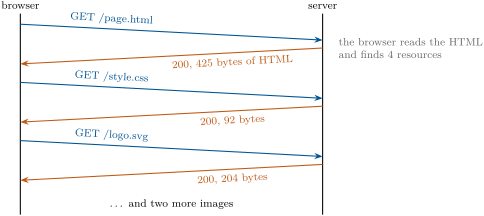
*Loading one page. Each arrow pair is one [request](#def-g10-http-clients-servers-http) and its [response](#def-g10-http-clients-servers-http); time runs downwards. The browser cannot ask for the stylesheet before it has read the page that names it.*
## 8.3 Forms and parameters
**Definition 8.7 (Form, parameter).**
A *form* is the part of a web page where the user types or chooses values and sends them; each value is sent as a *parameter*, a pair `name=value`, to the address that the form names.
```html
Brenmoor Library
Brenmoor Library
Open every day.
```
***Listing 8.6.** The library page, with its [form](#def-g10-http-clients-servers-form). code/grade-10/08-http-clients-servers/listings/site_files/page.html*
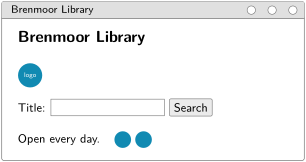
*The page as a browser shows it. Typing *forest* and pressing *Search* makes the browser [request](#def-g10-http-clients-servers-http) `/search?title=forest`: the [form](#def-g10-http-clients-servers-form)’s `method` is `get`.*
**Definition 8.8 (Methods GET and POST).**
The *method* of a [request](#def-g10-http-clients-servers-http) says what the client wants. *GET* asks for a resource; its [parameters](#def-g10-http-clients-servers-form), if any, travel in the [query string](#def-g10-http-clients-servers-url) of the address. *POST* sends data to the server, such as a [form](#def-g10-http-clients-servers-form) to record; its [parameters](#def-g10-http-clients-servers-form) travel in the body of the [request](#def-g10-http-clients-servers-http).
```python
def do_POST(self):
length = int(self.headers["Content-Length"])
body = self.rfile.read(length).decode("utf-8")
print(f"[server] body: {body}", flush=True)
if self.path == "/search":
self.search(parse_qs(body))
else:
self.reply(404, "No such page\n")
def search(self, params):
title = params.get("title", [""])[0]
self.reply(200, f"Searching for {title!r}\n")
```
***Listing 8.7.** The site: a [POST](#def-g10-http-clients-servers-methods) [request](#def-g10-http-clients-servers-http), whose [parameters](#def-g10-http-clients-servers-form) are read from the body. code/grade-10/08-http-clients-servers/listings/library_site.py*
```python
import urllib.request
from urllib.parse import urlencode
from serve import running
params = urlencode({"title": "forest"})
with running(42082):
url = "http://127.0.0.1:42082/search"
with urllib.request.urlopen(url + "?" + params) as response: # GET
print("[client] GET :", response.read())
with urllib.request.urlopen(url, data=params.encode()) as response: # POST
print("[client] POST:", response.read())
```
***Listing 8.8.** The same search, sent with [GET](#def-g10-http-clients-servers-methods) and with [POST](#def-g10-http-clients-servers-methods). code/grade-10/08-http-clients-servers/listings/form_get_post.py*
```
$ python form_get_post.py
[client] GET : b"Searching for 'forest'\n"
[client] POST: b"Searching for 'forest'\n"
[server] GET /search?title=forest HTTP/1.1 -> 200
[server] body: title=forest
[server] POST /search HTTP/1.1 -> 200
```
***Output 8.5.** With [GET](#def-g10-http-clients-servers-methods) the [parameter](#def-g10-http-clients-servers-form) is in the [request](#def-g10-http-clients-servers-http) line, so it ends up in the server’s log; with [POST](#def-g10-http-clients-servers-methods) it is in the body.*
**Method 8.9 (Choosing between GET and POST).**
1. A [request](#def-g10-http-clients-servers-http) that only reads (a search, a page) uses [GET](#def-g10-http-clients-servers-methods) : its address can be copied, bookmarked and sent again without harm. The rules of [HTTP](#def-g10-http-clients-servers-http) call [GET](#def-g10-http-clients-servers-methods) a *safe* [method](#def-g10-http-clients-servers-methods) : it must not change anything on the server.
2. A [request](#def-g10-http-clients-servers-http) that changes something (a loan, a message, an order) uses [POST](#def-g10-http-clients-servers-methods) , so that a crawler following links or a reloaded page does not repeat it unseen.
3. Large data (a file, a long text) goes in a [POST](#def-g10-http-clients-servers-methods) body: addresses have a limited length.
4. A password never goes in an address: addresses are logged and kept in the browser’s history. It goes in a [POST](#def-g10-http-clients-servers-methods) body, over [HTTPS](#def-g10-http-clients-servers-https) .
An address may only hold some [ASCII](https://one-course.com/books/computer-science/2/en/chapter/5-text-encodings-from-ascii-to-utf-8#def-g10-text-encodings-ascii) characters, so the others are written by *percent-encoding*: each byte of their [UTF-8](https://one-course.com/books/computer-science/2/en/chapter/5-text-encodings-from-ascii-to-utf-8#def-g10-text-encodings-utf8) encoding becomes `%` followed by two hexadecimal digits. In a [form](#def-g10-http-clients-servers-form)’s [query string](#def-g10-http-clients-servers-url), a space may also be written `+`.
```python
from urllib.parse import quote, unquote, urlencode
print(quote("café & co"))
print(urlencode({"title": "café & co", "page": 2}))
print(unquote("caf%C3%A9%20%26%20co"))
```
***Listing 8.9.** Percent-encoding and back. code/grade-10/08-http-clients-servers/listings/percent.py*
```
$ python percent.py
caf%C3%A9%20%26%20co
title=caf%C3%A9+%26+co&page=2
café & co
```
***Output 8.6.** *é* is the two bytes `C3 A9`; the space is `20` and `&` is `26`.*
## 8.4 Cookies and sessions
Each [HTTP](#def-g10-http-clients-servers-http) [request](#def-g10-http-clients-servers-http) stands alone: the server does not remember the previous one. To recognise a visitor, it hands the browser a small piece of text that the browser sends back.
**Definition 8.10 (Cookie, session).**
A *cookie* is a pair `name=value` that a server sends in a `Set-Cookie` [header](#def-g10-http-clients-servers-http-header) and that the browser stores and sends back, in a `Cookie` [header](#def-g10-http-clients-servers-http-header), with every later [request](#def-g10-http-clients-servers-http) to the same server. A *session* is the series of [requests](#def-g10-http-clients-servers-http) of one visitor that a server links together, usually through a cookie holding a random *session identifier*, while the session’s data stays on the server.
```python
def count(self):
cookie = self.headers.get("Cookie", "")
visits = int(cookie.removeprefix("visits=") or 0) + 1
self.reply(200, f"Visit number {visits}\n",
extra=[("Set-Cookie", f"visits={visits}")])
```
***Listing 8.10.** The site: a visit counter kept in a [cookie](#def-g10-http-clients-servers-cookie). code/grade-10/08-http-clients-servers/listings/library_site.py*
```python
import http.cookiejar
import urllib.request
from serve import running
jar = http.cookiejar.CookieJar()
browser = urllib.request.build_opener(urllib.request.HTTPCookieProcessor(jar))
with running(42083):
for _ in range(3):
with browser.open("http://127.0.0.1:42083/count") as response:
cookie = response.headers["Set-Cookie"]
print("[client]", response.read(), "Set-Cookie:", cookie)
print("[client] the jar holds:", [(c.name, c.value) for c in jar])
```
***Listing 8.11.** A client with a [cookie](#def-g10-http-clients-servers-cookie) jar, like a browser. code/grade-10/08-http-clients-servers/listings/cookie_counter.py*
```
$ python cookie_counter.py
[client] b'Visit number 1\n' Set-Cookie: visits=1
[client] b'Visit number 2\n' Set-Cookie: visits=2
[client] b'Visit number 3\n' Set-Cookie: visits=3
[client] the jar holds: [('visits', '3')]
[server] GET /count HTTP/1.1 -> 200
[server] GET /count HTTP/1.1 -> 200
[server] GET /count HTTP/1.1 -> 200
```
***Output 8.7.** Three visits: each [response](#def-g10-http-clients-servers-http) sets the [cookie](#def-g10-http-clients-servers-cookie) that the next [request](#def-g10-http-clients-servers-http) sends back.*
The counter lives in the browser: a visitor could edit the [cookie](#def-g10-http-clients-servers-cookie) and claim a thousand visits. Anything the server must trust, such as who is logged in, stays on the server, and the [cookie](#def-g10-http-clients-servers-cookie) holds only an identifier too long and random to guess ([Exercise 8.13](#exo-g10-http-clients-servers-13)).
**Safe use.**
[Cookies](#def-g10-http-clients-servers-cookie) are also how a site, or an advertiser present on many sites, recognises the same browser from visit to visit. Browsers let you see and delete the [cookies](#def-g10-http-clients-servers-cookie) of each site, block the [cookies](#def-g10-http-clients-servers-cookie) of sites other than the one you are visiting, and delete everything when the window is closed. A private window starts with no [cookies](#def-g10-http-clients-servers-cookie) and forgets them at the end.
## 8.5 What runs where
The server’s code ran on the server: it chose the answer, and the browser received only the result. A page can also carry code that runs in the browser, written in the language *JavaScript*. Such code reacts to *events*, a click on a button, a key typed in a box, the end of loading, by running a function called a *handler*: it can check a [form](#def-g10-http-clients-servers-form) before it is sent, or change part of the page without loading a new one. Whatever runs in the browser can be read and changed by the user, so a server checks every value it receives again.
**Definition 8.11 (HTTPS).**
*HTTPS* is [HTTP](#def-g10-http-clients-servers-http) sent over an encrypted connection: the same [requests](#def-g10-http-clients-servers-http) and [responses](#def-g10-http-clients-servers-http), but anyone who watches the packets on the way sees only unreadable bytes, and the browser checks that the server really is the one named in the address. Grade 12 explains how.
**History — The web.**
The web was proposed in March 1989 by Tim Berners-Lee, then working at a European physics laboratory, as a way to share documents linked to one another. By the end of 1990 the first web server and the first browser ran there, and the address of the first site was `info.cern.ch`. [HTTP](#def-g10-http-clients-servers-http), HTML and [URLs](#def-g10-http-clients-servers-url) were the three pieces of the proposal, and they still are.
## 8.6 Exercises
**Exercise 8.1 ★.**
Give the [scheme](#def-g10-http-clients-servers-url), [host](#def-g10-http-clients-servers-url), port, path, [query string](#def-g10-http-clients-servers-url) and [fragment](#def-g10-http-clients-servers-url) of `https://maps.brenmoor.example/route?from=3&to=17#map`. Which port does the browser use?
**Solution of Exercise 8.1.**
[Scheme](#def-g10-http-clients-servers-url) `https`, [host](#def-g10-http-clients-servers-url) `maps.brenmoor.example`, no port in the address, path `/route`, [query string](#def-g10-http-clients-servers-url) `from=3&to=17`, [fragment](#def-g10-http-clients-servers-url) `map`. With `https` and no port, the browser uses port $443$.
**Exercise 8.2 ★.**
Give the class of each [status code](#def-g10-http-clients-servers-status), and say whose fault each error is: `201`, `301`, `403`, `500`, `503`.
**Solution of Exercise 8.2.**
`201`: success (the resource was created). `301`: redirection (the resource has moved for good). `403`: client error (the [request](#def-g10-http-clients-servers-http) is refused). `500` and `503`: server errors (the server failed, or is not available for now). The `4xx` codes blame the [request](#def-g10-http-clients-servers-http); the `5xx` codes blame the server.
**Exercise 8.3 ★.**
The page’s [form](#def-g10-http-clients-servers-form) has `method="get"`. A user types *the lost code* and presses *Search*. Write the [request](#def-g10-http-clients-servers-http) line the browser sends.
**Solution of Exercise 8.3.**
`GET /search?title=the+lost+code HTTP/1.1`: the [form](#def-g10-http-clients-servers-form)’s [parameter](#def-g10-http-clients-servers-form) goes into the [query string](#def-g10-http-clients-servers-url), and in a [form](#def-g10-http-clients-servers-form)’s [query string](#def-g10-http-clients-servers-url) the spaces become `+`.
**Exercise 8.4 ★.**
A browser visits `/count` twice, then deletes the site’s [cookies](#def-g10-http-clients-servers-cookie), then visits it once more. What does each [response](#def-g10-http-clients-servers-http) say, and what is in the jar at the end?
**Solution of Exercise 8.4.**
*Visit number 1*, then *Visit number 2*; after the [cookies](#def-g10-http-clients-servers-cookie) are deleted, the browser sends no [cookie](#def-g10-http-clients-servers-cookie), so the server counts from zero again: *Visit number 1*. The jar holds `visits=1`.
**Exercise 8.5 ★.**
Write `query_params(url)`, which returns the dictionary of the [parameters](#def-g10-http-clients-servers-form) of an address’s [query string](#def-g10-http-clients-servers-url), without `urllib`. Leave the values percent-encoded.
**Solution of Exercise 8.5.**
Cut the address at `#` and keep what comes before; keep what follows the first `?`; split it at each `&`; split each pair at its first `=` (`exercises/query_params.py`). An address without `?` gives an empty dictionary.
**Exercise 8.6 ★★.**
A student writes a [response](#def-g10-http-clients-servers-http) by hand as a status line, a `Content-Type` [header](#def-g10-http-clients-servers-http-header), then the body. The client waits and never shows the page. Find the two things missing, and say what each one tells the client.
**Solution of Exercise 8.6.**
The empty line after the [headers](#def-g10-http-clients-servers-http-header), which tells the client that the [headers](#def-g10-http-clients-servers-http-header) are over, and the `Content-Length` [header](#def-g10-http-clients-servers-http-header), which tells it how many bytes of body to read. Without them the client cannot know where the [headers](#def-g10-http-clients-servers-http-header) end or where the body ends, so it keeps waiting for more (`exercises/build_response.py`).
**Exercise 8.7 ★★.**
In the site, the last branch of `do_GET` answers `404`. What would happen to a [request](#def-g10-http-clients-servers-http) for an unknown path if that branch were missing? Why is an answer always needed?
**Solution of Exercise 8.7.**
The function would end without sending anything: the client would wait for a [response](#def-g10-http-clients-servers-http) that never comes, until it gives up. [HTTP](#def-g10-http-clients-servers-http) pairs every [request](#def-g10-http-clients-servers-http) with one [response](#def-g10-http-clients-servers-http), so even a wrong [request](#def-g10-http-clients-servers-http) must be answered, with an error code that tells the client what went wrong.
**Exercise 8.8 ★★.**
Count the bytes of the [request](#def-g10-http-clients-servers-http) of the raw exchange listing, the `\r\n` included. How many of them are [headers](#def-g10-http-clients-servers-http-header) and empty line, and how many [request](#def-g10-http-clients-servers-http) line?
**Solution of Exercise 8.8.**
The [request](#def-g10-http-clients-servers-http) line `GET /hello HTTP/1.1` has $19$ characters, $21$ bytes with its line end. `Host: 127.0.0.1` takes $15 + 2 = 17$, `Connection: close` takes $17 + 2 = 19$, and the empty line $2$: $38$ bytes of [headers](#def-g10-http-clients-servers-http-header) and empty line. That makes $59$ bytes in all, the value computed by the function `request_bytes` of `exercises/build_response.py`.
**Exercise 8.9 ★★.**
A login [form](#def-g10-http-clients-servers-form) uses `method="get"` over `http`. The address after logging in is `/login?user=noor&password=tulip7`. List three places where the password can now be read, and correct the [form](#def-g10-http-clients-servers-form).
**Solution of Exercise 8.9.**
The browser’s history, the server’s log of [request](#def-g10-http-clients-servers-http) lines, and every machine on the way, since `http` is not encrypted (also anyone looking at the screen, and any page the browser reports the address to). Use `method="post"`, so that the password travels in the body, and serve the site over `https`.
**Exercise 8.10 ★★.**
Percent-encode *café & co* by hand, as in a path (space as `%20`). Then explain why a raw `&` cannot be left inside a [query string](#def-g10-http-clients-servers-url)’s value.
**Solution of Exercise 8.10.**
`caf%C3%A9%20%26%20co`: *é* is the [UTF-8](https://one-course.com/books/computer-science/2/en/chapter/5-text-encodings-from-ascii-to-utf-8#def-g10-text-encodings-utf8) bytes `C3 A9`, the space `20` and `&` `26`. In a [query string](#def-g10-http-clients-servers-url) `&` separates two [parameters](#def-g10-http-clients-servers-form), so a raw `&` inside a value would cut it in two and start a [parameter](#def-g10-http-clients-servers-form) named *co*.
**Exercise 8.11 ★★.**
Add a route `/sum?a=2&b=40` to the site that answers the sum, `42`, and answers `400` (bad [request](#def-g10-http-clients-servers-http)) when a [parameter](#def-g10-http-clients-servers-form) is missing or not a whole number.
**Solution of Exercise 8.11.**
In `do_GET`, for the path `/sum`, read `a` and `b` from `parse_qs(url.query)`, convert them with `int`, and answer the sum; if a [parameter](#def-g10-http-clients-servers-form) is missing (`KeyError`) or not a whole number (`ValueError`), answer `400` with a short message (`exercises/site_plus.py`). The tests ask for `/sum?a=2&b=40` and get `42`, and for `/sum?a=2` and get `400`.
**Exercise 8.12 ★★★.**
A page names $1$ stylesheet and $3$ images. Each new connection costs one round trip before the first [request](#def-g10-http-clients-servers-http), and each [request](#def-g10-http-clients-servers-http) and its [response](#def-g10-http-clients-servers-http) cost one more. How many round trips does loading the page take with a new connection for every [request](#def-g10-http-clients-servers-http)? With a single connection reused? Why can the stylesheet never be requested in the same round trip as the page?
**Solution of Exercise 8.12.**
There are $5$ [requests](#def-g10-http-clients-servers-http): the page, $1$ stylesheet and $3$ images. With a new connection each: $5 \times 2 = 10$ round trips. With one connection reused: $1 + 5 = 6$. The browser learns the stylesheet’s address only by reading the HTML, which arrives at the end of the page’s round trip.
**Exercise 8.13 ★★★.**
Write a route `/basket?add=bread` that keeps a shopping basket per visitor on the server: a dictionary from a [session](#def-g10-http-clients-servers-cookie) identifier to the list of items, the identifier made with `secrets.token_hex(8)` and sent in a [cookie](#def-g10-http-clients-servers-cookie). Why is it safer than keeping the basket itself in the [cookie](#def-g10-http-clients-servers-cookie)?
**Solution of Exercise 8.13.**
On a [request](#def-g10-http-clients-servers-http) without a known [session](#def-g10-http-clients-servers-cookie) [cookie](#def-g10-http-clients-servers-cookie), make an identifier with `secrets.token_hex(8)`, store an empty list under it in a dictionary on the server, and send `Set-Cookie: session=...`; then add the item to that visitor’s list (`exercises/site_plus.py`). The visitor can see and change only a random identifier, which cannot be guessed; the basket, and anything the server must trust, never leaves the server.
**Exercise 8.14 ★★★.**
A route `/a` redirects to `/b`, and `/b` redirects to `/a`. What does a client do? Try it with `urllib`, and explain how a client can detect such a loop.
**Solution of Exercise 8.14.**
The client follows `/a`, `/b`, `/a`, … A careless client would loop for ever. `urllib` remembers the addresses it was sent to: after the same address has come back a few times (nine [requests](#def-g10-http-clients-servers-http) in our run), it stops with an error saying that the redirections would lead to an infinite loop. A client can count the redirections of one [request](#def-g10-http-clients-servers-http) and give up past a limit, or stop when an address comes back.
**Exercise 8.15 ★★★.**
A site deletes a book from its catalogue when `GET /delete?book=12` is requested, from a link on an administrator’s page. Describe how a search engine’s crawler, which follows every link it finds, could empty the catalogue, and propose a correct design.
**Solution of Exercise 8.15.**
A crawler reads the administrator’s page, finds the links `/delete?book=1`, `/delete?book=2`, …, and [requests](#def-g10-http-clients-servers-http) each one with [GET](#def-g10-http-clients-servers-methods), since following a link is a [GET](#def-g10-http-clients-servers-methods): every book is deleted. [GET](#def-g10-http-clients-servers-methods) must be safe. Deleting should be a [POST](#def-g10-http-clients-servers-methods), sent by a [form](#def-g10-http-clients-servers-form) button on a page that only a logged-in administrator can reach; a crawler does not submit [forms](#def-g10-http-clients-servers-form).
## 8.7 Problem: What One Page Costs
**Problem 8.1.**
Weekend problem — how long the library page takes to load
The program `exercises/page_cost.py` starts the library site, [requests](#def-g10-http-clients-servers-http) `page.html` as a browser would, reads it, [requests](#def-g10-http-clients-servers-http) every resource it names, and prints the size of every body. Take a latency of $50$ ms: a round trip, a message there and its answer back, takes $50$ ms. Opening a connection costs one round trip; each [request](#def-g10-http-clients-servers-http) and its [response](#def-g10-http-clients-servers-http) cost one more.
**Part I — One page and its resources.**
1. Read `page.html` : which resources does it name, and with which tags?
2. How many [requests](#def-g10-http-clients-servers-http) does loading the page take in all?
3. Which [request](#def-g10-http-clients-servers-http) must come first, and why?
4. Which [status code](#def-g10-http-clients-servers-status) does each of them receive?
**Part II — Requests and bytes.**
5. Run the program. Give the size of each body and the total.
6. The [response](#def-g10-http-clients-servers-http) [headers](#def-g10-http-clients-servers-http-header) of the site take about $130$ bytes per [response](#def-g10-http-clients-servers-http) . Estimate the total number of bytes received, [headers](#def-g10-http-clients-servers-http-header) included. Which part of it is [headers](#def-g10-http-clients-servers-http-header) ?
7. The [requests](#def-g10-http-clients-servers-http) a browser sends are about $400$ bytes each, with many [headers](#def-g10-http-clients-servers-http-header) . Compare the bytes sent and the bytes received.
8. At $10$ megabits per second, how long does it take to receive the bytes of question 6? Compare with one round trip.
**Part III — Round trips.**
9. With a new connection for each [request](#def-g10-http-clients-servers-http) , how many round trips does the page take, and how many milliseconds?
10. With one connection reused for every [request](#def-g10-http-clients-servers-http) ?
11. A browser opens up to six connections at once to one server. With two connections opened together after the HTML has arrived, how many round trips does the page take?
12. Which matters more for this page: the number of bytes or the number of round trips?
13. With one reused connection, what latency would make the page take a whole second?
**Part IV — Caching.**
14. On a second visit, the browser still holds the four resources. If it asks for each one again with a [header](#def-g10-http-clients-servers-http-header) saying which copy it has, the server can answer `304 Not Modified` with no body. How many round trips does that visit take with one connection?
15. If the server says, in a [header](#def-g10-http-clients-servers-http-header) of the first visit, that the resources stay valid for a day, the browser does not ask at all. How many round trips then?
16. Why can the HTML page itself rarely be kept that way?
17. A reader opens the page ten times a day. With one reused connection, how many round trips per day does the day-long validity save, compared with asking again each time as in question 14?
18. State the result: the [requests](#def-g10-http-clients-servers-http) , the bytes and the round trips of the page, and its load time with a new connection per [request](#def-g10-http-clients-servers-http) and with one reused connection.
**Solution of Problem 8.1.**
**1.** `style.css`, with a `link` tag, and `logo.svg`, `map.svg` and `clock.svg`, with `img` tags.
**2.** $5$: the page and its $4$ resources.
**3.** The page: the other addresses are known only once its HTML has been read.
**4.** `200` for all five.
**5.** $425$, $92$, $204$, $203$ and $205$ bytes: $1129$ bytes of content.
**6.** $5 \times 130 = 650$ bytes of [headers](#def-g10-http-clients-servers-http-header), so about $1779$ bytes; the [headers](#def-g10-http-clients-servers-http-header) are more than a third of it.
**7.** About $5 \times 400 = 2000$ bytes sent, more than the $1779$ received: for small resources, the [requests](#def-g10-http-clients-servers-http) cost as much as the answers.
**8.** $1779 \times 8 = 14{,}232$ bits, at $10^7$ bits per second: about $1.4$ ms, against $50$ ms for one round trip.
**9.** $10$ round trips, $500$ ms.
**10.** $6$ round trips, $300$ ms.
**11.** $2$ round trips for the connection and the page; then each of the two new connections takes $1$ round trip to open and $2$ for its two resources, at the same time as the other: $2 + 3 = 5$ round trips, $250$ ms.
**12.** The round trips: the bytes take about $1.4$ ms, each round trip $50$ ms.
**13.** $6$ round trips in $1000$ ms: a latency of about $167$ ms, which is common on a distant or poor mobile connection.
**14.** Still $1 + 5 = 6$ round trips: the $304$ answers carry no body, but each question still costs a round trip.
**15.** $2$: the connection and the page.
**16.** The page changes (new books, opening hours, the results of a search): a copy kept for a day could show stale content.
**17.** $6 - 2 = 4$ round trips per visit, so $40$ per day, $2$ seconds of waiting saved.
**18.** The library page takes $5$ [requests](#def-g10-http-clients-servers-http) and $1129$ bytes of content, about $1.8$ KB with the [headers](#def-g10-http-clients-servers-http-header). At a latency of $50$ ms it loads in $10$ round trips, $500$ ms, with a new connection per [request](#def-g10-http-clients-servers-http), and in $6$ round trips, $300$ ms, with one reused connection: the time goes into round trips, not bytes.


