
सभी किताबें

पेशेवर

1 Markets I: The Ecosystem and Exchange-Traded Marketsबाज़ार ऑनलाइन 2 Markets II: Rates, FX and Creditबाज़ार ऑनलाइन 3 Markets III: Commodities, Energy and Cryptoबाज़ार ऑनलाइन 4 Quantitative Methodsविधियाँ ऑनलाइन 5 Derivatives and Volatilityडेरिवेटिव्स ऑनलाइन 6 Rates, Credit, XVA and Riskब्याज दरें, क्रेडिट और जोखिम ऑनलाइन 7 Research Craft: Predictors, Backtests, Measurement, Portfoliosअनुसंधान ऑनलाइन 8 Strategies I: Equities and Futuresरणनीतियाँ ऑनलाइन 9 Strategies II: Volatility, Relative Value, Macro and the Bank Desksरणनीतियाँ ऑनलाइन 10 Microstructure and Executionनिष्पादन ऑनलाइन 11 Market Making and High-Frequency Tradingमार्केट मेकिंग ऑनलाइन 12 Machine Learning for Marketsमशीन लर्निंग ऑनलाइन 13 Low-Latency Softwareतकनीक ऑनलाइन 14 Networks, Hardware and Trading Infrastructureतकनीक ऑनलाइन 15 Research, Data and Risk Platformsतकनीक ऑनलाइन 16 The Desk and the Firmफ़र्म ऑनलाइन 17 The Industry: Firms, Roles and Careersकरियर ऑनलाइन 18 Interviews I: Maths, Probability and Speedकरियर ऑनलाइन 19 Interviews II: Markets, Trading Games and the Final Roundकरियर ऑनलाइन 20 Interviews III: Codeकरियर ऑनलाइन
ऐप्स परिचय Coach लॉग इन पढ़ना शुरू करें

Computer Science · शब्दावली

Redirection क्या है?

Definition 8.5 University Computer Science — Year 1 · अध्याय 8 — The Shell

A redirection connects a standard stream of a command to a file: > f sends standard output to f, emptied first; >> f appends to it; < f reads standard input from it; 2> f sends standard error; and 2>&1 sends standard error wherever standard output goes at that point of the line. Redirections are performed by the shell before the program starts, from left to right.
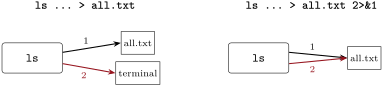
Standard output (1) and standard error (2) of ls. With > all.txt alone, the error still reaches the terminal; 2>&1, written after it, sends the error where the output goes now, to the file. Written before > all.txt, it would copy the old destination, the terminal ().
Standard output (1) and standard error (2) of ls. With > all.txt alone, the error still reaches the terminal; 2>&1, written after it, sends the error where the output goes now, to the file. Written before > all.txt, it would copy the old destination, the terminal (Exercise 8.6).
अध्याय में पढ़ें →