本书暂未推出简体中文版。现有版本:English。
University Computer Science — Year 1 · 本科一年级
8The Shell
How many loans did each member of the town library make in 2025? A Python program of fifteen lines answers it; so does one line typed at a terminal, assembled from five small programs that each do one thing. This chapter is about that second way of working: the shell, the programs it starts, the streams that join them, and the scripts that turn a line that worked once into a tool that works every time. The C programs of the previous chapters are among the programs it starts.
You already know
The operating system’s kernel runs programs and keeps their files in a tree of directories, each file named by a path, absolute from the root / or relative to the current directory. A running program is a process. Each file has permissions saying who may read, write or execute it.
8.1 Commands, processes and exit status
Definition 8.1 (Shell)
A shell is a program that reads command lines, typed or from a file, and runs them: for each command it starts the named program with the given arguments, waits for it to end, and reads the next line. The shell of this chapter is bash.
History — The shell and the pipe
On the first Unix system, the command interpreter was not part of the operating system but an ordinary program stored in a file, which any user could replace: redirection with < and > came almost at once. Pipes came in 1972, at the insistence of Douglas McIlroy, who had long argued that programs should be joined like operators. The shell written by Stephen Bourne for the Seventh Edition of Unix fixed the language that bash, the GNU project’s “Bourne-Again SHell”, still speaks.
Its users typed at terminals: a keyboard and a screen of text joined to the computer by a serial line. The VT100 of 1978 was one of the first to obey the standard escape sequences for moving the cursor, and the terminal windows of today still obey them.

Definition 8.2 (Command-line argument)
The shell cuts a command line into words. The first names the program; the others are its command-line arguments, which the program receives as strings: in C, as argv[1] to argv[argc - 1], argv[0] being the name it was started under.
Definition 8.3 (Exit status)
The exit status of a program is the small integer, from 0 to 255, it hands back when it ends: the value returned by main or passed to exit. By convention 0 means success and any other value failure. The shell keeps the status of the last command in the variable $?.
$ ls weather.csv; echo "exit status $?"
weather.csv
exit status 0
$ ls nosuchfile.csv; echo "exit status $?"
ls: cannot access 'nosuchfile.csv': No such file or directory
exit status 2
$ grep -q Hilltop weather.csv && echo "Hilltop found"
Hilltop found
$ grep -q Harbour weather.csv || echo "Harbour not found"
Harbour not found
$ true; echo $?
0
$ false; echo $?
1ls reports a missing file with 2; grep -q says only, by its status, whether it found a line.a && b runs b only if a succeeded; a || b only if a failed; a; b runs both. Programs are judged by their status, not by their messages: grep -q prints nothing at all.
Definition 8.4 (Environment variable)
An environment variable is a pair NAME=value in the environment of a running program, a list of strings that it receives when it starts, as a copy of its parent’s exported variables. A shell variable becomes part of the environment of the programs the shell starts when it is exported; NAME=value command sets it for that one command. A C program reads it with getenv("NAME").
#include <stdio.h>
#include <stdlib.h>

int main(int argc, char *argv[])
{
    printf("argc = %d:", argc);
    for (int i = 0; i < argc; i++)
        printf(" [%s]", argv[i]);
    const char *station = getenv("STATION");
    printf("\nSTATION = %s\n", station != NULL ? station : "(not set)");
    return argc - 1;                                    // the exit status: the number of arguments
}$ gcc -std=c17 -O2 -Wall env_child.c -o env_child
$ ./env_child one "two words" 3; echo "exit status $?"
argc = 4: [./env_child] [one] [two words] [3]
STATION = (not set)
exit status 3
$ STATION=Hilltop ./env_child
argc = 1: [./env_child]
STATION = Hilltop
$ STATION=Riverside
$ ./env_child
argc = 1: [./env_child]
STATION = (not set)
$ export STATION
$ ./env_child
argc = 1: [./env_child]
STATION = Riversidetwo words one argument; a variable reaches the program only once exported.Every program documents its arguments: man ls shows the manual page of ls, ls --help a summary. A running program is stopped by Ctrl-C, which the terminal turns into a signal sent to it; signals are studied in the Year 2 volume.
8.2 Redirection and pipes
Every program starts with three open streams (Chapter 6): standard input, standard output and standard error. In a terminal all three are the terminal; the shell can connect them elsewhere.
Definition 8.5 (Redirection)
A redirection connects a standard stream of a command to a file: > f sends standard output to f, emptied first; >> f appends to it; < f reads standard input from it; 2> f sends standard error; and 2>&1 sends standard error wherever standard output goes at that point of the line. Redirections are performed by the shell before the program starts, from left to right.
$ ls weather.csv nosuchfile.csv > out.txt
ls: cannot access 'nosuchfile.csv': No such file or directory
$ cat out.txt
weather.csv
$ ls weather.csv nosuchfile.csv > out.txt 2> err.txt
$ cat err.txt
ls: cannot access 'nosuchfile.csv': No such file or directory
$ ls weather.csv nosuchfile.csv > all.txt 2>&1
$ cat all.txt
ls: cannot access 'nosuchfile.csv': No such file or directory
weather.csv
$ echo "first line" > notes.txt
$ echo "second line" >> notes.txt
$ cat notes.txt
first line
second line
$ wc -l < weather.csv
732>; 2> and 2>&1 catch it.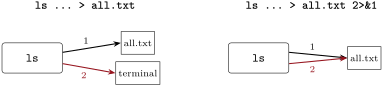
ls. With > all.txt alone, the error still reaches the terminal; 2>&1, written after it, sends the error where the output goes now, to the file. Written before > all.txt, it would copy the old destination, the terminal (Exercise 8.6).Definition 8.6 (Pipeline)
A pipeline is a sequence of commands joined by the operator |: the shell starts them all at once, and connects the standard output of each to the standard input of the next, so that data flows through them without intermediate files. The exit status of a pipeline is that of its last command.
Definition 8.7 (Filter)
A filter is a program that reads standard input, transforms it, and writes standard output, so that it can stand anywhere in a pipeline: sort sorts lines, uniq -c collapses runs of equal adjacent lines and counts them, wc -l counts lines, head and tail keep the first or last lines, cut keeps fields, tr translates characters, paste joins lines.
$ head -3 loans.csv
loan_id,book_id,member_id,out_date,due_date,return_date
1,59,41,2025-01-01,2025-01-22,2025-01-03
2,73,8,2025-01-01,2025-01-22,2025-01-08
$ tail -n +2 loans.csv | cut -d, -f3 | sort | uniq -c | sort -rn | head -5
     12 55
     11 14
     10 53
     10 50
     10 49
$ tail -n +2 loans.csv | cut -d, -f3 | sort -u | wc -l
60
uniq -c counts only adjacent equal lines, hence the sort before it.A pipeline that answers a question deserves a check. The Python program below computes the same table from the same file; the chapter’s test runs both and compares them.
import csv
import sys
from collections import Counter


def top_members(path, k=5):
    with open(path, newline="", encoding="utf8") as f:
        counts = Counter(row["member_id"] for row in csv.DictReader(f))
    # the order of `sort -rn`: by count, then by the whole line, both descending
    ranked = sorted(counts.items(), key=lambda mc: (mc[1], mc[0]), reverse=True)
    return ranked[:k], len(counts)


if __name__ == "__main__":
    top, distinct = top_members(sys.argv[1] if len(sys.argv) > 1 else "loans.csv")
    for member, count in top:
        print(f"{count:7d} {member}")
print(distinct)$ python3 loans_check.py loans.csv
12 55
11 14
10 53
10 50
10 49
60sort -rn orders equal counts by the whole line, in reverse, which the key of sorted reproduces.8.3 Patterns: globs and regular expressions
Before running a command, the shell rewrites its words.
Definition 8.8 (Pathname expansion, quoting, word splitting)
Pathname expansion replaces a word containing * (any string), ? (any one character) or [...] (one character of a set) by the sorted names of the files that match it, a glob; a pattern that matches nothing is left as it is, and names starting with a dot are matched only by a pattern starting with a dot. Word splitting cuts the result of an unquoted variable expansion into several words at spaces, tabs and newlines. Quoting suspends both: between single quotes every character is literal; between double quotes $ still expands variables but no splitting or pathname expansion happens; a backslash makes the next character literal.
$ touch a.csv b.csv notes.txt "rain 2025.csv"
$ ls
a.csv
b.csv
notes.txt
rain 2025.csv
$ echo *.csv
a.csv b.csv rain 2025.csv
$ echo ?.csv
a.csv b.csv
$ echo [ab].csv
a.csv b.csv
$ echo *.xml
*.xml
$ echo "*.csv" '*.csv'
*.csv *.csv
$ echo {a,b,c}.csv
a.csv b.csv c.csvbash expansion that makes words without looking at files.$ touch "rain 2025.csv"
$ f="rain 2025.csv"
$ ls $f
ls: cannot access 'rain': No such file or directory
ls: cannot access '2025.csv': No such file or directory
$ ls "$f"
rain 2025.csv
$ printf '[%s]\n' $f
[rain]
[2025.csv]
$ printf '[%s]\n' "$f"
[rain 2025.csv]
$ echo "the file is $f" 'the file is $f' \$f
the file is rain 2025.csv the file is $f $f
$ n=3; echo "$n files" "${n}0 files" "$n0 files"
3 files 30 files files
~ is expanded with the variables). Quotes act at every step, braces included, and are removed last: that is why "$f" reaches the program as one word with the variable’s value, spaces and all.A pattern of a different kind describes the lines of a file. grep prints the lines that match a regular expression; sed edits a stream line by line, here with its substitution s/pattern/replacement/; find walks a tree of directories and lists the files that pass its tests. Regular expressions are used here as the syntax of these tools: . is any character, [0-9] one digit, x* any number of x, ^ and $ the start and end of a line, a|b either, and with -E parentheses group and {4} repeats. Their theory, and the automata that run them, belong to the Year 2 volume.
$ grep -c Riverside weather.csv
366
$ grep -E ',Riverside,2[4-9]\.' weather.csv
2025-07-01,Riverside,24.4,0.0,0.5
2025-07-11,Riverside,24.4,0.0,15.4
2025-07-13,Riverside,25.0,0.0,27.3
2025-07-22,Riverside,24.0,0.1,29.6
2025-08-07,Riverside,26.5,7.8,21.5
$ grep -E ',,|-99' weather.csv
2025-01-29,Riverside,-99.0,0.0,19.6
2025-01-30,Hilltop,,2.3,17.7
2025-04-16,Riverside,,0.0,13.7
2025-08-16,Hilltop,,0.0,19.1
2025-11-03,Riverside,,8.3,1.2
2025-11-19,Riverside,,1.0,12.7
2025-12-18,Riverside,-99.0,0.0,6.0
2025-12-24,Hilltop,,0.0,6.8
$ sed -n 2,3p weather.csv
2025-01-01,Hilltop,3.9,0.0,15.3
2025-01-01,Riverside,4.3,0.0,10.4
$ sed 's/,/;/g' weather.csv | head -2
date;station;temp_c;rain_mm;wind_kmh
2025-01-01;Hilltop;3.9;0.0;15.3
$ sed -E 's/^([0-9]{4})-([0-9]{2})-([0-9]{2})/\3.\2.\1/' weather.csv | sed -n 2,3p
01.01.2025,Hilltop,3.9,0.0,15.3
01.01.2025,Riverside,4.3,0.0,10.4The two empty-or-error patterns, ,, and -99, find the eight bad temperatures that Chapter 6 counted. In the last command, \3 is the text matched by the third group: the date is rewritten day first.
$ mkdir -p town/library town/weather town/old
$ mv books.csv loans.csv members.csv town/library/
$ mv weather.csv town/weather/
$ touch town/old/notes.txt
$ find town -type d | sort
town
town/library
town/old
town/weather
$ find town -name '*.csv' | sort
town/library/books.csv
town/library/loans.csv
town/library/members.csv
town/weather/weather.csv
$ find town -name '*.csv' -size +10k | sort
town/library/loans.csv
town/weather/weather.csv
$ find town -name '*.csv' -exec wc -l {} + | sort -n
   61 town/library/members.csv
   81 town/library/books.csv
  401 town/library/loans.csv
  732 town/weather/weather.csv
1275 totalfind on a small tree: directories, files by name, by size, and a command run on all of them.8.4 Shell scripts
Definition 8.9 (Shell script)
A shell script is a file of shell commands run as a program. Its first line, #!/bin/bash, names the interpreter that runs it; made executable, it is started like any program. Inside it, $1, $2, … are its arguments, $# their number and "$@" all of them, each kept as one word; its exit status is that of exit, or of its last command.
#!/bin/bash
# check_csv.sh: every CSV file given must have a header and rows with as many fields as the header.
set -euo pipefail

if [ "$#" -eq 0 ]; then
    echo "usage: $0 FILE..." >&2
    exit 2
fi

status=0
for f in "$@"; do
    if [ ! -r "$f" ]; then
        echo "$f: cannot read" >&2
        status=1
        continue
    fi
    commas=$(head -1 "$f" | tr -dc ',')                    # the header's commas, e.g. ",,,,"
    rows=$(tail -n +2 "$f" | wc -l)
    bad=$(tail -n +2 "$f" | tr -dc ',\n' | grep -cvx "$commas" || true)
    if [ "$rows" -eq 0 ] || [ "$bad" -ne 0 ]; then
        echo "$f: $rows rows, $bad with a wrong number of fields"
        status=1
    else
        echo "$f: $rows rows of $(( ${#commas} + 1 )) fields"
    fi
done
exit "$status"$ chmod +x check_csv.sh
$ ./check_csv.sh *.csv; echo "exit status $?"
books.csv: 80 rows of 6 fields
loans.csv: 400 rows of 6 fields
members.csv: 60 rows of 3 fields
weather.csv: 731 rows of 5 fields
exit status 0
$ printf 'a,b\n1,2\n3\n' > broken.csv
$ ./check_csv.sh broken.csv nosuch.csv; echo "exit status $?"
broken.csv: 2 rows, 1 with a wrong number of fields
nosuch.csv: cannot read
exit status 1
$ ./check_csv.sh; echo "exit status $?"
usage: ./check_csv.sh FILE...
exit status 2Method 8.10 (Writing a script that fails loudly)
- Start with
set -euo pipefail: stop at the first failing command (-e), treat an unset variable as an error (-u), and give a pipeline the status of the last of its commands that failed, or 0 if none did (pipefail). - Check the arguments first; print the usage on standard error and exit with 2.
- Quote every expansion:
"$f","$@","$(command)". An unquoted variable holding a name with a space becomes two arguments. - Return a meaningful status: 0 when all is well, 1 for a negative answer, 2 for a misuse.
- Where a failing status is expected, say so:
grep -cexits 1 when it counts zero lines, which-ewould take for an error;|| trueaccepts it.
$(command) is replaced by the output of the command, $((...)) computes in integers, and ${#commas} is the length of a variable’s value. if, for and while test exit statuses: [ "$rows" -eq 0 ] is the program [, which compares and exits with 0 or 1.
8.5 Permissions and links
Definition 8.11 (Permission bits)
The permission bits of a file are nine bits, read (r), write (w) and execute (x) for its owner, for the members of its group, and for all other users, written rwxr-x--- by ls -l or as three octal digits, one per class, each the sum of 4 (read), 2 (write) and 1 (execute): 750. For a directory, r allows listing it, w creating and removing names in it, and x entering it.
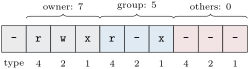
-rwxr-x---, octal 750: the owner may read, write and execute; the group may read and execute; others have no access. The first character is the type: - for a file, d for a directory, l for a symbolic link.$ echo "rain" > notes.txt
$ ls -l notes.txt
-rw-r--r-- 1 ada ada 5 Jan 5 2026 notes.txt
$ chmod go-r notes.txt
$ ls -l notes.txt
-rw------- 1 ada ada 5 Jan 5 2026 notes.txt
$ chmod 640 notes.txt
$ ls -l notes.txt
-rw-r----- 1 ada ada 5 Jan 5 2026 notes.txt
$ chmod u-w notes.txt
$ bash -c 'echo "more rain" >> notes.txt'
bash: line 1: notes.txt: Permission denied
$ mkdir box
$ chmod 711 box
$ ls -ld box
drwx--x--x 2 ada ada 4096 Jan 5 2026 box
$ umask
0022chmod in symbolic and octal form, a refused write, and the umask.chmod go-r removes read for group and others; chmod 640 sets all nine bits at once. Even the owner cannot write a file without its w bit, though the owner may give it back. A new file gets mode 666, a new directory 777, minus the bits of the umask: with 022, files are created rw-r--r--. Plugging in a removable drive makes its file system appear as a directory of the tree, an operation called mounting, which requires the rights of the administrator; desktop systems do it on the user’s behalf.
Definition 8.12 (Hard link, symbolic link)
A directory entry is a name for a file. A hard link, made by ln a b, is a second name for the same file: both names are equal, and the file disappears only when its last name is removed. A symbolic link, made by ln -s a c, is a small file that holds a path; opening it opens the file at that path, if there is one.
$ echo "Hilltop, 212 m" > station.txt
$ ln station.txt copy.txt
$ ln -s station.txt shortcut.txt
$ ls -l
total 8
-rw-r--r-- 2 ada ada 15 Jan  5  2026 copy.txt
lrwxrwxrwx 1 ada ada 11 Jan  5  2026 shortcut.txt -> station.txt
-rw-r--r-- 2 ada ada 15 Jan  5  2026 station.txt
$ [ station.txt -ef copy.txt ] && echo "station.txt and copy.txt are the same file"
station.txt and copy.txt are the same file
$ echo "Riverside, 48 m" >> copy.txt
$ cat station.txt
Hilltop, 212 m
Riverside, 48 m
$ rm station.txt
$ ls -l
total 4
-rw-r--r-- 1 ada ada 31 Jan  5  2026 copy.txt
lrwxrwxrwx 1 ada ada 11 Jan  5  2026 shortcut.txt -> station.txt
$ cat copy.txt
Hilltop, 212 m
Riverside, 48 m
$ cat shortcut.txt
cat: shortcut.txt: No such file or directory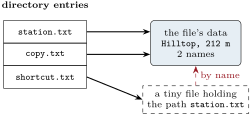
station.txt leaves the file with one name, copy.txt; the symbolic link still holds the path station.txt, which now names nothing.Safe use
Quote every variable in a script. Test a destructive command with echo in front of it before running it, and never write rm -r with a variable that might be empty. Keep your files rw-r--r-- or stricter, and never make a file writable by others to make an error go away.
8.6 Exercises
Exercise 8.1 ★
Predict what each line prints, with weather.csv the town’s weather file.
grep -q Hilltop weather.csv; echo $?
grep -c Harbour weather.csv; echo $?
ls weather.csv > /dev/null && false; echo $?
false || true; echo $?Solution
Solution of Exercise 8.1.
0
$ grep -c Harbour weather.csv; echo $?
0
1
$ ls weather.csv > /dev/null && false; echo $?
1
$ false || true; echo $?
0grep -q finds Hilltop: 0. grep -c prints its count, 0, and exits with 1 because it found no line. In the third line ls succeeds, so false runs and gives 1. In the fourth, false fails, so true runs: 0.
Exercise 8.2 ★
A directory holds r1.csv, r2.csv, r10.csv, R3.csv, rain.txt and .r4.csv. What do echo r?.csv, echo r*.csv, echo *.csv and echo [Rr][0-9]* print?
Solution
Solution of Exercise 8.2.
$ echo r?.csv
r1.csv r2.csv
$ echo r*.csv
r1.csv r10.csv r2.csv
$ echo *.csv
R3.csv r1.csv r10.csv r2.csv
$ echo [Rr][0-9]*
R3.csv r1.csv r10.csv r2.csv? is exactly one character, so r10.csv is not matched by r?.csv. .r4.csv starts with a dot and is matched by no pattern here. The names are sorted in the order of the locale; this run uses the plain byte order, in which capital letters come first.
Exercise 8.3 ★
Predict the output of the three pipelines.
printf 'Hilltop\nRiverside\nHilltop\nharbour\nHilltop\nRiverside\n' > visits.txt
sort visits.txt | uniq -c | sort -rn | head -2
uniq -c visits.txt | wc -l
tr a-z A-Z < visits.txt | sort -uSolution
Solution of Exercise 8.3.
$ sort visits.txt | uniq -c | sort -rn | head -2
      3 Hilltop
      2 Riverside
$ uniq -c visits.txt | wc -l
6
$ tr a-z A-Z < visits.txt | sort -u
HARBOUR
HILLTOP
RIVERSIDEWithout sort, uniq -c collapses only adjacent duplicates, and no two adjacent lines of visits.txt are equal: 6 lines. tr a-z A-Z capitalises every letter, which makes harbour and the others comparable.
Exercise 8.4 ★
What does ls -l show as the mode of a file after chmod 640, chmod 755, chmod 604, and after chmod 640 followed by chmod u+x,o+r?
Solution
Solution of Exercise 8.4.
$ chmod 640 f; ls -l f
-rw-r----- 1 ada ada 0 Jan  5  2026 f
$ chmod 755 f; ls -l f
-rwxr-xr-x 1 ada ada 0 Jan  5  2026 f
$ chmod 604 f; ls -l f
-rw----r-- 1 ada ada 0 Jan  5  2026 f
$ chmod 640 f; chmod u+x,o+r f; ls -l f
-rwxr--r-- 1 ada ada 0 Jan 5 2026 f640 is rw- (6) for the owner, r-- (4) for the group, nothing for others. u+x,o+r adds two bits to 640, which makes 744.
Exercise 8.5 ★★
The script below works until someone saves a file named members 2024.csv. Explain the run, and correct the script.
#!/bin/bash
# count_lines.sh: the number of lines of each CSV file of the current directory.
for f in $(ls *.csv); do
    wc -l $f
done$ bash count_lines.sh
wc: members: No such file or directory
wc: 2024.csv: No such file or directory
61 members.csvSolution
Solution of Exercise 8.5.
$(ls *.csv) is unquoted: its output, the two lines members 2024.csv and members.csv, is split at every space and newline into the words members, 2024.csv and members.csv, and wc is run on each. Let the shell expand the glob, which makes each name one word, and quote the variable: for f in *.csv; do wc -l "$f"; done.
Exercise 8.6 ★★
Compare ls nosuchfile > out1.txt 2>&1 with ls nosuchfile 2>&1 > out2.txt: where does the error message go in each case, and why?
Solution
Solution of Exercise 8.6.
$ ls nosuchfile > out1.txt 2>&1
$ cat out1.txt
ls: cannot access 'nosuchfile': No such file or directory
$ ls nosuchfile 2>&1 > out2.txt
ls: cannot access 'nosuchfile': No such file or directory
$ cat out2.txtRedirections are performed from left to right. In the first line, standard output goes to out1.txt, then 2>&1 sends standard error to the same place. In the second, 2>&1 sends standard error where standard output goes at that moment, the terminal; only then does standard output move to out2.txt, which stays empty.
Exercise 8.7 ★★
Write a script topk.sh FILE COL K that prints the K most frequent values of column COL of a CSV file with a header, each with its count, and rejects bad arguments with status 2.
Solution
Solution of Exercise 8.7.
#!/bin/bash
# topk.sh FILE COL K: the K most frequent values of column COL of a CSV file with a header (exercise 7).
set -euo pipefail

if [ "$#" -ne 3 ]; then
    echo "usage: $0 FILE COL K" >&2
    exit 2
fi
file=$1
col=$2
k=$3
if ! [[ "$col" =~ ^[1-9][0-9]*$ && "$k" =~ ^[1-9][0-9]*$ ]]; then
    echo "$0: COL and K must be positive integers" >&2
    exit 2
fi
tail -n +2 "$file" | cut -d, -f"$col" | sort | uniq -c | sort -rn | head -n "$k"
The test tests/test_pipeline.py runs it on the stations of the weather file and compares with a count made in Python.
Exercise 8.8 ★★
Write one pipeline that prints, for each station of the weather file, the line of its hottest day, ignoring missing values and error codes.
Solution
Solution of Exercise 8.8.
$ tail -n +2 weather.csv | grep -vE ',,|,-99' | sort -t, -k3,3gr | sort -t, -k2,2 -s -u
2025-07-17,Hilltop,23.0,1.5,23.2
2025-08-07,Riverside,26.5,7.8,21.5grep -v drops the lines with an empty temperature or the error code. The first sort orders the lines by the third field, as general numbers, in decreasing order. The second sorts by station only, -s keeping the previous order among equal stations, and -u keeps the first line of each station: its hottest day. The test checks it against Python.
Exercise 8.9 ★★
Among the 512 modes from 000 to 777, how many let the owner read and let neither the group nor the others write? Justify by counting.
Solution
Solution of Exercise 8.9.
A mode is nine independent bits. The owner’s read bit must be 1, and the group’s and the others’ write bits must be 0: three bits fixed, six free, modes. The test tests/test_pipeline.py counts them.
Exercise 8.10 ★★★
Write a script dupes.sh DIR that prints the groups of files with identical contents under DIR, using find, the checksum program cksum (which prints a checksum and a size) and filters. It must handle names with spaces. Why is a matching checksum not a proof of equal contents, and what would make the script faster on a large tree?
Solution
Solution of Exercise 8.10.
#!/bin/bash
# dupes.sh DIR: the groups of files with the same content under DIR, one group per line (exercise 10).
set -euo pipefail

if [ "$#" -ne 1 ] || [ ! -d "$1" ]; then
    echo "usage: $0 DIR" >&2
    exit 2
fi
table=$(mktemp)
trap 'rm -f "$table"' EXIT

# one line per file: CHECKSUM:SIZE PATH (cksum prints the checksum and the size of its input)
find "$1" -type f | sort | while IFS= read -r path; do
    echo "$(cksum < "$path" | tr ' ' ':') $path"
done | sort > "$table"

# every key that occurs twice or more, then the paths that share it
cut -d' ' -f1 "$table" | uniq -d | while read -r key; do
    grep "^$key " "$table" | cut -d' ' -f2- | paste -sd'|'
doneread -r with IFS= keeps a name with spaces whole, and every expansion is quoted. Two different contents can have the same 32-bit checksum, so equal checksums only make equality very likely; cmp on each pair would prove it. On a large tree, compute the checksums only for the files whose size occurs twice, since files of different sizes cannot be equal. The test makes three equal files (one with a space in its name), two of equal size and different content, and checks the single group printed.
Exercise 8.11 ★★★
In an empty directory: echo data > a; ln a b; ln -s a c; rm a. Give the number of names of the file at each step, and what cat b and cat c print at the end. Then echo new > a: what do they print now? Justify each answer from the definitions.
Solution
Solution of Exercise 8.11.
After echo: one name. After ln a b: two names for one file. ln -s a c creates a new, separate file holding the path a: still two names for the first one. After rm a: one name, b. cat b prints data; cat c looks for a and fails. After echo new > a, a is a new file with one name, unrelated to b: cat b still prints data, and cat c now prints new, since it follows whatever the path names. The test tests/test_pipeline.py checks the counts.
Exercise 8.12 ★★★
With f="a b", g='*', a directory holding only x.txt, and empty unset, how many arguments does printf receive in each line below, and what does each line print? Justify with the order of expansions.
printf '[%s]' $f "$f" '$f'; echo
printf '[%s]' $g "$g"; echo
printf '[%s]' "$f"$f "" $empty; echo
printf '[%s]' a\ b "c d"e'f g'; echoSolution
Solution of Exercise 8.12.
$ printf '[%s]' $f "$f" '$f'; echo
[a][b][a b][$f]
$ printf '[%s]' $g "$g"; echo
[x.txt][*]
$ printf '[%s]' "$f"$f "" $empty; echo
[a ba][b][]
$ printf '[%s]' a\ b "c d"e'f g'; echo
[a b][c def g]Line 1: $f expands and is split into a and b; "$f" expands without splitting; '$f' does not expand: 4 arguments. Line 2: unquoted, * undergoes pathname expansion and becomes x.txt; quoted, it stays *: 2. Line 3: in the word "$f"$f, the quoted part stays whole and the unquoted part is split, which gives a ba and b; "" is one empty argument; an unquoted expansion of an unset variable gives no word at all: 3. Line 4: the backslash protects the space, and adjacent quoted pieces form one word: 2.
8.7 Problem: A day’s log in one line
Problem 8.1
Weekend problem — A day’s log in one line
The library’s server writes a line to its access log for each request: the date and time, the member (or - for an anonymous search), the action, the book, and a status, with a reason when it is an error. A generator with a fixed seed reproduces one day of that log. The session below explores it with filters, answers two questions with a pipeline, checks them with a Python program, and tries a script.
import random

ACTIONS = ["search"] * 5 + ["borrow"] * 3 + ["return"] * 3 + ["renew"]
REASONS = ["no-such-book", "limit-reached", "card-expired"]
HOURS = list(range(8, 20))
WEIGHTS = [2, 5, 9, 8, 4, 6, 5, 6, 9, 7, 3, 1]  # quiet at opening and closing


def make_log(seed=2025, n=640):
    rng = random.Random(seed)
    visitors = rng.sample(range(1, 61), 42)  # the members who come in that day
    times = sorted(
        (rng.choices(HOURS, WEIGHTS)[0], rng.randrange(60), rng.randrange(60))
        for _ in range(n)
    )
    lines = []
    for h, m, s in times:
        action = rng.choice(ACTIONS)
        anonymous = action == "search" and rng.random() < 0.4
        member = "-" if anonymous else str(rng.choice(visitors))
        book = rng.randint(1, 80)
        line = f"2025-11-14 {h:02d}:{m:02d}:{s:02d} member={member} action={action}"
        line += f" book={book}"
        if member != "-" and rng.random() < 0.06:
            line += f" status=error reason={rng.choice(REASONS)}"
        else:
            line += " status=ok"
        lines.append(line)
    return lines


if __name__ == "__main__":
print("\n".join(make_log()))#!/bin/bash
# logstat.sh LOG HOUR: the number of lines and of distinct members in one hour of an access log.
set -euo pipefail
if [ "$#" -ne 2 ]; then
echo "usage: $0 LOG HOUR" >&2
exit 2
fi
log=$1
hour=$2
if ! [[ "$hour" =~ ^[0-2][0-9]$ ]]; then
echo "$0: hour must have two digits, got '$hour'" >&2
exit 2
fi
lines=$(grep -c "^.\{11\}$hour:" "$log" || true)
if [ "$lines" -eq 0 ]; then
echo "no line at hour $hour"
exit 1
fi
members=$(grep "^.\{11\}$hour:" "$log" | grep -oE 'member=[0-9]+' | sort -u | wc -l)
echo "hour $hour: $lines lines, $members distinct members"import re
import sys
from collections import Counter
def check(path):
with open(path, encoding="utf8") as f:
lines = f.read().splitlines()
hours = Counter(line[11:13] for line in lines)
busiest = max(hours.items(), key=lambda hc: (hc[1], hc[0]))
members = {m for line in lines for m in re.findall(r"member=([0-9]+)", line)}
return len(lines), busiest, len(members)
if __name__ == "__main__":
n, (hour, count), distinct = check(sys.argv[1])
print(f"{n} lines; busiest hour {hour} with {count} lines;", end=" ")
print(f"{distinct} distinct members")$ python3 make_log.py > access.log
$ wc -l access.log
640 access.log
$ head -3 access.log
2025-11-14 08:00:38 member=27 action=search book=9 status=ok
2025-11-14 08:02:49 member=- action=search book=69 status=ok
2025-11-14 08:06:22 member=3 action=return book=30 status=ok
$ grep status=error access.log | head -2
2025-11-14 08:09:17 member=24 action=return book=66 status=error reason=card-expired
2025-11-14 08:53:08 member=51 action=borrow book=55 status=error reason=card-expired
$ cut -d" " -f4 access.log | sort | uniq -c
147 action=borrow
58 action=renew
157 action=return
278 action=search
$ grep -c status=error access.log
22
$ grep -E "^.{11}1[23]:" access.log | wc -l
104
$ grep status=error access.log | sed -E "s/.*reason=//" | sort | uniq -c | sort -rn
8 no-such-book
7 limit-reached
7 card-expired
$ cut -c12-13 access.log | sort | uniq -c | sort -rn | head -3
92 11
84 10
79 16
$ grep -oE "member=[0-9]+" access.log | sort -u | wc -l
42
$ grep -c "member=-" access.log
114
$ python3 log_check.py access.log
640 lines; busiest hour 11 with 92 lines; 42 distinct members
$ chmod +x logstat.sh
$ ./logstat.sh access.log 10; echo "exit status $?"
hour 10: 84 lines, 34 distinct members
exit status 0
$ ./logstat.sh access.log 07; echo "exit status $?"
no line at hour 07
exit status 1
$ ./logstat.sh access.log 7am; echo "exit status $?"
./logstat.sh: hour must have two digits, got '7am'
exit status 2Part I — Filters and counts.
- How many requests did the library receive, and how many of them were searches?
- Why does
cut -d" " -f4give the action? What would-f5give? - What fraction of the requests failed?
- Why does the pipeline of the actions not need
sort -rnto be read, and why does it needsort? - Write the pipeline that counts the requests of member 24.
- How many requests came between 12:00:00 and 13:59:59? Explain the pattern
"^.{11}1[23]:".
Part II — Patterns.
- Explain the
sedcommand of the error reasons, and why it is preceded bygrep status=error. - The three reasons sum to how many lines? Check against question 3.
grep -oE "member=[0-9]+"prints only the matching part of each line. Why does it skip anonymous searches?- How many requests were anonymous, and how many were made by members? Check the total.
- Give a
grep -Epattern for the lines of an error during a borrow, and one for times from 18:30:00 on. - The
cut -c12-13of the busiest-hour pipeline counts on fixed columns. Which line of the generator guarantees that the hour is always at columns 12 and 13?
Part III — A script with arguments and exit codes.
- What does
logstat.shcheck before reading the log, and with which status does it refuse? - Why does it distinguish
07(status 1) from7am(status 2)? - The line
lines=$(grep -c ... || true)is needed because ofset -e. Explain. "^.{11}$hour:"is in double quotes. What would change with single quotes?- The script reads the log twice. Rewrite it to read it once, with a temporary file or a single pipeline.
- The chapter’s test runs the script on the generated log for the busiest hour, for
07, for7and with one argument. Which statuses does it expect, and why is each case worth a test?
Part IV — The pipeline against Python.
- Explain each stage of
cut -c12-13 access.log | sort | uniq -c | sort -rn | head -3. - If two hours tied for the most requests, which one would
head -1print, and which one wouldlog_check.py? Are they the same? - Why does the distinct-member pipeline need
sort -urather thanuniq? - The generator chooses 42 visitors for the day. Why is it no surprise that 42 distinct members appear, and how large would
nhave to be for one of them to be likely missing? - The shell and Python agree on this log. What does that agreement prove, and what does it not?
- State the named result of the problem, the pipeline theorem of the log.
Solution
Solution of Problem 8.1.
1. 640 requests, 278 of them searches.
2. With the space as separator, field 1 is the date, 2 the time, 3 the member, 4 the action; -f5 gives the book.
3. .
4. Four lines are easy to read in any order; uniq -c counts runs of adjacent equal lines, and the log is in time order, so without sort each action would appear many times with small counts.
5. grep -c "member=24 " access.log, with the space so that member 241 would not match, or grep -cw member=24.
6. 104. ^ anchors at the start, .{11} skips the 10 characters of the date and the space, and 1[23]: is an hour 12 or 13 followed by its colon.
7. s/.*reason=// replaces everything up to reason= by nothing, leaving the reason; on a line without reason=, nothing matches and the whole line would pass unchanged, so the error lines are selected first.
8. , the number of failed requests.
9. An anonymous line holds member=-, and [0-9]+ requires at least one digit after the =.
10. 114 anonymous and by members.
11. grep -E "action=borrow .*status=error", and grep -E "^.{11}(18:[3-5]|19:)".
12. The f-string writes the hour with {h:02d}, always two digits, after a 10-character date and a space.
13. The number of arguments (exactly two), and that the hour is two digits; on either failure it prints a message on standard error and exits with 2.
14. 07 is a valid hour at which nothing happened, a negative answer: 1. 7am is a misuse of the script: 2. A caller can then tell “no result” from “wrong call”.
15. grep -c exits with 1 when it counts zero lines; under set -e, that status inside $( ) assigned to a variable would stop the script before it could print its own message. || true turns it into a success.
16. In single quotes $hour would not be expanded, and grep would look for the characters $hour.
17. For example: grep "^.{11}$hour:" "$log" > "$tmp", then lines=$(wc -l < "$tmp") and the member pipeline on "$tmp", with tmp=$(mktemp) and a trap that removes it.
18. 0 for the busiest hour (the normal case), 1 for 07 (the negative answer), 2 for 7 (a bad hour) and for a missing argument (the usage): one test per exit path of the script.
19. cut keeps the two digits of the hour; sort groups equal hours; uniq -c counts each group; sort -rn orders the counts from largest; head -3 keeps three.
20. sort -rn breaks a tie by comparing whole lines in reverse, so the later hour would come first; max with the key (count, hour) also picks the later hour. They agree.
21. uniq removes only adjacent duplicates; the member ids appear in time order, not grouped. sort -u sorts and removes all duplicates.
22. About of the lines are anonymous, so about 530 lines draw a member among 42: the chance that a given visitor is never drawn is , about . It reaches , so that one missing visitor is expected, when , member lines, that is about 190 lines in all.
23. That two independent computations of the same two quantities give the same result on this input: an error in either would have to be matched by the same error in the other. It does not prove either program right on every log.
24. The pipeline theorem of the log. On the day’s 640 requests, the pipeline cut -c12-13 | sort | uniq -c | sort -rn | head -1 finds the busiest hour, 11 o’clock with 92 requests, and grep -oE "member=[0-9]+" | sort -u | wc -l finds 42 distinct members; the Python program, which shares no code with them, prints the same three numbers, and the chapter’s test checks the agreement each time the code is run.