University Computer Science — Year 1 · Bachelor Year 1
1From Source Code to a Running Program
Type a short program into a file and run it with Python: the command python hello_python.py runs it at once. Type the same program in C into hello.c, and nothing runs until another command, gcc hello.c -o hello, has turned the text into a new file; only that file can be run. Between the text you write and the program that runs there are four separate tools, three kinds of file and one layout of memory. This chapter opens each of them, on this year’s working language, C, and its compiler, gcc.
You already know
A program is a text in a programming language, and the operating system starts it, gives it memory and stops it. The processor only executes machine language: numbered instructions stored in memory, as the toy machine of the school volumes showed. An assembly language names those instructions with words and labels. You have also written Python: an interpreter reads the text and carries it out.
1.1 The four stages
Here is the C program we follow through every stage. It prints one line, using two macros written with #define.
#include <stdio.h>

#define GREETING "Hello from C"
#define SQUARE(x) ((x) * (x))

int main(void)
{
    int n = 7;
    printf("%s: %d squared is %d\n", GREETING, n, SQUARE(n));
    return 0;
}$ gcc -std=c17 -O2 -Wall -Wextra -o hello hello.c -lm && ./hello
Hello from C: 7 squared is 49Definition 1.1 (Source file, preprocessor)
A source file is a text file written in a programming language, here a .c file of C. The preprocessor is the first tool of a C build: it copies the source file, replacing every #include line by the text of the file it names, every use of a macro (a name defined by #define) by the text it stands for, and deleting comments. Its output is still C, with no # line left except line markers.
Definition 1.2 (Compiler, object file, linker, executable)
A compiler translates a program from one language into another, here from C into the assembly language of the processor; the translation is called compilation. The assembler then encodes the assembly as machine code in an object file: machine code with holes, together with a table of the names it defines and the names it uses. Each name in that table is a symbol. The linker combines object files and libraries into one executable file, a file the operating system can load and start; this step is linking, and a used symbol that no input defines is an undefined reference.
The command gcc runs all four tools in turn and deletes the intermediate files. Three options stop it early and keep them: -E after preprocessing, -S after compiling, -c after assembling. The session below takes Listing 1.1 through each stage by hand.
$ gcc -E hello.c -o hello.i
$ wc -l hello.c hello.i
   12 hello.c
  750 hello.i
  762 total
$ grep -n 'squared' hello.i
748:    printf("%s: %d squared is %d\n", "Hello from C", n, ((n) * (n)));
$ gcc -S -O2 hello.c -o hello.s
$ sed -n '/^main:/,/ret$/p' hello.s | grep -v cfi
main:
.LFB23:
	endbr64
	subq	$8, %rsp
	movl	$7, %ecx
	movl	$1, %edi
	xorl	%eax, %eax
	movl	$49, %r8d
	leaq	.LC0(%rip), %rdx
	leaq	.LC1(%rip), %rsi
	call	__printf_chk@PLT
	xorl	%eax, %eax
	addq	$8, %rsp
	ret
$ gcc -c -O2 hello.c -o hello.o
$ file hello.o
hello.o: ELF 64-bit LSB relocatable, x86-64, version 1 (SYSV), not stripped
$ nm hello.o
0000000000000000 r .LC0
000000000000000d r .LC1
                 U __printf_chk
0000000000000000 T main
$ gcc hello.o -o hello
$ ./hello
Hello from C: 7 squared is 49Read it from the top. The twelve lines of hello.c became 750 after preprocessing: #include <stdio.h> pulled in the declarations of the standard input–output library, and the line that interests us is now line 748, with GREETING replaced by the string and SQUARE(n) by ((n) * (n)). The compiler, asked for optimised code (-O2), then went further than the text: there is no multiplication in the assembly, only an instruction movl that loads the constant 49 into a register, because n is always 7. On this system printf also became __printf_chk, a checking variant that the system’s compiler substitutes when it can see the format string; the first instruction, endbr64, marks a legal target for indirect jumps. You will not write x86-64 assembly in this book (the Year 2 volume writes RISC-V assembly), but reading the compiler’s output is a skill: it tells you what your program really asks the machine to do.
The object file hello.o is in the ELF format (Executable and Linkable Format), the format of object files and executables on Linux. Its symbol table, printed by nm, shows a T for main (code, text in the old vocabulary, defined here), two r for the two strings (read-only data, local to the file), and a U for __printf_chk: used, but defined somewhere else. Only after linking with the C library does ./hello run.
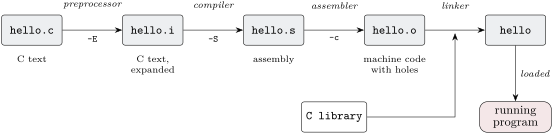
gcc runs them in turn, and the options -E, -S and -c stop it after the first, second or third. The linker fills the holes left in the object file with the addresses of the library’s code.History — C and Unix
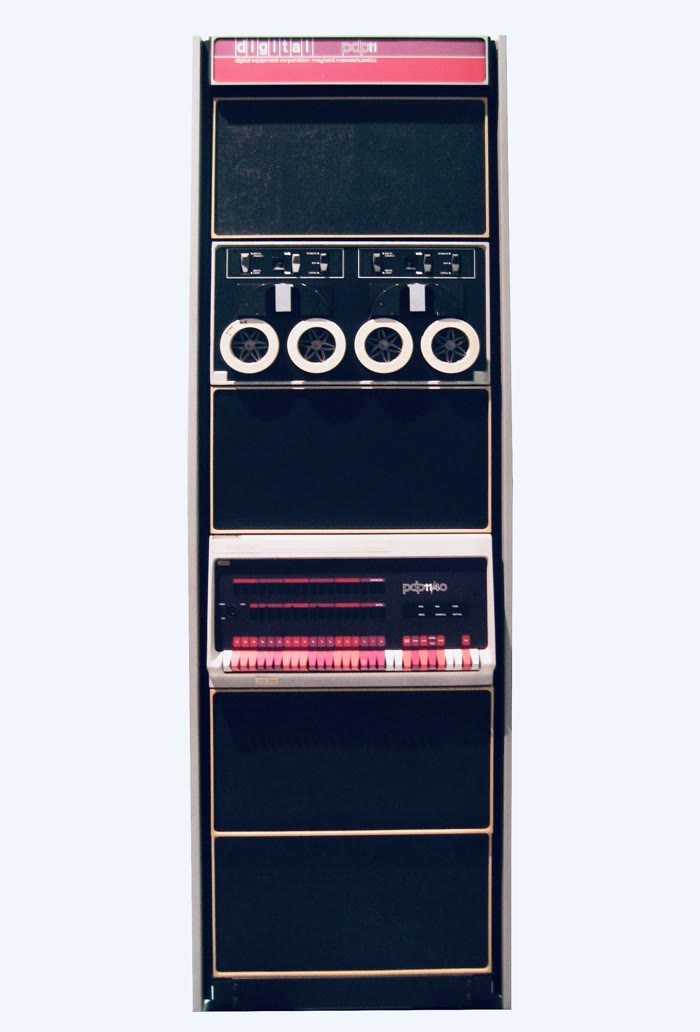
C came into being between 1969 and 1973 at Bell Labs, alongside the first versions of the Unix operating system, its most creative year being 1972. It descends from a language called B, itself derived from BCPL, and by early 1973 it was strong enough for the Unix kernel to be rewritten in C, for the PDP-11 minicomputer, during that summer. An operating system written in a language that a compiler could carry to other processors was new, and it is why C and Unix spread together. The language is now an international standard; this book follows the 2018 edition, C17 (ISO/IEC 9899:2018), which the -std=c17 option asks for.
1.2 Object files, symbols and the linker
A program of a few thousand lines is never one file. It is split into modules: a module is a pair of files, a header (.h) that declares what the module offers, and a .c file that defines it. Chapter 7 develops the method; here is the smallest example, a module that squares numbers and counts how often it was asked.
#ifndef SQUARE_H
#define SQUARE_H

long square(long x);
extern int square_calls;

#endif#include "square.h"
int square_calls = 0;
long square(long x)
{
square_calls++;
return x * x;
}#include <stdio.h>
#include "square.h"
int main(void)
{
long total = 0;
for (long i = 1; i <= 10; i++)
total += square(i);
printf("sum of the first ten squares: %ld\n", total);
printf("square was called %d times\n", square_calls);
return 0;
}The header says that a function square exists and takes and returns a long; it says that an int called square_calls exists somewhere (extern). That is all main.c needs to be compiled on its own: the compiler checks every call against the declaration and leaves a hole where the address of square will go. Each .c file is compiled separately into its object file, and the linker then matches every U of one file with a T (code) or B, D (data) of another.
$ gcc -c square.c
$ gcc -c main.c
$ nm square.o
0000000000000000 T square
0000000000000000 B square_calls
$ nm main.o
0000000000000000 T main
                 U printf
                 U square
                 U square_calls
$ gcc main.o square.o -o squares
$ ./squares
sum of the first ten squares: 385
square was called 10 times
$ gcc main.o -o broken
/usr/bin/ld: main.o: warning: relocation against `square_calls' in read-only section `.text'
/usr/bin/ld: main.o: in function `main':
main.c:(.text+0x26): undefined reference to `square'
/usr/bin/ld: main.c:(.text+0x57): undefined reference to `square_calls'
/usr/bin/ld: warning: creating DT_TEXTREL in a PIE
collect2: error: ld returned 1 exit status
$ gcc -c twice.c
$ gcc main.o square.o twice.o -o broken
/usr/bin/ld: twice.o: in function `square':
twice.c:(.text+0x0): multiple definition of `square'; square.o:square.c:(.text+0x0): first defined here
collect2: error: ld returned 1 exit statusExample 1.3 (Two link errors)
In the session, gcc main.o -o broken forgets square.o: main.o uses square and square_calls and nobody defines them, so the linker reports two undefined references (and two warnings that follow from the same missing data symbol). The last command links twice.o, which defines a second square: now the symbol is defined twice and the linker cannot choose. Note that the compiler accepted every file: each error belongs to the link, where the files meet.
Proposition 1.4 (When a link succeeds)
Consider object files in which every symbol is either defined (T, D, B, R) or used (U), and ignore libraries. Linking them succeeds if and only if every symbol used by one of the files is defined by exactly one of them, and no symbol is defined by two of them.
Proof. The linker builds one table from all the definitions. If a name is defined twice, it reports a multiple definition; if a used name is in no definition, it reports an undefined reference; these are its only two ways to fail in this model. Conversely, when every used name has exactly one definition, each hole is filled with the address of that definition, and the executable is complete. ∎
Remark 1.5 (Local symbols and libraries)
A lower-case letter in nm (t, b, r) marks a local symbol: a function or variable declared static at file level, invisible to the linker’s matching, so two files may each have their own. Libraries add one rule: the linker takes from a library only the object files that define something still undefined. The C library is linked by default, which is why printf resolved silently. A library can be copied into the executable (static linking) or loaded when the program starts (a shared library, the default for the C library on Linux).
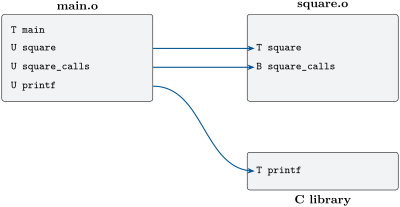
main.o uses (U) is matched with the one file that defines it. A U with no arrow is an undefined reference; a name with two definitions has two possible arrows, and the link fails.1.3 Warnings are a tool
C lets many mistakes through: the language trusts the programmer. The compiler, though, notices a great deal, and says so when it is asked. Every program in this book is compiled with -Wall -Wextra, which turn on most of its checks.
Definition 1.6 (Compiler warning)
A compiler warning is a message about a construct that is legal but probably wrong. Unlike an error, it does not stop the build; the option -Werror turns every warning into an error, and the tests of this book are built that way.
#include <stdio.h>

int main(void)
{
    int count;              // never given a value
    long big = 3000000000L;
    int x = 5;

    if (x = 0)              // assignment, not a comparison
        printf("x is zero\n");
    printf("big is %d\n", big);   // %d expects an int, not a long
    for (int i = 0; i < 3; i++)
        count++;
    printf("count is %d\n", count);
    return 0;
}$ gcc -std=c17 -O2 -Wall -Wextra -o warnings warnings.c -lm && ./warnings
warnings.c: In function 'main':
warnings.c:10:9: warning: suggest parentheses around assignment used as truth value [-Wparentheses]
10 | if (x = 0) // assignment, not a comparison
| ^
warnings.c:12:21: warning: format '%d' expects argument of type 'int', but argument 2 has type 'long int' [-Wformat=]
12 | printf("big is %d\n", big); // %d expects an int, not a long
| ~^ ~~~
| | |
| int long int
| %ld
warnings.c:14:14: warning: 'count' is used uninitialized [-Wuninitialized]
14 | count++;
| ~~~~~^~
big is -1294967296
count is 3Each warning gives the file, the line and the column, quotes the line, and names the option that enabled it in square brackets. The first says that if (x = 0) assigns 0 to x and tests the result, which is always false; the comparison is x == 0. The second says that %d expects an int while big is a long: the behaviour is undefined, and here printf took the low 32 bits of the long and printed instead of three billion. The third says that count is used before any value was stored in it. Its printed value, 3, is luck: an uninitialised variable may hold anything, and the next compiler version may print something else. The fixed version (warnings_fixed.c in the chapter’s code) compiles without a message and prints
$ gcc -std=c17 -O2 -Wall -Wextra -o warnings_fixed warnings_fixed.c -lm && ./warnings_fixed
big is 3000000000
count is 3In practice — Read the first message first
A single mistake can produce a cascade of messages. Fix the first one, rebuild, and read again; later messages are often consequences. A build that prints nothing is the goal of every program in this book.
1.4 The memory of a running program
When the operating system starts an executable, it gives the running program its own memory, laid out in regions. The program below creates one object of each kind, sorts their addresses and prints which comes first. It never prints an address itself: the numbers change from machine to machine, the order does not.
#include <stdint.h>
#include <stdio.h>
#include <stdlib.h>

int initialised_global = 42;   // static data, initialised
int zero_global;               // static data, zero-initialised
static int helper(int x) { return x + 1; }

struct place { const char *name; uintptr_t addr; };
static int by_addr(const void *a, const void *b)
{
    uintptr_t x = ((const struct place *)a)->addr;
    uintptr_t y = ((const struct place *)b)->addr;
    return (x > y) - (x < y);
}

int main(void)
{
    int local = helper(1);                    // the call stack
    int *block = malloc(sizeof *block);       // the heap
    if (block == NULL) return 1;              // no memory
    const char *literal = "a string literal"; // read-only data
    struct place p[] = {
        {"local variable (stack)", (uintptr_t)&local},
        {"heap block (malloc)", (uintptr_t)block},
        {"zero-initialised global", (uintptr_t)&zero_global},
        {"initialised global", (uintptr_t)&initialised_global},
        {"string literal", (uintptr_t)literal},
        {"function code", (uintptr_t)&helper},
    };
    size_t n = sizeof p / sizeof p[0];
    qsort(p, n, sizeof p[0], by_addr);
    puts("from low addresses to high addresses:");
    for (size_t i = 0; i < n; i++)
        printf("  %zu. %s\n", i + 1, p[i].name);
    printf("the stack lies %s the heap\n",
           (uintptr_t)&local > (uintptr_t)block ? "above" : "below");
    free(block);
    return 0;
}$ gcc -std=c17 -O2 -Wall -Wextra -o regions regions.c -lm && ./regions
from low addresses to high addresses:
1. function code
2. string literal
3. initialised global
4. zero-initialised global
5. heap block (malloc)
6. local variable (stack)
the stack lies above the heapDefinition 1.7 (Memory layout of a process)
The memory layout of a process is the arrangement of a running program’s memory in regions. The code segment holds the machine code and, next to it, read-only data such as string literals; the data segment holds the variables that exist for the whole run, the initialised ones first and then the zero-initialised ones (traditionally called bss). Above them grows the heap, from which the program requests blocks while it runs (Chapter 5); near the top of the address space is the call stack, which holds the local variables of the functions being executed (Chapter 3).
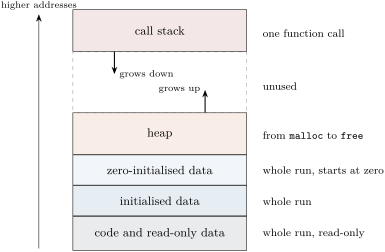
The lifetimes on the right of the figure are the real lesson. A global variable exists from the start of the run to its end; a local variable exists only while its function runs, and its memory is reused by the next call; a heap block lives exactly as long as the program decides. Most of the bugs of the next four chapters are a pointer that outlives the object it points to.
1.5 Interpreted and compiled
Here is the program of the opening, in Python. One command, and it runs.
GREETING = "Hello from Python"


def square(x):
    return x * x


n = 7
print(f"{GREETING}: {n} squared is {square(n)}")$ python hello_python.py
Hello from Python: 7 squared is 49Python does not skip the translation: it does it differently, and out of sight.
Definition 1.8 (Interpreter, bytecode)
An interpreter is a program that carries out another program by reading it, rather than translating it in advance into machine code. CPython, the usual Python, first compiles each function into bytecode: instructions for an imaginary machine, which a loop written in C fetches one by one and executes.
import dis


def square_plus(x, y):
    return x * x + y


dis.dis(square_plus)
print(square_plus(7, 1))$ python bytecode.py
5 0 RESUME 0
6 2 LOAD_FAST 0 (x)
4 LOAD_FAST 0 (x)
6 BINARY_OP 5 (*)
10 LOAD_FAST 1 (y)
12 BINARY_OP 0 (+)
16 RETURN_VALUE
50square_plus: RESUME, which starts the function, then six instructions.The function became a stack machine program: push x, push x, multiply, push y, add, return. Each instruction is decoded by the interpreter’s loop at every execution, and the loop checks the types of x and y each time, since they could be integers, floats or lists. The C compiler made those decisions once, before the program ran. The price of the interpreter’s flexibility can be measured. Here is the sieve of Eratosthenes, written the same way in both languages.
#include <stdio.h>
#include <stdlib.h>
#include <time.h>

enum { N = 20000000 };

int main(void)
{
    struct timespec t0, t1;
    timespec_get(&t0, TIME_UTC);
    char *composite = calloc(N, 1);
    if (composite == NULL)
        return 1;
    long count = 0;
    for (long i = 2; i < N; i++) {
        if (composite[i])
            continue;
        count++;
        for (long j = i * i; j < N; j += i)
            composite[j] = 1;
    }
    free(composite);
    timespec_get(&t1, TIME_UTC);
    double s = (t1.tv_sec - t0.tv_sec) + (t1.tv_nsec - t0.tv_nsec) / 1e9;
    printf("primes below %d: %ld\n", N, count);
    printf("time: %.2f s\n", s);
    return 0;
}import time
N = 20_000_000
def count_primes(n):
composite = bytearray(n)
count = 0
for i in range(2, n):
if composite[i]:
continue
count += 1
for j in range(i * i, n, i):
composite[j] = 1
return count
if __name__ == "__main__":
t0 = time.perf_counter()
count = count_primes(N)
t1 = time.perf_counter()
print(f"primes below {N}: {count}")
print(f"time: {t1 - t0:.2f} s")$ gcc -std=c17 -O2 -Wall -Wextra -o sieve sieve.c -lm && ./sieve
primes below 20000000: 1270607
time: 0.07 s$ python pysieve.py
primes below 20000000: 1270607
time: 1.16 sBoth print the same count, and the compiled program is more than ten times faster here. That is not a verdict on the languages. Python started at once, found its errors with readable messages, and its own library offers faster routes (a slice assignment instead of the inner loop). C asked for a build, would have printed nonsense for an out-of-range index instead of an error, and gave speed in return. The rest of this volume uses both, each where it fits: C where the machine is the subject, Python where the algorithm is.
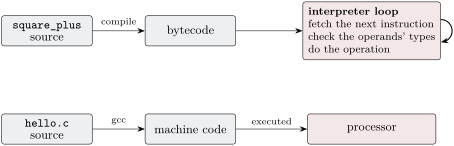
gcc produces machine code that the processor executes directly, with every decision taken before the run.1.6 Exercises
Exercise 1.1 ★
Which stage of a build, or the running program, reports each problem? (a) #include "sqare.h", misspelt, when only square.h exists; (b) a missing semicolon at the end of a statement; (c) undefined reference to `cube'; (d) a division by zero whose divisor is read from the keyboard.
Solution
Solution of Exercise 1.1.
(a) The preprocessor: it cannot open sqare.h and stops with a fatal error. (b) The compiler: the text is not valid C. (c) The linker: every file compiled, but no object file or library defines cube. (d) None of the stages: the program builds, and the division fails while it runs (on Linux, the running program is stopped with a “floating point exception”).
Exercise 1.2 ★
A module geometry.c was compiled with gcc -c, and nm printed its symbols:
$ gcc -c geometry.c
$ nm geometry.o
0000000000000000 B calls
0000000000000000 T hypotenuse
0000000000000008 b last_sign
0000000000000000 D scale
U sqrtFor each of the five lines, say whether the name is a function or a variable, defined here or elsewhere, visible to other files or not, and for the variables whether they start at zero. Then guess the declarations.
Solution
Solution of Exercise 1.2.
calls (B): a variable defined here, visible to other files, starting at zero. hypotenuse (T): a function defined here, visible. last_sign (b): a variable defined here but local to the file (static), starting at zero. scale (D): a variable defined here, visible, with an initial value. sqrt (U): used here, defined elsewhere (the mathematics library). The source was:
#include <math.h>

double scale = 2.0;
long calls;
static int last_sign;

double hypotenuse(double a, double b)
{
    calls++;
    last_sign = a < 0 || b < 0;
    return scale * sqrt(a * a + b * b);
}Exercise 1.3 ★
In which region of the running program does each object (a) to (f) of the program below live, and how long?
#include <stdlib.h>

const char *motto = "keep it simple";   // (a) motto, (b) the characters
int table[1000];                        // (c)
int limit = 10;                         // (d)

int main(void)
{
    int depth = 0;                      // (e)
    char *buffer = malloc(64);          // (f) the 64 bytes
    if (buffer == NULL)
        return 1;
    buffer[0] = (char)(depth + limit + table[0] + motto[0]);
    free(buffer);
    return 0;
}Solution
Solution of Exercise 1.3.
(a) The pointer motto: initialised data, for the whole run. (b) The characters of the literal: read-only data next to the code, whole run. (c) table: zero-initialised data, whole run. (d) limit: initialised data, whole run. (e) depth: the call stack, while main runs. (f) The 64 bytes: the heap, from malloc to free.
Exercise 1.4 ★
Write out what the preprocessor makes of the two printf lines of the program below, and predict what it prints.
#include <stdio.h>

#define DOUBLE(x) x + x
#define DOUBLE_SAFE(x) ((x) + (x))

int main(void)
{
    printf("3 * DOUBLE(2)      = %d\n", 3 * DOUBLE(2));
    printf("3 * DOUBLE_SAFE(2) = %d\n", 3 * DOUBLE_SAFE(2));
    return 0;
}Solution
Solution of Exercise 1.4.
The macro is replaced by its text, without regard to the surrounding operators: 3 * DOUBLE(2) becomes 3 * 2 + 2, which is 8, and 3 * DOUBLE_SAFE(2) becomes 3 * ((2) + (2)), which is 12.
$ gcc -std=c17 -O2 -Wall -Wextra -o macro_trap macro_trap.c -lm && ./macro_trap
3 * DOUBLE(2)      = 8
3 * DOUBLE_SAFE(2) = 12Exercise 1.5 ★★
The files users.c and admin.c both include the header limits_bad.h, which holds the single line int max_users = 100;. Each file compiles, but the link fails:
$ gcc -c users.c
$ gcc -c admin.c
$ gcc users.o admin.o -o users
/usr/bin/ld: admin.o:(.data+0x0): multiple definition of `max_users'; users.o:(.data+0x0): first defined here
collect2: error: ld returned 1 exit statusExplain the message, and change the header and one source file so that the program builds, with one variable shared by both files.
Solution
Solution of Exercise 1.5.
The header is copied into both files, so each object file defines its own max_users (a D symbol); the linker finds two definitions of one global name. A header should only declare: extern int max_users; in the header, and the one definition int max_users = 100; in users.c. Then admin.o has a U max_users that the definition in users.o fills.
Exercise 1.6 ★★
The program below always finds no negative reading. Read its warning, then fix the program.
#include <stdio.h>

int main(void)
{
    unsigned int readings[] = {3, -2, 7, -5, 0};
    int count = 0;
    for (int i = 0; i < 5; i++)
        if (readings[i] < 0)
            count++;
    printf("negative readings: %d\n", count);
    return 0;
}$ gcc -std=c17 -O2 -Wall -Wextra -o negatives negatives.c -lm && ./negatives
negatives.c: In function 'main':
negatives.c:9:25: warning: comparison of unsigned expression in '< 0' is always false [-Wtype-limits]
9 | if (readings[i] < 0)
| ^
negative readings: 0Solution
Solution of Exercise 1.6.
An unsigned int is never negative: -2 and -5 were converted to 4294967294 and 4294967291 when the array was initialised, and readings[i] < 0 is false for every value, as the warning says. Declare int readings[]: the program then prints negative readings: 2.
Exercise 1.7 ★★
A one-file program computes the mean and the maximum of an array of double with two functions mean(const double *x, size_t n) and maximum(const double *x, size_t n), and prints them from main. Split it into a module stats (a header with include guards and a .c file) and a file stats_main.c; give the commands that build it in separate steps.
Solution
Solution of Exercise 1.7.
The header (with its guard) and the implementation are in the chapter’s exercises/ folder, tested by tests/stats_test.c:
#ifndef STATS_H
#define STATS_H

#include <stddef.h>

double mean(const double *x, size_t n);
double maximum(const double *x, size_t n);

#endif
The file stats_main.c includes "stats.h" and keeps only main. The build takes three commands: gcc -c stats.c, then gcc -c stats_main.c, then gcc stats.o stats_main.o -o stats.
Exercise 1.8 ★★
A header point.h contains only struct point { int x, y; };, with no include guard. The headers shapes.h and draw.h both include it, and main.c includes shapes.h then draw.h. How many copies of point.h does the preprocessor put into main.c, what happens next, and what do include guards change? With headers each including point.h, all included by main.c, how many copies are there with and without guards?
Solution
Solution of Exercise 1.8.
Two copies: one through shapes.h, one through draw.h. The compiler then sees the structure defined twice and stops with redefinition of 'struct point'. With a guard, the second inclusion finds the guard’s macro already defined and skips the text: one copy. With headers: copies without guards (an error as soon as ), exactly one with them.
Exercise 1.9 ★★
Predict the three lines printed by this program.
#include <stdio.h>

void tick(void)
{
    static int kept = 0;
    int fresh = 0;
    kept++;
    fresh++;
    printf("kept = %d, fresh = %d\n", kept, fresh);
}

int main(void)
{
    tick();
    tick();
    tick();
    return 0;
}Solution
Solution of Exercise 1.9.
kept lives in the data segment and keeps its value from call to call; fresh is created at each call.
$ gcc -std=c17 -O2 -Wall -Wextra -o calls calls.c -lm && ./calls
kept = 1, fresh = 1
kept = 2, fresh = 1
kept = 3, fresh = 1Exercise 1.10 ★★★
A program has source files of about lines each, and one header included by of them. (a) After an edit to one source file, how many lines does a rebuild compile with separate compilation, and how many if the program were one file? (b) Same question after an edit to the header. (c) A day of work makes 30 edits to source files and 4 to the header. Count the lines compiled in each organisation, and the ratio.
Solution
Solution of Exercise 1.10.
The whole program has lines. (a) Separate compilation recompiles the edited file: 500 lines (then links); one file: 20 000 lines. (b) The header is copied into 12 files, so 12 of them are recompiled: lines, against 20 000. (c) Separate: lines; one file: lines; the ratio is .
Exercise 1.11 ★★★
Write a function const char *region_of(const void *p, const void *stack_marker) that returns "code", "static data", "heap" or "stack" for a pointer into the corresponding region of the running program, given the address of any local variable of the caller as stack_marker. Explain why such a function can only work on a known layout, and why the C language does not promise it.
Solution
Solution of Exercise 1.11.
The tested solution is exercises/region_of.c (test tests/region_of_test.c): it takes one marker in each region (its own code, a static variable, a block just obtained from malloc, and the caller’s local) and returns the region whose marker is nearest to p.
const char *region_of(const void *p, const void *stack_marker)
{
void *heap_marker = malloc(1);
uintptr_t a = (uintptr_t)p;
uintptr_t marks[4] = {(uintptr_t)®ion_of, (uintptr_t)&data_marker,
(uintptr_t)heap_marker, (uintptr_t)stack_marker};
const char *names[4] = {"code", "static data", "heap", "stack"};
int best = 0;
for (int i = 1; i < 4; i++)
if (gap(a, marks[i]) < gap(a, marks[best]))
best = i;
free(heap_marker);
return names[best];
}It works because, on this machine, the regions are far apart compared with their sizes. The C standard only defines the comparison of pointers into the same array or object; comparing pointers into different objects, or reading their order as integers, says nothing that the language guarantees, and another system may place the regions in another order.
Exercise 1.12 ★★★
Three object files have these symbols. a.o: T main, U parse, U total. b.o: T parse, D total, U emit. c.o: T emit, T parse. (a) Which of the links a.o b.o, a.o b.o c.o, a.o c.o succeed, and why do the others fail? (b) Using Proposition 1.4, count the subsets of containing a.o that link successfully. (c) If parse were declared static in c.o, what would change?
Solution
Solution of Exercise 1.12.
(a) a.o b.o fails: b.o uses emit, which nobody defines. a.o b.o c.o fails: parse is defined twice. a.o c.o fails: total is undefined. (b) The subsets containing a.o are , , , ; lacks parse, and the other three fail as in (a): none of the four links. (c) A static parse in c.o is a local symbol, not matched by the linker; then a.o b.o c.o links (parse and total from b.o, emit from c.o), and exactly one subset succeeds.
1.7 Problem: One program, four files, one process
Problem 1.1
Weekend problem — One program, four files, one process
A small word counter is split into four files: a header count.h, a module count.c that counts lines and words one character at a time, a module report.c that prints the counts, and wcmain.c, which reads the standard input.
#ifndef COUNT_H
#define COUNT_H

#define MAX_REPORTS 3

extern long lines, words;
void feed(int c);
void report(const char *title);

#endif#include <ctype.h>
#include "count.h"
long lines, words;
static int in_word = 0;
void feed(int c)
{
if (c == '\n')
lines++;
if (isspace(c))
in_word = 0;
else if (!in_word) {
in_word = 1;
words++;
}
}#include <stdio.h>
#include "count.h"
const char *unit = "words";
void report(const char *title)
{
static int reports = 0;
if (reports >= MAX_REPORTS)
return;
reports++;
printf("%s: %ld lines, %ld %s (report %d)\n", title, lines, words, unit,
reports);
}#include <stdio.h>
#include <stdlib.h>
#include "count.h"
int main(void)
{
char *title = malloc(16);
if (title == NULL)
return 1; // no memory: stop before writing through NULL
int c;
snprintf(title, 16, "standard input");
while ((c = getchar()) != EOF)
feed(c);
report(title);
free(title);
return 0;
}$ gcc -E count.c | wc -l
328
$ gcc -c count.c report.c wcmain.c
$ nm count.o
U __ctype_b_loc
0000000000000000 T feed
0000000000000010 b in_word
0000000000000000 B lines
0000000000000008 B words
$ nm report.o
U lines
U printf
0000000000000000 T report
0000000000000000 b reports.0
0000000000000000 D unit
U words
$ nm wcmain.o
U feed
U free
U getchar
0000000000000000 T main
U malloc
U report
U snprintf
$ size count.o report.o wcmain.o
text data bss dec hex filename
214 0 20 234 ea count.o
238 8 4 250 fa report.o
229 0 0 229 e5 wcmain.o
$ gcc count.o report.o wcmain.o -o wcount
$ printf 'one two\nthree four five\n' | ./wcount
standard input: 2 lines, 5 words (report 1)Part I — Preprocessing.
- Which files does the preprocessor read to produce the expanded
count.c? Why is the expansion more than 300 lines long whencount.chas 18? - What does the preprocessor put in place of
MAX_REPORTSinreport.c? Does the compiler ever see the nameMAX_REPORTS? - Does
count.csee the declaration ofreport? Does that matter? - If the include guard of
count.hwere removed, would any of the three files fail to compile? Justify from what the header contains. - Someone writes
#define MAX_REPORTS 3;with a semicolon. Write the line ofreport.cthat the compiler would receive and say whether it still compiles.
Part II — Object files.
- List the symbols that
count.odefines and the one it uses. Where does the used one come from? - Why is
in_wordprinted with a lower-casebandlineswith an upper-caseB? - Why is
reportsprinted asreports.0, with a lower-case letter? - The variable
unitis aDsymbol of 8 bytes inreport.o. What are those 8 bytes, and where are the six bytes of"words"stored? - Explain the
bsscolumn ofsize: 20 bytes forcount.o, 4 forreport.o. Why doesin_word, initialised to 0, count as bss? - The file
wcmain.odefines one symbol and uses six. Classify the six into those another file of the program defines and those the C library defines.
Part III — Linking.
- Check Proposition 1.4 on the three object files, ignoring the C library: list each used symbol and its unique definition.
- What would the link print without
report.o? Name every undefined reference. - A colleague adds
long words;towcmain.cat file level. What happens at the link? And withstatic long words;? - Why could the link succeed even though the three object files were compiled at different times?
- Could
count.candreport.ceach contain astatic intcalledin_word? Two non-static ones?
Part IV — The running program.
- The program printed
2 lines, 5 words. Tracefeedon the input to check the 5. - Ten objects take part in a run: the code of
feed, the code ofmain,lines,words,in_word,unit, the characters of"words",reports, the localcofmain, and the 16 bytes thattitlepoints to. Place each in its region. - For each of the ten, say when its lifetime starts and ends.
- Which of the ten exist before
mainstarts, and with which values? - If
reportwere called four times, what would the fourth call print, and why doesreportsremember the earlier calls while a local variable ofreportcould not? - The pointer
titleitself is a local variable. In which region is it, and in which region is what it points to? - After
free(title), which of the ten objects no longer exist, and which still do? - Count the objects of the placement table in each region and state the result.
Solution
Solution of Problem 1.1.
1. count.c, count.h, <ctype.h> and the system headers that <ctype.h> includes; their declarations make up most of the 328 lines.
2. The text 3: the compiler receives if (reports >= 3) and never sees the name.
3. Yes, count.h declares report; it does not matter, since count.c never calls it and a declaration produces no code.
4. No. The header holds macros (an identical redefinition is allowed), extern declarations and prototypes, which may all be repeated; and each file includes it only once. Guards become necessary when a header defines a type.
5. if (reports >= 3;): a syntax error; report.c no longer compiles.
6. Defined: feed (T), lines and words (B), in_word (b). Used: __ctype_b_loc, from the C library; isspace expands into a lookup in a table the library provides.
7. in_word is static at file level: local to count.c, invisible to the linker. lines is global.
8. reports is a static local of report: it lives in the data segment but its name belongs to the function, so the compiler gives it a file-local name with a suffix, reports.0.
9. The 8 bytes are a pointer: the address of the string. Its six bytes (w o r d s and the final zero byte) are read-only data, counted by size in the text column.
10. count.o: bytes for lines, words, in_word; report.o: 4 bytes for reports. Zero-initialised objects take no room in the file: only their total size is recorded, and the loader fills the region with zeros. An explicit = 0 is the same thing.
11. feed (in count.o) and report (in report.o); free, getchar, malloc, snprintf come from the C library.
12. lines and words (used by report.o): defined once, in count.o. feed (used by wcmain.o): count.o. report (used by wcmain.o): report.o. The global definitions feed, lines, words, report, unit, main are pairwise distinct. The condition holds.
13. undefined reference to `report', from wcmain.o; it is the only one.
14. long words; at file level is a definition: the link fails with multiple definition of `words'. With static, it is a separate local variable that stays 0; the link succeeds and the counts are unaffected.
15. An object file records names, not dates: the linker matches names. The header guarantees that every file was compiled with the same declarations.
16. Two static int in_word: yes, each file has its own. Two non-static ones: a multiple definition at the link.
17. The input is one two, a newline, three four five, a newline. A word starts at each non-space character that follows a space or the start: at o, t, t, f, f, so 5 words; two newlines, so 2 lines.
18. Code and read-only data: the code of feed, the code of main, the characters of "words". Initialised data: unit. Zero-initialised data: lines, words, in_word, reports. Call stack: c. Heap: the 16 bytes.
19. The eight objects of the code and data regions: the whole run. c: from the start of the call of main to its return. The 16 bytes: from malloc to free.
20. The eight objects of the code and data regions: lines, words, in_word, reports hold 0, unit holds the address of "words".
21. Nothing: reports is 3, so report returns at once. A static local lives in the data segment for the whole run; an automatic local is created anew at each call and could not count calls.
22. title is on the call stack (a local of main); the bytes it points to are on the heap.
23. The 16 bytes no longer exist. The nine others do; title still exists, but it now holds the address of a freed block: it must not be used.
24. The placement table: of the ten objects, 3 live in the code region, 1 in initialised data, 4 in zero-initialised data, 1 on the heap and 1 on the call stack; eight of them exist for the whole run.