University Computer Science — Year 1 · Bachelor Year 1
9Version Control with Git
Yesterday the library’s catalogue program worked; today its test fails, and forty edits were made in between, some by you, some by a colleague. Which one broke it? Copies named catalogue_old.py and catalogue_final2.py do not answer. A version control system does: it keeps every recorded state of the project, says who changed what and why, merges the work of several people, and can search its own history for the change that broke a test, in six runs of that test where forty would seem needed. This chapter teaches the one used almost everywhere, Git, through sessions run on a small catalogue.
You already know
A file holds bytes and is named by a path in a tree of folders. A test runs a piece of a program on chosen inputs and compares the result with the expected one; its exit status says whether it passed (Chapter 8).
9.1 Snapshots and commits
Definition 9.1 (Version control system, repository)
A version control system records the successive states of the files of a project, with their authors, dates and reasons, and can restore or compare any of them. The recorded history of a project is its repository; with Git it is kept in a hidden folder .git at the top of the project.
Definition 9.2 (Commit, snapshot)
A commit is one recorded state of the project: a snapshot of every tracked file as it was when the commit was made, together with an author, a date, a message, and the identifiers of its parent commits, the commits it was made from: none for the first commit, one usually, two for a merge.
History — Git
Git was born in 2005 in the community that develops the Linux kernel. The kernel had used a proprietary system for three years, whose free licence was then withdrawn; its developers, Linus Torvalds in particular, wrote their own. Its aims were speed, a simple design, thousands of parallel branches, and full distribution: every copy holds the whole history.
$ git init -q -b main catalogue
$ cd catalogue
$ printf 'The Silent Code,2002\nThe Paper Forest,1996\n' > books.csv
$ git add books.csv
$ git commit -q -m "Start the catalogue with two books"
$ printf 'Harbour Lights,2011\n' >> books.csv
$ git commit -q -am "Add Harbour Lights"
$ git log
commit 8da0a4433b74113ff0e129e56581f29ef6afdd75
Author: Ada Lovelace <[email protected]>
Date:   Mon Jan 5 09:00:00 2026 +0000

    Add Harbour Lights

commit 3e494d142e1c6bfdab3f2c6a39315040b0336200
Author: Ada Lovelace <[email protected]>
Date:   Mon Jan 5 09:00:00 2026 +0000

    Start the catalogue with two books
$ git log --oneline
8da0a44 Add Harbour Lights
3e494d1 Start the catalogue with two books
$ git show --stat HEAD
commit 8da0a4433b74113ff0e129e56581f29ef6afdd75
Author: Ada Lovelace <[email protected]>
Date:   Mon Jan 5 09:00:00 2026 +0000

    Add Harbour Lights

 books.csv | 1 +
1 file changed, 1 insertion(+)The session pins the author, Ada Lovelace, and the date, so that it reruns identically; in daily use Git takes both from the configuration and the clock. git add chooses what goes into the next commit, git commit records it, -a adding every tracked file that changed. The long hexadecimal number after commit is the commit’s identifier, which --oneline abbreviates to its first seven digits.
Git stores the project as objects of three kinds: a blob holds the content of a file, a tree lists the names of a folder with the objects they stand for, and a commit points to the tree of the top folder. Each object is named by a hash of its content: a 40-digit hexadecimal number computed from the type, the length and the bytes of the object, by the function SHA-1 (a newer format uses SHA-256 and 64 digits; hash functions are studied in the Year 3 volume).
$ git cat-file -p HEAD
tree 525ef202ac0c29c3522cd0e13a613e90d1a9dd9b
parent 3e494d142e1c6bfdab3f2c6a39315040b0336200
author Ada Lovelace <[email protected]> 1767603600 +0000
committer Ada Lovelace <[email protected]> 1767603600 +0000

Add Harbour Lights
$ git cat-file -p HEAD^{tree}
100644 blob d343e221360398b3292388f1abfb19f0b775809d	books.csv
$ git cat-file -p HEAD:books.csv
The Silent Code,2002
The Paper Forest,1996
Harbour Lights,2011
$ git hash-object books.csv
d343e221360398b3292388f1abfb19f0b775809d
$ { printf 'blob %d\0' "$(wc -c < books.csv)"; cat books.csv; } | sha1sum
d343e221360398b3292388f1abfb19f0b775809d  -
$ git cat-file -t 3e494d1
commitbooks.csv, and the blob’s name computed by hand.Two consequences follow from naming by content. Identical files are stored once, under one name. And a commit names its parent by the parent’s hash, so changing anything in an old commit, a single byte of a file or of a message, changes its name, then the name of every commit after it: a history cannot be altered without the change showing.
9.2 The staging area
Definition 9.3 (Working tree, staging area)
The working tree is the folder of the project, the files as you edit them. The staging area (also called the index) holds the snapshot that the next commit will record; git add copies a file of the working tree into it, and git commit records it in the repository.
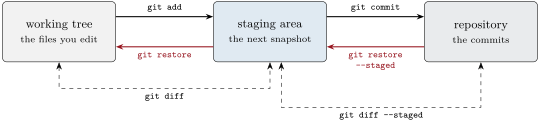
git add and git commit move changes to the right; git restore brings a file back from the staging area, and git restore --staged unstages it. Each diff compares two neighbouring places.$ printf 'Stone Bridge,1987\n' >> books.csv
$ printf '# Catalogue\nOne line per book: title,year.\n' > README.md
$ git status --short
M books.csv
?? README.md
$ git add README.md
$ git status --short
A README.md
M books.csv
$ git diff
diff --git a/books.csv b/books.csv
index d343e22..248ecd5 100644
--- a/books.csv
+++ b/books.csv
@@ -1,3 +1,4 @@
The Silent Code,2002
The Paper Forest,1996
Harbour Lights,2011
+Stone Bridge,1987
$ git diff --staged
diff --git a/README.md b/README.md
new file mode 100644
index 0000000..08a2228
--- /dev/null
+++ b/README.md
@@ -0,0 +1,2 @@
+# Catalogue
+One line per book: title,year.
$ git commit -q -m "Explain the file format"
$ git status --short
M books.csv
$ git restore books.csv
$ git status --shortstatus, diff and diff --staged each see a different part.In git status --short, the first column describes the staging area against the last commit and the second the working tree against the staging area: A added, M modified, ?? untracked. A diff shows changed lines with - and + and a few lines of context around them; the header @@ -1,3 +1,4 @@ says that lines 1 to 3 of the old version became lines 1 to 4 of the new. The last git restore threw the unstaged line away: Git never saw it, so nothing can bring it back. Stage or commit what you want to keep.
Method 9.4 (A good commit)
- One change per commit: a fix, a feature, a rename, not three of them mixed. Stage the files, or the parts of files, that belong to it, and leave the rest for the next commit.
- The tests pass at every commit, so that any commit can be checked out and used.
- A message whose first line says what the commit does, in fewer than 60 characters, and whose body says why.
- Nothing generated: compiled files, outputs and temporary files are listed in a file
.gitignoreand never committed.
9.3 Branches and merges
Definition 9.5 (Commit graph, ancestor)
The commits of a repository and the links from each commit to its parents form the commit graph. A commit is an ancestor of a commit if can be reached from by following parent links, itself included. No commit is its own ancestor through one link or more, since a commit’s name depends on its parents’ names, which must exist before it: the graph has no cycle (graphs are studied in Chapter 24).
Definition 9.6 (Branch)
A branch is a name that points to a commit, its tip. Committing on a branch makes a new commit whose parent is the tip and moves the name to it. HEAD names the current branch. A branch contains the commits that are ancestors of its tip.
Definition 9.7 (Merge, merge base)
To merge a branch into the current branch is to make contain the commits of . The merge base of two commits is their best common ancestor: a common ancestor of which no other common ancestor is a descendant. If the tip of is itself the merge base, is simply moved to the tip of : a fast-forward merge. Otherwise Git makes a three-way merge: it compares each file in the merge base, in and in , keeps every change made on either side, and records the result in a merge commit with two parents.
$ git switch -q -c genres
$ sed -i 's/$/,mystery/' books.csv
$ git commit -q -am "Add a genre column"
$ git switch -q main
$ git merge genres
Updating 8da0a44..9fdd4a5
Fast-forward
 books.csv | 6 +++---
 1 file changed, 3 insertions(+), 3 deletions(-)
$ git switch -q -c sort-by-year
$ sort -t, -k2,2n books.csv > sorted.csv && mv sorted.csv books.csv
$ git commit -q -am "Sort the books by year"
$ git switch -q main
$ printf 'Stone Bridge,1987,history\n' >> books.csv
$ git commit -q -am "Add Stone Bridge"
$ git merge-base main sort-by-year
9fdd4a5e8613c2ab66981f2fe27010d3f2bb6bef
$ git merge --no-edit sort-by-year
Auto-merging books.csv
Merge made by the 'ort' strategy.
 books.csv | 2 +-
 1 file changed, 1 insertion(+), 1 deletion(-)
$ git log --graph --oneline --all
*   58e34f4 Merge branch 'sort-by-year'
|\
| * 346e84d Sort the books by year
* | 88f4716 Add Stone Bridge
|/
* 9fdd4a5 Add a genre column
* 8da0a44 Add Harbour Lights
* 3e494d1 Start the catalogue with two books
$ cat books.csv
The Paper Forest,1996,mystery
The Silent Code,2002,mystery
Harbour Lights,2011,mystery
Stone Bridge,1987,historylog --graph.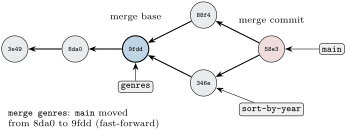
main; the three-way merge made commit 58e3, whose two parents are the tips of the two branches, and whose content combines both changes made since the merge base 9fdd.The three-way merge kept the order of sort-by-year and the line added on main: each side changed a different part of the file. Comparing with the merge base is what makes this possible: a line that differs between the two tips is taken from the side that changed it since the base. Another way to combine branches, rebasing, replays the commits of one branch on top of the other, producing new commits with new names and a straight history; it should not be used on commits that others already have.
9.4 Conflicts and remotes
Definition 9.8 (Merge conflict)
A merge conflict arises when both sides of a three-way merge changed the same lines of a file differently since the merge base. Git then stops before committing, writes both versions into the file between the markers <<<<<<<, ======= and >>>>>>>, and waits for a person to write the right result, stage it with git add and commit.
$ git switch -q -c rename
$ sed -i 's/The Paper Forest/The Paper Forest (2nd ed.)/' books.csv
$ git commit -q -am "Name the second edition"
$ git switch -q main
$ sed -i 's/The Paper Forest,1996/The Paper Forest,1997/' books.csv
$ git commit -q -am "Fix the year of The Paper Forest"
$ git merge rename
Auto-merging books.csv
CONFLICT (content): Merge conflict in books.csv
Automatic merge failed; fix conflicts and then commit the result.
$ git status --short
UU books.csv
$ cat books.csv
The Silent Code,2002
<<<<<<< HEAD
The Paper Forest,1997
=======
The Paper Forest (2nd ed.),1996
>>>>>>> rename
Harbour Lights,2011
$ printf 'The Silent Code,2002\nThe Paper Forest (2nd ed.),1997\nHarbour Lights,2011\n' > books.csv
$ git add books.csv
$ git commit -q --no-edit
$ git log --oneline --graph
*   4cac20f Merge branch 'rename'
|\
| * a9d83f7 Name the second edition
* | 17dfc05 Fix the year of The Paper Forest
|/
* 8da0a44 Add Harbour Lights
* 3e494d1 Start the catalogue with two books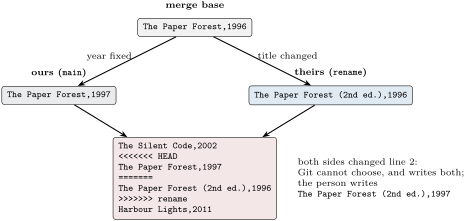
A conflict is not an error of Git: it is a question only a person can answer, since Git cannot know that the two changes are compatible. Small, frequent merges keep conflicts small.
Definition 9.9 (Remote repository, clone)
A remote repository is another repository of the same project, named in the local one (usually origin). A clone is a complete copy of a repository, history included, made by git clone. git push sends local commits to a remote and moves its branch; git fetch brings the remote’s new commits without merging them; git pull fetches and merges.
$ cd ..
$ git init -q --bare -b main shared.git
$ cd catalogue
$ git remote add origin ../shared.git
$ git push -q origin main
$ cd ..
$ git clone -q shared.git colleague
$ cd colleague
$ printf 'Stone Bridge,1987\n' >> books.csv
$ git commit -q -am "Add Stone Bridge"
$ git push -q origin main
$ cd ../catalogue
$ git log --oneline
8da0a44 Add Harbour Lights
3e494d1 Start the catalogue with two books
$ git pull -q origin main
$ git log --oneline
1b63ead Add Stone Bridge
8da0a44 Add Harbour Lights
3e494d1 Start the catalogue with two books
$ git branch -a
* main
remotes/origin/mainThe shared repository here is bare, a repository with no working tree, as on a server: nobody edits in it, all push to it. In a team, the shared repository lives on a server reached through the network, but the commands are the same; nothing in this session left the machine. A push that would lose commits on the remote, because someone pushed first, is refused: the pusher must pull, merge, and push again.

9.5 Searching history
$ git log --oneline
bc8f464 Fix a year
1b63ead Add Stone Bridge
8da0a44 Add Harbour Lights
3e494d1 Start the catalogue with two books
$ git log -S"1996" --oneline
bc8f464 Fix a year
3e494d1 Start the catalogue with two books
$ git blame books.csv
^3e494d1 (Ada Lovelace 2026-01-05 09:00:00 +0000 1) The Silent Code,2002
bc8f4648 (Ada Lovelace 2026-01-05 09:00:00 +0000 2) The Paper Forest,1997
8da0a443 (Ada Lovelace 2026-01-05 09:00:00 +0000 3) Harbour Lights,2011
1b63ead6 (Ada Lovelace 2026-01-05 09:00:00 +0000 4) Stone Bridge,1987log -S lists the commits that changed the number of occurrences of a string; blame shows, for each line, the last commit that changed it.These commands answer “when did this text appear or disappear” and “who last touched this line”. They do not answer “which commit broke the test”, since the commit that breaks a program may change lines far from where the failure shows. That question has a better answer.
Definition 9.10 (Bisection of a history)
Given a commit known to be good (a test passes) and a later one known to be bad (it fails), the bisection of the history between them tests a commit near the middle of the candidates, those that are ancestors of the bad commit and not of the good one; if it is bad, the culprit is among its ancestors; if good, among the others. It repeats until a single commit remains: the first bad commit, whose parents are all good. git bisect run automates it with a test command whose exit status is the verdict: 0 for good, 1 to 127 for bad, except 125, which means “cannot test this commit, skip it”.
The session below generates a history of 64 commits of the catalogue (Listing 9.3, in the problem), on two branches merged at the end. The test check.py of the last commit fails. Bisection finds why.
$ python3 make_history.py repo
$ cd repo
$ git rev-list --count HEAD
64
$ python3 check.py; echo "exit status $?"
FAIL: oldest() returned ('Harbour Lights', 2011)
exit status 1
$ git bisect start HEAD $(git rev-list --max-parents=0 HEAD)
Bisecting: 31 revisions left to test after this (roughly 5 steps)
[80502c470b5390380cd334fb70760f85c107d666] Add The Amber Map
$ git bisect run python3 check.py
running 'python3' 'check.py'
FAIL: oldest() returned ('Harbour Lights', 2011)
Bisecting: 15 revisions left to test after this (roughly 4 steps)
[47d1d75da0502e80dd6d3aec701ebe986254b856] Add The Amber Lights
running 'python3' 'check.py'
ok
Bisecting: 7 revisions left to test after this (roughly 3 steps)
[2641214f8b5afcde03e0d5b6892ebffb2c7acbf3] Add The Quiet Map
running 'python3' 'check.py'
ok
Bisecting: 3 revisions left to test after this (roughly 2 steps)
[97caf497aeca0d499ce31307e1fd9e341bf3c99f] Add The Northern Letter
running 'python3' 'check.py'
ok
Bisecting: 1 revision left to test after this (roughly 1 step)
[2a55f3ceb0e0f517a4715207fce1cd1a74bd1e53] Add The Copper River
running 'python3' 'check.py'
ok
Bisecting: 0 revisions left to test after this (roughly 0 steps)
[6bdea1a8873d3675ca64d18fff04a6dde1960af6] Tidy the catalogue functions
running 'python3' 'check.py'
FAIL: oldest() returned ('Harbour Lights', 2011)
6bdea1a8873d3675ca64d18fff04a6dde1960af6 is the first 'bad' commit
commit 6bdea1a8873d3675ca64d18fff04a6dde1960af6
Author: Ada Lovelace <[email protected]>
Date:   Mon Jan 5 09:31:00 2026 +0000

    Tidy the catalogue functions

 catalogue.py | 2 +-
 1 file changed, 1 insertion(+), 1 deletion(-)
bisect found first 'bad' commit
$ git bisect reset
Previous HEAD position was 6bdea1a Tidy the catalogue functions
Switched to branch 'main'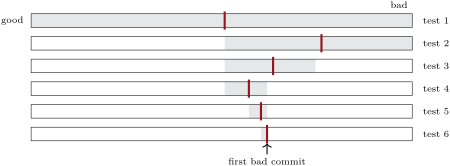
Each test at least halves the number of candidates, so candidates need at most tests on a linear history (Exercise 9.10): six for 63 candidates, ten for a thousand, twenty for a million. The method needs a test that decides automatically and a history whose commits each build and run, which is one more reason for the good commits of Method 9.4.
Safe use
A repository is a history, not a backup unless it is copied elsewhere: push to a second machine. Never commit passwords or keys: removing them in a later commit leaves them in the history, readable by anyone with a clone. Commands that rewrite history (rebase, reset --hard, push --force) can lose work; use them only on commits nobody else has.
9.6 Exercises
Exercise 9.1 ★
In the catalogue of Output 9.1, with nothing changed since the last commit, the commands below are run. What does git status --short print?
printf 'Stone Bridge,1987\n' >> books.csv
git add books.csv
printf 'Winter Map,2019\n' >> books.csv
printf 'draft\n' > notes.txt
git status --shortSolution
Solution of Exercise 9.1.
$ git status --short
MM books.csv
?? notes.txtbooks.csv is modified in the staging area (the Stone Bridge line, first column M) and modified again in the working tree since it was staged (the Winter Map line, second column M). notes.txt was never added: untracked.
Exercise 9.2 ★
In the graph of Output 9.4, list the commits that the branch sort-by-year contains, those that genres contains, and those that main contains after the merge.
Exercise 9.3 ★
Does each merge fast-forward? (a) main at commit , branch fix made from with two commits, nothing committed on main since; git merge fix on main. (b) The same after one commit on main. (c) git merge main on fix in case (a). Justify with the merge base.
Solution
Solution of Exercise 9.3.
(a) The merge base of main and fix is , the tip of main: fast-forward, main moves to the tip of fix. (b) The merge base is still , but the tip of main is now a later commit: a three-way merge, with a merge commit. (c) The merge base is , the tip of main being an ancestor of fix: fix already contains every commit of main, and Git answers “Already up to date” without changing anything.
Exercise 9.4 ★
After the commands below, run on the catalogue of Output 9.1, which change does git diff --staged show, and which does git diff show? What would git commit record?
sed -i 's/1996/1997/' books.csv
git add books.csv
sed -i 's/2011/2012/' books.csvSolution
Solution of Exercise 9.4.
$ git diff --staged | grep '^[-+][A-Z]'
-The Paper Forest,1996
+The Paper Forest,1997
$ git diff | grep '^[-+][A-Z]'
-Harbour Lights,2011
+Harbour Lights,2012git add copied the file with the year 1997 into the staging area; the change to 2012 came after, in the working tree only. git commit records the staging area: the year 1997 and Harbour Lights still dated 2011.
Exercise 9.5 ★★
The working tree holds two unrelated changes to the same file: a corrected year and a new book. Using only commands of this chapter and of the shell, without an editor, make two commits, one per change.
$ git diff
diff --git a/books.csv b/books.csv
index d343e22..f42aad8 100644
--- a/books.csv
+++ b/books.csv
@@ -1,3 +1,4 @@
 The Silent Code,2002
-The Paper Forest,1996
+The Paper Forest,1997
 Harbour Lights,2011
+Stone Bridge,1987Solution
Solution of Exercise 9.5.
Keep a copy of the file with both changes, remove the new last line, commit the year, then put the copy back and commit the book.
$ cp books.csv both.csv
$ sed -i '$d' books.csv
$ git commit -q -am "Fix the year of The Paper Forest"
$ mv both.csv books.csv
$ git commit -q -am "Add Stone Bridge"
$ git log --oneline --stat -2
2d0db63 Add Stone Bridge
 books.csv | 1 +
 1 file changed, 1 insertion(+)
17dfc05 Fix the year of The Paper Forest
 books.csv | 2 +-
1 file changed, 1 insertion(+), 1 deletion(-)With an editor, one would stage a part of the file with git add -p, which asks, for each changed block, whether to stage it.
Exercise 9.6 ★★
In the conflict of Output 9.5, a hurried colleague types git commit -am "Merge rename" right after git merge rename. Does Git accept it? What does the commit contain, which problems does it cause, and how can such a commit be detected?
Solution
Solution of Exercise 9.6.
$ git merge rename > /dev/null
$ git commit -q -am "Merge rename"
$ cat books.csv
The Silent Code,2002
<<<<<<< HEAD
The Paper Forest,1997
=======
The Paper Forest (2nd ed.),1996
>>>>>>> rename
Harbour Lights,2011
$ git diff --check HEAD^1 HEAD; echo "exit status $?"
books.csv:2: leftover conflict marker
books.csv:4: leftover conflict marker
books.csv:6: leftover conflict marker
exit status 2Git accepts it: -a stages the file as it is, markers included, and staging is how a conflict is declared resolved. The commit records a file of seven lines, three of them markers, and two versions of the same book: any program that reads the catalogue now fails or counts the book twice, on every branch that merges this one. git diff --check between the merge and its first parent reports the markers, with an exit status of 2; a test of the file’s format would also catch them.
Exercise 9.7 ★★
Write a test script bisect_test.sh for git bisect run on the catalogue: exit 0 if check.py passes, 1 if it fails, and 125 if the commit cannot be tested because catalogue.py does not even parse. Why is 125 needed, when a Python program that does not parse stops with an exit status of 1 anyway?
Solution
Solution of Exercise 9.7.
#!/bin/bash
# bisect_test.sh: the test for `git bisect run`: 0 good, 1 bad, 125 untestable.
if ! python3 -c 'import ast; ast.parse(open("catalogue.py").read())' 2> /dev/null; then
    exit 125                # the program does not even parse: no verdict, skip
fi
python3 check.py > /dev/null 2>&1
status=$?
case $status in
    0) exit 0 ;;            # the test passes: good
    1) exit 1 ;;            # the test fails: bad
    *) exit 125 ;;          # anything else is not a verdict on the bug
esac
A program that does not parse stops before running the test, with a status of 1, which bisect run would read as “bad”: bisection would then blame a commit for a failure unrelated to the bug it is looking for, and conclude wrongly. The status 125 says “no verdict”, and bisection tests a neighbouring commit instead. Statuses above 127 abort the bisection, which is why the script maps any unexpected status to 125. The test tests/test_history.py runs the script on the four cases.
Exercise 9.8 ★★
A history has commits to . is the first; ’s parent is , ’s is , ’s is , ’s is , ’s is ; is a merge with parents and ; ’s parent is . Give the merge base of and , and of and . Which commits would a merge of into compare?
Solution
Solution of Exercise 9.8.
The ancestors of are ; those of are . The common ancestors are , and , , are ancestors of : the merge base is , not . For and , the common ancestors are , and the merge base is . A merge of into compares each file in , in and in : what and changed since is kept from the side of , what changed from the side of .
Exercise 9.9 ★★
From the catalogue of Output 9.1, three branches are made from its last commit: on a, one commit A1; on b, one commit B1; on main, one commit M1. Then, on main, git merge a and git merge b. Draw the commit graph, with its merge commits and their parents.
Solution
Solution of Exercise 9.9.
$ git log --graph --oneline
*   78ddb07 Merge branch 'b'
|\
| * e197476 B1
* |   37358c0 Merge branch 'a'
|\ \
| * | 4b809e1 A1
| |/
* / 6512b81 M1
|/
* 8da0a44 Add Harbour Lights
* 3e494d1 Start the catalogue with two booksThe first merge commit has parents M1 and A1; the second has parents the first merge and B1. Every branch was made from 8da0, which is the merge base of both merges.
Exercise 9.10 ★★★
A linear history has commits , good and bad, and once a commit is bad all later ones are. Prove that bisection, testing the middle candidate each time, finds the first bad commit in at most tests, and that no method that only tests commits can do better in the worst case.
Solution
Solution of Exercise 9.10.
Call the candidates : the first bad commit is one of them, since is good and bad. Let be the largest number of tests bisection needs when consecutive candidates remain, the last of them known bad. . For , testing the candidate of position leaves the first candidates if it is bad and the last if it is good: . By induction, , since for , . Lower bound: a method that makes at most tests, each with two answers, can end in at most different ways, and it must name different culprits for the possible histories: , so . The test tests/test_history.py checks the recurrence for .
Exercise 9.11 ★★★
In a history with merges, a test of a commit that says “bad” keeps as candidates the ancestors of , and one that says “good” removes and its ancestors. Show that bisection still ends. Then take a good commit , branches of one commit each, , all made from , and one merge of all of them, bad. How many tests are needed in the worst case? Compare with .
Solution
Solution of Exercise 9.11.
Let the candidates be the ancestors of the known bad commit that are not ancestors of a good commit, included; the test picks a candidate . If is bad, the candidates become those that are ancestors of , and , which is not an ancestor of (the graph has no cycle), leaves; if is good, leaves. The set loses at least one commit at each test, so bisection ends, with alone. In the example, the candidates are and , and each has no candidate among its ancestors but itself: a “good” verdict removes one commit only. If the culprit is , every must be tested: tests in the worst case, against on a linear history of as many candidates (3 instead of 7 for ). Merges of many short branches make bisection slower.
Exercise 9.12 ★★★
Write a script touch_count.sh [REPO] that prints, for each file of a repository, the number of commits that changed it, the most changed first, merge commits excluded. Run it on the generated history of the problem: which counts can you predict from the generator alone?
Solution
Solution of Exercise 9.12.
#!/bin/bash
# touch_count.sh [REPO]: for each file, the number of commits that changed it.
set -euo pipefail
cd "${1:-.}"
git log --format= --name-only --no-merges |
    grep -v '^$' |
    sort | uniq -c |
sort -k1,1rn -k2,2$ python3 make_history.py repo
$ bash touch_count.sh repo
39 books.csv
23 covers.csv
2 catalogue.py
1 check.py--name-only lists the files changed by each commit and --format= prints nothing else, leaving blank lines that grep removes; --no-merges skips the merge, which would otherwise count again files brought from the branch. All four counts follow from the generator: books.csv is created by the first commit and extended by 38 of the next 39 main commits, the other one being the bad commit: 39; covers.csv 23, one per branch commit; catalogue.py 2, its creation and the bad commit; check.py 1. The test tests/test_history.py checks them from the generator’s constants.
9.7 Problem: Who broke the catalogue?
Problem 9.1
Weekend problem — Who broke the catalogue?
The program below writes the history of a small catalogue program: 40 commits on main, a branch covers made after the twentieth with 23 commits of its own, and a merge. One commit of main breaks the function oldest, which then returns the newest book; the test check.py detects it. The session reads the graph; Output 9.8 bisected the same history.
WORDS = ["Silent", "Paper", "Stone", "Harbour", "Winter",
         "Copper", "Hidden", "Northern", "Quiet", "Amber"]
NOUNS = ["Code", "Forest", "Bridge", "Lights", "Garden",
         "River", "Letter", "Map", "Tower", "Orchard"]
MAIN, BRANCH = 40, 23  # commits on main (before the merge), commits on the branch
FORK, BAD = 20, 31  # the branch starts after main commit 20; main commit 31 is bad
    git("init", "-q", "-b", "main")
    write("catalogue.py", CATALOGUE.format(fn="min"))
    write("check.py", CHECK)
    write("books.csv", a_book())
    git("add", ".")
    git("commit", "-q", "-m", "Start the catalogue")
    for i in range(2, MAIN + 1):
        if i == BAD:
            write("catalogue.py", CATALOGUE.format(fn="max"))
            git("commit", "-q", "-am", "Tidy the catalogue functions")
        else:
            title = a_book()
            write("books.csv", title, "a")
            git("commit", "-q", "-am", f"Add {title.rsplit(',', 1)[0]}")
        if i == FORK:
            git("branch", "covers")
    git("switch", "-q", "covers")
    for _ in range(BRANCH):
        line = f"{rng.randint(1, 40)},cover-{rng.randint(100, 999)}.jpg\n"
        write("covers.csv", line, "a")
        git("add", "covers.csv")
        book = line.split(",")[0]
        git("commit", "-q", "-m", f"Add a cover for book {book}")
    git("switch", "-q", "main")
git("merge", "-q", "--no-edit", "covers")$ python3 make_history.py repo
$ cd repo
$ git rev-list --count HEAD
64
$ git log --graph --oneline | sed -n '1,3p;25,27p;34,36p;45,48p;65,66p'
* 8424896 Merge branch 'covers'
|\
| * ebc93ee Add a cover for book 33
| * 5a5e47f Add a cover for book 16
* | cc84672 Add The Winter Bridge
* | 353818a Add The Northern Code
* | 80502c4 Add The Amber Map
* | 6bdea1a Tidy the catalogue functions
* | 2a55f3c Add The Copper River
* | abade2e Add The Northern River
|/
* 66ce86b Add The Copper Map
* a9689ed Add The Northern Tower
* e413575 Add The Paper Tower
* bafeea4 Start the catalogue
$ git log --oneline --merges
8424896 Merge branch 'covers'
$ git rev-list --count --first-parent HEAD
41
$ git rev-list --count covers
43
$ git log --oneline -1 $(git merge-base HEAD^1 HEAD^2)
66ce86b Add The Copper Map
$ git rev-list --count HEAD ^covers
21
$ git rev-list --count covers ^HEAD^1
23
$ git log --oneline -1 -- catalogue.py
6bdea1a Tidy the catalogue functions
$ git diff HEAD~11 HEAD~10 -- catalogue.py | grep -E '^[-+] '
- return min(books, key=lambda book: book[1])
+ return max(books, key=lambda book: book[1])sed keeps a few lines of the long graph.Part I — Reading the graph.
- How many commits does the history hold? Check the number against the generator.
- Which commit has two parents? How does
log --graphshow where the branch starts and where it is merged? rev-list --count --first-parent HEADprints 41. Which commits does it count?- Why does
rev-list --count coversprint 43? - Is the commit “Tidy the catalogue functions” an ancestor of the tip of
covers? OfHEAD? - The generator dates its commits a minute apart. If it gave them all the same date, would the history still be well defined? Would the identifiers change from run to run?
Part II — Merge base and merge.
- Which commit is the merge base of the two parents of the merge? Which line of the generator decides it?
rev-list --count HEAD ^coversprints 21. Which commits are they?rev-list --count covers ^HEAD^1prints 23. What does that number say about the merge?- For each of
catalogue.py,books.csvandcovers.csv, say which sides changed the file since the merge base, and what the three-way merge kept. - Why did the merge produce no conflict?
- Does the tip of
coverspass the test? Does the merge? Why?
Part III — Finding the culprit.
- The last commit that changed
catalogue.pyis the culprit here. Why canlog -- catalogue.pynot replace bisection in general? - Explain, from the diff, what the bad commit changed, and why the test prints
Harbour Lights. git bisect start HEADfollowed by the first commit says what? How many commits are candidates?- In Output 9.8, list the six verdicts and the number of candidates left after each test.
- The covers commits are candidates at the start, yet none was tested. Why?
- Had
catalogue.pyfailed to parse at some commit of the branch, how wouldcheck.pyhave exited, and what would bisection have concluded? What doesbisect_test.sh(Exercise 9.7) change?
Part IV — The logarithmic bound.
- Show that after tests that each halve the candidates, at most remain.
- Deduce the number of tests needed for candidates.
- Testing the commits one by one, from the oldest, how many tests would find this culprit? In the worst case?
- Git announced “roughly 5 steps” after choosing the first commit to test, then ran the test six times. Explain both numbers.
- The history has a merge. Why did the bound still hold in this run? Use Exercise 9.11.
- State the named result of the problem, bisection finds the culprit among 64 commits in at most 6 tests.
Solution
Solution of Problem 9.1.
1. 64: 40 commits on main, 23 on the branch, and the merge.
2. The merge, 8424896. |\ under it opens a second column, its second parent’s line; the |/ near the bottom joins that column to the commit the branch was made from.
3. The commits reached from HEAD through first parents only: the merge and the 40 commits of main.
4. The tip of covers has as ancestors its 23 commits and the first 20 commits of main: 43.
5. No: it is the 31st commit of main, made after the branch left at the 20th. Yes for HEAD, which is reached from it through the merge’s first parent.
6. The graph would be the same, since it is made of parent links, not dates. The identifiers are the same at each run anyway, since they are hashes of contents, names, dates and parents that the seed and the fixed dates determine; with dates taken from the clock, they would change at every run.
7. 66ce86b, “Add The Copper Map”, the 20th commit of main: the test if i == FORK: of the loop makes the branch just after it.
8. The commits reachable from HEAD and not from covers: the 20 commits 21 to 40 of main, and the merge.
9. The 23 commits of the branch are not ancestors of the first parent of the merge: the merge brought exactly them into main.
10. catalogue.py: changed on main only (min to max), so the merge keeps max. books.csv: on main only, so main’s version. covers.csv: created on the branch only, so the branch’s version.
11. No file was changed on both sides since the merge base.
12. The tip of covers has the catalogue of commit 20, with min: it passes. The merge has max: it fails.
13. A program can break through a change to another file (the data, a library, a configuration), and a file may be changed by dozens of commits, of which log cannot say which one broke the test.
14. min became max: oldest returns the book with the largest year, and among the three books of the test that is Harbour Lights, 2011.
15. That HEAD is bad and the first commit good. The candidates are the ancestors of HEAD that are not ancestors of the first commit: 63 commits.
16. Bad, good, good, good, good, bad. Git announces 31, 15, 7, 3, 1 and 0 commits left to test after each choice: the candidates halve at every test.
17. The first test, at “Add The Amber Map”, the 32nd commit of main, was bad: the candidates became its ancestors, among which no commit of the branch.
18. With a syntax error, Python stops with status 1 before running the test, and bisect run reads “bad”. Had such a commit been tested, bisection would have treated it as broken by the bug: had it been on the branch, before the first test removed the branch, it could have been named the first bad commit. bisect_test.sh returns 125 for it, and the commit is skipped.
19. By induction: after the test , at most candidates remain, and .
20. and : six tests.
21. Along main from the oldest, the commits 2 to 31: 30 tests, the last one bad. In the worst case, 62 tests for 63 candidates, since the last candidate need not be tested.
22. After choosing the first commit, 31 candidates remain whatever its verdict, and about tests are still needed after this one: five, plus the one about to run, make six.
23. The bad commit lies on main after the fork, and the first test, bad, left only commits of main: from then on the candidates formed a linear history, on which each test halves them (Exercise 9.10). Had the first verdict been good, the branch would have stayed, with the risk shown in Exercise 9.11.
24. Bisection finds the culprit among 64 commits in at most 6 tests. With the first commit good and the last bad, the 63 candidates halve at each test, so tests suffice; the captured run of git bisect run took exactly six, and named “Tidy the catalogue functions”, the commit that changed min into max, which the chapter’s test confirms by running check.py on all 64 commits.