এই বইটি এখনো বাংলা ভাষায় পাওয়া যায় না। সংস্করণ: English।
University Computer Science — Year 1 · স্নাতক প্রথম বর্ষ
6Strings, Structures and Files
A program keeps a person’s name in a ten-byte field and their age just after it. Someone types a twelve-letter name; the program copies it; the name prints correctly, and the age has become 0. Nothing crashed, no warning appeared, and the next program to read the age will believe it. This chapter explains the three facts behind that story: how C stores text, how it lays out a group of fields in memory, and how those bytes reach a file. With them, a C program can read the town’s weather file robustly and write it back in a form that a program can reach record by record.
You already know
A text file is a sequence of characters cut into lines, and a file of records holds one record per line, its fields separated by a character such as a comma. Each character is stored as a number, its code: ASCII for the letters of English, UTF-8 for every script, ASCII characters keeping their one-byte codes. Programs read standard input and write standard output.
6.1 Null-terminated strings
C has no string type. It has arrays of char, and a convention.
Definition 6.1 (Null-terminated string)
In C, a null-terminated string is a sequence of characters stored in consecutive char and followed by a byte of value 0, the null character ’\0’ (code 0, NUL, in ASCII). Its length is the number of characters before that byte. A string literal "rain" is an array of 5 char, the last one zero, that the program must not modify.
#include <stdio.h>
#include <string.h>

int main(void)
{
    char town[16] = "Brenmoor";
    printf("strlen = %zu, sizeof = %zu\n", strlen(town), sizeof town);
    for (size_t i = 0; i <= strlen(town); i++)
        printf("%4d", town[i]);
    printf("\n");
    town[4] = '\0';                                    // cut the string in the middle
    printf("now \"%s\", strlen = %zu, sizeof = %zu\n", town, strlen(town), sizeof town);
    printf("sizeof \"Brenmoor\" = %zu\n", sizeof "Brenmoor");
    return 0;
}$ gcc -std=c17 -O2 -Wall -Wextra -o strlen_demo strlen_demo.c -lm && ./strlen_demo
strlen = 8, sizeof = 16
66 114 101 110 109 111 111 114 0
now "Bren", strlen = 4, sizeof = 16
sizeof "Brenmoor" = 9strlen counts the characters until it meets the zero byte: it reads the whole string, so its cost is linear in the length, and calling it in the condition of a loop over the string, as Listing 6.1 does for brevity, makes the loop quadratic. sizeof gives the size of the array, fixed at compile time and unrelated to the length of the string it currently holds. Every function of <string.h> relies on the zero byte: strcpy(dst, src) copies the characters of src and its zero into dst, strcat(dst, src) copies them after the end of dst, strcmp compares two strings character by character. None of them knows the size of dst.
Definition 6.2 (Buffer overflow)
A buffer overflow is a write past the end (or before the start) of an array, into the memory that follows it. It is undefined behaviour; in practice, it changes whatever the program keeps there.
Here is the story of the introduction, built three ways: plainly, with the address sanitizer, and with the optimisation that this machine’s compiler accompanies with extra checks.
#include <stdio.h>
#include <string.h>

struct person {
    char name[10];
    int age;
};

int main(void)
{
    struct person p = {"Ann", 19};
    printf("before: %s, age %d\n", p.name, p.age);
    strcpy(p.name, "Christabelle");                    // 12 letters and a zero byte: 13 bytes
    printf("after:  %s, age %d\n", p.name, p.age);
    return 0;
}$ gcc -std=c17 -O0 overflow.c -o plain && ./plain
before: Ann, age 19
after: Christabelle, age 0
$ gcc -std=c17 -O0 -g -fsanitize=address overflow.c -o asan && ./asan
before: Ann, age 19
after: Christabelle, age 0
$ gcc -std=c17 -O0 -g -fsanitize=address overflow_local.c -o local
$ { ./local 2>&1 | grep -E "ERROR|WRITE of|#1 |overflows"; } 2>/dev/null
==1000==ERROR: AddressSanitizer: stack-buffer-overflow on address 0x7fffffffec4a at pc 0x7ffff743a2c3 bp 0x7fffffffec10 sp 0x7fffffffe3b8
WRITE of size 13 at 0x7fffffffec4a thread T0
#1 0x5555555552ca in main ~/session/overflow_local.c:8
[32, 42) 'name' (line 7) <== Memory access at offset 42 overflows this variable
$ gcc -std=c17 -O2 overflow.c -o fortified 2>/dev/null
$ { ./fortified 2>&1; } 2>/dev/null; echo "exit status $?"
*** buffer overflow detected ***: terminated
exit status 134
strcpy. The last two letters fall into the two unused bytes that keep age at an offset multiple of 4; the zero byte that ends the string lands on the low byte of age, stored first, and 19 becomes 0.The address sanitizer protects the space around each variable, not the inside of a structure: the write stays within the 16 bytes of p, so it is not reported. Into a plain array of 10 bytes the same copy is caught at once. The third build shows a defence many systems add: when optimising, this compiler defines _FORTIFY_SOURCE, which replaces strcpy by a version that knows the size of p.name when the compiler does, and stops the program on an overflow. None of the three should be relied on. The size must travel with the buffer, and every copy must respect it.
#include <stdio.h>

int main(void)
{
    char name[10];
    const char *names[] = {"Ann", "Wilhelmina", "Christabelle"};
    for (int i = 0; i < 3; i++) {
        int needed = snprintf(name, sizeof name, "%s", names[i]);
        if (needed >= (int)sizeof name)
            printf("\"%s\" truncated: kept \"%s\", needed %d + 1 bytes\n", names[i], name, needed);
        else
            printf("\"%s\" fits\n", name);
    }
    return 0;
}$ gcc -std=c17 -O2 -Wall -Wextra -o safe_copy safe_copy.c -lm && ./safe_copy
"Ann" fits
"Wilhelmina" truncated: kept "Wilhelmin", needed 10 + 1 bytes
"Christabelle" truncated: kept "Christabe", needed 12 + 1 bytessnprintf keeps 9 characters and the zero byte, and returns the length it would have needed.snprintf(buf, size, format, ...) writes at most size bytes, the last always zero, and returns the length the full result would have had: a result greater than or equal to size means the text was cut. The program then decides: refuse, warn, or allocate a bigger buffer.
A program receives its command-line arguments as strings: main(int argc, char *argv[]) gets their number and an array of pointers to them, argv[0] being the program’s name. Turning them into numbers is a small lesson in robustness.
#include <errno.h>
#include <stdio.h>
#include <stdlib.h>

int main(int argc, char *argv[])
{
    printf("argc = %d, argv[0] = \"%s\"\n", argc, argv[0]);
    for (int i = 1; i < argc; i++) {
        char *end;
        errno = 0;
        long v = strtol(argv[i], &end, 10);
        const char *verdict = end == argv[i] ? "no digits"
                            : *end != '\0'   ? "trailing characters"
                            : errno == ERANGE ? "out of range"
                                              : "ok";
        printf("%-12s atoi = %11d   strtol = %20ld  %s\n", argv[i], atoi(argv[i]), v, verdict);
    }
    return 0;
}$ gcc -std=c17 -O2 -Wall -Wextra -o args args.c -lm && ./args 12 7x -3 hello 99999999999
argc = 6, argv[0] = "./args"
12 atoi = 12 strtol = 12 ok
7x atoi = 7 strtol = 7 trailing characters
-3 atoi = -3 strtol = -3 ok
hello atoi = 0 strtol = 0 no digits
99999999999 atoi = 1215752191 strtol = 99999999999 okatoi cannot say that something went wrong.atoi returns 0 for hello, as for the string 0, and 7 for 7x; on a number too large for an int its behaviour is undefined, here a value cut to 32 bits. strtol reports, through its second argument, where the digits stopped, and through errno, a variable of the C library that it sets to ERANGE, an overflow of long. The last argument fits in a long but not in an int: a caller wanting an int still has to check the range (Exercise 6.12).
6.2 Structures, unions and enumerations
Definition 6.3 (Structure, field)
A structure in C is a type made of several named members, the fields, of possibly different types, stored in one block of memory in the order of their declaration. A field is reached with . from a structure and with -> from a pointer to one: p->x means (*p).x.
#include <stdio.h>

typedef struct {
    double x, y;
} point;

struct station {
    char name[12];
    point where;
    int altitude;
};

void move_copy(point p) { p.x += 1.0; }                 // changes a copy
void move(point *p) { p->x += 1.0; }                    // changes the caller's point

int main(void)
{
    struct station h = {.name = "Hilltop", .altitude = 212, .where = {.x = 3.5, .y = 7.0}};
    struct station r = {.name = "Riverside"};           // the other fields are zero
    struct station *s = &h;
    printf("%s at (%.1f, %.1f), %d m\n", s->name, s->where.x, s->where.y, s->altitude);
    printf("%s at (%.1f, %.1f), %d m\n", r.name, r.where.x, r.where.y, r.altitude);
    move_copy(h.where);
    printf("after move_copy: x = %.1f\n", h.where.x);
    move(&h.where);
    printf("after move:      x = %.1f\n", h.where.x);
    r = h;                                              // assignment copies every field
    r.name[0] = 'X';
    printf("%s and %s\n", h.name, r.name);
    return 0;
}$ gcc -std=c17 -O2 -Wall -Wextra -o point point.c -lm && ./point
Hilltop at (3.5, 7.0), 212 m
Riverside at (0.0, 0.0), 0 m
after move_copy: x = 3.5
after move: x = 4.5
Hilltop and Xilltopint.typedef gives a type a second name, so that point can be written instead of a full structure type. Designated initialisers, .name = ..., set fields by name in any order and set every other field to zero. A structure passed to a function is copied, like any argument (Chapter 3); assignment copies every field, including arrays inside it, which an array alone cannot do. To let a function change a structure, or to avoid copying a large one, pass its address.
Definition 6.4 (Enumeration)
An enumeration declares named integer constants: enum kind { CIRCLE, RECTANGLE }; makes CIRCLE 0 and RECTANGLE 1, and enum kind a type whose values are meant to be those names.
Definition 6.5 (Union, tagged union)
A union is a type whose members all start at the same address and share the same storage: its size is that of its largest member, and only the member last written holds a meaningful value. A tagged union is a structure holding a union and a field, the tag, that records which member is in use.
#include <stdio.h>

enum kind { CIRCLE, RECTANGLE };

struct shape {
    enum kind kind;                                     // the tag
    union {
        struct { double r; } circle;
        struct { double w, h; } rect;
    } as;                                               // one storage, two readings
};

double area(const struct shape *s)
{
    switch (s->kind) {
    case CIRCLE:
        return 3.14159265358979 * s->as.circle.r * s->as.circle.r;
    case RECTANGLE:
        return s->as.rect.w * s->as.rect.h;
    }
    return 0.0;
}

int main(void)
{
    struct shape shapes[] = {
        {.kind = CIRCLE, .as.circle = {.r = 1.0}},
        {.kind = RECTANGLE, .as.rect = {.w = 3.0, .h = 2.0}},
    };
    for (int i = 0; i < 2; i++)
        printf("shape %d: kind %d, area %.4f\n", i, shapes[i].kind, area(&shapes[i]));
    printf("sizeof: union %zu, shape %zu\n", sizeof shapes[0].as, sizeof shapes[0]);
    struct shape bad = shapes[0];
    bad.kind = RECTANGLE;                               // the tag lies: r is read as w, and h as bytes no circle sets
    printf("lying tag: area %g\n", area(&bad));
    return 0;
}$ gcc -std=c17 -O2 -Wall -Wextra -o shapes shapes.c -lm && ./shapes
shape 0: kind 0, area 3.1416
shape 1: kind 1, area 6.0000
sizeof: union 16, shape 24
lying tag: area 0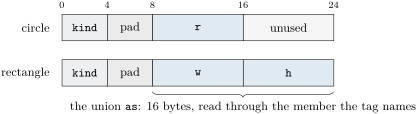
double starts at offset 8) says which reading is meaningful.The function area must check the tag before reading the union, and the switch without a default lets -Wall warn when a new kind is added to the enumeration but not to the switch. Nothing in C prevents the tag and the contents from disagreeing; the Year 2 volume meets languages whose sum types make that disagreement impossible.
6.3 Layout and alignment
The structure of the opening story occupies 16 bytes for 14 bytes of fields. The two extra bytes come from a requirement of the processor and its calling conventions.
Definition 6.6 (Alignment, padding)
The alignment of a type is a power of two by which the address of every object of that type must be divisible; on this machine it equals the size for char, short, int, long, double and pointers. Padding is the unused bytes that the compiler inserts in a structure so that each field lies at an offset multiple of its alignment, and at the end so that the size is a multiple of the largest alignment of a field, which keeps every element of an array of structures aligned.
#include <stddef.h>
#include <stdio.h>

struct loose {
    char station;
    double temp;
    char flag;
    int date;
};

struct tight {
    double temp;
    int date;
    char station;
    char flag;
};

int main(void)
{
    printf("alignments: char %zu, int %zu, double %zu\n",
           _Alignof(char), _Alignof(int), _Alignof(double));
    printf("loose: size %2zu  station@%zu temp@%zu flag@%zu date@%zu\n", sizeof(struct loose),
           offsetof(struct loose, station), offsetof(struct loose, temp),
           offsetof(struct loose, flag), offsetof(struct loose, date));
    printf("tight: size %2zu  temp@%zu date@%zu station@%zu flag@%zu\n", sizeof(struct tight),
           offsetof(struct tight, temp), offsetof(struct tight, date),
           offsetof(struct tight, station), offsetof(struct tight, flag));
    struct tight a[3];
    printf("array of 3 tight: %zu bytes, a[1] starts %td bytes after a[0]\n",
           sizeof a, (char *)&a[1] - (char *)&a[0]);
    return 0;
}$ gcc -std=c17 -O2 -Wall -Wextra -o layout layout.c -lm && ./layout
alignments: char 1, int 4, double 8
loose: size 24 station@0 temp@8 flag@16 date@20
tight: size 16 temp@0 date@8 station@12 flag@13
array of 3 tight: 48 bytes, a[1] starts 16 bytes after a[0]
station, f: flag). In loose, the double forces seven bytes of padding after the first char; sorted by decreasing alignment, the fields leave only two bytes at the end.Method 6.7 (Ordering the fields of a structure)
Declare the fields by decreasing alignment: double, pointers and long first, then int and float, then short, then char and arrays of char. No padding is then needed between fields, and the size is the sum of the fields rounded up to the largest alignment, the smallest size possible (Exercise 6.9). Use offsetof and sizeof to check, never a count by hand.
The C standard leaves layout to the implementation; on this machine, the rules are those of the calling conventions of Chapter 3, which every compiler for it follows, so that a structure built by one library is read correctly by another.
6.4 Text files and binary files
Definition 6.8 (Stream, standard streams)
A stream is the C library’s access to a file or a device: a FILE * returned by fopen, through which the program reads or writes bytes in order, the library collecting them in a buffer and passing them to the system in large blocks. Three standard streams are open when main starts: stdin (standard input), stdout (standard output) and stderr (standard error, for messages, not fully buffered).
fopen(path, mode) opens a stream, or returns NULL and sets errno; perror prints the reason. The mode "r" reads; "w" creates the file or empties it; "a" writes at the end; a "+" allows both reading and writing; a "b" asks for binary mode, which changes nothing on this system but matters on systems that translate line ends. fclose writes what is left in the buffer and can fail, so its result is checked when writing.
Definition 6.9 (Text file, binary file)
A text file holds characters only, usually in lines, so that a person can read it and any program can parse it; a number in it is a sequence of digit characters. A binary file holds bytes in a format defined by a program, such as the bytes of values copied from memory; it is smaller and faster to read, but meaningless without its format.
{
    int values[3] = {7, 1000, 305419896};
    FILE *f = fopen("numbers.txt", "w");
    if (f == NULL) {
        perror("numbers.txt");
        return 1;
    }
    for (int i = 0; i < 3; i++)
        fprintf(f, "%d\n", values[i]);
    if (fclose(f) != 0) {
        perror("numbers.txt");
        return 1;
    }
    printf("wrote numbers.txt\n");
    return 0;
}{
int values[3] = {7, 1000, 305419896};
FILE *f = fopen("numbers.bin", "wb");
if (f == NULL) {
perror("numbers.bin");
return 1;
}
size_t written = fwrite(values, sizeof values[0], 3, f);
printf("position after writing: %ld\n", ftell(f));
if (fclose(f) != 0 || written != 3) {
perror("numbers.bin");
return 1;
}
printf("wrote %zu numbers to numbers.bin\n", written);
return 0;
}$ gcc -std=c17 -O2 -Wall write_text.c -o write_text && ./write_text
wrote numbers.txt
$ gcc -std=c17 -O2 -Wall write_binary.c -o write_binary && ./write_binary
position after writing: 12
wrote 3 numbers to numbers.bin
$ ls -l numbers.txt numbers.bin
-rw-r--r-- 1 ada ada 12 Jan 5 2026 numbers.bin
-rw-r--r-- 1 ada ada 17 Jan 5 2026 numbers.txt
$ od -A d -t x1 numbers.txt
0000000 37 0a 31 30 30 30 0a 33 30 35 34 31 39 38 39 36
0000016 0a
0000017
$ od -A d -t x1 numbers.bin
0000000 07 00 00 00 e8 03 00 00 78 56 34 12
0000012
$ od -A d -t d4 numbers.bin
0000000 7 1000 305419896
0000012od -t x1), then the binary one read back as 4-byte integers.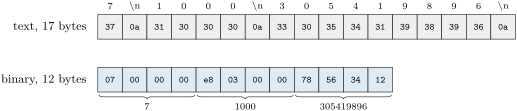
0a); its size depends on how many digits the numbers have. In the binary file each number is four bytes, whatever its value, least significant byte first.The binary file stores 1000 = 0x000003e8 as e8 03 00 00: the least significant byte first.
Definition 6.10 (Byte order)
The byte order (or endianness) of a machine is the order in which it stores the bytes of a multi-byte integer at increasing addresses. A little-endian machine stores the least significant byte first, a big-endian one the most significant byte first. x86-64 processors are little-endian.
#include <stdio.h>

int main(void)
{
    unsigned int x = 0x12345678;
    unsigned char *b = (unsigned char *)&x;             // read the int byte by byte
    printf("0x%08x is stored as", x);
    for (size_t i = 0; i < sizeof x; i++)
        printf(" %02x", b[i]);
    printf("\n");
    signed char s = -16;                                // the byte 0xf0
    unsigned char u = 0xf0;
    int from_s = s, from_u = u;
    printf("byte 0xf0 as signed char -> int %d = 0x%08x\n", from_s, (unsigned)from_s);
    printf("byte 0xf0 as unsigned char -> int %d = 0x%08x\n", from_u, (unsigned)from_u);
    return 0;
}int, and a byte widened two ways code/bachelor-1/06-c-strings-structs-files/listings/endian.c$ gcc -std=c17 -O2 -Wall -Wextra -o endian endian.c -lm && ./endian
0x12345678 is stored as 78 56 34 12
byte 0xf0 as signed char -> int -16 = 0xfffffff0
byte 0xf0 as unsigned char -> int 240 = 0x000000f00xf0 becomes or 240.Definition 6.11 (Sign extension)
Sign extension is the widening of a signed integer to more bits by copying its sign bit into all the new high bits, which keeps its value in two’s complement: the byte f0 read as a signed char () becomes fffffff0, still . An unsigned value is widened by zeros instead.
Whether plain char is signed depends on the platform (it is signed here); code that reads bytes from a file uses unsigned char, as Listing 6.10 does, or a byte above 127 becomes negative. A binary file written by fwrite from memory therefore depends on the machine twice: on its byte order and on the layout of its structures. A format meant to be read elsewhere writes each value byte by byte, in an order the format fixes (Exercise 6.10).
Definition 6.12 (File position)
The file position of a stream is the offset, in bytes from the start of the file, at which the next read or write happens; each read or write advances it by the number of bytes transferred. ftell returns it, and fseek moves it, which allows access to any record of a file of fixed-size records without reading the ones before.
Reading byte after byte from the start is sequential access; jumping with fseek to offset , the record number of size , is direct access, possible because every record has the same size. A text file of lines of different lengths only allows the first.
6.5 Reading input robustly
Input comes from people and from other programs, and either can be wrong. scanf("%d", &v) skips spaces, reads digits, and returns the number of values it converted; on a line 4.5 it reads 4 and leaves .5 for the next call, and on twelve it converts nothing and leaves the whole word in the input, so that a loop that does not check its result reads the same word forever. The robust pattern reads whole lines, then converts them.
Method 6.13 (Reading a number per line)
- Read a line with
fgets(buf, sizeof buf, f), which stops at the newline or at the buffer’s size and returnsNULLat the end of the input. - Remove the newline:
buf[strcspn(buf, "\n")] = ’\0’;. - Convert with
strtol(orstrtod), settingerrnoto 0 first; reject the line if no digit was read, if characters remain after the number, or iferrnoisERANGE. - Report a rejected line on
stderr, with its number, and decide whether to go on or to stop.
#include <errno.h>
#include <stdio.h>
#include <stdlib.h>
#include <string.h>

int main(void)
{
    char line[64];
    long total = 0;
    int good = 0, lineno = 0;
    while (fgets(line, sizeof line, stdin) != NULL) {
        lineno++;
        line[strcspn(line, "\n")] = '\0';              // drop the newline, if any
        char *end;
        errno = 0;
        long v = strtol(line, &end, 10);
        if (end == line || *end != '\0' || errno == ERANGE) {
            fprintf(stderr, "line %d: not a number: \"%s\"\n", lineno, line);
            continue;
        }
        total += v;
        good++;
    }
    printf("%d numbers, total %ld\n", good, total);
    return 0;
}$ gcc -std=c17 -O2 -Wall -Wextra -o read_numbers read_numbers.c -lm && ./read_numbers
line 3: not a number: "4.5"
line 4: not a number: ""
line 6: not a number: "twelve"
line 7: not a number: "99999999999999999999"
line 8: not a number: "15 "
4 numbers, total 135The messages go to stderr so that they reach the person even when the standard output is redirected to a file or to another program, which then receives only the result. The line 15 (with a space) is rejected here; a real program would probably accept trailing spaces, as Exercise 6.12 does. With these tools, the town’s weather file can be read and checked.
#include <stdio.h>
#include <stdlib.h>
#include <string.h>

int main(int argc, char *argv[])
{
    if (argc != 2) {
        fprintf(stderr, "usage: %s FILE\n", argv[0]);
        return 2;
    }
    FILE *f = fopen(argv[1], "r");
    if (f == NULL) {
        perror(argv[1]);
        return 1;
    }
    char line[128];
    int rows = 0, missing = 0, codes = 0;
    if (fgets(line, sizeof line, f) == NULL) {         // the header
        fclose(f);
        return 1;
    }
    while (fgets(line, sizeof line, f) != NULL) {
        rows++;
        char *temp = strchr(line, ',');                // after the date
        temp = temp ? strchr(temp + 1, ',') : NULL;    // after the station
        if (temp == NULL)
            continue;
        temp++;
        if (*temp == ',')
            missing++;                                 // an empty field
        else if (strtod(temp, NULL) == -99.0)
            codes++;                                   // the logger's error code
    }
    fclose(f);
    printf("%d rows, %d missing temperatures, %d error codes\n", rows, missing, codes);
return 0;$ gcc -std=c17 -O2 -Wall -Wextra weather_csv.c -o weather_csv
$ ./weather_csv weather.csv
731 rows, 6 missing temperatures, 2 error codes
$ ./weather_csv nosuchfile.csv; echo "exit status $?"
nosuchfile.csv: No such file or directory
exit status 1Two stations over 365 days make 730 rows: one row too many, which the weekend problem finds. Splitting a line with strtok, the library’s tokeniser, would have been shorter and wrong: it treats two consecutive commas as one, so an empty field disappears and the next field takes its place.
Safe use
Never use gets, removed from the language because it cannot be told the size of its buffer, nor scanf("%s") without a width. Copy strings with a size: snprintf, or a function that takes the capacity of the destination and reports truncation. Check the result of every fopen, fgets, fread, fwrite and fclose.
6.6 Exercises
Exercise 6.1 ★
Predict the eight numbers printed.
int main(void)
{
    char a[] = "rain";
    char b[20] = "rain";
    const char *c = "rain";
    char d[] = "rain\0fall";
    printf("%zu %zu\n", strlen(a), sizeof a);
    printf("%zu %zu\n", strlen(b), sizeof b);
    printf("%zu %zu\n", strlen(c), sizeof c);
    printf("%zu %zu\n", strlen(d), sizeof d);
    return 0;
}Solution
Solution of Exercise 6.1.
a is an array sized by its literal: 4 characters, 5 bytes. b has 20 bytes and holds a string of 4. c is a pointer: 8 bytes, whatever it points to. d is an array of 10 bytes (9 characters and the final zero); strlen stops at the first zero byte, after rain.
$ gcc -std=c17 -O2 -Wall -Wextra -o exo_lengths exo_lengths.c -lm && ./exo_lengths
4 5
4 20
4 8
4 10Exercise 6.2 ★
Predict the sizes of the two structures, drawing the offset of each field.
#include <stdio.h>

struct a {
    char c1;
    int i;
    char c2;
    short s;
};

struct b {
    int i;
    short s;
    char c1;
    char c2;
};

int main(void)
{
    printf("%zu %zu\n", sizeof(struct a), sizeof(struct b));
    return 0;
}Exercise 6.3 ★
The program below reads its standard input, made of the four lines 1 12, 2 0, 3 x7 and 4 5. What does it print, and why is day 4 never read?
#include <stdio.h>

int main(void)
{
    int day, rain;
    int r;
    while ((r = scanf("%d %d", &day, &rain)) == 2)
        printf("day %d: %d\n", day, rain);
    printf("last return value: %d\n", r);
    return 0;
}scanf returns code/bachelor-1/06-c-strings-structs-files/listings/exo_fscanf.cSolution
Solution of Exercise 6.3.
$ gcc -std=c17 -O2 -Wall -Wextra -o exo_fscanf exo_fscanf.c -lm && ./exo_fscanf
day 1: 12
day 2: 0
last return value: 1On the third line, scanf converts 3, then meets x, which is not a digit: it returns 1, and the loop, which requires 2, stops. The x7 and the fourth line stay unread. With fgets and a conversion per line, the bad line could be reported and the next one read.
Exercise 6.4 ★
The program writes 0x12345678 with fwrite. Which four bytes does the file hold on this machine, in order, and which on a big-endian machine?
int main(void)
{
    unsigned int x = 0x12345678;
    FILE *f = fopen("x.bin", "wb");
    if (f == NULL)
        return 1;
    fwrite(&x, sizeof x, 1, f);
    fclose(f);
    return 0;
}int in a file code/bachelor-1/06-c-strings-structs-files/listings/exo_fwrite.cSolution
Solution of Exercise 6.4.
78 56 34 12 here, least significant byte first; 12 34 56 78 on a big-endian machine.
0000000 78 56 34 12
0000004Exercise 6.5 ★★
Explain the report: which bytes does the first strcat write, and why is the write 13 bytes long? Give two corrections.
#include <stdio.h>
#include <string.h>

int main(void)
{
    char greeting[16] = "Hello, ";
    strcat(greeting, "Christabelle");
    strcat(greeting, "!");
    printf("%s\n", greeting);
    return 0;
}==1000==ERROR: AddressSanitizer: stack-buffer-overflow on address 0x7fffffffec50 at pc 0x7ffff743a2c3 bp 0x7fffffffec10 sp 0x7fffffffe3b8
WRITE of size 13 at 0x7fffffffec50 thread T0
#1 0x555555555355 in main ~/session/exo_strcat.c:8
[32, 48) 'greeting' (line 7) <== Memory access at offset 48 overflows this variableSolution
Solution of Exercise 6.5.
greeting holds "Hello, ", 7 characters, at offsets 32 to 38 of the frame (its 16 bytes run from 32 to 47). The first strcat copies the 12 letters of Christabelle and the zero byte, 13 bytes, from offset 39: up to offset 51, four bytes past the array. The sanitizer reports the first byte out of bounds, offset 48. The full greeting needs characters and the zero byte: declare char greeting[21], or build it with snprintf and check its result.
Exercise 6.6 ★★
With the input 10, 20, 30 on three lines, this program prints 4 numbers, total 90. Explain, and correct the loop.
#include <stdio.h>

int main(void)
{
    int v, total = 0, count = 0;
    while (!feof(stdin)) {
        scanf("%d", &v);
        total += v;
        count++;
    }
    printf("%d numbers, total %d\n", count, total);
    return 0;
}Solution
Solution of Exercise 6.6.
feof becomes true only after a read has failed at the end of the file, not before. After 30 is read the end is not yet detected; the fourth scanf fails, leaves v at 30, and the loop adds it a second time and counts it: 4 numbers, . Loop on the result of the read: while (scanf("%d", &v) == 1) { total += v; count++; }.
$ gcc -std=c17 -O2 -Wall -Wno-unused-result -o exo_feof exo_feof.c -lm && ./exo_feof
4 numbers, total 90Exercise 6.7 ★★
Write int str_append(char *dst, size_t cap, const char *src), which appends as much of src to the string in dst (a buffer of cap bytes) as fits, always leaves dst terminated, and returns 0, or if it had to truncate.
Solution
Solution of Exercise 6.7.
int str_append(char *dst, size_t cap, const char *src)
{
    if (cap == 0)
        return -1;
    size_t n = 0;
    while (n < cap && dst[n] != '\0')
        n++;
    if (n == cap)                                       // dst was not terminated within cap
        return -1;
    while (*src != '\0' && n + 1 < cap)
        dst[n++] = *src++;
    dst[n] = '\0';
    return *src == '\0' ? 0 : -1;
}The first loop finds the end of dst without reading past cap bytes; the second copies while there is room for the zero byte. The test tests/safe_copy_test.c covers a buffer filled exactly, a truncation, cap 0 and a destination that is not terminated.
Exercise 6.8 ★★
A settings file holds lines key=value, empty lines and comment lines starting with #. Write a function that reads it into an array of struct setting { char key[32]; char value[64]; }, and reports the number of the first malformed line.
Solution
Solution of Exercise 6.8.
int read_settings(FILE *f, struct setting *s, int max, int *bad_line)
{
    char line[128];
    int n = 0, lineno = 0;
    while (n < max && fgets(line, sizeof line, f) != NULL) {
        lineno++;
        line[strcspn(line, "\n")] = '\0';
        if (line[0] == '\0' || line[0] == '#')
            continue;
        char *eq = strchr(line, '=');
        size_t klen = eq ? (size_t)(eq - line) : 0;
        if (eq == NULL || klen == 0 || klen >= sizeof s[n].key || strlen(eq + 1) >= sizeof s[n].value) {
            *bad_line = lineno;
            return -1;
        }
        memcpy(s[n].key, line, klen);
        s[n].key[klen] = '\0';
        strcpy(s[n].value, eq + 1);                     // fits: checked above
        n++;
    }
    return n;
}Both lengths are checked before any copy, so memcpy and strcpy cannot overflow. The test tests/parse_test.c reads three settings around a comment and an empty line, and finds the bad line 2 of a second file.
Exercise 6.9 ★★
The alignments are powers of two, and the size of each type is a multiple of its alignment. Prove that ordering the fields of a structure by decreasing alignment gives the smallest possible size, namely the sum of the sizes of the fields rounded up to a multiple of the largest alignment.
Solution
Solution of Exercise 6.9.
Let be the largest alignment and the sum of the sizes. In any order, the size is at least and is a multiple of : at least rounded up to a multiple of . Sorted by decreasing alignment, each field starts right after the previous one with no padding: by induction, the offset of a field is a sum of sizes of fields with alignments at least its own; each such size is a multiple of that larger alignment, hence of its own (a power of two divides a larger power of two), so the offset is already aligned. Only the final rounding to a multiple of remains: the bound is reached. The test tests/test_layout_orders.py compares with every permutation of four sets of fields.
Exercise 6.10 ★★★
Write record_write and record_read for the record { uint32_t date; int16_t temp; uint16_t rain; } in an 8-byte format, little-endian, written byte by byte with shifts so that the file is the same on every machine. Test the round trip, and give the 8 bytes for the date 20250614, and 123.
Solution
Solution of Exercise 6.10.
static void put(unsigned char *p, uint32_t v, int n)
{
    for (int i = 0; i < n; i++)
        p[i] = (unsigned char)(v >> (8 * i));           // least significant byte first
}

static uint32_t get(const unsigned char *p, int n)
{
    uint32_t v = 0;
    for (int i = 0; i < n; i++)
        v |= (uint32_t)p[i] << (8 * i);
    return v;
}

void record_encode(const struct record *r, unsigned char out[RECORD_BYTES])
{
    put(out, r->date, 4);
    put(out + 4, (uint16_t)r->temp, 2);                 // two's complement bits of the temperature
    put(out + 6, r->rain, 2);
}

void record_decode(const unsigned char in[RECORD_BYTES], struct record *r)
{
    r->date = get(in, 4);
    r->temp = (int16_t)get(in + 4, 2);                  // back to a signed value
    r->rain = (uint16_t)get(in + 6, 2);
}, is 0xFFDD on 16 bits, : the bytes are f6 ff 34 01 dd ff 7b 00. Shifts and masks act on values, not on the memory representation, so the same bytes are written on any machine. The test tests/record_io_test.c checks these 8 bytes and a round trip of 100 records through a temporary file.
Exercise 6.11 ★★★
A sentence of words of letters, each followed by a space, is built in a large buffer by calls of strcat. Counting the bytes of the destination that strcat examines to find its end, then the bytes it writes, show that the total is . Give a linear method.
Solution
Solution of Exercise 6.11.
Before call (from 1), the destination holds characters; strcat examines them and the zero byte, bytes, then writes characters and a zero, bytes. Summing over : , quadratic in . Keep a pointer to the end (or the length) and copy each word there: bytes per word, linear. The test tests/test_layout_orders.py checks the formula.
Exercise 6.12 ★★★
Write int read_int(const char *s, int *out), which accepts optional spaces, a sign, digits and optional trailing spaces or newline, and rejects an empty string, a non-number, trailing characters and any value outside the range of int. Test it on a table of at least twelve cases.
Solution
Solution of Exercise 6.12.
int read_int(const char *s, int *out)
{
    char *end;
    errno = 0;
    long v = strtol(s, &end, 10);
    if (end == s)                                       // no digits at all (empty, or not a number)
        return -1;
    if (errno == ERANGE || v < INT_MIN || v > INT_MAX)  // too large for long, or for int
        return -1;
    while (isspace((unsigned char)*end))                // trailing spaces and the newline are fine
        end++;
    if (*end != '\0')
        return -1;
    *out = (int)v;
    return 0;
}strtol skips leading spaces itself; end == s catches the empty string, spaces only, and words. The range of long is wider than that of int here, so both tests are needed. The table of tests/parse_test.c holds 13 cases, among them 2147483647 (accepted), 2147483648 (rejected), 4.5 and 1 2.
6.7 Problem: A binary file for the weather station
Problem 6.1
Weekend problem — A binary file for the weather station
The town’s weather file holds one line per station and per day: date, station, temperature in degrees Celsius, rain in millimetres and wind in kilometres per hour. A program reads it into memory, skipping a line identical to the one before, and writes the readings to three archives: first.bin with the structure reading_first, reading.bin with reading, and packed.bin in a format of 12 bytes written byte by byte. It then reads the packed file back.
#ifndef WEATHER_H
#define WEATHER_H
#include <stdint.h>
#include <stdio.h>

enum { TEMP_MISSING = 1, TEMP_ERROR = 2 };             // bits of the flag field

struct reading_first {                                  // the fields in the order of the CSV
    int32_t date;                                       // 20250614
    char station;                                       // 'H' or 'R'
    double temp;                                        // degrees Celsius
    char flag;
    float rain, wind;                                   // millimetres, km/h
};

struct reading {                                        // the same fields, by decreasing alignment
    double temp;
    int32_t date;
    float rain, wind;
    char station;
    char flag;
};

#define PACKED_BYTES 12     // date 4, station 1, flag 1, temp, rain, wind in tenths: 2 each

// Parses one CSV line. Returns 0, or -1 if the line is malformed.
int parse_reading(const char *line, struct reading *r);
// Reads the whole file (header first); skips a line equal to the previous one. Returns the number of
// readings stored in r[0..max-1], or -1. *lines, *duplicates count the data lines and the skipped ones.
int read_weather(FILE *f, struct reading *r, int max, int *lines, int *duplicates);
void pack_reading(const struct reading *r, unsigned char out[PACKED_BYTES]);
void unpack_reading(const unsigned char in[PACKED_BYTES], struct reading *r);

#endifint parse_reading(const char *line, struct reading *r)
{
const char *f[5]; // the start of each field
f[0] = line;
for (int i = 1; i < 5; i++) {
const char *comma = strchr(f[i - 1], ',');
if (comma == NULL)
return -1;
f[i] = comma + 1;
}
int y, m, d;
if (sscanf(f[0], "%4d-%2d-%2d,", &y, &m, &d) != 3)
return -1;
r->date = y * 10000 + m * 100 + d;
r->station = f[1][0];
r->flag = 0;
r->temp = 0.0;
double v;
if (f[2][0] == ',')
r->flag = TEMP_MISSING;
else if (field_double(f[2], f[3] - 1, &v) != 0)
return -1;
else if (v == -99.0)
r->flag = TEMP_ERROR;
else
r->temp = v;
if (field_double(f[3], f[4] - 1, &v) != 0)
return -1;
r->rain = (float)v;
char *end;
r->wind = strtof(f[4], &end);
return (end == f[4] || (*end != '\n' && *end != '\0')) ? -1 : 0;
}void pack_reading(const struct reading *r, unsigned char out[PACKED_BYTES])
{
put(out, (uint32_t)r->date, 4);
out[4] = (unsigned char)r->station;
out[5] = (unsigned char)r->flag;
put(out + 6, (uint16_t)(int16_t)lround(r->temp * 10), 2);
put(out + 8, (uint16_t)lround(r->rain * 10), 2);
put(out + 10, (uint16_t)lround(r->wind * 10), 2);
}$ gcc -std=c17 -O2 -Wall -Wextra archive.c weather_io.c -o archive -lm
$ ./archive
731 lines, 1 duplicate, 730 readings (6 missing, 2 error codes)
sizeof: reading_first 32, reading 24, packed 12
sizes: first.bin 23360, reading.bin 17520, packed.bin 8760
read back: 730 of 730 readings equal
reading 160: 20250322 H 3.5 C, 10.3 mm, 11.0 km/h
$ ls -l weather.csv first.bin reading.bin packed.bin
-rw-r--r-- 1 ada ada 23360 Jan 5 2026 first.bin
-rw-r--r-- 1 ada ada 8760 Jan 5 2026 packed.bin
-rw-r--r-- 1 ada ada 17520 Jan 5 2026 reading.bin
-rw-r--r-- 1 ada ada 24358 Jan 5 2026 weather.csv
$ od -A d -t x1 -N 32 first.bin
0000000 f5 fd 34 01 48 00 00 00 33 33 33 33 33 33 0f 40
0000016 00 40 55 55 00 00 00 00 cd cc 74 41 ff 7f 00 00
0000032
$ od -A d -t x1 -N 24 packed.bin
0000000 f5 fd 34 01 48 00 27 00 00 00 99 00 f5 fd 34 01
0000016 52 00 2b 00 00 00 68 00
0000024
$ head -2 weather.csv
date,station,temp_c,rain_mm,wind_kmh
2025-01-01,Hilltop,3.9,0.0,15.3Part I — Designing the record.
- Give the offset of each field of
reading_first, and the number of padding bytes afterstation, afterflagand at the end. Check the total, 32. - Same question for
reading, and check 24. - How many bytes of the 32 hold data? What fraction of
first.binis padding? - Why is
readingnot 22 bytes, the sum of its fields? What would go wrong in an array of 22-byte structures? - The temperature is stored as a
doublein memory but as a 2-byte count of tenths in the packed format. Which temperatures can 2 signed bytes hold, and is that enough for the town? - The flag has two bits,
TEMP_MISSINGandTEMP_ERROR. Why store a flag rather than a special temperature such as , the value the logger itself writes?
Part II — Text against binary.
- Recompute the sizes of the three archives from the number of readings and the three record sizes.
- The CSV file is 24 358 bytes. Its header line has 36 characters. What is the mean length of a data line, newline included?
- In the first 32 bytes of
first.bin, find the date, the station, the temperature 3.9 and the wind 15.3. Decode the datef5 fd 34 01. - Bytes 17 to 19 of
first.binare40 55 55, not zeros. What are they, and why could writing padding bytes to a file be a problem for a program that handles secrets? - Why are the padding bytes of
reading.binzeros? (Look at wheredaysis declared inarchive.c.) - The program jumps straight to reading 160 of
packed.bin. At which file position does it read, and why could it not do the same in the CSV file?
Part III — Byte order and a portable format.
- Decode the first 12 bytes of
packed.bin, and the second reading (the next 12 bytes). - Which bytes would a big-endian machine write for the first reading into
reading.binwithfwrite? And intopacked.bin? - Why does
pack_readingconvert the temperature toint16_tbeforeuint16_t? Give the two bytes written for . - In
unpack_reading, explain how(int16_t)get(in + 6, 2)recovers from those two bytes, and where sign extension happens. - The packed format rounds to tenths with
lround. Why is that exact for this file, but would not be for a temperature measured to the hundredth? - A reader on another machine receives
packed.bin. What must the format’s documentation say for it to read the file correctly?
Part IV — Reading the CSV robustly.
- The program reports 731 lines, 1 duplicate and 730 readings. Why is 730 the expected count, and how does
read_weatherfind the duplicate? What kind of duplicate would it miss? - Six temperatures are missing and two are error codes. How does
parse_readingtell the three cases apart (missing, , a real value)? - Why does
field_doublecompareendwithstop? Give a field it rejects thatstrtodalone would accept. - What does
parse_readingreturn for the line2025-03-01,Hilltop,4.1,0.0(a field missing), and which test detects it? - The packed archive is how many times smaller than the CSV? Than
first.bin? - State the named result of the problem, the size of the archive.
Solution
Solution of Problem 6.1.
1. date 0 (4 bytes), station 4, 3 bytes of padding, temp 8 (8 bytes), flag 16, 3 bytes of padding, rain 20, wind 24, 4 bytes of padding to reach a multiple of 8: 32.
2. temp 0, date 8, rain 12, wind 16, station 20, flag 21, 2 bytes of padding: 24.
3. bytes of data, 10 of padding: of first.bin.
4. The size is a multiple of the largest alignment, 8. In an array of 22-byte structures, the second element would start at offset 22 and its double at 22, not a multiple of 8.
5. From to tenths, to degrees: far more than any air temperature.
6. is a possible value of the type, so every computation (a mean, a minimum) would have to remember to exclude it, and one that forgets gives a wrong result silently. A flag is a separate field that cannot be mistaken for a temperature.
7. , , bytes, as ls -l shows.
8. bytes per line.
9. f5 fd 34 01 read least significant byte first is 0x0134fdf5 , the date 2025-01-01. Byte 4, 48, is H. Bytes 8 to 15, 33 33 33 33 33 33 0f 40, are the double 0x400f333333333333, 3.9. Bytes 24 to 27, cd cc 74 41, are the float 0x4174cccd, 15.3.
10. Padding: bytes no field owns, which the compound literal did not set, so they keep what the stack held before, here pieces of an address. A program that writes structures with fwrite may write fragments of its memory, perhaps a password, into a file that leaves the machine.
11. days is a static array, initialised to zero bytes at the start, padding included, and the parser only writes fields.
12. Offset . In the CSV, lines have different lengths: the position of line 160 is known only after reading the 160 lines before it.
13. f5 fd 34 01: 20250101; 48: H; 00: no flag; 27 00: 39 tenths, 3.9; 00 00: rain 0.0; 99 00: 153 tenths, 15.3. Second: the same date, 52 (R), flag 0, 2b 00 (4.3), rain 0.0, 68 00 (10.4).
14. reading.bin: each field with its bytes reversed (the double as 40 0f 33 \dots{} 33, the date as 01 34 fd f5, and so on), and, with a different compiler, possibly another layout. packed.bin: exactly the same bytes, since pack_reading computes each byte with shifts.
15. lround gives as a long; converting it to int16_t keeps the value, and converting that to uint16_t gives , the two’s complement bits. Bytes dd ff. Converting a negative long directly to uint16_t gives the same bits, but the two steps say what is meant.
16. get rebuilds 0xffdd as an uint32_t, 65 501; the conversion to int16_t reads those 16 bits as two’s complement, (converting a value out of range to a signed type is implementation-defined; this compiler keeps the low 16 bits). Dividing by 10.0 converts to double: the integer is first widened, by sign extension, to int.
17. Every value of the file has one decimal, so ten times it is an integer up to the rounding error of double, which lround removes. A temperature to the hundredth would lose its last digit.
18. The order and width of the fields, the byte order (little-endian), the signedness of each field, the units (tenths), and the meaning of each flag bit.
19. Two stations, 365 days: 730 lines. read_weather compares each line with the one before; the line of 2025-06-14 for Riverside appears twice in a row. A duplicate not adjacent to its twin, or one differing by a space, would pass.
20. An empty field (f[2][0] is a comma) sets TEMP_MISSING; a field equal to sets TEMP_ERROR; any other number is stored.
21. stop is the address of the comma after the field: the number must fill the whole field. strtod alone accepts 4.1x or 4.1 and stops before the bad character; field_double rejects them.
22. : the loop that looks for four commas finds only three, strchr returns NULL, and parse_reading returns at once.
23. times smaller than the CSV, and times smaller than first.bin.
24. The size of the archive. For readings, a binary archive of fixed records of bytes has exactly bytes, here (fields in file order), (fields by decreasing alignment) and (packed, portable), all three equal to the sizes of the files written; the text file’s size, 24 358 bytes, depends on the digits of every value and allows only sequential access.