
All books

Professional

Apps About Coach Log in Start reading

Computer Science · Glossary

What is Cursor?

Definition 3.2 Primary & Middle School Computer Science · Chapter 3 — The Keyboard and the Mouse

The cursor is the small blinking line in a text that shows where the next letter you type will appear.
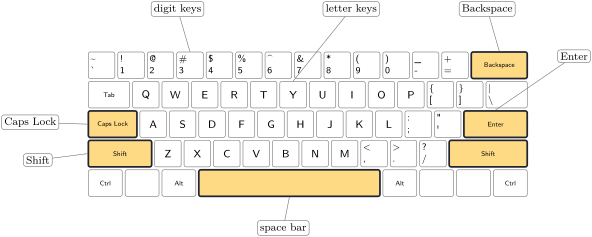
The main keys of a keyboard. The keys that change what other keys do, or that do not type a letter, are outlined. On your keyboard the letters may be in another order: this drawing shows one common keyboard.

Examples

Example 3.3 (Typing “Lina” with a capital)

Hold Shift down with one hand, press L with the other, then let go of Shift: a capital L appears. Then press i, n, a. If you made a mistake, press Backspace once to rub out the last letter, and type it again. To write the surname on the next line, press Enter, not the space bar.

Read in context →