
Todos los libros

Profesional

Apps Acerca de Coach Iniciar sesión Empezar a leer

Computer Science · Glosario

¿Qué es Cursor?

Definition 3.2 Primary & Middle School Computer Science · Capítulo 3 — The Keyboard and the Mouse

The cursor is the small blinking line in a text that shows where the next letter you type will appear.
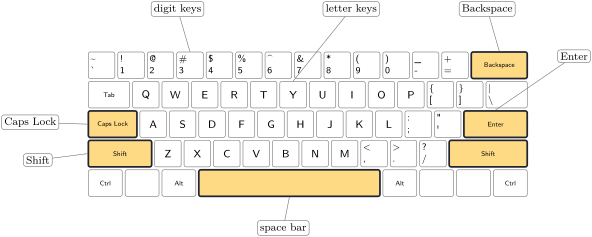
The main keys of a keyboard. The keys that change what other keys do, or that do not type a letter, are outlined. On your keyboard the letters may be in another order: this drawing shows one common keyboard.

Ejemplos

Example 3.3 (Typing “Lina” with a capital)

Hold Shift down with one hand, press L with the other, then let go of Shift: a capital L appears. Then press i, n, a. If you made a mistake, press Backspace once to rub out the last letter, and type it again. To write the surname on the next line, press Enter, not the space bar.

Leer en el capítulo →