
جميع الكتب

مهني

1 Markets I: The Ecosystem and Exchange-Traded Marketsالأسواق عبر الإنترنت 2 Markets II: Rates, FX and Creditالأسواق عبر الإنترنت 3 Markets III: Commodities, Energy and Cryptoالأسواق عبر الإنترنت 4 Quantitative Methodsالأساليب عبر الإنترنت 5 Derivatives and Volatilityالمشتقات عبر الإنترنت 6 Rates, Credit, XVA and Riskالفائدة والائتمان والمخاطر عبر الإنترنت 7 Research Craft: Predictors, Backtests, Measurement, Portfoliosالبحث عبر الإنترنت 8 Strategies I: Equities and Futuresالاستراتيجيات عبر الإنترنت 9 Strategies II: Volatility, Relative Value, Macro and the Bank Desksالاستراتيجيات عبر الإنترنت 10 Microstructure and Executionالتنفيذ عبر الإنترنت 11 Market Making and High-Frequency Tradingصناعة السوق عبر الإنترنت 12 Machine Learning for Marketsتعلم الآلة عبر الإنترنت 13 Low-Latency Softwareالتكنولوجيا عبر الإنترنت 14 Networks, Hardware and Trading Infrastructureالتكنولوجيا عبر الإنترنت 15 Research, Data and Risk Platformsالتكنولوجيا عبر الإنترنت 16 The Desk and the Firmالشركة عبر الإنترنت 17 The Industry: Firms, Roles and Careersالمسارات المهنية عبر الإنترنت 18 Interviews I: Maths, Probability and Speedالمسارات المهنية عبر الإنترنت 19 Interviews II: Markets, Trading Games and the Final Roundالمسارات المهنية عبر الإنترنت 20 Interviews III: Codeالمسارات المهنية عبر الإنترنت
التطبيقات حول المدرب تسجيل الدخول ابدأ القراءة

Computer Science · المسرد

ما معنى Cursor؟

Definition 3.2 Primary & Middle School Computer Science · الفصل 3 — The Keyboard and the Mouse

The cursor is the small blinking line in a text that shows where the next letter you type will appear.
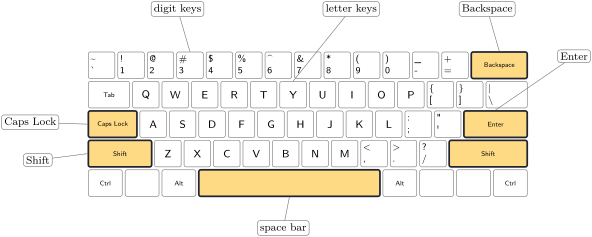
The main keys of a keyboard. The keys that change what other keys do, or that do not type a letter, are outlined. On your keyboard the letters may be in another order: this drawing shows one common keyboard.

أمثلة

Example 3.3 (Typing “Lina” with a capital)

Hold Shift down with one hand, press L with the other, then let go of Shift: a capital L appears. Then press i, n, a. If you made a mistake, press Backspace once to rub out the last letter, and type it again. To write the surname on the next line, press Enter, not the space bar.

اقرأ في الفصل →