本书暂未推出简体中文版。现有版本:English。
High School Computer Science · 10–12 年级
11Project: A Small Web Application
The chapter on HTTP ended with a server that knew five addresses by heart. A real site is not written that way: its pages are built from data at the moment they are asked for, its forms change that data, and it is tested as carefully as any other program. This project builds such a site for the Brenmoor library, from a one-paragraph specification to a tested program, in five milestones.
You already know
A request has a method, a path and headers; the answer has a status code, headers and a body. GET puts its parameters in the query string, POST in the body; a cookie is a value the browser sends back to the server that set it (the chapter on HTTP). A join matches the rows of two tables on a common column (the chapter on tables). A test compares what a function does with what it should do (the chapter on testing). An HTML page is made of elements written as tags, and a style sheet decides how they look (Book 1, grade 9).
11.1 The specification
A catalogue of the Brenmoor library, served on
127.0.0.1at port , built from the town’s tables of books, loans and members. It has a home page listing every book; a page for each book, with its loans; a search form that finds books by a word of their title; a form on each book’s page to reserve it, given a member number, which records the reservation in memory; and a clear error page for any other address. Every address is tested. Nothing leaves the machine.
The program is split in three layers. A small server part speaks HTTP: it turns each request into a dictionary and sends back what the application returns. The application decides, for each path, which function builds the answer. The data part reads the three tables once, at the start.

The server part is given: server.py builds a dictionary with the method, the path (with its % escapes decoded), the query, the form and the cookies, calls app.dispatch, and writes the answer. A function start(app, port) runs it in the background, and client.py sends one request and shows the answer without following redirects.
        def answer(self):
            url = urlsplit(self.path)
            size = int(self.headers.get("Content-Length", 0))
            body = self.rfile.read(size).decode("utf-8")
            cookies = SimpleCookie(self.headers.get("Cookie", ""))
            request = {
                "method": self.command,
                "path": unquote(url.path),
                "query": {k: v[0] for k, v in parse_qs(url.query).items()},
                "form": {k: v[0] for k, v in parse_qs(body).items()},
                "cookies": {k: m.value for k, m in cookies.items()},
            }
            status, kind, text, headers = app.dispatch(request)
            data = text.encode("utf-8")
            self.send_response(status)
            self.send_header("Content-Type", kind + "; charset=utf-8")
            self.send_header("Content-Length", str(len(data)))
            for name, value in headers:
                self.send_header(name, value)
            self.end_headers()
            self.wfile.write(data)

do_GET = do_POST = do_PUT = do_DELETE = answer11.2 Milestone 1: routes and a dispatcher
Definition 11.1 (Route, dispatcher)
In a web application, a route links a family of paths to the function that answers them, such as every path /book/<number> to the function book. The dispatcher is the function that receives each request, finds its route, and calls that function with the parts of the path it needs.
The first milestone answers in plain text: the point is to get the routes right before any page is built. The route table is a dictionary from the first part of the path to a pair: the function, and the number of further parts it takes. The key None holds the function for every path that matches no route.
"""Milestone 1: routes and a dispatcher. The pages are plain text for now."""
from data import BOOKS


def reply(status, text, kind="text/plain", headers=()):
    return status, kind, text, list(headers)


def home(request):
    return reply(200, f"The library has {len(BOOKS)} books.\n")


def book(request, number):
    if not number.isdigit() or int(number) not in BOOKS:
        return not_found(request)
    b = BOOKS[int(number)]
    return reply(200, f"{b['title']}, by {b['author']} ({b['year']})\n")


def not_found(request):
    return reply(404, f"No page at {request['path']}\n")


# first part of the path -> (function, number of further parts it takes)
ROUTES = {"": (home, 0), "book": (book, 1), None: (not_found, 0)}


def dispatch(request, routes=ROUTES):
    """Choose the function by the first part of the path; the others are arguments."""
    first, *rest = request["path"].strip("/").split("/")
    function, count = routes.get(first, routes[None])
    if len(rest) != count:
        function, rest = routes[None][0], []
return function(request, *rest)import app_m1
from client import fetch
from server import start
server = start(app_m1, 42111)
for path in ["/", "/book/7", "/book/999", "/book/seven", "/book", "/shop"]:
status, headers, text = fetch(42111, "GET", path)
print(f"{path:12} {status} {text.strip()}")
server.shutdown()$ python run_m1.py
/ 200 The library has 80 books.
/book/7 200 The Silent Kingdom, by Ines Yewwell (1950)
/book/999 404 No page at /book/999
/book/seven 404 No page at /book/seven
/book 404 No page at /book
/shop 404 No page at /shop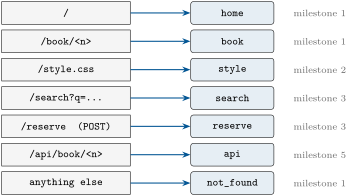
/book/<n>, / and /search with richer ones.11.3 Milestone 2: pages built from the tables
The pages are now HTML, built by a function page(title, body) that adds the parts every page shares. A book’s page joins two tables: the book’s row in BOOKS, and its loans in LOANS, a dictionary from book number to loans that data.py builds once at the start.
A page is text, and some of that text comes from outside: a title in a table, a word typed in a form, a path. If a path contained <script>, a page that printed it as it is would contain a script, and the browser would run it. Text that comes from outside must never be read as HTML.
Definition 11.2 (Escaping)
Escaping a text for HTML replaces each character that has a meaning in HTML by an entity that only displays it: < becomes <, > becomes >, & becomes &, and the quotes become " and '. Python’s html.escape does it.
"""Milestone 2: HTML pages built from the tables, with every value escaped."""
from html import escape

from app_m1 import dispatch as dispatch_m1
from app_m1 import reply
from data import BOOKS, HERE, LOANS


def page(title, body, status=200, headers=()):
    html = ('<!DOCTYPE html>\n<html><head><meta charset="utf-8">\n'
            f"<title>{escape(title)}</title>\n"
            '<link rel="stylesheet" href="/style.css"></head>\n'
            f"<body>\n<h1>{escape(title)}</h1>\n{body}\n</body></html>\n")
    return reply(status, html, "text/html", headers)


def home(request):
    items = [f'<li><a href="/book/{n}">{escape(b["title"])}</a></li>'
             for n, b in sorted(BOOKS.items())]
    return page("The Brenmoor library", "<ul>\n" + "\n".join(items) + "\n</ul>")


def book_body(n):
    b = BOOKS[n]
    rows = [f"<tr><td>{escape(loan['out_date'])}</td>"
            f"<td>{escape(loan['return_date'] or 'not yet')}</td></tr>\n"
            for loan in LOANS.get(n, [])]
    return (f"<p>{escape(b['author'])}, {b['year']}, {b['pages']} pages</p>\n"
            "<table>\n<tr><th>out</th><th>back</th></tr>\n"
            f"{''.join(rows)}</table>")


def book(request, number):
    if not number.isdigit() or int(number) not in BOOKS:
        return not_found(request)
return page(BOOKS[int(number)]["title"], book_body(int(number)))The rest of the file adds not_found, which escapes the path it shows, a route for the style sheet, and a dispatch that calls the one of milestone 1 with the new route table: the dispatcher itself does not change.
import app_m2
from client import fetch, show
from server import start

server = start(app_m2, 42112)
show(42112, "GET", "/", lines=("<h1>", "/book/7\""))
status, headers, text = fetch(42112, "GET", "/book/7")
print("GET /book/7 ->", status, headers["Content-Type"])
print(text, end="")
show(42112, "GET", "/<script>alert('hello')</script>", lines=("error",))
server.shutdown()$ python run_m2.py
GET / -> 200
<h1>The Brenmoor library</h1>
<li><a href="/book/7">The Silent Kingdom</a></li>
GET /book/7 -> 200 text/html; charset=utf-8
<!DOCTYPE html>
<html><head><meta charset="utf-8">
<title>The Silent Kingdom</title>
<link rel="stylesheet" href="/style.css"></head>
<body>
<h1>The Silent Kingdom</h1>
<p>Ines Yewwell, 1950, 286 pages</p>
<table>
<tr><th>out</th><th>back</th></tr>
<tr><td>2025-02-09</td><td>2025-02-24</td></tr>
<tr><td>2025-03-20</td><td>2025-03-30</td></tr>
<tr><td>2025-05-22</td><td>2025-07-12</td></tr>
<tr><td>2025-07-05</td><td>2025-08-24</td></tr>
<tr><td>2025-07-16</td><td>not yet</td></tr>
<tr><td>2025-09-28</td><td>2025-10-16</td></tr>
</table>
</body></html>
GET /<script>alert('hello')</script> -> 404
<p class="error">No page at /<script>alert('hello')</script></p>body { font-family: sans-serif; max-width: 40em; margin: 2em auto; }
h1 { color: #0b4f8a; }
table { border-collapse: collapse; }
td, th { border: 1px solid #999; padding: 0.2em 0.6em; }
.error { color: #a01010; }/style.css. code/grade-10/11-project-web-application/listings/style.css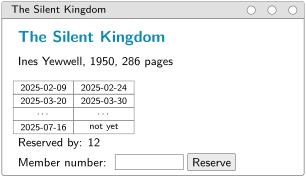
book and member to /reserve with POST.11.4 Milestone 3: forms
The search form uses GET: searching changes nothing on the server, and its address can be bookmarked. The reservation form uses POST: it changes the server’s data. After a successful POST, the server does not send a page; it answers 303 See Other with a Location header, and the browser then asks for the book’s page with GET. This is called redirect after POST: if the reader reloads the page, the browser repeats the GET, not the reservation.
def search(request):
    words = request["query"].get("q", "").strip()
    found = [n for n, b in sorted(BOOKS.items())
             if words and words.lower() in b["title"].lower()]
    items = "".join(f'<li><a href="/book/{n}">{escape(BOOKS[n]["title"])}</a></li>\n'
                    for n in found)
    body = f"{SEARCH_FORM}\n<p>{len(found)} found</p>\n<ul>\n{items}</ul>"
    return app_m2.page(f"Search: {words}", body)


def book(request, number):
    if not number.isdigit() or int(number) not in BOOKS:
        return app_m2.not_found(request)
    n = int(number)
    who = ", ".join(str(m) for m in RESERVATIONS.get(n, [])) or "nobody"
    form = (f'<form action="/reserve" method="post">'
            f'<input type="hidden" name="book" value="{n}">'
            f'Member number: <input name="member"> <button>Reserve</button></form>')
    body = f"{app_m2.book_body(n)}\n<p>Reserved by: {who}</p>\n{form}"
    return app_m2.page(BOOKS[n]["title"], body)


def reserve(request):
    book_n, member = request["form"].get("book", ""), request["form"].get("member", "")
    if not (book_n.isdigit() and int(book_n) in BOOKS):
        return app_m2.page("No such book", "<p>Choose a book first.</p>", 400)
    if not (member.isdigit() and int(member) in MEMBERS):
        return app_m2.page("No such member", f"<p>{escape(member)}?</p>", 400)
    RESERVATIONS.setdefault(int(book_n), []).append(int(member))
    return app_m2.page("Reserved", "", 303, [("Location", f"/book/{book_n}")])
Every value of the form is checked before it is used: a book number that is not a number, or not in the catalogue, and a member number that is not a member, are answered with 400 Bad Request. A program that trusts its forms can be broken by anyone who types into them, or who sends a request without any form at all.
import app_m3
from client import show
from server import start

server = start(app_m3, 42113)
show(42113, "GET", "/search?q=forest", lines=("<h1>", "found", "<li>"))
show(42113, "GET", "/search?q=%3Cb%3Ehi", lines=("<h1>",))
show(42113, "POST", "/reserve", form={"book": "7", "member": "12"})
show(42113, "POST", "/reserve", form={"book": "7", "member": "99"})
show(42113, "GET", "/book/7", lines=("Reserved by",))
server.shutdown()$ python run_m3.py
GET /search?q=forest -> 200
<h1>Search: forest</h1>
<p>8 found</p>
<li><a href="/book/2">The Paper Forest</a></li>
<li><a href="/book/9">The Lost Forest</a></li>
<li><a href="/book/12">Under the Forest</a></li>
<li><a href="/book/21">The Clockwork Forest</a></li>
<li><a href="/book/33">The Last Forest</a></li>
<li><a href="/book/54">The Silent Forest</a></li>
<li><a href="/book/69">Notes on the Forest</a></li>
<li><a href="/book/73">Seven Forest</a></li>
GET /search?q=%3Cb%3Ehi -> 200
<h1>Search: <b>hi</h1>
POST /reserve -> 303
Location: /book/7
<h1>Reserved</h1>
POST /reserve -> 400
<h1>No such member</h1>
GET /book/7 -> 200
<p>Reserved by: 12</p>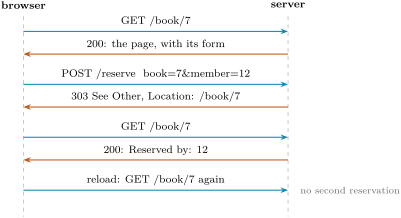
11.5 Milestone 4: tests against the real server
Each milestone has been tried by hand. A test suite tries every route at once, every time the program changes. It starts the real server in a process of its own, sends HTTP requests with urllib like any client, and checks each status and one line of each page. urlopen follows the 303 by itself, and turns a 4xx or 5xx answer into an exception, whose code the helper get returns.
"""Milestone 4: start the real server in its own process and request every route."""
import socket
import subprocess
import sys
import time
import unittest
from urllib.error import HTTPError
from urllib.parse import urlencode
from urllib.request import urlopen

PORT = 42116
BASE = f"http://127.0.0.1:{PORT}"


def get(path, form=None):
    """Return (status, text); a form is sent with POST, and redirects are followed."""
    data = urlencode(form).encode() if form is not None else None
    try:
        with urlopen(BASE + path, data=data, timeout=5) as response:
            return response.status, response.read().decode("utf-8")
    except HTTPError as error:  # 4xx and 5xx arrive as exceptions
        return error.code, error.read().decode("utf-8")


class AppTests(unittest.TestCase):
    @classmethod
    def setUpClass(cls):
        command = [sys.executable, "server.py", "app_m3", str(PORT)]
        cls.server = subprocess.Popen(command, stdout=subprocess.DEVNULL)
        for _ in range(100):  # wait until the server accepts connections
            try:
                socket.create_connection(("127.0.0.1", PORT), timeout=1).close()
                return
            except OSError:
                time.sleep(0.05)

    @classmethod
    def tearDownClass(cls):
        cls.server.terminate()
cls.server.wait() def test_home_lists_every_book(self):
status, text = get("/")
self.assertEqual(status, 200)
self.assertEqual(text.count("<li>"), 80)
def test_book_page(self):
status, text = get("/book/7")
self.assertEqual(status, 200)
self.assertIn("<h1>The Silent Kingdom</h1>", text)
def test_missing_pages(self):
for path in ["/book/999", "/book/x", "/book", "/shop"]:
self.assertEqual(get(path)[0], 404, path)
def test_style(self):
self.assertIn("font-family", get("/style.css")[1])
def test_search_escapes(self):
status, text = get("/search?q=%3Cscript%3E")
self.assertIn("<script>", text)
self.assertNotIn("<script>", text)
def test_reserve_then_redirect(self):
status, text = get("/reserve", {"book": "9", "member": "3"})
self.assertEqual(status, 200) # urlopen followed the 303 to /book/9
self.assertIn("Reserved by: 3", text)
def test_reserve_refused(self):
self.assertEqual(get("/reserve", {"book": "9", "member": "0"})[0], 400)
self.assertEqual(get("/reserve", {"book": "81", "member": "3"})[0], 400)
if __name__ == "__main__":
unittest.main()$ bash run_tests.sh
test_book_page (app_tests.AppTests.test_book_page) ... ok
test_home_lists_every_book (app_tests.AppTests.test_home_lists_every_book) ... ok
test_missing_pages (app_tests.AppTests.test_missing_pages) ... ok
test_reserve_refused (app_tests.AppTests.test_reserve_refused) ... ok
test_reserve_then_redirect (app_tests.AppTests.test_reserve_then_redirect) ... ok
test_search_escapes (app_tests.AppTests.test_search_escapes) ... ok
test_style (app_tests.AppTests.test_style) ... ok
----------------------------------------------------------------------
OKpython -m unittest -v app_tests; the line that gives the duration is left out.In practice — Two kinds of tests
The tests of this milestone go through the network, the server and the application: they are slow, a fraction of a second each, but they would catch a mistake in any layer. Because the application only receives a dictionary, it can also be tested by calling dispatch directly, with no server at all; the chapter’s own tests do both.
11.6 Milestone 5: a cookie and a JSON route
Two improvements finish the project. The search answer sets a cookie last, which the browser sends back with every later request; the home page then offers the last search as a link. And a route /api/book/<n> answers in JSON instead of HTML, for another program rather than a person: the same data, in the format of the chapter on tables.
def search(request):
    status, kind, text, headers = app_m3.search(request)
    words = request["query"].get("q", "").strip()
    headers.append(("Set-Cookie", f"last={quote(words)}; Path=/; HttpOnly"))
    return status, kind, text, headers


def home(request):
    status, kind, text, headers = app_m2.home(request)
    last = unquote(request["cookies"].get("last", ""))
    if last:
        link = f'<a href="/search?q={quote(last)}">{escape(last)}</a>'
        text = text.replace("<ul>", f"<p>Your last search: {link}</p>\n<ul>", 1)
    return status, kind, text, headers


def api(request, kind, number):
    if kind != "book" or not number.isdigit() or int(number) not in BOOKS:
        error = json.dumps({"error": "no such book"})
        return reply(404, error + "\n", "application/json")
    n = int(number)
    b = BOOKS[n]
    record = {"book": n, "title": b["title"], "author": b["author"],
              "year": int(b["year"]), "loans": len(LOANS.get(n, [])),
              "reserved_by": app_m3.RESERVATIONS.get(n, [])}
    return reply(200, json.dumps(record, indent=1) + "\n", "application/json")


ROUTES = dict(app_m3.ROUTES)
ROUTES.update({"": (home, 0), "search": (search, 0), "api": (api, 2)})


def dispatch(request):
return dispatch_m1(request, ROUTES)import app_m5
from client import show
from server import start
server = start(app_m5, 42115)
_, headers, _ = show(42115, "GET", "/search?q=silent%20forest", lines=("found",))
cookie = headers["Set-Cookie"].split(";")[0] # what the browser keeps: name=value
show(42115, "GET", "/", cookie=cookie, lines=("last search",))
show(42115, "POST", "/reserve", form={"book": "7", "member": "12"})
status, headers, text = show(42115, "GET", "/api/book/7", lines=())
print(headers["Content-Type"])
print(text, end="")
show(42115, "GET", "/api/book/700", lines=("error",))
server.shutdown()$ python run_m5.py
GET /search?q=silent%20forest -> 200
Set-Cookie: last=silent%20forest; Path=/; HttpOnly
<p>1 found</p>
GET / -> 200
<p>Your last search: <a href="/search?q=silent%20forest">silent forest</a></p>
POST /reserve -> 303
Location: /book/7
<h1>Reserved</h1>
GET /api/book/7 -> 200
application/json; charset=utf-8
{
"book": 7,
"title": "The Silent Kingdom",
"author": "Ines Yewwell",
"year": 1950,
"loans": 6,
"reserved_by": [
12
]
}
GET /api/book/700 -> 404
{"error": "no such book"}The application meets its specification: every route answers, every value from outside is checked or escaped, and the test suite proves it each time it runs. What it lacks is memory: the reservations live in a dictionary and vanish when the server stops. Keeping them in a database, which several servers can share safely, is the subject of a later chapter.
11.7 Exercises
Exercise 11.1 ★
For each path, say which function of milestone 1 answers, and with which arguments: /, /book/12, /book/12/, /book/12/loans, /books/12.
Solution
Solution of Exercise 11.1.
/: home(request). /book/12 and /book/12/: book(request, "12"), since the slashes at both ends are stripped before splitting. /book/12/loans: three parts, one too many, so not_found(request). /books/12: no route books, so not_found(request).
Exercise 11.2 ★
What does the page of milestone 2 contain, exactly, for the path /a&b<i>? What would a browser display?
Solution
Solution of Exercise 11.2.
The title is Not found and the paragraph is
<p class="error">No page at /a&b<i></p>
The browser displays No page at /a&b<i>, as typed, in the colour of the class error; no italic starts, since <i> was escaped.
Exercise 11.3 ★
Add a route /about with a page of one sentence about the catalogue.
Solution
Solution of Exercise 11.3.
A function about(request) that returns app_m2.page("About", "<p>...</p>"), and an entry "about": (about, 0) in the route table (exercises/app_ex.py).
Exercise 11.4 ★
How many HTTP requests does the test suite of milestone 4 send in all? Count the redirection.
Exercise 11.5 ★
A student forgets the word return on the last line of book. What does dispatch give back for /book/7, and what happens in the server?
Solution
Solution of Exercise 11.5.
book returns None, and so does dispatch. In the server, the line status, kind, text, headers = app.dispatch(request) raises a TypeError: the server prints the traceback, closes the connection without any answer, and goes on serving the other requests. The client sees the connection closed without a response (RemoteDisconnected with http.client).
Exercise 11.6 ★★
Add a route /author/<name> that lists the books of an author, with a 404 if there are none. How many books does Zoe Stoneton have?
Solution
Solution of Exercise 11.6.
author(request, name) keeps the books whose author is name, and returns not_found(request) if there are none; the route is "author": (author, 1). The space in the name arrives as %20 and the server decodes it. Zoe Stoneton has books, the most of any author (exercises/app_ex.py).
Exercise 11.7 ★★
In a copy of reserve, the values are read from request["query"] instead of request["form"]. What does every reservation sent by the form now get, and why? Which test catches it?
Solution
Solution of Exercise 11.7.
The form’s fields travel in the body of the POST, not in the query string, so request["query"] is empty: the book number is "", and every reservation gets 400 with the page No such book. The test test_reserve_then_redirect fails, since it expects the book’s page after the redirection.
Exercise 11.8 ★★
Let the home page take a parameter sort, which may be title, author or year; any other value gets a 400.
Solution
Solution of Exercise 11.8.
Read key = request["query"].get("sort", "title"), answer 400 if it is not one of the three, and list the books in the order sorted(BOOKS, key=lambda n: (BOOKS[n][key], n)); the number n breaks ties, so the order is the same at every request (exercises/app_ex.py).
Exercise 11.9 ★★
With books in the catalogue, how many different pages answer 200 with GET, if searches are not counted? How many for the Brenmoor catalogue? Why is the number of different addresses that answer 200 much larger?
Solution
Solution of Exercise 11.9.
The home page, the style sheet, one page per book and one JSON answer per book: . For books, pages (with GET, /reserve answers 400, not 200). The addresses are far more numerous, without end: as in exercise 11.1, a trailing slash or leading zeros (/book/7/, /book/07, /book/007, …) give another address for the same page.
Exercise 11.10 ★★
A test file starts the server with subprocess.Popen at its top, runs its tests, and stops the server on its last line. One test fails. What happens to the server, and to the next run of the tests? Fix it.
Solution
Solution of Exercise 11.10.
The failing test raises an exception, the last line is never reached, and the server keeps running after the tests. The next run cannot open the same port, and its server stops at once, while the tests talk to the old server, which runs the old code. The fix is to stop the server in a finally block, or in tearDownClass as in milestone 4, which unittest calls whatever the tests did.
Exercise 11.11 ★★
The specification says that /reserve accepts only POST, and the other routes only GET. Make the dispatcher answer 405 Method Not Allowed otherwise, with the header that this status requires.
Solution
Solution of Exercise 11.11.
A dictionary METHODS = {"reserve": {"POST"}}, with {"GET"} for every other route; before calling the route’s function, dispatch compares request["method"] with the allowed set and otherwise answers 405 with the header Allow, which a 405 answer must carry, listing the allowed methods (exercises/app_ex.py).
Exercise 11.12 ★★★
Show the home page twenty books at a time: /?page=1 to the last page, 404 outside. Test the first and last pages, the pages just outside, and that all the pages together show every book once.
Solution
Solution of Exercise 11.12.
With books and per page there are pages. The page shows the books at positions to of the sorted list, the slice order[(p - 1) * 20:p * 20]. Pages and , and a page that is not a number, get a 404. The test requests pages to , checks the statuses , and counts links over the four pages (tests/test_web_app.py).
Exercise 11.13 ★★★
A reader reserves a book, then reloads the page three times. Count the reservations recorded if the server answers the POST with the book’s page directly, and if it answers with a 303. Why does a browser warn before repeating a POST?
Solution
Solution of Exercise 11.13.
If the POST is answered with a page, reloading repeats the POST: reservations of the same book by the same member. With a 303, the page shown is the answer to a GET, and reloading repeats the GET: reservation. Browsers warn before repeating a POST because a POST may change data on the server, while a GET must not.
Exercise 11.14 ★★★
A member may hold at most three reservations. Refuse a fourth with status 409 Conflict, and test it.
Solution
Solution of Exercise 11.14.
Before recording, count the member’s reservations over all the books, and answer 409 if there are already three. The test sends four reservations for member and expects (exercises/app_ex.py).
Exercise 11.15 ★★★
The server answers several requests at the same time, one thread each. Member holds two reservations and sends two more at the same moment. Show an order of the steps of the limit check of the previous exercise in which both are accepted. How can the program prevent it?
Solution
Solution of Exercise 11.15.
Thread A counts member ’s reservations: , fewer than . Thread B counts them too: still . A records its reservation (), then B records its own (). Each check was right when it was made, but the data changed between the check and the recording. The fix is to make the check and the recording one step that no other thread can interrupt: a lock (threading.Lock) that a thread holds from the count to the recording (exercises/app_ex.py). If several server programs share the data, a lock inside one of them is not enough; the database that holds the data must provide it, as a later chapter shows.