এই বইটি এখনো বাংলা ভাষায় পাওয়া যায় না। সংস্করণ: English।
High School Computer Science · শ্রেণি 10–12
5Text Encodings: From ASCII to UTF-8
The town’s café sends its weekly menu to the notice board at the station, a screen run by a small computer. On Monday the board shows Lighthouse Café. The menu file has not changed, the screen is not broken, and nobody typed an Ã. The file and the board simply disagree about what the bytes of the file mean.
A text file is a sequence of bytes, and a byte is a number from to . Turning letters into numbers and back needs a table that both sides agree on. This chapter follows these tables from the first one, which had room for the English alphabet only, to the one used today for every script in the world, and explains, byte by byte, how é became é.
You already know
A computer stores each character as a number, its code, taken from a code table (Book 1, grade 5). In Python a string is a sequence of characters, ord(c) gives the code of a character and chr(n) the character of a code (Book 1, grade 7). A byte is written with two hexadecimal digits, from 00 to FF (Book 1, grade 8).
5.1 Characters, code points and bytes
Two questions must be kept apart: which number stands for a character, and which bytes stand for that number.
Definition 5.1 (Character, code point)
A character is a unit of written text: a letter, a digit, a punctuation sign, a space, an emoji. A code point is the number that a code table gives to a character. Code points are written U+ followed by at least four hexadecimal digits: U+0041 is A, U+00E9 is é.
Definition 5.2 (Character encoding)
A character encoding is a rule that turns a sequence of characters into a sequence of bytes (encoding) and back (decoding). A text file holds bytes only; reading it as text needs the encoding it was written with.
Python keeps the two worlds apart: a str holds characters, a bytes value holds bytes, and the methods encode and decode cross between them, always with the name of an encoding.
5.2 ASCII on seven bits
Definition 5.3 (ASCII)
ASCII (American Standard Code for Information Interchange, 1968) is a code table of characters, numbered from to , so that each fits in bits. Codes to and are control characters (line feed, tabulation, …), which are not printed; codes to are the space, the digits, the English letters in both cases and punctuation. As an encoding, ASCII stores each character in one byte whose leftmost bit is .
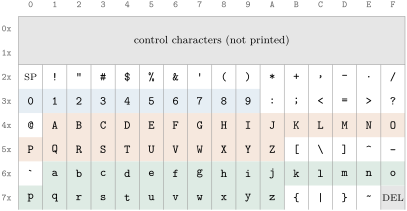
30, capital letters (orange) at 41 and small letters (green) at 61, exactly 20 hexadecimal, that is , further on.The layout was designed with care: the digit has code , and a small letter’s code is the capital’s plus , a single bit.
for c in "Aa0 ~":
    print(repr(c), ord(c), hex(ord(c)), format(ord(c), "07b"))
print(chr(66), chr(98), chr(0x41 + 25))
print(ord("a") - ord("A"), chr(ord("g") - 32))$ python ord_chr.py
'A' 65 0x41 1000001
'a' 97 0x61 1100001
'0' 48 0x30 0110000
' ' 32 0x20 0100000
'~' 126 0x7e 1111110
B b Z
32 Gprint(" " + " ".join(f"{c:X}" for c in range(16)))
for row in range(2, 8):
cells = []
for col in range(16):
code = 16 * row + col
cells.append(chr(code) if code < 127 else ".")
print(f"{row:X}x " + " ".join(cells))$ python ascii_table.py
0 1 2 3 4 5 6 7 8 9 A B C D E F
2x ! " # $ % & ' ( ) * + , - . /
3x 0 1 2 3 4 5 6 7 8 9 : ; < = > ?
4x @ A B C D E F G H I J K L M N O
5x P Q R S T U V W X Y Z [ \ ] ^ _
6x ` a b c d e f g h i j k l m n o
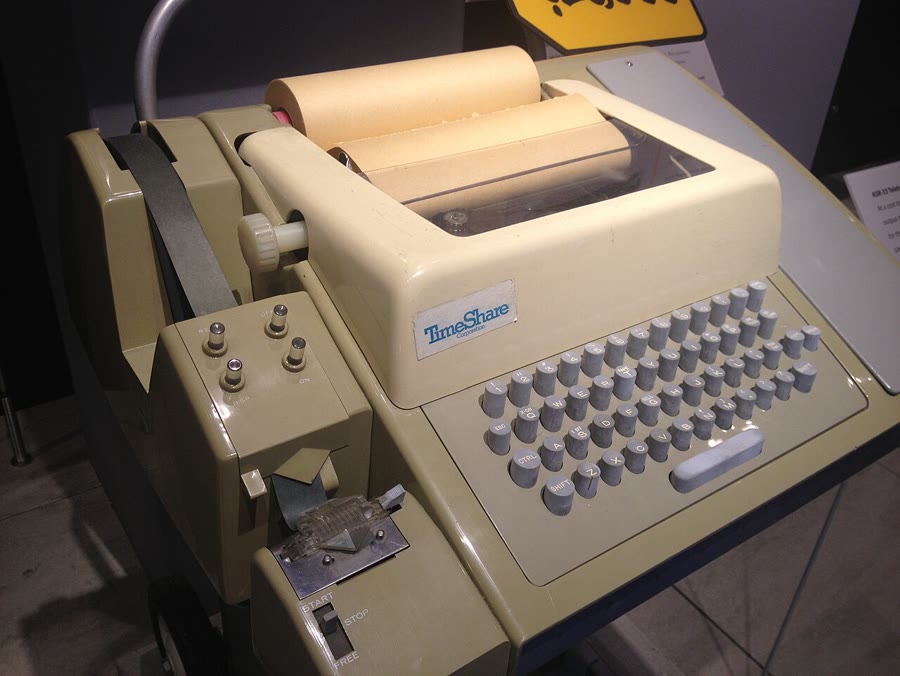
7x p q r s t u v w x y z { | } ~ .2x to 7x; the dot stands for code , which is not printable.ASCII has no é, no ñ, no ß, and none of the world’s other scripts. It was enough for the teleprinters of the 1960s, which wrote English, and too little for nearly everyone else.
5.3 One-byte extensions and their conflicts
A byte has bits, and ASCII uses only codes to . The obvious idea was to give the other values, from to , to the letters that ASCII lacks.
Definition 5.4 (One-byte extension of ASCII)
A one-byte extension of ASCII is an encoding that keeps ASCII for bytes to and gives bytes to to other characters, one character per byte.
The best known is ISO-8859-1, also called Latin-1 (1987), for Western European languages: in it, byte E9 is é.
The trouble is that there were dozens of such tables, one for Greek, one for Cyrillic, one for each make of computer, and each gave the same byte a different meaning. A file does not say which table it was written with.
word = "été"
for encoding in ("latin-1", "utf-8", "utf-16-le"):
    data = word.encode(encoding)
    print(f"{encoding:9}  {len(data)} bytes  {data.hex(' ')}")

data = bytes([0x63, 0x61, 0x66, 0xE9])
print(data.decode("latin-1"), ascii(data.decode("mac_roman")))$ python latin1_vs_utf8.py
latin-1 3 bytes e9 74 e9
utf-8 5 bytes c3 a9 74 c3 a9
utf-16-le 6 bytes e9 00 74 00 e9 00
café 'caf\xc8'E9 is é in Latin-1 and È, code point U+00C8, in an old table of another make of computer, mac_roman. The function ascii writes a character that is not ASCII as an escape \x...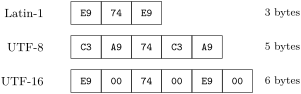
5.4 Unicode and UTF-8
The way out was to stop making tables and make one.
Definition 5.5 (Unicode)
Unicode is a single code table for the characters of every writing system, first published in 1991. Its code points run from U+0000 to U+10FFFF; the first are those of ASCII and the first those of Latin-1. Unicode says which number each character has, not which bytes store it: that is the job of an encoding of Unicode.
Facts as of 2026
Unicode 18.0, released in September 2026, contains characters. A new version comes out about once a year, mostly adding characters of historic scripts and new emoji.
Storing every code point in bytes would work but would make every English text four times larger. The encoding used by most of the web and by almost every text file today uses between one and four bytes.
Definition 5.6 (UTF-8)
UTF-8 encodes each code point in to bytes. Its bits are placed in the free positions x of the patterns of the figure below, from left to right. The first byte tells how many bytes follow; every following byte, a continuation byte, starts with the bits 10.
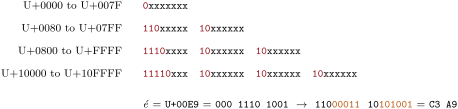
x of the two-byte pattern.(The code points U+D800 to U+DFFF are left out: they are reserved for UTF-16, which writes the code points above U+FFFF as a pair of such numbers.)
The listing builds the bytes with the shifts and masks of the chapter on machine integers, and checks them against Python’s own encoder.
def utf8_encode(cp):
    """Return the UTF-8 bytes of the code point cp, 0 <= cp <= 0x10FFFF."""
    if cp < 0x80:
        return bytes([cp])
    if cp < 0x800:
        return bytes([0b110_00000 | cp >> 6, 0b10_000000 | cp & 0x3F])
    if cp < 0x10000:
        return bytes([0b1110_0000 | cp >> 12,
                      0b10_000000 | (cp >> 6) & 0x3F,
                      0b10_000000 | cp & 0x3F])
    return bytes([0b11110_000 | cp >> 18,
                  0b10_000000 | (cp >> 12) & 0x3F,
                  0b10_000000 | (cp >> 6) & 0x3F,
                  0b10_000000 | cp & 0x3F])


for cp in (0x41, 0xE9, 0x20AC, 0x1F600):
    mine = utf8_encode(cp)
print(f"U+{cp:04X} {mine.hex(' '):12} same as Python: {mine == chr(cp).encode()}")$ python utf8_by_hand.py
U+0041 41 same as Python: True
U+00E9 c3 a9 same as Python: True
U+20AC e2 82 ac same as Python: True
U+1F600 f0 9f 98 80 same as Python: TrueProposition 5.7 (Properties of UTF-8)
- An ASCII text is its own UTF-8 encoding, byte for byte.
- No byte of a character of two or more bytes is below , so an ASCII byte in UTF-8 is always an ASCII character.
- A continuation byte is never the first byte of a character, so a program that starts reading in the middle of a text finds the next character boundary by skipping at most three bytes.
Proof. (1) Code points below use the one-byte pattern 0xxxxxxx, which is the ASCII byte itself. (2) In a pattern of two or more bytes, every byte starts with a bit, so it is at least . (3) A continuation byte starts with 10; a first byte starts with 0, 110, 1110 or 11110, never 10. A character has at most three continuation bytes. ∎
5.5 Garbled text, and bytes in Python
Now the notice board can be explained.
Definition 5.8 (Mojibake)
Mojibake (garbled text, from a Japanese word) is the text obtained when bytes are decoded with an encoding other than the one they were written with.
name = "Lighthouse Café"
data = name.encode("utf-8")
print(data.hex(" "))
wrong = data.decode("latin-1")
print(len(name), len(wrong), ascii(wrong))
print(wrong.encode("latin-1").decode("utf-8"))$ python mojibake.py
4c 69 67 68 74 68 6f 75 73 65 20 43 61 66 c3 a9
15 16 'Lighthouse Caf\xc3\xa9'
Lighthouse Café\xc3 and \xa9. Encoding back and decoding right repairs it.
C3 is à and byte A9 is the copyright sign ©.Method 5.9 (Recognising the encoding of garbled text)
- An accented letter replaced by two characters, the first often à or Â: UTF-8 bytes read as Latin-1 (or as a close one-byte table). Repair: encode with Latin-1, decode with UTF-8.
- A replacement sign, or the error
UnicodeDecodeError: one-byte-table bytes read as UTF-8. Decode with the right one-byte table. - Three or four characters for one letter: the mistake was made twice; repair once per layer.
Decoding does not always succeed. Byte E9 starts a three-byte character in UTF-8, so a Latin-1 é at the end of a text is an incomplete UTF-8 character.
data = "Café".encode("latin-1")
print(data)
print(data.decode("utf-8", errors="backslashreplace"))
print(data.decode("utf-8"))$ python decode_error.py
b'Caf\xe9'
Caf\xe9
Traceback (most recent call last):
File "decode_error.py", line 4, in <module>
print(data.decode("utf-8"))
^^^^^^^^^^^^^^^^^^^^
UnicodeDecodeError: 'utf-8' codec can't decode byte 0xe9 in position 3: unexpected end of data
[exit status 1]errors="backslashreplace" writes the bad byte as an escape; without it, decoding stops.With errors="replace", Python puts the replacement character U+FFFD, usually drawn as a question mark in a diamond, in place of each bad byte; with the default, errors="strict", it stops.
Method 5.10 (Reading and writing text files)
Always name the encoding: open(name, encoding="utf-8"), Path(name).read_text(encoding="utf-8"). Without it, Python uses the system’s default, which is not the same on every computer. To convert a file, read it with its old encoding and write it with the new one.
from pathlib import Path

text = "Lighthouse Café\ncrêpes, 4 \u20ac\n"
Path("menu.txt").write_text(text, encoding="cp1252")

old = Path("menu.txt").read_text(encoding="cp1252")
Path("menu-utf8.txt").write_text(old, encoding="utf-8")

for name in ("menu.txt", "menu-utf8.txt"):
    print(name, Path(name).stat().st_size, "bytes")
print(Path("menu.txt").read_bytes()[-4:].hex(" "))
print(Path("menu-utf8.txt").read_bytes()[-6:].hex(" "))$ python convert_file.py
menu.txt 28 bytes
menu-utf8.txt 32 bytes
34 20 80 0a
34 20 e2 82 ac 0aThe table used here, cp1252, is a one-byte table close to Latin-1 that has the euro sign at byte 80.
5.6 Exercises
Exercise 5.1 ★
What do ord("A"), chr(97), ord("9") - ord("0") and chr(ord("A") + 2) return?
Solution
Solution of Exercise 5.1.
65, "a", 9 (the digits are consecutive from code ), and "C".
Exercise 5.2 ★
Give the bytes, in hexadecimal, of the word été in Latin-1 and in UTF-8, using the figure of UTF-8 patterns, and check them against the listing.
Solution
Solution of Exercise 5.2.
In Latin-1 each letter is one byte: E9 74 E9. In UTF-8, t is 74 and é is C3 A9, as the figure computes: C3 A9 74 C3 A9. The listing prints the same bytes.
Exercise 5.3 ★
What do len("Café"), len("Café".encode("utf-8")) and len("Café".encode("latin-1")) return? Explain the difference.
Solution
Solution of Exercise 5.3.
4, 5 and 4. A string counts characters; bytes count bytes. é takes two bytes in UTF-8 and one in Latin-1; the other three letters take one byte in both.
Exercise 5.4 ★
Write the codes of A and a on bits and show that they differ by one bit. Deduce a way to change the case of an ASCII letter with one bitwise operation.
Solution
Solution of Exercise 5.4.
A is 1000001 () and a is 1100001 (): they differ only in the bit worth . For an ASCII letter c, chr(ord(c) ^ 32) changes its case, chr(ord(c) | 32) makes it small and chr(ord(c) & ~32) makes it capital.
Exercise 5.5 ★
Write is_ascii(s), which tells whether every character of the string s is an ASCII character, using ord.
Exercise 5.6 ★★
Decode by hand the UTF-8 bytes 63 72 C3 AA 70 65: split them into characters with the first bytes, then compute each code point.
Solution
Solution of Exercise 5.6.
63 and 72 are below 80: c and r. C3 starts with 110, so it begins a two-byte character with AA: the free bits are 00011 and 101010, that is 000 1110 1010 EA, the code point U+00EA, ê. Then 70 is p and 65 is e: the word is crêpe.
Exercise 5.7 ★★
Write utf8_length(cp), which returns the number of UTF-8 bytes of a code point, and test it against len(chr(cp).encode()).
Solution
Solution of Exercise 5.7.
Compare with the pattern boundaries: below 0x80, below 0x800, below 0x10000, otherwise (exercises/utf8_length.py). The tests check it on random code points.
Exercise 5.8 ★★
A program reads a UTF-8 file of town names with open(name, encoding="latin-1") and prints Lighthouse Café. Which item of the method on garbled text is this? Correct the program, and say how to repair a string already read wrongly.
Solution
Solution of Exercise 5.8.
Item 1: UTF-8 bytes read as Latin-1. The program should open the file with encoding="utf-8". A string already read wrongly is repaired with s.encode("latin-1").decode("utf-8"), which gives back the bytes of the file and decodes them correctly.
Exercise 5.9 ★★
The bytes 43 61 66 E9 20 63 72 EA 70 65 are Café crêpe in Latin-1. What does decoding them as UTF-8 with errors="replace" return? How many replacement characters appear, and why does the error handler matter for a program that reads files from many sources?
Solution
Solution of Exercise 5.9.
The text Caf, a replacement character, cr, a replacement character, pe (ascii writes it ’Caf\ufffd cr\ufffdpe’): two replacement characters U+FFFD, one for each of the bytes E9 and EA: each starts a three-byte UTF-8 character but is followed by an ASCII byte, so it is invalid on its own. A program that reads files from many sources must decide what a bad byte does: stop (strict), so that the mistake is noticed, or go on (replace), so that one bad byte does not lose the whole file.
Exercise 5.10 ★★
How many code points can the two-byte pattern of UTF-8 hold in its free bits? Why does UTF-8 use it only for U+0080 to U+07FF, and how many code points is that?
Solution
Solution of Exercise 5.10.
free bits hold values. Code points below U+0080 must use the one-byte pattern, the shortest one (RFC 3629 forbids longer forms; that is why the bytes C0 and C1 never appear), so the two-byte pattern serves U+0080 to U+07FF: code points.
Exercise 5.11 ★★
To fit a 4-byte field of a form, a program keeps the first bytes of a name’s UTF-8 encoding and decodes them. For Café it stops with an error. Explain, and write cut(text, n), which returns the longest beginning of text whose UTF-8 encoding has at most n bytes.
Solution
Solution of Exercise 5.11.
The UTF-8 bytes of Café are 43 61 66 C3 A9; the first keep C3 without its continuation byte, and decoding stops at an incomplete character. The function cut of exercises/cut_bytes.py keeps the first bytes, walks back over continuation bytes to the first byte of the last character, and drops that character if its pattern needs more bytes than are left. On Café with it returns Caf. The tests check it on random texts.
Exercise 5.12 ★★★
Write utf8_decode(data), which returns the list of code points of valid UTF-8 bytes, with the shifts and masks of the chapter on machine integers, and test it against Python’s decode on random code points.
Solution
Solution of Exercise 5.12.
In exercises/utf8_decode.py: read the first byte b; if b < 0x80 the character has one byte and its code point is b; if b >> 5 == 0b110, two bytes and the code point starts with b & 0x1F; if b >> 4 == 0b1110, three bytes and b & 0x0F; otherwise four bytes and b & 0x07. For each continuation byte, shift the code point places left and add the byte’s low bits, data[i + k] & 0x3F. The tests decode random code points and compare with Python.
Exercise 5.13 ★★★
Prove that in valid UTF-8 a sequence of bytes that is the encoding of a character never appears inside the encoding of a longer character. Deduce that searching for the bytes of a word inside the bytes of a text never finds a false match that starts in the middle of a character.
Solution
Solution of Exercise 5.13.
The encoding of a character starts with a first byte, which is never a continuation byte; inside the encoding of a longer character, every byte after the first is a continuation byte. So a match could only start at the first byte of the longer character, and then the two first bytes are equal; but the first byte gives the length, so the two characters would have the same length, a contradiction. A word is a sequence of characters, so its bytes start with a first byte: a match of the word in the text always starts at the first byte of a character of the text, never in its middle.
Exercise 5.14 ★★★
Write fix_mojibake(s), which undoes one layer of UTF-8 read as Latin-1 when that is possible and returns s unchanged otherwise. Why is fix_mojibake("Café") equal to Café?
Solution
Solution of Exercise 5.14.
try: return s.encode("latin-1").decode("utf-8"), and if either step raises an error, return s (exercises/fix_mojibake.py). Café encodes in Latin-1 to 43 61 66 E9, which is not valid UTF-8 (E9 is not followed by continuation bytes): decoding fails, and the string is returned unchanged. A correct string is left alone, and a string garbled once is repaired.
Exercise 5.15 ★★★
A text has characters: ASCII characters, accented Latin letters and euro signs. Give its size in bytes in UTF-8, in UTF-16 and in a one-byte table that has all these characters. When would UTF-16 be the smaller of the first two?
Solution
Solution of Exercise 5.15.
UTF-8: bytes. UTF-16: bytes. A one-byte table: bytes. UTF-16 is smaller than UTF-8 when most characters lie from U+0800 to U+FFFF, where UTF-8 needs bytes and UTF-16 : Chinese, Japanese or Korean text, for example.
5.7 Problem: The Notice Board
Problem 5.1
Weekend problem — what the station screen shows
The station’s notice board receives the café’s message as a file of bytes. The program exercises/notice_board.py prints the bytes of the message, garbles it once and twice, and counts the bytes of the town’s place names in three encodings.
Part I — A byte dump.
- The file begins
4c 69 67 68 74 68 6f 75 73 65 20 43 61 66 c3 a9. Using the ASCII table, decode the first bytes. - Which bytes are not ASCII? Using the UTF-8 patterns, decode them to one code point and name the character.
- The second line of the dump is
3a 20 63 72 c3 aa 70 65 73 20 74 6f 64 61 79. Decode it. - How many characters and how many bytes does the whole message have?
Part II — Which encoding?
- Could these bytes be Latin-1? What would the board show then?
- Could they be pure ASCII? Why not?
- Explain why a valid UTF-8 reading is strong evidence that the file is UTF-8: what would a Latin-1 text have to contain for its bytes to be valid UTF-8 by chance?
- The board shows Lighthouse Café: crêpes today. Which encoding did the board use, and which item of the method does this match?
Part III — Two layers.
- A second, older screen copies the garbled text, saves it in UTF-8, and reads it back as Latin-1. Using the program’s output, how is é written after two layers? Give the four code points.
- How many bytes does é take in UTF-8 after one layer, and after two?
- Show that each layer at least doubles the number of bytes of every non-ASCII character.
- Undo the two layers in Python with the function
ungarbleof the program, and say in which order the two operations are applied at each step. - What happens to the ASCII characters of the message through the layers, and why?
Part IV — The town’s names.
- The town has places. How many bytes do their names take in UTF-8, in UTF-16 and in Latin-1, according to the program?
- Explain why the UTF-16 total is exactly twice the number of characters.
- Explain why the UTF-8 total is one more than the Latin-1 total.
- How many bytes does UTF-8 save over UTF-16 on these names, and what fraction is that?
- If the café were renamed with a Greek word of letters (each Greek letter has a code point between
U+0370andU+03FF), how would each total change? - State the result: the sizes of the town’s names in the three encodings, the saving of UTF-8 over UTF-16, and the rule that turns é into é.
Solution
Solution of Problem 5.1.
1. Lighthouse Caf: 4c is L, 69 i, …, 20 the space, 43 C, 61 a, 66 f.
2. c3 a9. C3 begins a two-byte character; the free bits 00011 and 101001 give U+00E9, é.
3. : crêpes today, with c3 aa for ê (U+00EA).
4. Lighthouse Café: crêpes today has characters and bytes: two characters take two bytes.
5. Every byte is a Latin-1 character, so yes: the board would show Lighthouse Café: crêpes today.
6. Bytes c3, a9 and aa are above 7f; ASCII has only codes.
7. For a Latin-1 text to be valid UTF-8 by chance, every byte from C2 to F4, that is, most accented letters, capital or small, would have to be followed by exactly the right number of bytes from 80 to BF, which are symbols such as © or «. Real texts almost never contain such pairs, so valid UTF-8 with non-ASCII bytes is almost certainly UTF-8.
8. The board decoded with Latin-1 (or a close one-byte table): item 1 of the method.
9. The program prints \xc3\x83\xc2\xa9 for é: the four code points U+00C3, U+0083, U+00C2, U+00A9.
10. After one layer é is two characters, Ã and ©, of two UTF-8 bytes each: bytes. After two layers it is four characters of two bytes each: bytes.
11. A non-ASCII character takes at least UTF-8 bytes, all of them or more. Read as Latin-1, each of these bytes becomes one non-ASCII character, which in turn takes UTF-8 bytes. So a character of bytes becomes characters of bytes, bytes.
12. At each step, first encode with Latin-1 (which gives back the bytes that were mis-read), then decode with UTF-8; the step is applied twice, undoing the last layer first.
13. They pass unchanged: an ASCII character is one byte below in UTF-8, and that byte is the same character in Latin-1.
14. bytes in UTF-8, in UTF-16 and in Latin-1.
15. All characters of the names have code points below U+10000, and UTF-16 writes each of them in two bytes: .
16. Every character takes one byte in Latin-1. In UTF-8 the same holds for ASCII characters, and only é, in Lighthouse Café, takes two.
17. bytes, very nearly half ().
18. The name Lighthouse Café ( characters, bytes in UTF-8) is replaced by Greek letters of bytes each in UTF-8 and in UTF-16. UTF-8: bytes. UTF-16: bytes. Latin-1 has no Greek letters: the names could no longer be written in it at all.
19. The town’s place names take bytes in UTF-8, in UTF-16 and in Latin-1: UTF-8 saves bytes over UTF-16, almost half. The rule of the notice board: UTF-8 bytes read as Latin-1 turn every non-ASCII letter into two characters, and é, bytes C3 A9, becomes é.