本书暂未推出简体中文版。现有版本:English。
High School Computer Science · 10–12 年级
4Floating-Point Numbers
Type 0.1 + 0.2 == 0.3 at Python’s prompt. The answer is False. Ask for 0.1 + 0.2, and Python prints 0.30000000000000004. Nothing is broken: the computer adds exactly what it was given, but it was never given . A memory of bits cannot hold the infinitely many digits that has in base , so it holds the nearest number it can.
This chapter shows which numbers a computer can store with a fractional part, how far apart they are, how the small errors of each operation build up, and how a program should compare such numbers. Its weekend problem is a real failure in which a tenth of a second, stored a little short, added up to a third of a second.
You already know
A number in scientific notation is written with , such as (mathematics and physics books, grades 9 and 10). In base each position is worth twice the one on its right (Book 1, grade 8). The previous chapter showed that a processor keeps whole numbers in a fixed number of bits; here too the number of bits is fixed.
4.1 Binary fractions
from fractions import Fraction

print(0.1 + 0.2)
print(0.1 + 0.2 == 0.3)
print(f"{0.1:.30f}")
print(Fraction(0.1))
print(Fraction(0.1) == Fraction(1, 10))$ python point_one.py
0.30000000000000004
False
0.100000000000000005551115123126
3602879701896397/36028797018963968
False0.1 shows its error; as an exact fraction, its denominator is a power of two.The denominator is . That is the key: the computer stores numbers whose denominator is a power of two.
Definition 4.1 (Binary fraction)
A binary fraction is a number written in base with digits after a binary point: stands for , each position worth half of the one on its left. A number has a binary fraction with finitely many digits exactly when it is a fraction whose denominator can be a power of two.
For example, is in base . But cannot be written with a power of two as denominator ( has the factor ), so its binary digits never end. They are found by doubling: multiply by ; the whole part ( or ) is the next digit; keep the fractional part and repeat.
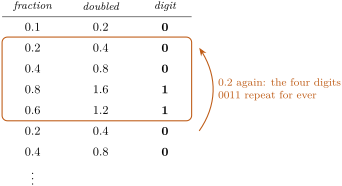
from fractions import Fraction


def binary_fraction(x, n):
    """Return the first n binary digits after the point of x, a Fraction, 0 <= x < 1."""
    digits = ""
    for _ in range(n):
        x = 2 * x
        if x >= 1:
            digits += "1"
            x = x - 1
        else:
            digits += "0"
    return digits


print("0.375 = 0." + binary_fraction(Fraction(3, 8), 8))
print("0.1   = 0." + binary_fraction(Fraction(1, 10), 30))
print("1/3 = 0." + binary_fraction(Fraction(1, 3), 30))$ python to_binary_fraction.py
0.375 = 0.01100000
0.1 = 0.000110011001100110011001100110
1/3 = 0.010101010101010101010101010101A computer that keeps a fixed number of binary digits must therefore cut somewhere. Whatever it keeps is slightly more or slightly less than ; the decimal number that we type is not the number it stores.
4.2 Sign, exponent and significand
Keeping a fixed number of digits after the point would waste them: a distance in kilometres between stars and the size of an atom in metres need digits in very different places. Scientific notation solves this by letting the point float, and computers do the same in base .
Definition 4.2 (Floating-point number)
A floating-point number is a number written , where the sign is or , the exponent is a whole number, and the significand is a binary fraction with and a fixed number of digits. Each of the three parts is stored in a fixed number of bits.
Python’s float is the -bit format of the IEEE 754 standard, used by almost every computer. Its bits are split : one bit for the sign; eleven bits for the exponent, stored with added so that it is never negative; and fifty-two bits for the digits of the significand after its point. The digit before the point is always , so it is not stored: the significand has significant bits.

0.1: sign ; exponent field , that is ; fraction bits . The value is in base . The last digits instead of show that the digits were rounded up.The module struct turns a float into its eight bytes, which the listing below cuts into the three fields.
import struct
import sys


def fields(x):
    """Return the sign, exponent and fraction bits of the 64-bit float x, as strings."""
    (n,) = struct.unpack(">Q", struct.pack(">d", x))
    bits = format(n, "064b")
    return bits[0], bits[1:12], bits[12:]


for x in (1.0, -2.5, 0.1):
    sign, exponent, fraction = fields(x)
    e = int(exponent, 2)
    print(f"{x:5}  sign {sign}  exponent {exponent} = {e} - 1023 = {e - 1023}")
    print(f"       fraction {fraction}")
print(float.hex(0.1))
print(sys.float_info.mant_dig, sys.float_info.max_exp, sys.float_info.max)$ python float_bits.py
1.0 sign 0 exponent 01111111111 = 1023 - 1023 = 0
fraction 0000000000000000000000000000000000000000000000000000
-2.5 sign 1 exponent 10000000000 = 1024 - 1023 = 1
fraction 0100000000000000000000000000000000000000000000000000
0.1 sign 0 exponent 01111111011 = 1019 - 1023 = -4
fraction 1001100110011001100110011001100110011001100110011010
0x1.999999999999ap-4
53 1024 1.7976931348623157e+308float.hex writes the significand in hexadecimal; the last line prints the number of significant bits, the largest exponent and the largest float.Sixty-four bits are too many to work by hand. A toy format of bits has the same structure: one sign bit, exponent bits stored with added, and fraction bits ; a positive pattern stands for . (The toy format has no zero and no special values; the real one reserves some patterns for them.)
from fractions import Fraction


def toy_value(e, f):
    """Value of the pattern with exponent field e (0..7), fraction field f (0..15)."""
    return (1 + Fraction(f, 16)) * Fraction(2) ** (e - 3)


values = sorted(toy_value(e, f) for e in range(8) for f in range(16))
print(len(values), "positive values, from", values[0], "to", values[-1])
for e in range(8):
    low = toy_value(e, 0)
    gap = toy_value(e, 1) - low
    high = toy_value(e, 15)
print(f"exponent field {e}: from {str(low):>4} to {str(high):>6}, gap {gap}")$ python toy_float.py
128 positive values, from 1/8 to 31
exponent field 0: from 1/8 to 31/128, gap 1/128
exponent field 1: from 1/4 to 31/64, gap 1/64
exponent field 2: from 1/2 to 31/32, gap 1/32
exponent field 3: from 1 to 31/16, gap 1/16
exponent field 4: from 2 to 31/8, gap 1/8
exponent field 5: from 4 to 31/4, gap 1/4
exponent field 6: from 8 to 31/2, gap 1/2
exponent field 7: from 16 to 31, gap 1
4.3 Gaps between neighbours
The same happens in the 64-bit format. Between and the significands to give values, evenly spaced by ; between and , the same number of values spaced by ; and so on. math.nextafter(x, math.inf) gives the next float above x, and math.ulp(x) the gap.

import math

for x in (1.0, 2.0, 1000.0, 2.0**52, 2.0**53):
    up = math.nextafter(x, math.inf)
    print(f"{x:>18}  next float up {up:>20}  gap {math.ulp(x)}")
print(2.0**53 + 1 == 2.0**53)
print(1.0 + 2.0**-53 == 1.0, 1.0 + 2.0**-52 == 1.0)$ python gaps.py
1.0 next float up 1.0000000000000002 gap 2.220446049250313e-16
2.0 next float up 2.0000000000000004 gap 4.440892098500626e-16
1000.0 next float up 1000.0000000000001 gap 1.1368683772161603e-13
4503599627370496.0 next float up 4503599627370497.0 gap 1.0
9007199254740992.0 next float up 9007199254740994.0 gap 2.0
True
True FalseDefinition 4.3 (Machine epsilon)
The machine epsilon of a floating-point format is the gap between and the next number of the format. For the 64-bit format it is .
Proposition 4.4 (Relative size of the gaps)
For a 64-bit float with , the gap to the next float is , which lies between and , where . All whole numbers from to are floats, but is not.
Proof. On the floats are with for : the gap is . Since , that gap is between and . For the gap is at most , so every whole number below is a float; for the gap is , so after the next float is . ∎
So a float has about significant decimal digits, whatever its size. That is plenty for most measurements; the trouble comes when errors build up.
4.4 Rounding error and how it builds up
Definition 4.5 (Rounding error)
When the exact result of an operation, or a number typed in decimal, is not a float, the computer keeps the nearest float. The difference between the exact value and the stored value is the rounding error. For one operation it is at most half the gap, that is, at most times the size of the result.
One rounding error is tiny. But each addition makes a new one, and a program that adds many numbers adds their errors too.
import math

for count in (10, 1_000_000):
    tenths = [0.1] * count
    total = 0.0
    for t in tenths:
        total = total + t
    print(f"{count} tenths: loop {total!r}  fsum {math.fsum(tenths)!r}")

print(1e16 + 1.0 - 1e16, 1e16 - 1e16 + 1.0)math.fsum. code/grade-10/04-floating-point/listings/sum_tenths.py$ python sum_tenths.py
10 tenths: loop 0.9999999999999999 fsum 1.0
1000000 tenths: loop 100000.00000133288 fsum 100000.0
0.0 1.0The function math.fsum keeps track of the digits lost at each step and rounds only once, at the end; it is slower, and exact enough to give and . The last line shows that the order of the additions matters: is not a float (it lies above , where the gap is ), so the is lost if it is added to first, and kept if is computed first. Addition of floats is not associative.
The worst case is the subtraction of two nearly equal numbers. Their leading digits cancel, and what remains is mostly the rounding error they carried.
import math

x = 1e-8
print("1 - cos(x)        :", 1 - math.cos(x))
print("2 * sin(x / 2)**2 :", 2 * math.sin(x / 2) ** 2)
print("x**2 / 2 :", x**2 / 2)$ python cancel.py
1 - cos(x) : 0.0
2 * sin(x / 2)**2 : 5.0000000000000005e-17
x**2 / 2 : 5.0000000000000005e-17For , is so close to that it rounds to exactly , and the subtraction gives . The formula , from trigonometry, avoids the subtraction and gives the right value, , very nearly .
Method 4.6 (Keeping rounding errors small)
- Count with whole numbers when you can: money in cents, time in ticks, and compute the decimal value only to print it.
- Compute a value directly (
k * 0.1) rather than by adding a step many times. - Avoid subtracting nearly equal numbers; look for a formula that does not.
- To add many numbers, use
math.fsum.
4.5 Comparing floats, and special values
Since computed floats carry rounding errors, == between two of them asks the wrong question. The right question is whether they are close.
Method 4.7 (Comparing two floats)
Use math.isclose(a, b), which is true when : a relative tolerance, which scales with the numbers. Near zero a relative tolerance is too strict (only is close to ), so add an absolute tolerance chosen from the problem: math.isclose(a, b, abs_tol=1e-9).
The format also reserves some patterns for results that are not ordinary numbers.
Definition 4.8 (Special values)
The special values of the floating-point format are inf and -inf, the results of an overflow beyond the largest float; nan (“not a number”), the result of an operation that has no meaning, such as ; and -0.0, a zero that remembers it came from the negative side. Every comparison with nan is false, even nan == nan.
import math

a = 0.1 + 0.2
print(a == 0.3, math.isclose(a, 0.3))
print(math.isclose(1e-12, 0.0), math.isclose(1e-12, 0.0, abs_tol=1e-9))

big = 1e308 * 10
print(big, -big, big - big)
nan = big - big
print(nan == nan, math.isnan(nan), max(nan, 1.0), max(1.0, nan))
print(0.0 == -0.0, math.copysign(1.0, -0.0))$ python compare.py
False True
False True
inf -inf nan
False True nan 1.0
True -1.0max gives a different answer depending on where the nan is.The fourth line shows why nan is dangerous: max(nan, 1.0) keeps nan because 1.0 > nan is false, while max(1.0, nan) keeps 1.0 for the same reason. A missing measurement stored as nan can silently change a result. Test for it with math.isnan, never with ==.
History — A standard for floating-point arithmetic
Before the 1980s, each make of computer had its own floating-point format and its own rounding, and the same program could give different answers on two machines. The IEEE published a common standard, IEEE 754, in 1985; its current edition dates from 2019. Thanks to it, the results of this chapter’s listings are the same on every computer that runs Python.
4.6 Exercises
Exercise 4.1 ★
What do 0.1 * 3, 0.1 * 3 == 0.3, 0.5 * 3 == 1.5 and 0.25 + 0.5 == 0.75 print? Why are the last two True?
Solution
Solution of Exercise 4.1.
0.30000000000000004, False, True, True. The numbers , , and have a power of two as denominator (, , , ): they are stored exactly, and so are the exact results of these operations, which are floats too. and are not stored exactly.
Exercise 4.2 ★
Write , and in base , by the doubling method for the fractional parts.
Solution
Solution of Exercise 4.2.
: , , , so . : , , , , so . (the whole part is , the fraction is ).
Exercise 4.3 ★
Find the binary digits of by the doubling method, and show that they repeat. What is the period?
Solution
Solution of Exercise 4.3.
, digit ; , digit , keep ; and has come back. So in base , with period , two digits, as the listing printed.
Exercise 4.4 ★
What do math.isclose(1.0, 1.0 + 1e-10), math.isclose(1e-10, 2e-10) and math.isclose(1e-10, 2e-10, abs_tol=1e-9) return? Explain each with the formula of the method.
Solution
Solution of Exercise 4.4.
True: . False: but is far smaller; relatively, and differ by a factor of two. True: the absolute tolerance is larger than .
Exercise 4.5 ★
The loop x = 0.0 then while x != 1.0: x = x + 0.1 never stops. Using the output on adding tenths, say why, and rewrite the loop so that it stops after ten turns.
Solution
Solution of Exercise 4.5.
After ten additions x is 0.9999999999999999, not 1.0, so x != 1.0 stays true and the loop goes on for ever. Count whole turns instead: for k in range(1, 11): x = k * 0.1, or test while x < 0.95, a bound far from any rounding error.
Exercise 4.6 ★★
A 64-bit float has the sign bit , the exponent field 10000000010 and the fraction bits 1100 followed by zeros. What number is it?
Solution
Solution of Exercise 4.6.
The sign is ; the exponent field is , so ; the significand is in base , that is . The number is .
Exercise 4.7 ★★
Every float is a fraction with a power of two as denominator, so its binary digits end. Write exact_binary(x), which returns all the binary digits after the point of a float , using Fraction(x) and the doubling method. How many digits does the stored 0.1 have?
Solution
Solution of Exercise 4.7.
In exercises/exact_binary.py: q = Fraction(x), then, while q != 0, double q, write the digit 1 and subtract if q >= 1, else write 0. The loop ends because each doubling removes a factor from the denominator. The stored 0.1 is : its binary digits stop at the th place.
Exercise 4.8 ★★
What is the gap between and the next float? How many floats are there between and ? Check with math.ulp.
Solution
Solution of Exercise 4.8.
lies in , where the gap is , which is what math.ulp(2.0**20) prints. There are floats in , as in every interval between two consecutive powers of two.
Exercise 4.9 ★★
What do (1e16 + 1.0) + 1.0, 1e16 + (1.0 + 1.0) and sum([1e16, 1.0, 1.0]) print? Which order of addition keeps the most digits?
Solution
Solution of Exercise 4.9.
The first line prints 1e+16: each 1.0 is lost in turn, since is not a float and rounds back to . 1.0000000000000002e+16: is computed first, and is a float. sum also prints 1.0000000000000002e+16: since Python 3.12 it keeps the lost digits along the way, like math.fsum (an older Python’s sum prints 1e+16). Adding the small numbers together first keeps the most digits.
Exercise 4.10 ★★
A timer fires every s, and a program computes the time of the th firing either with t += 0.1 or as k * 0.1. For the first firings, which method gives k / 10 exactly more often? Explain with the method of this chapter.
Solution
Solution of Exercise 4.10.
k * 0.1 matches k / 10 for of the firings, t += 0.1 for only (exercises/accumulate.py). The product makes one rounding error; the sum carries every error of the additions before it. That is the second item of the method on keeping rounding errors small.
Exercise 4.11 ★★
Write almost_equal(a, b, rel, abs_) that combines a relative and an absolute tolerance as math.isclose does, and test it against math.isclose on random pairs.
Solution
Solution of Exercise 4.11.
return abs(a - b) <= max(rel * max(abs(a), abs(b)), abs_), with rel=1e-9 and abs_=0.0 by default (exercises/almost_equal.py); the chapter’s tests compare it with math.isclose on random pairs.
Exercise 4.12 ★★★
Prove that is not a 64-bit float, and that is. What does 2**53 + 1.0 give?
Solution
Solution of Exercise 4.12.
lies in , where the floats are with having binary digits after the point: they are for whole numbers , all even. is odd, so it is not one of them; is (). 2**53 + 1.0 gives 9007199254740992.0: the exact sum is exactly halfway between two floats, and the rule rounds to the one whose last bit is , here .
Exercise 4.13 ★★★
In the toy format, how many values lie in , in , and in all? Which whole numbers from to are values of the format? Which is the smallest whole number that is not?
Solution
Solution of Exercise 4.13.
values in (exponent field ), in , and positive values in all, as the listing printed. Every whole number from to is a value: from to the gaps are at most , and from to the gap is exactly . The smallest whole number that is not a value is , above the largest value, .
Exercise 4.14 ★★★
The roots of , for large and , are found with the formula . For , compute the small root with the sign, then as divided by the large root (the product of the roots is ). Explain the difference, and say which is right.
Solution
Solution of Exercise 4.14.
With the sign, is extremely close to , and the subtraction loses nearly every digit: Python gives . The large root is about , computed with an addition of two negative numbers and no cancellation; divided by it gives , which is right to all printed digits, since the small root is (exercises/quadratic.py). The second method is right; the first is wrong by .
Exercise 4.15 ★★★
A weather station’s readings are floats, and a missing reading is stored as nan. The function largest starts with best = readings[0] and keeps any r > best. What does it return for [nan, 3.0, 7.0], and for [3.0, nan, 7.0]? Correct it.
Solution
Solution of Exercise 4.15.
For [nan, 3.0, 7.0] it returns nan: best starts as nan, and r > nan is always false. For [3.0, nan, 7.0] it returns 7.0, since nan > 3.0 is false and nan is skipped. The fix removes the missing readings first, values = [r for r in readings if not math.isnan(r)], asserts that some remain, and takes the largest of them (exercises/nan_max.py).
4.7 Problem: A Clock That Drifts
Problem 4.1
Weekend problem — a third of a second in a hundred hours
On 25 February 1991, an air-defence system at Dhahran, in Saudi Arabia, failed to intercept an incoming missile, which hit a barracks and killed soldiers. A report of the U.S. General Accounting Office found the cause: the system counted time in tenths of a second as a whole number, and converted it to seconds with registers only bits long; the conversion lost precision, and the error grew the longer the system ran. The battery had been running for about hours. The report’s table gives the error: s after hours, s after hours, and a shift of m in where the system looked for its target. This problem rebuilds the table; the program exercises/clock_drift.py does the exact arithmetic.
Part I — A tenth, chopped.
- Using the figure on the doubling method, write the first binary digits of after the point.
- A value is chopped after binary places when the digits after the th are dropped. Write the function
chopped(x, bits)of the program in words. - Show that the digits of dropped after the rd place are times , that is .
- Deduce the error of one tenth chopped after places, and give it in seconds to three significant digits.
Part II — The error per tick.
- The clock adds the chopped tenth at each tick. How many ticks are there in one hour?
- Compute the drift after one hour, and compare it with the report’s s.
- In the same way, compute the drift after hours and compare it with s.
- Why does the drift grow in proportion to the running time?
Part III — A hundred hours.
- How many ticks are there in hours?
- Compute the drift after hours from the error per tick.
- Run the program and compare its six lines with the report’s values at , , , , and hours.
- The program also computes the drift for a tenth chopped after places. What is it after hours? Which of the two matches the report?
- Rebooting the system resets the count of ticks to . What drift would remain if it were rebooted every hours?
Part IV — From time to distance.
- An error in time becomes an error in position: an object moving at metres per second covers metres in seconds. From the report’s s and m, find the speed it assumed, to the nearest m/s.
- With that speed, check the report’s shift of m after hours.
- How far would the target have moved during the drift after hours with the -place tenth?
- The error could have been avoided by counting time only in whole ticks. Explain how, using the method on keeping rounding errors small.
- Suppose instead that the time is computed as the number of ticks times a 64-bit
0.1, whose rounding error is about , with one more rounding for the product. Estimate the error after hours. Is it zero? - State the result: the error of one tick, and the drift after hours, computed exactly, compared with the report.
Solution
Solution of Problem 4.1.
1. (the digits repeat from the second place on).
2. Multiply by , drop the fractional part, and divide by again: what remains is with only its first binary places.
3. The digits from the second place on repeat ; the th and th digits are and , then again. So the dropped part is , and in base is (since is doubled twice, ).
4. s per tick, as the program prints.
5. ticks.
6. s, the report’s value.
7. ticks, so s, again the report’s value.
8. Each tick adds the same error, so the total error is the number of ticks times the error per tick, and the number of ticks grows in proportion to the time.
9. ticks.
10. s.
11. The program prints , , , , and s: the six values of the report’s table, to the four printed decimals (the chapter’s tests check them).
12. s. Only the tenth chopped after places matches the report’s figures. The report says that the registers were bits long, but not how those bits were used; the figures are what point to places.
13. The count restarts at each reboot, so the drift never exceeds its value after hours, s.
14. , so about m/s.
15. m, the report’s shift.
16. m: smaller, but still far more than the size of a target.
17. Keep the count of ticks as a whole number, which is exact, and convert it to seconds only when needed with one multiplication or, better, one division by . The error is then a single rounding, whatever the running time: items 1 and 2 of the method.
18. The rounding error of 0.1 contributes s, and the rounding of the product, near , at most half a gap, about s. The error is not zero, but about s, a billionth of the error of the chopped -place tenth.
19. One tick of s chopped after binary places is short by s; after hours, that is ticks, the clock is behind by s, exactly the value published in the report.