High School Computer Science · Grades 10–12
7Processing Data Tables
The town of Brenmoor has two weather stations, one on the hill and one by the river, and each records the temperature, the rain and the wind once a day. Ilias wants the year’s mean temperature at the river for a school report. His first try gives °C. Then he notices a January day at °C, a summer day recorded twice, and blank cells. Which number is true?
This chapter treats a file of records as a table and does to it what every data program does: select, sort, group, join with another table, and find the records that cannot be right. Each operation is a few lines of Python; the care goes into knowing what each line does to the data.
You already know
A dictionary maps keys to values; a record can be stored as a dictionary, and a table as a list of records. A table saved as a text file with separators can be loaded as such a list (Book 1, grade 8, which also sorted lists and counted comparisons). The mathematics book defines the mean, the median and the spread of a list of values (grade 10).
7.1 A table of records
Definition 7.1 (Header, descriptor, domain)
A data table is a list of records that all have the same fields. The name of a field is a descriptor; the first line of a table file, which lists the descriptors, is its header. The domain of a column is the set of values it may take: dates of 2025, the two station names, temperatures in degrees.

The town’s tables are CSV files (comma-separated values, described in 2005): one record per line, the fields separated by commas, the header first. A field that itself holds a comma is put between double quotes. Python’s csv module knows these rules; csv.DictReader reads each line as a dictionary whose keys are the descriptors. Every value it gives is a string, so the program converts them.
import csv


def convert(text):
    """Turn a cell into an int, a float, None if empty, or leave it as a string."""
    if text == "":
        return None
    for kind in (int, float):
        try:
            return kind(text)
        except ValueError:
            pass
    return text


def read_table(path):
    """Read a CSV file with a header line into a list of dicts with converted values."""
    with open(path, encoding="utf-8", newline="") as f:
        return [{k: convert(v) for k, v in row.items()} for row in csv.DictReader(f)]


if __name__ == "__main__":
    weather = read_table("weather.csv")
    print(len(weather), "records; columns:", list(weather[0]))
    for row in weather[:2]:
        print(row)
    stations = {}
    for row in weather:
        stations[row["station"]] = stations.get(row["station"], 0) + 1
print(stations)$ python load_weather.py
731 records; columns: ['date', 'station', 'temp_c', 'rain_mm', 'wind_kmh']
{'date': '2025-01-01', 'station': 'Hilltop', 'temp_c': 3.9, 'rain_mm': 0.0, 'wind_kmh': 15.3}
{'date': '2025-01-01', 'station': 'Riverside', 'temp_c': 4.3, 'rain_mm': 0.0, 'wind_kmh': 10.4}
{'Hilltop': 365, 'Riverside': 366}The other listings of the chapter import read_table from this file. An empty cell becomes None, a value that Python reserves for “nothing”; keeping it apart from matters, since a day without a measured temperature is not a day at °C.
7.2 Selecting, projecting and sorting
Definition 7.2 (Selection, projection)
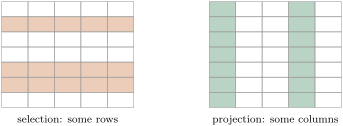
A selection keeps the records of a table that satisfy a condition. A projection keeps some columns of every record.
from load_weather import read_table

weather = read_table("weather.csv")

# selection: keep the records that satisfy a condition
wet = [row for row in weather if row["station"] == "Hilltop" and row["rain_mm"] >= 15]
# projection: keep some columns of each record
print([(row["date"], row["rain_mm"]) for row in wet])
print(len(weather), "->", len(wet), "records;", len(weather[0]), "-> 2 columns")$ python select_project.py
[('2025-01-12', 16.1), ('2025-05-27', 16.1), ('2025-07-12', 15.7), ('2025-11-24', 18.1)]
731 -> 4 records; 5 -> 2 columnsSorting a table needs a rule saying which record comes first.
Definition 7.3 (Sort key, stable sort)
A sort key is a function that gives each record the value it is sorted by. A sort is stable when records with equal keys keep the order they had before sorting.
Python’s sorted(table, key=f) sorts by f(record), and it is stable. A key may be a tuple: tuples compare their first items, then, on a tie, their second items, and so on. A minus sign in front of a number sorts it from largest to smallest.
from load_weather import read_table

weather = read_table("weather.csv")
windy = sorted(weather, key=lambda row: row["wind_kmh"], reverse=True)
for row in windy[:4]:
    print(row["date"], row["station"], row["wind_kmh"])

june = [row for row in weather if row["date"].startswith("2025-06-1")]
by_station_then_rain = sorted(june, key=lambda row: (row["station"], -row["rain_mm"]))
for row in by_station_then_rain[:4]:
print(row["station"], row["date"], row["rain_mm"])$ python sort_key.py
2025-06-23 Hilltop 40.9
2025-02-09 Riverside 34.3
2025-08-25 Riverside 34.0
2025-04-25 Hilltop 31.9
Hilltop 2025-06-11 4.9
Hilltop 2025-06-13 3.9
Hilltop 2025-06-15 1.7
Hilltop 2025-06-14 0.3Remark 7.4
Since sorted is stable, the same order can be built in two passes: first by rain, then by station. The second pass keeps the rain order among the records of each station. Exercise 7.13 proves it.
7.3 Grouping and aggregating
Definition 7.5 (Grouping, aggregate)
Grouping splits the records of a table into groups that share the value of one or more columns. An aggregate is one value computed from a whole group: a count, a sum, a mean, a median, a largest value.
The usual way in Python is a dictionary from the group’s key to the list of its values, filled in one pass.
from load_weather import read_table

weather = read_table("weather.csv")
groups = {}  # (station, month) -> list of temperatures
for row in weather:
    if row["temp_c"] is not None:
        key = (row["station"], row["date"][5:7])
        groups.setdefault(key, []).append(row["temp_c"])

print("month  Hilltop  Riverside")
for month in ["01", "02", "06", "07", "12"]:
    means = [sum(groups[s, month]) / len(groups[s, month])
             for s in ("Hilltop", "Riverside")]
print(f"{month:5} {means[0]:8.2f} {means[1]:10.2f}")$ python group_mean.py
month Hilltop Riverside
01 2.61 0.65
02 2.79 5.39
06 17.37 19.01
07 18.88 21.25
12 2.69 0.95The river station is lower and warmer all summer, yet colder than the hill in January and December by about two degrees. Before believing it, look at what went into those two means: each holds one of the values. One reading of among lowers a monthly mean by about degrees.
7.4 Joining tables
The library keeps its loans in one table and its books in another; a loan names its book only by book_id. To print the titles of the books still out, both tables are needed.
Definition 7.6 (Join)
The join of two tables on a shared column is the table of the pairs of records, one from each table, that have the same value in that column, each pair merged into one record.
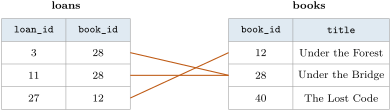
book_id, on three loans and three books of the town’s tables: each loan meets the book with its number. Book appears in two joined records; book , which none of these three loans names, appears in none.The simplest program compares every record of one table with every record of the other: a nested-loop join.
from load_weather import read_table

loans = read_table("loans.csv")
books = read_table("books.csv")
out = [loan for loan in loans if loan["return_date"] is None]

comparisons = 0
result = []
for loan in out:              # nested-loop join: every pair is compared
    for book in books:
        comparisons += 1
        if loan["book_id"] == book["book_id"]:
            result.append((loan["out_date"], book["title"]))
print(len(out), "books still out; the first two:")
print(result[:2])
print(comparisons, "comparisons")$ python join_loans.py
22 books still out; the first two:
[('2025-01-01', 'Under the Bridge'), ('2025-01-29', 'Under the Forest')]
1760 comparisonsA dictionary does better: build it once from the books, by number, and each loan then finds its book in one lookup. The listing joins four tables this way, from the loan to the book, and from the loan to the member and to the person.
from load_weather import read_table

loans = read_table("loans.csv")
books = read_table("books.csv")
members = read_table("members.csv")
people = read_table("people.csv")

book_by_id = {book["book_id"]: book for book in books}  # one pass over books
person_by_id = {p["person_id"]: p for p in people}
member_by_id = {m["member_id"]: m for m in members}

for loan in loans:
    if loan["return_date"] is None and loan["due_date"] < "2025-07-01":
        book = book_by_id[loan["book_id"]]  # one lookup per loan
        person = person_by_id[member_by_id[loan["member_id"]]["person_id"]]
        print(loan["due_date"], book["title"], "-",
person["first_name"], person["last_name"])$ python join_index.py
2025-01-22 Under the Bridge - Wen Glenfield
2025-02-19 Under the Forest - Gil Stoneton
2025-02-24 The Clockwork Engine - Ivo Ivyfield
2025-03-15 The Last Tower - Dev Stonefield
2025-03-19 Seven Forest - Hana Brookwick
2025-04-06 The Paper Code - Omar Oakmore
2025-04-28 The Paper Bridge - Bea Hartwick
2025-05-08 The Silent Machine - Bea Stoneford
2025-05-15 A Map of the Lighthouse - Nils Reedby
2025-06-20 The Lost Forest - Dev StonefieldProposition 7.7 (Cost of a join)
Joining a table of records with a table of records takes comparisons with nested loops; with a dictionary built on the second table, it takes insertions and lookups.
For the loans and books, that is comparisons against steps. The cost of an algorithm is the subject of grade 11; here it is enough to count.
7.5 Missing and inconsistent data
Definition 7.8 (Missing value, consistency test)
A missing value is a cell with no data: empty in the file, None in the program. A consistency test is a rule that every correct record satisfies, such as a value inside its column’s domain, or a due date days after the loan; a record that fails it is wrong, or the rule is.
Error codes are the worst kind of bad value: a station that cannot measure writes , a number inside the column’s type but far outside its domain, and every sum and mean takes it at face value.
from load_weather import read_table

weather = read_table("weather.csv")
missing = [r["date"] + " " + r["station"] for r in weather if r["temp_c"] is None]
codes = [r["date"] + " " + r["station"] for r in weather if r["temp_c"] == -99.0]
seen, duplicates, clean = set(), [], []
for r in weather:
    key = (r["date"], r["station"])
    if key in seen:
        duplicates.append(key)
    elif r["temp_c"] is not None and r["temp_c"] != -99.0:
        clean.append(r)
    seen.add(key)
print("missing:", len(missing), missing[:2])
print("error codes:", codes)
print("duplicates:", duplicates)


def mean_temp(rows, station):
    values = [r["temp_c"] for r in rows
              if r["station"] == station and r["temp_c"] is not None]
    return sum(values) / len(values), len(values)


for station in ("Hilltop", "Riverside"):
    raw, n_raw = mean_temp(weather, station)
    good, n_good = mean_temp(clean, station)
print(f"{station:9} raw {raw:6.3f} ({n_raw}) clean {good:6.3f} ({n_good})")$ python clean_weather.py
missing: 6 ['2025-01-30 Hilltop', '2025-04-16 Riverside']
error codes: ['2025-01-29 Riverside', '2025-12-18 Riverside']
duplicates: [('2025-06-14', 'Riverside')]
Hilltop raw 10.628 (362) clean 10.628 (362)
Riverside raw 11.430 (363) clean 12.016 (360)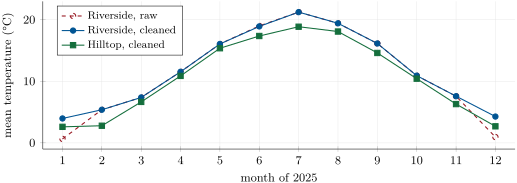
Method 7.9 (Cleaning a table)
- Count the records and compare with what is expected (one per station and per day).
- For each column, check every value against the domain; list the missing values and the impossible ones.
- Look for records that repeat a key that should be unique, such as (date, station).
- Decide, for each kind of defect, a rule: drop the record, keep it without that value, or correct it from another source, and write the rule down next to the result.
- Never change the original file: write the cleaned table to a new one, or clean while reading.
In practice — Data about people
The library tables are about people: who borrowed what, and when. A table that lets someone be identified, directly by a name or indirectly by a joined number, holds personal data, which data protection law lets an organisation keep only for a stated purpose, and for no longer than that purpose needs. A join is exactly how scattered harmless columns become a profile of a person.
Not every table is flat. A member has several loans, and a loan list inside a record does not fit in a CSV line.
Definition 7.10 (JSON)
JSON (JavaScript Object Notation, specified in its current form in 2017) is a text format for nested data: objects between braces, which map names to values, lists between square brackets, and numbers, strings, true, false and null. A value may itself be an object or a list. JSON exchanged between systems is written in UTF-8.
import json

from load_weather import read_table

loans = read_table("loans.csv")
member = {"member_id": 8, "loans": []}
for loan in loans:
    if loan["member_id"] == 8 and loan["out_date"] < "2025-04-01":
        member["loans"].append({"book": loan["book_id"], "out": loan["out_date"],
                                "back": loan["return_date"]})
text = json.dumps(member, indent=2)
print(text)
print(json.loads(text) == member)$ python to_json.py
{
"member_id": 8,
"loans": [
{
"book": 73,
"out": "2025-01-01",
"back": "2025-01-08"
},
{
"book": 54,
"out": "2025-02-15",
"back": "2025-03-23"
}
]
}
TrueNone is written null, and reading the text back gives the same dictionary.Python’s json.dumps turns dictionaries and lists into JSON text, and json.loads reads it back; web services exchange their data this way, as the next chapter shows.
7.6 Exercises
Exercise 7.1 ★
Change the condition of the selection listing to row["rain_mm"] >= 15 without the station test. Will the result have more or fewer records than before? Can it have fewer than ?
Solution
Solution of Exercise 7.1.
More, or as many: every record that passed both tests still passes the weaker one, so the Hilltop days stay, and Riverside’s rainy days join them. The result has records; it can never have fewer than .
Exercise 7.2 ★
What does sorted(["pear", "fig", "apple", "kiwi"], key=len) return? Why does "kiwi" stay after "pear"?
Solution
Solution of Exercise 7.2.
["fig", "pear", "kiwi", "apple"]: the keys are the lengths . "pear" and "kiwi" have the same key, , and the sort is stable, so they keep their order.
Exercise 7.3 ★
Write project(table, cols), which returns the table restricted to the columns of the list cols, in that order.
Solution
Solution of Exercise 7.3.
return [{c: row[c] for c in cols} for row in table] (exercises/table_tools.py): one new dictionary per record, built in the order of cols.
Exercise 7.4 ★
Table has records whose key values are ; table has records with keys . How many records does the join of and on the key have? Which keys never appear in it?
Solution
Solution of Exercise 7.4.
Key : pairs; key : ; key has no partner in , key none in . The join has records, and the keys and never appear in it.
Exercise 7.5 ★
A program reads the books with csv.DictReader and sorts them with key=lambda r: r["year"], without converting anything. Why does a book of year 10 come before one of year 9? Correct it. Why does the mistake not show on the town’s books, whose years all have four digits?
Solution
Solution of Exercise 7.5.
Without conversion the years are strings, and strings compare character by character: "1" comes before "9", so "10" comes before "9". The key must be int(r["year"]) (exercises/bugs.py). For strings of the same length made of digits, the order of the strings is the order of the numbers, which is why four-digit years hide the bug.
Exercise 7.6 ★★
Write group_count(table, col), which returns a dictionary from each value of the column to the number of records with that value. Use it to count the books of each genre.
Solution
Solution of Exercise 7.6.
Start from an empty dictionary and, for each record, do counts[v] = counts.get(v, 0) + 1 with v = row[col] (exercises/table_tools.py). On the books: science , adventure , history , comics , mystery and sport each, poetry and nature each: in all.
Exercise 7.7 ★★
A duplicate detector stores each line of a file in a set and reports a line already seen. The file holds 2025-06-14,Riverside,21.5 and, further on, the same record with a space after the first comma. Why is the duplicate missed? Correct the detector.
Solution
Solution of Exercise 7.7.
The two lines are different strings: one has a space that the other has not, so the set holds both. Compare records, not lines: split each line at the commas, strip the spaces around each cell, and store the tuple of cells (exercises/bugs.py).
Exercise 7.8 ★★
Records : (Ada, B), (Ben, A), (Cy, B), (Dee, A), (Eli, B). Give the result of a stable sort on the class; then of a stable sort on the name followed by a stable sort on the class.
Solution
Solution of Exercise 7.8.
By class: (Ben, A), (Dee, A), (Ada, B), (Cy, B), (Eli, B); within a class the records keep their first order. By name then by class: the names are already in order, so the first pass changes nothing and the result is the same, which is also the table sorted by (class, name).
Exercise 7.9 ★★
Write median_by(table, group, col), which returns the median of the column col for each value of group, skipping missing values. Compare the median and the mean temperature of the raw Riverside record: which is less disturbed by the error codes, and why?
Solution
Solution of Exercise 7.9.
Group the non-missing values in a dictionary of lists, then take the median of each list: sort it, and take the middle value, or the mean of the two middle values when the length is even (exercises/table_tools.py). On the raw Riverside record the median is , against once cleaned; the mean is , against . Two values of move the median by one position among , but they pull the mean by their whole size.
Exercise 7.10 ★★
How many comparisons does a nested-loop join of the loans with the books make, and how many steps does a join through a dictionary make? And for loans and books?
Solution
Solution of Exercise 7.10.
comparisons against steps. For loans and books: comparisons against steps.
Exercise 7.11 ★★
A program computes the mean temperature by skipping None values only. On Riverside it prints . Explain what is wrong, and correct the function so that it also skips a given list of error codes.
Solution
Solution of Exercise 7.11.
The two readings of are numbers, not None: they are counted as temperatures and pull the mean down. The corrected mean(values, error_codes=(-99.0,)) keeps only the values that are neither None nor an error code (exercises/bugs.py). With the duplicate removed as well, Riverside’s mean is .
Exercise 7.12 ★★★
Write left_join(left, right, key): like a join, but a record of left without any match is kept once, with None for the columns of right. Use it to find the members who borrowed nothing in 2025, and the books that were never lent. How many records does the left join of the members with the loans have?
Solution
Solution of Exercise 7.12.
Build a dictionary from each key to the list of right records with that key. For each left record, add one merged record per match, or, when there is none, the left record with None in every right column (exercises/table_tools.py). On the town’s tables nobody is left out: every member borrowed at least one book and every book was lent at least once, so the left join of the members with the loans has exactly the records of the ordinary join.
Exercise 7.13 ★★★
Prove that sorting a table stably by a key , then stably by a key , gives the table sorted by the pair . Take two records and with and show that ends before , in each of the two possible cases.
Solution
Solution of Exercise 7.13.
Case 1: . The second sort orders by , so it puts before , whatever came before. Case 2: and . After the first sort, is before , since that sort orders by . The second sort sees equal keys for and ; being stable, it keeps them in that order. In both cases ends before , so the final table is sorted by .
Exercise 7.14 ★★★
Write a consistency checker for the loans: every due date is days after its out date, and no book comes back before it went out. Use datetime.date.fromisoformat and timedelta. Run it on the town’s loans; then change one line of a copy and check that it is caught.
Solution
Solution of Exercise 7.14.
For each loan, turn the dates into date objects; report the loan if its due date is not out + timedelta(days=21), or if a return date exists and is before out (exercises/check_loans.py). On the town’s loans it finds no problem; on a loan returned the day before it went out, with a due date days later, it reports both rules.
Exercise 7.15 ★★★
Export all members with their list of loans as JSON, read the text back, and test that the result equals what was exported. Which Python values would not survive such a round trip?
Solution
Solution of Exercise 7.15.
json.dumps then json.loads gives back an equal list of dictionaries for the members and their loans (exercises/json_roundtrip.py). Values that do not survive: a tuple comes back as a list, a dictionary key that is a number comes back as a string, and sets, dates and bytes cannot be written at all without a conversion chosen by the program.
7.7 Problem: The Corrected Weather Record
Problem 7.1
Weekend problem — what the river station really measured in 2025
The program exercises/corrected_weather.py cleans the weather table and computes the year’s mean temperature and warmest month of each station. Use it and the listings of the chapter.
Part I — Loading and counting.
- How many records should the table hold for two stations over the year 2025? How many does it hold?
- How many records does each station have?
- Which descriptors does the header give, and what is the domain of each column?
- Which value does a blank temperature cell become after
read_table?
Part II — Finding the defects.
- List the defects that
clean_weather.pyfinds, by kind and by station. - Which consistency test reveals each kind of defect?
- Are the two records of 14 June at Riverside identical? What does that suggest about their origin?
- How many temperature values does each station have once missing values are left out?
Part III — Rules.
- For a missing temperature, would you drop the whole record or keep its rain and wind? Why?
- For a record with , why must the value not be replaced by ?
- For the duplicate, which record do you keep?
- Could a missing value be filled from the other station on the same day? What would that assume?
- How many records remain once the rules of the program are applied?
Part IV — The corrected record.
- Run the program. Give the raw and the corrected mean temperature of each station.
- Why does the Hilltop mean not change?
- What would the Riverside mean be with only the duplicate removed, the codes still in? Compare with the corrected one.
- Check the size of the codes’ effect by hand: two values of added to good values whose mean is , making .
- Which month is the warmest at each station, and by how much is the river warmer than the hill then?
- State the result: the corrected 2025 mean temperature at Riverside, the number of days it rests on, and the error that the error codes would have caused.
Solution
Solution of Problem 7.1.
1. records are expected; the table holds .
2. Hilltop and Riverside .
3. date: the days of 2025; station: Hilltop or Riverside; temp_c: temperatures, say from to °C; rain_mm and wind_kmh: numbers or more.
4. None.
5. Six missing temperatures, three at each station; two error codes, both at Riverside (29 January and 18 December); one duplicate, Riverside on 14 June.
6. Missing values: the test that a value is present. Error codes: the domain of the temperature column. Duplicate: the pair (date, station) must be unique.
7. Yes, every field is equal. It is most likely one reading saved twice, not two measurements.
8. Hilltop and Riverside , the duplicate and the codes still included.
9. For the temperature mean, the record is left out; the rain and wind were measured and stay usable for their own statistics. The program, which computes only temperatures, simply drops the record.
10. °C is a possible temperature: the mean would be wrong without any sign of it. The code means that nothing was measured; it is a missing value.
11. The two are identical, so either; the program keeps the first one met.
12. It would assume that the two stations measure the same, or differ by a known amount; they differ by more than a degree on average. Any filled value should be marked as estimated; here, leaving it missing is simpler and honest.
13. .
14. Hilltop: °C raw and corrected. Riverside: raw, corrected.
15. Hilltop’s only defects are missing values, which the raw mean already skips; it has no code and no duplicate.
16. , which is below the corrected value: almost all the error comes from the codes; the duplicate summer day raised the raw mean by about .
17. The good values add up to about . With the two codes: . Each code sits about degrees below the mean, and there are two among : .
18. July at both: °C at Hilltop and °C at Riverside, degrees warmer by the river.
19. The corrected 2025 mean temperature at Riverside is °C, over days; the two error codes would have lowered it to °C, an error of degree, and the raw file with its duplicate gives °C.