এই বইটি এখনো বাংলা ভাষায় পাওয়া যায় না। সংস্করণ: English।
High School Computer Science · শ্রেণি 10–12
13The von Neumann Machine and Assembly Language
In a computer’s memory, the instruction “add register to register ” and the number followed by the number are the same two bytes. The processor cannot tell them apart; it reads whatever its program counter points at, and runs it as an instruction. This single idea, program and data in the same memory, is what makes a computer able to load a new program as easily as new data, and it is also why a wrong write can turn data into code.
This chapter takes the toy machine of Book 1 seriously: its whole instruction set, programs with jumps and loops, the stack and subroutines, and the step from a line of Python down to the machine’s instructions.
You already know
A processor repeats the same cycle: fetch the instruction at the address in the program counter, decode it, execute it. Its registers are a few fast cells inside it; machine language is the numbers that encode its instructions; a chip may hold several cores, each running its own program (Book 1, grade 7). An adder, a multiplexer and a register of flip-flops are built from gates (the previous chapter).
13.1 Processor, memory, buses
Definition 13.1 (von Neumann architecture)
A computer has a von Neumann architecture when it is made of a processor (a control unit, an ALU and registers), one memory that holds both the program and its data, and input and output devices, and when the processor runs the program by fetching its instructions from that memory one after the other.
Definition 13.2 (Bus)
A bus is a set of wires shared by several components to carry one kind of signal. The address bus carries the number of the memory cell or device being accessed, the data bus the value read or written, and the control bus the signals that say what to do and when, such as “read” or “write”.
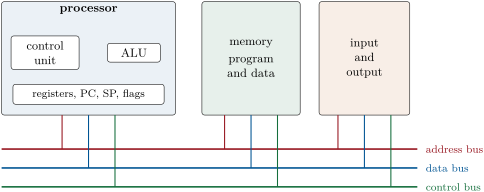
Each fetch, each LOAD and each STORE is a trip over the buses: the processor puts an address on the address bus and “read” on the control bus, and the memory answers on the data bus. A machine with several processors, or several cores, has them share the memory in the same way, each running its own instructions.
History — A report and a baby
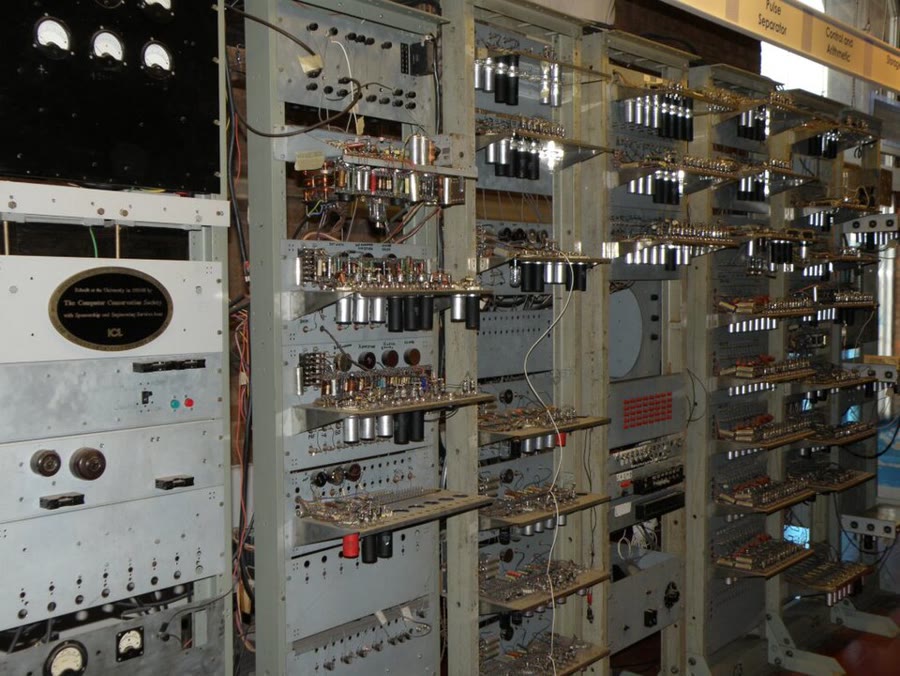
In 1945, the mathematician John von Neumann circulated a First Draft of a Report on the EDVAC, which described a computer keeping its program in the same electronic memory as its data, instead of on plugboards or punched tape.
The first machine to run such a stored program was built in Manchester, England, by Freddie Williams, Tom Kilburn and Geoff Tootill: nicknamed the Baby, it ran its first program, instructions written by Kilburn to find the largest factor of a number, on 21 June 1948.
13.2 The toy machine in full
Book 1 traced small programs of the toy machine by hand. Its full description is short: cells of one byte, four registers R0 to R3, a program counter PC, a stack pointer SP, and the three flags of the previous chapter. Arithmetic wraps modulo .
Definition 13.3 (Instruction set)
The instruction set of a processor is the list of the instructions it can execute, with their encoding in bytes and their exact effect on registers, flags and memory.
The toy machine has instructions. Each takes two bytes: the first holds a -bit operation code and a -bit register number, the second an operand: a number, an address, or a second register.
| 0 | HALT | 10 | NOT r | 20 | OUT r |
| 1 | LOADI r, n | 11 | SHL r | 21 | LOADR r, s |
| 2 | LOAD r, [a] | 12 | SHR r | 22 | STORER r, s |
| 3 | STORE r, [a] | 13 | CMP r, s | 23 | PUSH r |
| 4 | ADD r, s | 14 | JMP a | 24 | POP r |
| 5 | SUB r, s | 15 | JZ a | 25 | CALL a |
| 6 | ADDI r, n | 16 | JNZ a | 26 | RET |
| 7 | AND r, s | 17 | JN a | 27 | NOP |
| 8 | OR r, s | 18 | JC a | ||
| 9 | XOR r, s | 19 | IN r |
LOADI puts a number in a register, LOAD and STORE move a byte between a register and a cell, and LOADR and STORER do the same with the address in a register. The arithmetic and logic instructions, and CMP, which subtracts without keeping the result, set the flags , and .

ADD R1, R2: the bytes and .The step of the machine refines the cycle of Book 1: fetch the two bytes at PC and PC + 1, add to PC, decode, execute. A jump writes a new address into PC after that increment, so the next fetch happens there.
13.3 Assembly programs with jumps
Definition 13.4 (Assembly language, assembler, label)
An assembly language writes a machine’s instructions with names instead of numbers, one instruction per line. A label is a name given to the address of a line, so that other instructions can refer to it. An assembler is the program that translates assembly language into machine code, replacing every name and every label by its number.
Definition 13.5 (Jump, conditional jump)
A jump writes an address into the program counter, so that execution goes on there. A conditional jump does so only if a flag has a given value (JZ if , JNZ if , JN if , JC if ), and otherwise lets execution go on to the next instruction.
Conditions and loops are built from these. CMP R0, R1 computes and sets when it needs a borrow, that is when for numbers without sign: JC after a CMP means “jump if smaller”.
; max2.toy -- reads two numbers, prints the larger
        IN    R0
        IN    R1
        CMP   R0, R1      ; R0 - R1: C = 1 when R0 < R1
        JC    second
        OUT   R0
        HALT
second: OUT   R1
HALT$ python -m toymachine run max2.toy
201max2.stdin.A loop is a jump backwards. The option --trace prints a row before each step: the step number, PC, the instruction, the four registers and the three flags.
; count_down.toy -- prints 3, 2, 1
; capture: args=--trace
        LOADI R0, 3
        LOADI R1, 1
loop:   OUT   R0
        SUB   R0, R1      ; sets Z when R0 reaches 0
        JNZ   loop
HALT$ python -m toymachine run count_down.toy --trace
step PC instruction R0 R1 R2 R3 Z N C
1 0 LOADI R0, 3 0 0 0 0 0 0 0
2 2 LOADI R1, 1 3 0 0 0 0 0 0
3 4 OUT R0 3 1 0 0 0 0 0
3
4 6 SUB R0, R1 3 1 0 0 0 0 0
5 8 JNZ 4 2 1 0 0 0 0 0
6 4 OUT R0 2 1 0 0 0 0 0
2
7 6 SUB R0, R1 2 1 0 0 0 0 0
8 8 JNZ 4 1 1 0 0 0 0 0
9 4 OUT R0 1 1 0 0 0 0 0
1
10 6 SUB R0, R1 1 1 0 0 0 0 0
11 8 JNZ 4 0 1 0 0 1 0 0
12 10 HALT 0 1 0 0 1 0 0
halted after 12 stepsJNZ 4 jumps back to address until the subtraction reaches (step , ).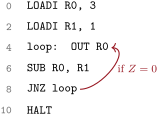
loop is the number ; the assembler writes JNZ 4. When , execution goes on to the next line, HALT.The data of a program can sit in memory right after its code: DATA places bytes there, and a label gives their address. With an address in a register, LOADR reads a cell chosen at run time, which is how a loop walks through an array.
; sum_array.toy -- adds the numbers of an array stored after the program
        LOADI R0, 0         ; the total
        LOADI R1, array     ; address of the next number
        LOAD  R2, [length]  ; how many are left
loop:   LOADR R3, R1        ; R3 = M[R1]
        ADD   R0, R3
        ADDI  R1, 1
        ADDI  R2, -1        ; Z when none is left
        JNZ   loop
        OUT   R0
        HALT
length: DATA  6
array:  DATA  12, 7, 30
DATA 1, 25, 9$ python -m toymachine run sum_array.toy
84The assembler shows what the program becomes: for each line, its address, its two bytes in decimal and in binary, and the source.
$ python -m toymachine asm sum_array.toy
  0:   4   0  00000100 00000000  LOADI R0, 0         ; the total
  2:   5  21  00000101 00010101  LOADI R1, array     ; address of the next number
  4:  10  20  00001010 00010100  LOAD  R2, [length]  ; how many are left
  6:  87   1  01010111 00000001  loop:   LOADR R3, R1        ; R3 = M[R1]
  8:  16   3  00010000 00000011  ADD   R0, R3
 10:  25   1  00011001 00000001  ADDI  R1, 1
 12:  26 255  00011010 11111111  ADDI  R2, -1        ; Z when none is left
 14:  64   6  01000000 00000110  JNZ   loop
 16:  80   0  01010000 00000000  OUT   R0
 18:   0   0  00000000 00000000  HALT
 20:   6      00000110           length: DATA  6
 21:  12   7  30 00001100 00000111 00011110  array:  DATA  12, 7, 30
24: 1 25 9 00000001 00011001 00001001 DATA 1, 25, 9sum_array.toy. The label array became and loop became ; the DATA lines take one byte per number.
sum_array.toy: ten instructions in cells to , the data in to . A program that uses the stack fills it from cell down, towards the code.Negative numbers are stored in two’s complement; IN reads as . The flag tells a negative result, and JN acts on it.
; abs_value.toy -- reads a number from -128 to 127, prints its absolute value
        IN    R0
        ADDI  R0, 0         ; adds nothing, but sets N from bit 7
        JN    negative
        OUT   R0
        HALT
negative:
        NOT   R0            ; two's complement: flip every bit...
        ADDI  R0, 1         ; ...and add 1
        OUT   R0
HALTNOT and ADDI 1 negate a number. code/grade-11/02-von-neumann-machine/listings/abs_value.toy$ python -m toymachine run abs_value.toy
42The toy machine has no multiplication. A loop adds to a total times; the weekend problem measures its cost and finds a much faster way.
; multiply.toy -- reads a and b, prints a * b by adding a, b times
        IN    R0            ; a
        IN    R1            ; b, the number of additions left
        LOADI R2, 0         ; the product
        LOADI R3, 1
        ADDI  R1, 0         ; sets Z if b is 0
        JZ    done
loop:   ADD   R2, R0
        SUB   R1, R3
        JNZ   loop
done:   OUT   R2
HALT$ python -m toymachine run multiply.toy
143multiply.stdin.13.4 Subroutines and the stack
A piece of code used in several places is written once, as a subroutine, and called. The difficulty is to come back: the subroutine must know where it was called from.
Definition 13.6 (Subroutine, stack pointer)
A subroutine is a sequence of instructions that is entered by CALL and left by RET. The stack pointer SP holds the address of the top of a zone of memory, the stack, used last in, first out: PUSH r lowers SP by one and stores r there, POP r reads it back and raises SP. CALL a pushes the address of the next instruction and jumps to a; RET pops an address into PC.
The stack starts at the top of memory: SP is at the start, so the first PUSH writes cell . A subroutine that uses a register the caller needs saves it with PUSH and gives it back with POP before returning.
; call_square.toy -- a subroutine that squares R0 into R1
; capture: args=--trace
        LOADI R0, 3
        CALL  square        ; pushes the return address 4, jumps
        OUT   R1
        HALT
square: PUSH  R2            ; keep the caller's R2
        LOADI R1, 0
        LOADI R2, 0
        ADD   R2, R0        ; R2 = R0 additions to do
again:  ADD   R1, R0
        ADDI  R2, -1
        JNZ   again
        POP   R2            ; give R2 back
RET ; pops 4 into PCR0, and keeps the caller’s R2. code/grade-11/02-von-neumann-machine/listings/call_square.toy$ python -m toymachine run call_square.toy --trace
step PC instruction R0 R1 R2 R3 Z N C
1 0 LOADI R0, 3 0 0 0 0 0 0 0
2 2 CALL 8 3 0 0 0 0 0 0
3 8 PUSH R2 3 0 0 0 0 0 0
4 10 LOADI R1, 0 3 0 0 0 0 0 0
5 12 LOADI R2, 0 3 0 0 0 0 0 0
6 14 ADD R2, R0 3 0 0 0 0 0 0
7 16 ADD R1, R0 3 0 3 0 0 0 0
8 18 ADDI R2, 255 3 3 3 0 0 0 0
9 20 JNZ 16 3 3 2 0 0 0 1
10 16 ADD R1, R0 3 3 2 0 0 0 1
11 18 ADDI R2, 255 3 6 2 0 0 0 0
12 20 JNZ 16 3 6 1 0 0 0 1
13 16 ADD R1, R0 3 6 1 0 0 0 1
14 18 ADDI R2, 255 3 9 1 0 0 0 0
15 20 JNZ 16 3 9 0 0 1 0 1
16 22 POP R2 3 9 0 0 1 0 1
17 24 RET 3 9 0 0 1 0 1
18 4 OUT R1 3 9 0 0 1 0 1
9
19 6 HALT 3 9 0 0 1 0 1
halted after 19 stepsCALL; step pops it, and the program goes on at OUT R1.During the call, cell holds the return address and cell the saved R2. POP R2 takes back the last value pushed, the saved register, which leaves the return address on top for RET. Every PUSH needs its POP before the RET; a missing one makes RET jump to whatever value is on top. The stack and its uses are a chapter of their own in grade 12.
Since program and data share the memory, nothing stops a program from writing over its own instructions. Here a number meant as data lands on the code:
; self_modify.toy -- a number written over an instruction
; capture: args=--trace
        LOADI R0, 80        ; just a number...
        STORE R0, [stop]    ; ...stored at an address that holds code
        LOADI R1, 7
stop:   HALT                ; the byte 80 is 4 x 20 + 0: OUT R0
HALT$ python -m toymachine run self_modify.toy --trace
step PC instruction R0 R1 R2 R3 Z N C
1 0 LOADI R0, 80 0 0 0 0 0 0 0
2 2 STORE R0, [6] 80 0 0 0 0 0 0
3 4 LOADI R1, 7 80 0 0 0 0 0 0
4 6 OUT R0 80 7 0 0 0 0 0
80
5 8 HALT 80 7 0 0 0 0 0
halted after 5 stepsHALT at address has become OUT R0: the machine runs the number as an instruction.Safe use
A program that writes outside its data can change what the machine does next. Attacks on real software have used this for decades: send more data than a buffer holds, let it overwrite code or a return address on the stack, and the processor runs the attacker’s bytes. Modern systems mark memory pages as either writable or executable, never both, to stop it.
13.5 From a line of Python to the machine
A compiler translates an if or a while into tests and jumps, as this chapter did by hand. The loop while n > 0: n = n - 1 becomes: a label; a comparison of n with ; a conditional jump past the loop when the condition is false; the body; and a jump back to the label.
Python itself does not run on the processor directly. It first translates a function into the instructions of another machine, simple enough to be run by a program: its bytecode. The module dis shows them.
import dis


def count_down(n):
    while n > 0:
        n = n - 1
    return n


dis.dis(count_down)$ python py_dis.py
4 0 RESUME 0
5 2 LOAD_FAST 0 (n)
4 LOAD_CONST 1 (0)
6 COMPARE_OP 68 (>)
10 POP_JUMP_IF_FALSE 11 (to 34)
6 >> 12 LOAD_FAST 0 (n)
14 LOAD_CONST 2 (1)
16 BINARY_OP 10 (-)
20 STORE_FAST 0 (n)
5 22 LOAD_FAST 0 (n)
24 LOAD_CONST 1 (0)
26 COMPARE_OP 68 (>)
30 POP_JUMP_IF_FALSE 1 (to 34)
32 JUMP_BACKWARD 11 (to 12)
7 >> 34 LOAD_FAST 0 (n)
36 RETURN_VALUEcount_down: the left column is the line of the source, the next the address of the instruction.The shape is the toy machine’s: loads, a comparison, POP_JUMP_IF_FALSE out of the loop, the body, a jump back. One difference: Python copies the test to the bottom of the loop (addresses to ), and its jump back goes to the body, at , not to the first test; the first test runs only once, before the first turn. Bytecode is an internal detail of Python, which changes from one version to the next; this output comes from Python 3.12.
Definition 13.7 (System on a chip)
A system on a chip is a single chip that gathers what used to be separate components: processor cores, memory caches, a graphics processor, a memory controller, radios, controllers for the devices, and the management of power.
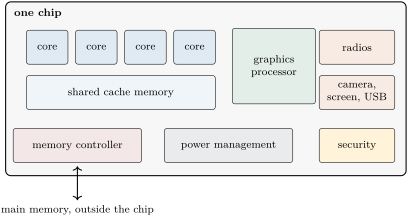
Gathering the components on one chip shortens the wires between them: signals travel faster, and moving data costs less energy, which matters for a battery. The price is that nothing can be changed or added afterwards.
13.6 Exercises
Exercise 13.1 ★
What does this program print?
LOADI R0, 6 LOADI R1, 9 SUB R1, R0 OUT R1 HALT
Solution
Solution of Exercise 13.1.
R1 becomes , and the program prints 3.
Exercise 13.2 ★
Encode ADD R1, R2 and JNZ 6 in two bytes each, in decimal and in binary.
Solution
Solution of Exercise 13.2.
ADD R1, R2: operation code , , so , then : 00010001 00000010. JNZ 6: operation code , , so , then : 01000000 00000110.
Exercise 13.3 ★
Decode the bytes and then .
Solution
Solution of Exercise 13.3.
: operation , CMP, with and : CMP R0, R3. : JZ, to the address : JZ 18.
Exercise 13.4 ★
R0 holds and R1 holds . Give the result and the flags , , after SUB R0, R1, then after SUB R1, R0.
Solution
Solution of Exercise 13.4.
wraps to : , (bit 7 is , the result read with sign is ), (a borrow). Starting again from and , SUB R1, R0 gives : , , .
Exercise 13.5 ★
Write max3.toy, which reads three numbers and prints the largest.
Solution
Solution of Exercise 13.5.
Keep the largest in R0; read the next number into R1, CMP R0, R1, and when JC shows R0 smaller, copy R1 into R0 (LOADI R0, 0 then ADD R0, R1, since there is no move instruction). The file exercises/max3.toy does it; the tests run it on random triples.
Exercise 13.6 ★★
A student changes count_down.toy to start at and subtract , to print , , , . What happens? Fix it with one more instruction.
Solution
Solution of Exercise 13.6.
It prints , , , , then wraps to , and the odd numbers , , … follow: the counter never reaches , so JNZ always jumps, until the machine stops the program after steps. The fix is JC done right after the SUB: the subtraction borrows exactly when the counter was smaller than (exercises/count_by_two_fixed.toy).
Exercise 13.7 ★★
Write max_array.toy, which prints the largest number of an array stored with its length after the program.
Solution
Solution of Exercise 13.7.
As sum_array.toy, but with CMP R0, R3 and JC to a block that copies R3 into R0 before going on (exercises/max_array.toy). On the array it prints .
Exercise 13.8 ★★
The program sum.toy of Book 1 reads , sets a total to and a register to , then repeats ADD R1, R0, SUB R0, R2, JNZ loop, and finally prints and halts. How many steps does it execute for an input ? What happens for ?
Solution
Solution of Exercise 13.8.
Three steps before the loop, three per turn, and OUT and HALT: . For , the first SUB gives and : the loop runs times, adding , which modulo is . The program prints after steps. The tests check for , , .
Exercise 13.9 ★★
In the trace of call_square.toy, give the value of SP and the contents of cells and after steps , , and .
Solution
Solution of Exercise 13.9.
After step (CALL): SP , cell holds . After step (PUSH R2): SP , cell holds , the caller’s R2. After step (POP R2): SP ; cell still holds , since popping does not erase. After step (RET): SP , which wraps to ; cell still holds .
Exercise 13.10 ★★
In a copy of the subroutine, the line POP R2 has been removed, and the caller had put in R2. What does RET do, and what does the program print?
Solution
Solution of Exercise 13.10.
On top of the stack is the pushed by PUSH R2, not the return address: RET pops it and jumps to address . That cell is empty, and two bytes are HALT: the program stops there and prints nothing (exercises/bad_return.toy; the tests check it). With other values in R2, it could have run anything.
Exercise 13.11 ★★
Write times_ten.toy, which reads and prints (modulo ) with three shifts and additions, writing as (the machine has no copy instruction: copying a register takes a LOADI of and an addition).
Solution
Solution of Exercise 13.11.
SHL R0 gives , which is copied into R1; two more SHL R0 give , and ADD R0, R1 gives (exercises/times_ten.toy). All modulo : for , .
Exercise 13.12 ★★★
Prove that shift_multiply.toy, from the weekend problem, executes exactly steps, where is the number of bits of ( for ). Deduce a bound that holds for every input.
Solution
Solution of Exercise 13.12.
Before the loop: IN, IN, LOADI, steps. Each turn with a bit runs ADDI, JZ, SHR, JC (taken), ADD, SHL, JMP; with a bit , ADDI, JZ, SHR, JC (not taken), JMP next, SHL, JMP: steps either way. Each turn shifts R1 right by one, so after turns it is ; then ADDI, JZ, OUT, HALT: steps. In all . Since for an -bit number, no input takes more than steps.
Exercise 13.13 ★★★
Write divide.toy, which reads and and prints the quotient and the remainder of by , by repeated subtraction.
Solution
Solution of Exercise 13.13.
While (CMP R0, R1 then JC done), subtract from and add to the quotient; then print the quotient and what is left of , the remainder (exercises/divide.toy; the tests compare it with // and % on pairs).
Exercise 13.14 ★★★
A program needs cells of data, and calls subroutines nested at most deep, each of which pushes at most registers. How many instructions can its code have at most, so that the stack never reaches the code or the data? Apply it to , , .
Solution
Solution of Exercise 13.14.
instructions take cells from address , then come the data cells. Each level of call pushes a return address and at most registers: the stack holds at most cells, from down. Nothing overlaps if . For , , : , so at most instructions.
Exercise 13.15 ★★★
Translate into toy assembly, and test on several inputs:
while a != b: if a > b: a = a - b else: b = b - a
which leaves in a the greatest common divisor of two numbers ; the program reads and and prints the result.
Solution
Solution of Exercise 13.15.
After reading into R0 and into R1: CMP R0, R1; JZ done when they are equal; JC to a block that does SUB R1, R0 when ; otherwise SUB R0, R1; both jump back to the comparison; done prints R0 (exercises/gcd.toy). The tests compare it with math.gcd on pairs.
13.7 Problem: Multiplication on a Machine That Cannot
Problem 13.1
Weekend problem — two ways to multiply, and their cost
The toy machine has no instruction to multiply. The program multiply.toy adds to a total times. The program below uses the binary digits of instead: is the sum of over the bits of that are , and is shifted left times.
; shift_multiply.toy -- a * b by shifts and additions, one bit of b at a time
        IN    R0            ; a, doubled at each bit
        IN    R1            ; b, halved at each bit
        LOADI R2, 0         ; the product
loop:   ADDI  R1, 0         ; Z when no bit of b is left
        JZ    done
        SHR   R1            ; the lowest bit of b goes into C
        JC    add
        JMP   next
add:    ADD   R2, R0        ; this bit is 1: add a times its weight
next:   SHL   R0
        JMP   loop
done:   OUT   R2
HALT"""Problem: the steps of both multiplications, for every b from 0 to 255."""
from pathlib import Path
from toymachine import Machine, assemble
HERE = Path(__file__).parent
def steps(program, a, b):
m = Machine(program, inputs=[a, b])
m.run()
assert m.outputs == [a * b % 256]
return m.steps
repeated = assemble((HERE / "multiply.toy").read_text())
shifting = assemble((HERE / "shift_multiply.toy").read_text())
for name, program in (("repeated addition", repeated), ("shift and add", shifting)):
counts = [steps(program, 13, b) for b in range(256)]
worst = max(counts)
mean = sum(counts) / 256
print(f"{name:17}: b = 0 -> {counts[0]:3} steps, b = 1 -> {counts[1]:3},"
f" worst {worst} (first at b = {counts.index(worst)}), mean {mean:.1f}")$ python step_counts.py
repeated addition: b = 0 -> 8 steps, b = 1 -> 11, worst 773 (first at b = 255), mean 390.5
shift and add : b = 0 -> 7 steps, b = 1 -> 14, worst 63 (first at b = 128), mean 56.0Part I — Repeated addition.
- Count the steps of
multiply.toyfor , line by line. - Show that for it takes steps. Check and against the output.
- Does the number of steps depend on ?
- Compute the mean over the values of , and compare with the output.
Part II — Shift and add.
- Run
shift_multiply.toyby hand for , : giveR0,R1,R2at each passage throughloop. - Why does
SHR R1followed byJCtest the lowest bit of ? - What does
SHL R0compute, and why must it run at every turn, whether the bit was or ? - Show that the loop turns once per bit of , up to its highest .
- What happens to the product when it does not fit in bits?
Part III — Counting all the cases.
- Count the steps of one turn of the loop when the bit is , and when it is .
- Deduce that the program takes steps, where is the number of bits of . Check and .
- For how many values of is ? Explain why the worst case is first reached at .
- Compute the mean number of steps from the number of values of having each , and compare with .
- In
step_counts.py, what does theassertinstepscheck, and why is% 256needed?
Part IV — The worst cases.
- Give the worst case of each method, and their ratio.
- For which values of is repeated addition faster? Faster by how much at most?
- A program combines both: repeated addition for small , shift and add otherwise. Where should it switch?
- On a machine with -bit registers, what would the worst cases become?
- Real processors have a multiplication instruction, built as a circuit. Which idea of this problem does such a circuit use, and what does it do at once that the program does one turn at a time?
- State the result: the worst-case steps of both methods over all -bit values of , and the formula for shift and add.
Solution
Solution of Problem 13.1.
1. IN, IN, LOADI, LOADI, ADDI, JZ (taken), OUT, HALT: steps.
2. The same steps before the loop, per turn for turns, then OUT and HALT: . For , ; for , , as printed.
3. No: R0 is only added, never tested.
4. , as printed.
5. At loop: , then , , , ; the last test finds , and the program prints .
6. SHR moves every bit one place right, and the bit that falls out, the lowest, goes into ; JC jumps exactly when it was .
7. : after turns R0 holds , the value of bit of . It must double at every turn so that it matches the weight of the next bit, which the next turn tests, whatever this one was.
8. Each turn halves R1, dropping its lowest bit; it becomes once every bit up to the highest has been dropped, after turns.
9. ADD and SHL wrap modulo , so the program prints , the low byte of the product.
10. in both cases (the list is in the solution of exercise 12): taking JC to add costs the ADD, not taking it costs a JMP next.
11. steps before, per turn, at the end: . For , and steps; for , and ; as printed.
12. for from to : values. is the smallest of them, so the worst case, , appears first there.
13. One value has , and values have each from to . The mean is
printed .
14. That the machine printed exactly one number, the product modulo : the machine’s arithmetic wraps while Python’s does not.
15. and steps: repeated addition is about times slower in the worst case.
16. For from to , and ; at both take . The largest saving is steps, at ( against ).
17. Below , but the test that chooses costs a CMP and a jump, steps, which eats most of a saving of at most : it is not worth it.
18. Repeated addition: steps; shift and add: .
19. The same idea, shifted copies of for the bits of that are , added up. The circuit makes all the shifted copies at once with AND gates and adds them with a tree of adders, in a few levels of gates instead of one turn per bit.
20. Over all -bit values of , multiplication by repeated addition takes up to steps (), and by shift and add at most (, where is the number of bits of ): about times fewer in the worst case, and against steps on average.