Buku ini belum tersedia dalam Bahasa Indonesia. Edisi: English.
High School Computer Science · Kelas 10–12
14Operating Systems and the Command Line
Two programs want to print at the same moment; two others want to write the same file; a third would like to read a file that belongs to someone else. None of them may decide alone. A program that runs underneath all the others, and that alone may touch the hardware, decides for them: the kernel of the operating system.
This chapter looks at what that kernel does, then works with it the way programmers do every day, by typing commands: moving through the tree of files, copying and removing, setting who may read what, and joining small commands into pipelines that answer questions about the town’s data.
You already know
A program is a list of instructions run by the computer; the operating system is the program that starts the others and shares the machine between them (Book 1, grade 4). Files are kept in folders, folders in other folders, and a path names a file by the folders that lead to it (Book 1, grade 3). A text file holds characters only, line by line (Book 1, grade 8).
14.1 What the kernel does
Definition 14.1 (Kernel, system call)
The kernel is the part of the operating system that runs with full control of the hardware. It shares the processor between the running programs, gives each its own memory, keeps the files, drives the devices, and checks who may do what. A program asks the kernel for a service through a system call, such as opening a file, reading from it, or starting another program.
A program never drives the disk or the printer itself. When Python runs open("loans.csv"), it ends in a system call; the kernel checks that the file exists and that this user may read it, and only then hands back a number by which the program will refer to the open file. Two programs that print at once get their pages one after the other, because both go through the kernel, which keeps a queue.
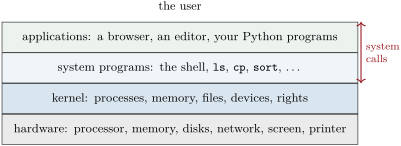
The operating system is the kernel and the system programs around it. Some are free software, some are not.
Definition 14.2 (Free software)
A program is free software when its licence gives every user the freedom to share it, to study how it works, and to modify it, which requires access to its source code. A proprietary program’s licence withholds some of these freedoms.
A related term, open source, comes with its own definition, a list of ten criteria starting with free redistribution and access to the source code; in practice most licences meet both definitions.
Facts as of 2026
The operating systems in common use form a few families. The Linux kernel, free software, runs most servers and, modified, Android phones, whose kernel is based on a long-term-supported Linux kernel. Apple’s systems run its computers and phones. Microsoft’s Windows runs many personal computers. They differ in many details, but the commands of this chapter work on Linux and on Apple’s computers, and on Windows inside a Linux environment.
14.2 The file-system tree
Definition 14.3 (File-system tree, root directory)
The file-system tree is the arrangement of all the directories (folders) and files of a system: each directory may contain files and other directories, and all of them are inside one directory, the root directory, written /.
Definition 14.4 (Absolute path, relative path, working directory)
An absolute path names a file from the root, starting with /, such as /home/ada/library/books/books.csv. Each running program has a working directory, and a relative path, which does not start with /, names a file from there. In a path, . is the directory itself and .. its parent.
The shell is the program that reads commands and runs them. The sessions of this chapter are captured from a real shell: each line after $ is a command, and the lines below it are what it printed. They run in a fresh directory, shown as ~/session, where ~ is the user’s home directory.
$ mkdir library
$ cd library
$ pwd
~/session/library
$ mkdir books members notes
$ ls
books
members
notes
$ cd books
$ pwd
~/session/library/books
$ cd ..
$ touch .settings
$ ls
books
members
notes
$ ls -a
.
..
.settings
books
members
notesls prints one name per line; at a terminal it uses columns.mkdir makes a directory, cd changes the working directory, pwd prints it. A name starting with a dot is hidden: ls leaves it out, ls -a shows it, along with . and ... Settings files are hidden this way, so that they do not clutter the listing.
$ mkdir -p library/books library/members
$ mv books.csv library/books/
$ cd library/members
$ ls ../books
books.csv
$ head -3 ../books/books.csv
book_id,title,author,year,genre,pages
1,The Silent Code,Fatou Dalewell,2002,mystery,65
2,The Paper Forest,Zoe Stoneton,1996,sport,133
$ realpath ../books/books.csv
~/session/library/books/books.csv
$ cd ../../library/./books
$ pwd
~/session/library/books.., and the absolute path that realpath computes.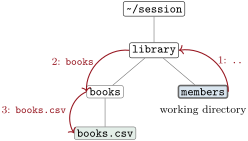
members, the relative path ../books/books.csv takes three steps: up to library, down into books, then to the file.14.3 The shell
Definition 14.5 (Shell, command, option)
A shell is a program that reads command lines and runs them. A command line is a program’s name followed by its arguments, separated by spaces. An argument that starts with - is an option: it changes how the command works, such as -a for ls.
$ mkdir backup
$ cp books.csv backup/books-copy.csv
$ ls backup
books-copy.csv
$ mv backup/books-copy.csv backup/old-books.csv
$ ls backup
old-books.csv
$ rm backup/old-books.csv
$ ls backup
$ rmdir backup
$ ls
books.csvcp copies, mv moves or renames, rm removes a file, rmdir an empty directory.Safe use
rm does not move a file to a bin: the file is gone, and there is no command to bring it back. rm -r removes a directory with everything inside it. Before removing, list what will go with ls, never remove with a pattern you have not checked, and keep copies of what matters somewhere else.
Every command describes itself. --help prints a short summary, and man followed by the command’s name shows its full manual.
$ ls --help | head -4
Usage: ls [OPTION]... [FILE]...
List information about the FILEs (the current directory by default).
Sort entries alphabetically if none of -cftuvSUX nor --sort is specified.
ls’s own summary, cut by head, which keeps the first lines.14.4 Users, rights and permissions
Definition 14.6 (User, group, permission)
Each person or service on a system is a user, with a name and a number, and belongs to one or more groups. Each file has an owner and a group, and nine permission bits: read, write and execute, for the owner, for the members of the group, and for all the others. For a directory, read lets one list it, write lets one create or remove names in it, and execute lets one enter it and reach what is inside.
The kernel checks the bits of one class only: the owner’s if the user owns the file, otherwise the group’s if the user is in the file’s group, otherwise the others’. ls -l prints them as ten characters: the type (d for a directory, - for a file), then r, w, x or - for each class.
$ mkdir notes
$ echo "top secret" > notes/secret.txt
$ ls -l
total 12
-rw-r--r-- 1 ada ada 4119 Jan  5  2026 books.csv
drwxr-xr-x 2 ada ada 4096 Jan  5  2026 notes
$ chmod 640 books.csv
$ chmod u-r notes/secret.txt
$ ls -l books.csv notes/secret.txt
-rw-r----- 1 ada ada 4119 Jan  5  2026 books.csv
--w-r--r-- 1 ada ada   11 Jan  5  2026 notes/secret.txt
$ cat notes/secret.txt
cat: notes/secret.txt: Permission denied
$ chmod u+r notes/secret.txt
$ cat notes/secret.txt
top secretchmod changes the bits. Once its owner has no r, even the owner cannot read the file, until the bit comes back.chmod takes the bits either as letters, u, g, o for the classes, + or - and the rights, or as a number in octal: one digit per class, the sum of for read, for write and for execute.

-rw-r----- of books.csv after chmod 640: the owner reads and writes, the group reads, the others have nothing.In practice — The administrator
Every system has an administrator account, called root on Linux, for which the kernel skips the permission checks. A program run as the administrator can read, change or remove any file; a bug in it, or an attacker who takes it over, can too. Programs run as an ordinary user, with the fewest rights that let them work, and the administrator account is used only for the tasks that need it.
14.5 Redirection and pipes
Definition 14.7 (Standard input and output, redirection, pipe)
Each program starts with a standard input, where it reads, and a standard output, where it writes; at a terminal they are the keyboard and the screen. A redirection connects them to a file instead: > f writes the output into f, emptying it first, >> f adds at the end of f, and < f reads the input from f. A pipe, a | b, connects the standard output of a to the standard input of b.
$ echo "first line" > log.txt
$ echo "second line" >> log.txt
$ cat log.txt
first line
second line
$ echo "a new start" > log.txt
$ cat log.txt
a new start
$ wc -l < books.csv
81
$ head -1 books.csv > header.txt
$ cat header.txt
book_id,title,author,year,genre,pages> replaces, >> adds. The town’s books.csv has lines, a header and books.Small commands, each doing one thing, join into pipelines. cut -d, -f3 keeps the third field of each line, fields being separated by commas; tail -n +2 drops the first line; sort sorts the lines; uniq -c counts each run of equal lines, which must be adjacent, hence the sort before it; sort -n sorts by numerical value; grep -c counts the lines that match a pattern.
$ head -3 loans.csv
loan_id,book_id,member_id,out_date,due_date,return_date
1,59,41,2025-01-01,2025-01-22,2025-01-03
2,73,8,2025-01-01,2025-01-22,2025-01-08
$ cut -d, -f3 loans.csv | head -3
member_id
41
8
$ cut -d, -f3 loans.csv | tail -n +2 | sort | uniq -c | sort -n | tail -3
     10 53
     11 14
     12 55
$ grep -c ',$' loans.csv
22
14.6 Exercises
Exercise 14.1 ★
The working directory is /home/ada/library/books. What does pwd print after cd ../members? After cd ../../notes?
Solution
Solution of Exercise 14.1.
First /home/ada/library/members: the .. goes up to library, and the path then goes down into members. Then /home/ada/notes, since two levels up from members is /home/ada.
Exercise 14.2 ★
The working directory is /home/ada/library/members. Give the absolute path of ../books/./books.csv.
Solution
Solution of Exercise 14.2.
/home/ada/library/books/books.csv: .. leads to /home/ada/library, and . stays where it is.
Exercise 14.3 ★
Write the mode rw-r----- in octal, and chmod 754 in letters.
Solution
Solution of Exercise 14.3.
rw- is , r-- is , --- is : 640. And , , : rwxr-xr--.
Exercise 14.4 ★
A directory holds a.txt and b.txt. What does ls print after mv a.txt c.txt? After mv b.txt c.txt?
Solution
Solution of Exercise 14.4.
b.txt and c.txt, since mv renamed a.txt. Then only c.txt: the second mv renames b.txt to a name that already exists, and the old c.txt, with the text of a.txt, is replaced without a warning.
Exercise 14.5 ★
Write a command line that prints the number of books in books.csv, without counting its header.
Solution
Solution of Exercise 14.5.
tail -n +2 books.csv | wc -l, which prints . tail -n +2 prints from the second line on.
Exercise 14.6 ★★
To add a line at the top of f.txt, a student types cat top.txt f.txt > f.txt. What does f.txt contain afterwards, and why? Write a command line that works.
Solution
Solution of Exercise 14.6.
The shell sets up the redirection before cat starts: > f.txt empties f.txt first. cat then copies top.txt, and finds f.txt empty or, on some systems, refuses with input file is output file. Either way, the old lines are lost and f.txt holds only the top line. Write to another file, then rename it:
cat top.txt f.txt > new.txt
mv new.txt f.txt
Exercise 14.7 ★★
A file has owner ana, group teachers and mode 640. The group has the members ana and ben. Which of ana, ben and chloe may read it? Write it?
Solution
Solution of Exercise 14.7.
ana is the owner, so the owner’s bits rw- apply: she reads and writes. ben is in the group: r--, he reads only. chloe is among the others: ---, nothing. Readers: ana and ben; writer: ana.
Exercise 14.8 ★★
Write a pipeline that prints the three authors with the most books in books.csv, with their counts.
Solution
Solution of Exercise 14.8.
cut -d, -f3 books.csv | tail -n +2 | sort | uniq -c | sort -n | tail -3
It prints 6 Elif Ashworth, 6 Quinn Ivymore and 7 Zoe Stoneton, each count first. The titles hold no comma, so the third field is always the author.
Exercise 14.9 ★★
A directory is named My Notes. What happens with cd My Notes? Give two ways to enter it.
Solution
Solution of Exercise 14.9.
The shell splits the line at spaces, so cd receives two arguments, My and Notes, and fails with too many arguments. Either quote the name, cd "My Notes", or put a backslash before the space, as in cd My\ Notes; both pass a single argument.
Exercise 14.10 ★★
What does g.txt contain after echo a >> g.txt and then echo b >> g.txt, if it did not exist before? And if the second >> is a >?
Solution
Solution of Exercise 14.10.
The first >> creates the file, and the second adds to it: g.txt holds the two lines a and b. With > the second time, the file is emptied first and holds only b.
Exercise 14.11 ★★
Give a chmod command that lets the group read a file but not write it, without changing the bits of the owner and of the others.
Solution
Solution of Exercise 14.11.
chmod g+r,g-w file. The letters change only the bits named, unlike an octal mode, which sets all nine.
Exercise 14.12 ★★★
How many different values can the nine permission bits take? In how many of them may the others write?
Solution
Solution of Exercise 14.12.
Each of the nine bits is or independently: values, the octal numbers 000 to 777. The others may write when the bit of value in the last digit is ; the other eight bits are free, so values, half of them.
Exercise 14.13 ★★★
Explain why any relative path, together with the absolute path of the working directory, can be written as an absolute path that contains neither . nor ... Describe the steps, and why they always end.
Solution
Solution of Exercise 14.13.
Join the absolute path of the working directory, a /, and the relative path. Then read the names between the slashes from left to right, keeping a list of the names kept so far, which starts empty. A . is skipped. A .. removes the last name kept, if there is one; at the root there is none, and the root’s parent is the root itself. Any other name is added at the end. The list then never holds . or .., and each name kept is a step down from the one before, so the list, written with slashes, is the absolute path of the same file.
Each step reads one name of the joined path, which has finitely many names, so the steps end. (A symbolic link, a name that points to another place, would make .. go elsewhere; this chapter’s file systems have none.)
Exercise 14.14 ★★★
Write a shell script count_loans.sh that takes a member number as its argument, written $1 inside the script, and prints how many loans of loans.csv that member made. It should print a usage message and stop with an error status if it gets no argument.
Solution
Solution of Exercise 14.14.
The script is code/grade-11/03-os-and-command-line/exercises/count_loans.sh:
if [ $# -ne 1 ]; then
echo "usage: bash count_loans.sh MEMBER" >&2
exit 1
fi
cut -d, -f3 loans.csv | tail -n +2 | grep -c -x "$1"
$# is the number of arguments; >&2 sends the message to the standard error, so that it does not mix with the result; exit 1 stops with a status other than , which means failure. grep -x keeps the lines equal to the whole pattern, so that member 5 does not count the loans of 55. For 55 the script prints , as the pipeline of the chapter found.
Exercise 14.15 ★★★
To find the largest book number in loans.csv, a student types
cut -d, -f2 loans.csv | tail -n +2 | sort | tail -1
and gets 9. Why? Fix the command line.
Solution
Solution of Exercise 14.15.
sort compares lines as text, character by character, and 9 comes after 8, so 9 sorts after 80. Sorting by numerical value fixes it:
cut -d, -f2 loans.csv | tail -n +2 | sort -n | tail -1
which prints .
14.7 Problem: Who May Read the Timetable?
Problem 14.1
Weekend problem — the fewest rights that meet a policy
A school’s small server has four users: the teachers ana and ben, in the group teachers, and the students chloe and dev. The program below holds its files with their owner, group and mode, and computes who may read and write each one, following the kernel’s rule, including the execute bit of every directory above.
"""Who may read, write or enter each file of the school's server?"""
GROUPS = {"teachers": {"ana", "ben"}, "students": {"chloe", "dev"}}
USERS = ["ana", "ben", "chloe", "dev"]
FILES = {  # path: (owner, group, mode)
    "/school": ("ana", "teachers", 0o755),
    "/school/timetable.txt": ("ana", "teachers", 0o666),
    "/school/news.txt": ("ben", "teachers", 0o644),
    "/school/marks": ("ana", "teachers", 0o755),
    "/school/marks/g11.csv": ("ana", "teachers", 0o644),
    "/school/exam.txt": ("ben", "teachers", 0o644),
}


def bits(user, path):
    """The bits (r, w, x) that apply to this user: owner, else group, else others."""
    owner, group, mode = FILES[path]
    if user == owner:
        return (mode >> 6) & 7
    if user in GROUPS[group]:
        return (mode >> 3) & 7
    return mode & 7


def can(user, path, right):
    """right is 4 (read), 2 (write) or 1 (execute; for a directory, enter)."""
    parents = [p for p in FILES if path.startswith(p + "/")]
    return all(bits(user, p) & 1 for p in parents) and bool(bits(user, path) & right)


if __name__ == "__main__":
    print(f"{'':22}" + "".join(f"{u:>7}" for u in USERS))
    for path, (_, _, mode) in FILES.items():
        row = ""
        for u in USERS:
            r = "r" if can(u, path, 4) else "-"
            w = "w" if can(u, path, 2) else "-"
            row += f"{r + w:>7}"
print(f"{path:22}{row} {mode:o}")$ python timetable.py
ana ben chloe dev
/school rw r- r- r- 755
/school/timetable.txt rw rw rw rw 666
/school/news.txt r- rw r- r- 644
/school/marks rw r- r- r- 755
/school/marks/g11.csv rw r- r- r- 644
/school/exam.txt r- rw r- r- 644r) and write (w) each file, with its present mode.The head of the school then writes a policy: everyone reads the timetable and the news, but only teachers change the timetable and only ben the news; only teachers may see the marks; the exam is ben’s alone. The second program tries all modes of each file, parents first, and keeps the one with the fewest bits among those that meet the policy exactly.
"""The smallest modes that meet the policy exactly: try all 512 for each file."""
from timetable import FILES, USERS, can

ALL, TEACHERS = "ana ben chloe dev", "ana ben"
POLICY = {  # path: {rights: the users who must have them; nobody else may}
    "/school": {"r": ALL, "w": "ana", "x": ALL},
    "/school/timetable.txt": {"r": ALL, "w": TEACHERS, "x": ""},
    "/school/news.txt": {"r": ALL, "w": "ben", "x": ""},
    "/school/marks": {"r": TEACHERS, "w": TEACHERS, "x": TEACHERS},
    "/school/marks/g11.csv": {"r": TEACHERS, "w": TEACHERS, "x": ""},
    "/school/exam.txt": {"r": "ben", "w": "ben", "x": ""},
}
RIGHT = {"r": 4, "w": 2, "x": 1}


def meets(path):
    return all(can(u, path, RIGHT[k]) == (u in who.split())
               for k, who in POLICY[path].items() for u in USERS)


total = 0
for path in sorted(FILES, key=len):  # parents first: a child's access needs them
    owner, group, old = FILES[path]
    good = []
    for mode in range(512):
        FILES[path] = (owner, group, mode)
        if meets(path):
            good.append(mode)
    new = min(good, key=lambda m: bin(m).count("1"))
    FILES[path] = (owner, group, new)
    changed = bin(old ^ new).count("1")
    total += changed
    print(f"{path:22} {old:o} -> {new:o}  ({len(good)} mode(s) fit,"
          f" {changed} bits changed)")
print("bits changed in all:", total)$ python policy.py
/school 755 -> 755 (1 mode(s) fit, 0 bits changed)
/school/marks 755 -> 770 (1 mode(s) fit, 3 bits changed)
/school/news.txt 644 -> 644 (1 mode(s) fit, 0 bits changed)
/school/exam.txt 644 -> 600 (1 mode(s) fit, 2 bits changed)
/school/timetable.txt 666 -> 664 (1 mode(s) fit, 1 bits changed)
/school/marks/g11.csv 644 -> 660 (8 mode(s) fit, 2 bits changed)
bits changed in all: 8Part I — Users and groups.
- For the file
/school/news.txt, which class of bits applies to each of the four users? - Why does
bitstest the owner before the group? anaowns/school/news.txt’s directory but not the file. Can she change the file? Can she remove it?- What does
cancheck about the directories above the file, and why?
Part II — The present modes.
- Write the mode of each file as ten characters, as
ls -lwould. - Explain the row of
/school/timetable.txt: why maychloechange it? - Explain why
devmay read the marks. anaowns the timetable; how could a student who may write it harm her?
Part III — Directories.
- What do the bits , , allow on
/school/marks? - If
/school/markshad mode774, couldchloelist its names? Readg11.csv? - If it had mode
771, could she readg11.csvif she knew its name? - With the new mode
770, why do modes ofg11.csvmeet the policy? - Why does
policy.pyhandle the directories before the files inside them?
Part IV — The least privileges.
- Check by hand that
664meets the policy for the timetable, and that no mode with fewer bits does. - For each file, write the
chmodcommand, in octal and in letters. - Count the bits changed for each file from its old and new modes, and check the total.
- The exam file’s group is
teachers. Why is600still needed althoughanais a teacher? - A new teacher arrives. Which single change gives her every right the policy grants to teachers, without any
chmod? - Why is it better to give the fewest rights that work, rather than open everything and close what goes wrong?
- State the result: the modes to set and the number of permission bits that change.
Solution
Solution of Problem 14.1.
1. The owner is ben: his bits are the owner’s. ana is in the group teachers and is not the owner: the group’s bits. chloe and dev are neither: the others’ bits.
2. The owner may also be in the group. The kernel uses the first class that fits, so an owner gets the owner’s bits even when the group’s would give more.
3. She cannot change it: the group’s bits r-- apply to her. She can remove it: removing a name changes the directory, not the file, and her bits on /school, rwx, let her.
4. That the user has the execute bit of every directory above the file: without it, the file cannot be reached, whatever its own bits.
5. drwxr-xr-x, -rw-rw-rw-, -rw-r--r--, drwxr-xr-x, -rw-r--r--, -rw-r--r--, in the order of the table.
6. Mode 666 gives the others rw-, and /school lets everyone enter: any user may write the timetable.
7. /school/marks has mode 755, so the others may enter it, and g11.csv has mode 644, so the others may read it.
8. The student can empty it or write false times in it; everyone would read the false timetable.
9. lets one list the names inside; lets one create, remove or rename names inside; lets one enter the directory and reach the files inside by their names.
10. With 774 the others have r--: chloe could list the names, but could not read g11.csv, since without she cannot reach it.
11. With 771 the others have --x: she could not list the names, but she could reach g11.csv by its name and, with its mode 644, read it. Hiding a name is not a protection.
12. The students cannot enter /school/marks any more, so the others’ bits of g11.csv never apply to anyone: their values all meet the policy. The owner’s bits must be rw- and the group’s rw-; the search keeps the one with the fewest bits, 660.
13. Whether a user reaches a file depends on the modes of the directories above it, so they must be final before the file’s modes are tried. A directory’s path is a beginning of its files’ paths, so sorting by length puts it first.
14. With 664, ana (owner) has rw-, ben (group) rw-, chloe and dev (others) r--, and all four enter /school: everyone reads, only teachers write, nobody executes. Each of its five bits is needed by someone: ana can get and only from the owner’s bits, ben only from the group’s, the students only from the others’. So every mode that meets the policy has these five bits, and none may have more: is forbidden to all, to the others. 664 is the only one.
15. The commands, in octal or in letters:
/school/marks:chmod 770, orchmod g+w,o-rx;/school/exam.txt:chmod 600, orchmod go-r;/school/timetable.txt:chmod 664, orchmod o-w;/school/marks/g11.csv:chmod 660, orchmod g+w,o-r;/schooland/school/news.txtkeep755and644.
16. : the group gains , the others lose and , bits. : bits. : bit. : bits. In all , as printed.
17. ana is not the owner of the exam but is in its group, so the group’s bits apply to her: they must be --- for her not to read it.
18. Adding her to the group teachers, which the administrator does once: every right teachers have comes from the group’s bits.
19. A right that nobody needs is never noticed until someone misuses it, and the harm is done before it is closed. With the fewest rights that work, a mistake or a stolen account can do the least.
20. The policy is met by setting /school/marks to 770, exam.txt to 600, timetable.txt to 664 and g11.csv to 660, keeping 755 and 644 for /school and news.txt: permission bits change. Every mode is the only one that meets the policy, except that of g11.csv, where do and 660 has the fewest bits.