本书暂未推出简体中文版。现有版本:English。
High School Computer Science · 10–12 年级
15Network Layers and Protocols
A message leaves a laptop, cut into packets. On its way it crosses a home network, a provider’s network, a cable under the sea and two more networks at the other end, and some of these lose a packet now and then. Yet the message arrives whole, in order, and only once. No single network does this: each does one small job, and a few agreed rules, stacked on one another, do the rest.
This chapter takes those rules apart: the layers and the headers each one adds, the addresses and masks that tell which machines share a network, the tables that routers read to send a packet on, and a protocol that makes a lossy line reliable, which the weekend problem then pushes to its limit on a long cable.
You already know
Data crosses a network in packets, each with a packet header that holds, among other things, the addresses of its sender and of its receiver. An IP address names a machine on the internet; routers pass packets from network to network; the domain name system turns names into addresses; a client asks and a server answers (Book 1, grade 8). HTTP is a protocol, and a port number names a program on a machine (chapter 8). A mask keeps some bits of a number with an AND (chapter 3).
15.1 Layers and headers
A protocol fixes the format of the messages and the dialogue: who speaks first, what may answer what. HTTP is one, but it says nothing of how its bytes cross the cable. That job is split among several protocols, stacked.
Definition 15.1 (Layer, encapsulation)
A network’s protocols are organised in layers, each using the service of the layer below and offering one to the layer above: the application layer (HTTP, for instance), the transport layer, which links two programs, the network layer, which carries packets from machine to machine across networks, and the link layer, which carries frames across one cable or one radio link. Each layer adds its own header in front of what it receives from above: this is encapsulation.
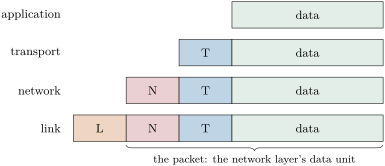
The program below builds the three headers around an HTTP request. They are toy headers, cut down to the addresses and port numbers; real ones hold more fields, as the next section shows.
"""Each layer wraps what the layer above gives it in its own header (toy headers)."""
import ipaddress


def transport(data, src_port, dst_port):
    return src_port.to_bytes(2, "big") + dst_port.to_bytes(2, "big") + data


def network(segment, src, dst):
    return ipaddress.ip_address(src).packed + ipaddress.ip_address(dst).packed + segment


def mac(text):
    return bytes.fromhex(text.replace(":", ""))


def link(packet, src_mac, dst_mac):
    return mac(dst_mac) + mac(src_mac) + bytes([0x08, 0x00]) + packet


def show(name, data, header):
    print(f"{name:12}{data[:header].hex(' '):42}| {len(data) - header} bytes inside")


message = b"GET / HTTP/1.1\r\n\r\n"
segment = transport(message, 49152, 80)
packet = network(segment, "192.0.2.10", "198.51.100.7")
frame = link(packet, "02:00:00:00:00:0a", "02:00:00:00:00:01")
show("link", frame, 14)
show("network", packet, 8)
show("transport", segment, 4)
print(f"{'application':12}{message}")
print("frame:", len(frame), "bytes, of which", len(frame) - len(message), "of headers")$ python encapsulate.py
link 02 00 00 00 00 01 02 00 00 00 00 0a 08 00 | 30 bytes inside
network c0 00 02 0a c6 33 64 07 | 22 bytes inside
transport c0 00 00 50 | 18 bytes inside
application b'GET / HTTP/1.1\r\n\r\n'
frame: 44 bytes, of which 26 of headersc0 00 00 50 are the ports and ; c0 00 02 0a is 192.0.2.10.A router opens the frame, reads the network header to choose where the packet goes next, and puts it in a new frame for the next link: the link header changes at each step, the network header travels from end to end, and the transport header is read only by the two machines at the ends.
15.2 Addresses and the network mask
An IP address of the version used here, IPv4, has bits, written as four bytes in decimal separated by dots: 192.0.2.10 is . Its first bits name a network, the rest a machine in that network.
Definition 15.2 (Network mask, prefix)
The network mask of a network is a -bit number made of ones followed by zeros: the bits under the ones are the network part of each address, the others the machine’s part. The number of ones is the prefix length, written after a slash: 192.0.2.0/24 is the network whose addresses share their first bits with 192.0.2.0. Two machines are on the same network when the AND of their address with the mask gives the same result.
The addresses in this chapter’s examples come from three blocks set aside for documentation, 192.0.2.0/24, 198.51.100.0/24 and 203.0.113.0/24, which no real machine uses. Homes and schools use other reserved blocks inside their own networks, such as 192.168.0.0/16 and 10.0.0.0/8, which never appear on the internet itself.
$ python same_network.py
192.0.2.0/26 mask 255.255.255.192 -> 64 addresses
first 192.0.2.0 last 192.0.2.63
192.0.2.37 in 192.0.2.0/26 : True
192.0.2.64 in 192.0.2.0/26 : False
198.51.100.7 in 192.0.2.0/26 : False
192.0.2.37/24 belongs to the network 192.0.2.0/24ipaddress module knows masks and prefixes. A /26 leaves bits to the machines: addresses."""The network part of an address, by hand: an AND with the mask."""
import ipaddress
def to_int(dotted):
a, b, c, d = (int(x) for x in dotted.split("."))
return (a << 24) | (b << 16) | (c << 8) | d
def to_dotted(n):
return ".".join(str((n >> shift) & 255) for shift in (24, 16, 8, 0))
def mask(prefix):
return (2**32 - 1) ^ (2**(32 - prefix) - 1) # prefix ones, then zeros
address, prefix = "192.0.2.37", 26
print(f"address {to_int(address):032b}")
print(f"mask {mask(prefix):032b} = {to_dotted(mask(prefix))}")
network = to_int(address) & mask(prefix)
print(f"AND {network:032b} = {to_dotted(network)}")
print("module:", ipaddress.ip_interface(f"{address}/{prefix}").network)$ python mask_bits.py
address 11000000000000000000001000100101
mask 11111111111111111111111111000000 = 255.255.255.192
AND 11000000000000000000001000000000 = 192.0.2.0
module: 192.0.2.0/26The first address of a network, all machine bits , names the network itself, and the last, all machine bits , is used to reach every machine of the network at once: a /26 leaves addresses for machines.
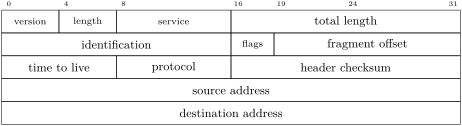
Thirty-two bits give about four billion addresses, too few for every device in the world. The newer version, IPv6, uses -bit addresses, written in hexadecimal; both versions run side by side on the internet.
15.3 A routing table read by hand
Definition 15.3 (Routing table, next hop, default route)
A router’s routing table lists networks, each written with its prefix, and for each the next hop: the neighbouring router to pass the packet to, or “direct” when the network is connected to the router itself. When several lines contain the destination, the router takes the one with the longest prefix, the most precise. The line 0.0.0.0/0, which contains every address, is the default route: it is used when no other line fits.
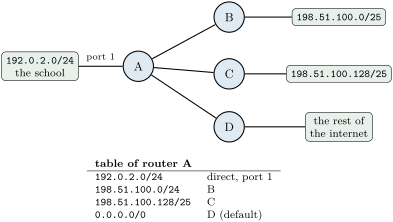
"""A router's table, read by longest prefix match."""
import ipaddress

TABLE = [  # destination, next hop
    ("192.0.2.0/24", "direct, port 1"),
    ("198.51.100.0/24", "router B"),
    ("198.51.100.128/25", "router C"),
    ("0.0.0.0/0", "router D (default)"),
]


def lookup(address):
    address = ipaddress.ip_address(address)
    best = None
    for dest, hop in TABLE:
        net = ipaddress.ip_network(dest)
        if address in net and (best is None or net.prefixlen > best[0].prefixlen):
            best = (net, hop)
    return best


for a in ["192.0.2.99", "198.51.100.7", "198.51.100.200", "203.0.113.5"]:
    net, hop = lookup(a)
print(f"{a:16} matches {str(net):19} -> {hop}")$ python route_lookup.py
192.0.2.99 matches 192.0.2.0/24 -> direct, port 1
198.51.100.7 matches 198.51.100.0/24 -> router B
198.51.100.200 matches 198.51.100.128/25 -> router C
203.0.113.5 matches 0.0.0.0/0 -> router D (default)198.51.100.200; the /25 is longer. Nothing but the default route contains 203.0.113.5.Each router decides only the next hop. The packet’s whole route is never written anywhere: it is the chain of these local choices, which is why the tables of neighbouring routers must agree, and why routers exchange what they know with one another.
15.4 Reliable delivery over an unreliable network
Packets get lost: a router whose queue is full drops what arrives, a radio link loses a frame to noise. The network layer does not repair this. The two ends repair it themselves.
Definition 15.4 (Acknowledgement, timeout, retransmission)
An acknowledgement is a short message by which the receiver tells the sender that a packet arrived. If no acknowledgement comes back within a set time, the timeout, the sender sends the packet again: a retransmission.
Retransmission brings a new trap. If the packet arrived but its acknowledgement was lost, the sender sends it again and the receiver gets it twice. The receiver must tell a new packet from a copy.
Definition 15.5 (Alternating-bit protocol)
In the alternating-bit protocol, each packet carries one bit, for the first, for the next, again, and so on. The sender sends a packet until an acknowledgement with its bit comes back, then moves to the next packet with the other bit. The receiver acknowledges every packet with the bit it carries, and keeps it only if its bit is the one expected; a packet with the other bit is a copy, and is dropped.
History — A note of two pages
The alternating-bit protocol was published in May 1969 by K. A. Bartlett, R. A. Scantlebury and P. T. Wilkinson, in a note of two pages on reliable transmission over links that lose messages.
The simulation below uses a channel that loses each item with a set probability, drawn from a seeded generator, so that every run loses the same packets.
"""A channel that loses some of what it carries, at random but reproducibly."""
import random


class Channel:
    def __init__(self, loss, seed):
        self.loss = loss                  # the probability of losing each item
        self.rng = random.Random(seed)

    def carry(self, item):
        """Return the item, or None if it was lost on the way."""
return None if self.rng.random() < self.loss else item"""The alternating-bit protocol over two lossy channels (data one way, acks back)."""
from lossy_channel import Channel
def run(messages, data_line, ack_line):
sent_bit, expected, delivered, sends = 0, 0, [], 0
for m in messages:
while True: # send m until its acknowledgement comes back
sends += 1
print(f"send ({sent_bit}, {m})", end=" ")
frame = data_line.carry((sent_bit, m))
if frame is None:
print("lost; timeout")
continue
bit, data = frame
if bit == expected:
delivered.append(data)
expected = 1 - expected
print("delivered", end=" ")
else:
print("duplicate dropped", end=" ")
ack = ack_line.carry(bit) # the receiver acknowledges every frame
if ack is None:
print("ack lost; timeout")
continue
print(f"ack {ack}")
if ack == sent_bit:
sent_bit = 1 - sent_bit
break
return delivered, sends
if __name__ == "__main__":
got, sends = run(["a", "b", "c", "d"], Channel(0.3, seed=10), Channel(0.3, seed=3))
print("received", got, "after", sends, "sends")$ python alternating_bit.py
send (0, a) delivered ack lost; timeout
send (0, a) duplicate dropped ack 0
send (1, b) delivered ack 1
send (0, c) lost; timeout
send (0, c) delivered ack 0
send (1, d) delivered ack 1
received ['a', 'b', 'c', 'd'] after 6 sends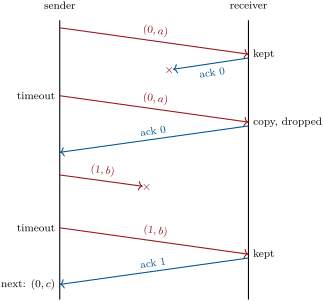
Waiting for each acknowledgement before sending on, stop and wait, has a cost: while the packet and its acknowledgement travel, the line is idle. If sending a packet takes a time and the round trip a time , the line is busy a fraction of the time.
"""Stop and wait: the sender is busy for T, then idle for one round trip."""

PACKET = 1500 * 8  # bits


def utilisation(rate, rtt):
    t = PACKET / rate              # time to put the packet on the line
    return t / (t + rtt)


for name, rate, rtt in [("one room", 100e6, 0.0002), ("one town", 100e6, 0.002),
                        ("one country", 1e9, 0.02), ("faster line", 10e9, 0.02)]:
    u = utilisation(rate, rtt)
    print(f"{name:12} {rate / 1e6:>6.0f} Mbit/s  rtt {rtt * 1000:>4} ms  "
f"busy {u:7.3%} useful {u * rate / 1e6:6.2f} Mbit/s")$ python throughput.py
one room 100 Mbit/s rtt 0.2 ms busy 37.500% useful 37.50 Mbit/s
one town 100 Mbit/s rtt 2.0 ms busy 5.660% useful 5.66 Mbit/s
one country 1000 Mbit/s rtt 20.0 ms busy 0.060% useful 0.60 Mbit/s
faster line 10000 Mbit/s rtt 20.0 ms busy 0.006% useful 0.60 Mbit/s15.5 Ports and the transport layer
An IP address names a machine; a port number, bits, names a program on it. Ports to are the system ports, given to well-known services, such as for HTTP and for HTTPS; a client’s own port is usually taken from the top of the range, to , as in the frame of the first section.
Definition 15.6 (TCP, UDP)
The internet’s two main transport protocols are TCP, which gives two programs a reliable stream of bytes, in order and without copies, by numbering the bytes, acknowledging them and sending again what is lost, and UDP, which sends single datagrams with no acknowledgement, so that they may be lost, duplicated or arrive out of order. A TCP header has at least bytes, a UDP header .
TCP’s reliability has a price in time, since a lost packet waits for its retransmission and the bytes behind it wait too. A video call prefers UDP: a lost image is better skipped than shown late. Neither protocol promises when data arrives; reliable does not mean fast.
Definition 15.7 (Peer-to-peer network)
In a peer-to-peer network, every machine is both client and server: each asks the others for data and serves what it has, with no central server.
Before a program can send anything to library.example, the name must become an address. A machine first looks in a small local table, then, if the name is not there, asks the domain name system. The names ending in .example are reserved for examples like this one.
"""Names to addresses from a local table, in the format of a hosts file."""
HOSTS = """\
# address       names
192.0.2.10      library.example  library
192.0.2.11      mail.example
198.51.100.7    town.example
"""


def parse(text):
    table = {}
    for line in text.splitlines():
        line = line.split("#")[0].strip()      # a # starts a comment
        if line:
            address, *names = line.split()
            for name in names:
                table[name] = address
    return table


table = parse(HOSTS)
for name in ["library", "town.example", "school.example"]:
print(name, "->", table.get(name, "unknown here: ask the name system"))$ python hosts_lookup.py
library -> 192.0.2.10
town.example -> 198.51.100.7
school.example -> unknown here: ask the name system15.6 Exercises
Exercise 15.1 ★
Give the network address of 192.168.10.37/24.
Solution
Solution of Exercise 15.1.
The mask 255.255.255.0 keeps the first three bytes and clears the last: 192.168.10.0.
Exercise 15.2 ★
How many addresses does a /26 network contain? How many machines can it hold, the first and last addresses set apart?
Solution
Solution of Exercise 15.2.
bits for the machines: addresses. Without the first (the network) and the last (all the machines at once), machines.
Exercise 15.3 ★
With router A’s table, where does a packet for 198.51.100.130 go? For 198.51.100.127?
Solution
Solution of Exercise 15.3.
198.51.100.130 is in 198.51.100.0/24 and in 198.51.100.128/25, which holds .128 to .255; the /25 is longer: router C. 198.51.100.127 is only in the /24: router B.
Exercise 15.4 ★
In what order do the headers come in a frame, from its first byte? Which of them does a router read and replace?
Solution
Solution of Exercise 15.4.
The link header, then the network header, then the transport header, then the data. A router reads the link header, which brought the frame to it, and the network header, to choose the next hop; it replaces the link header with one for the next link, and in the network header it only lowers the time to live. It does not read the transport header.
Exercise 15.5 ★
Write a function same_network(a, b, prefix) that tells whether two addresses, given as dotted strings, are on the same network, without the ipaddress module’s networks: build the mask, then compare.
Solution
Solution of Exercise 15.5.
def same_network(a, b, prefix):
m = (2**32 - 1) ^ (2**(32 - prefix) - 1)
x = int(ipaddress.ip_address(a))
y = int(ipaddress.ip_address(b))
return x & m == y & m
The module only turns the dotted strings into numbers; to_int of the chapter would do as well. The precedence of & is higher than that of ==, so no brackets are needed.
Exercise 15.6 ★★
A student computes the network part of 192.0.2.37/26 with an OR instead of an AND, and gets 255.255.255.229. Explain what the OR did, bit by bit.
Solution
Solution of Exercise 15.6.
An OR with gives , an OR with leaves the bit: the ones of the mask became ones, and the last bits of the address stayed. in binary, so the last byte is and the first three are . The result keeps the machine’s part and loses the network’s, exactly the opposite of what was wanted.
Exercise 15.7 ★★
Write a function lookup(table, address) that takes a table as a list of pairs, prefix and next hop, and returns the next hop by longest prefix match, or None if no line contains the address.
Solution
Solution of Exercise 15.7.
def lookup(table, address):
a = ipaddress.ip_address(address)
fits = [(ipaddress.ip_network(d), hop) for d, hop in table
if a in ipaddress.ip_network(d)]
if not fits:
return None
return max(fits, key=lambda f: f[0].prefixlen)[1]
The tests check that it agrees with the chapter’s lookup on its four addresses, and that it returns None once the default route is removed.
Exercise 15.8 ★★
A program sends a message of bytes over TCP and IPv4 on an Ethernet link, whose header has bytes: two addresses of bytes and a type of . How many bytes leave the machine, and what share of them are headers?
Solution
Solution of Exercise 15.8.
bytes: of TCP, of IPv4, of Ethernet. The headers are , about percent. Small messages pay a high share of headers.
Exercise 15.9 ★★
The alternating-bit protocol sends the messages x and y. The first packet sent is lost; the first acknowledgement of y is lost; nothing else is. Write the trace, in the format of the chapter’s output, and count the sends.
Solution
Solution of Exercise 15.9.
send (0, x) lost; timeout
send (0, x) delivered ack 0
send (1, y) delivered ack lost; timeout
send (1, y) duplicate dropped ack 1
Four sends for two messages.
Exercise 15.10 ★★
A receiver keeps every packet without checking its bit. Show, with a lost acknowledgement, what goes wrong.
Solution
Solution of Exercise 15.10.
The packet (0, a) arrives and is kept; its acknowledgement is lost. The sender’s timeout sends (0, a) again, and this receiver keeps it too: the application receives a twice, as the function receiver of exercises/net_ex.py shows when called with check_bit=False.
Exercise 15.11 ★★
A line of Mbit/s sends packets of bytes by stop and wait, with a round trip of ms. What share of the time is the line busy, and what is the useful rate?
Solution
Solution of Exercise 15.11.
ms. The busy share is , that is percent, and the useful rate is Mbit/s.
Exercise 15.12 ★★★
The channel may lose packets and acknowledgements, but never reorders them and never invents them. Show that the receiver of the alternating-bit protocol keeps every message exactly once, in order. Consider what the receiver may see while the sender is sending one message.
Solution
Solution of Exercise 15.12.
Write for the bit of message : when is odd, when it is even, so . We show that the following holds each time the sender starts on message : the receiver has kept and nothing else, it expects the bit , and everything still on its way, in either direction, carries the bit . It holds for , with nothing on the way.
While the sender sends , the data channel holds, in this order, some old copies of and then copies of ; since the channel never reorders, every old copy arrives, or is lost, before any copy of . The old copies have the bit , not the one expected: they are dropped, and only acknowledged with . The first copy of that arrives has the expected bit: is kept, once, and the receiver now expects ; later copies of have the bit and are dropped. On the way back, the sender ignores the acknowledgements . An acknowledgement is sent only after a copy of arrived, so when the first one reaches the sender, has been kept; the sender moves on to . At that moment every acknowledgement sent earlier, with , has arrived or been lost, and every old copy of too: what remains on the way carries . The statement holds for .
So each message is kept exactly once, in order, as long as each packet, sent again and again, eventually gets through.
Exercise 15.13 ★★★
With a window of , the sender may have up to packets sent and not yet acknowledged. Write window_time(n, w, rtt): time is counted in ticks, one packet is sent per tick at most, and the acknowledgement of a packet sent at tick arrives at tick . Return the tick at which the last acknowledgement arrives, with no loss. Compare , and for , .
Solution
Solution of Exercise 15.13.
def window_time(n, w, rtt):
acks, tick, sent = [], 0, 0
while sent < n:
acks = [a for a in acks if a > tick]
if len(acks) < w:
acks.append(tick + 1 + rtt)
sent += 1
tick += 1
return max(acks)
The list holds the arrival ticks of the acknowledgements still awaited. For and : ticks with , each packet taking ; with ; with , which is : with packets in flight, the acknowledgement of the first comes back just when the sender wants to send the sixth, and the sender never waits.
Exercise 15.14 ★★★
Suppose now the channel may delay a packet and deliver it after later ones. Find a sequence of events where the alternating-bit receiver keeps a message twice and loses another.
Solution
Solution of Exercise 15.14.
The sender sends (0, a), which the channel holds back. The timeout sends (0, a) again; this copy arrives, is kept and acknowledged. The sender sends (1, b), which is kept and acknowledged, then (0, c). The old copy of (0, a) now arrives before (0, c): its bit is the one expected, so the receiver keeps a a second time and acknowledges it with . Then (0, c) arrives with a bit that is no longer expected and is dropped as a copy; the sender, seeing an acknowledgement , believes c arrived and goes on. The receiver has kept a, b, a, and c is lost.
Exercise 15.15 ★★★
Split 192.0.2.0/24 into four networks of equal size. Give each one’s prefix, its first and last addresses, and the number of machines it can hold.
Solution
Solution of Exercise 15.15.
Four networks need more bits of prefix: four /26, each of addresses and machines.
192.0.2.0/26, from.0to.63;192.0.2.64/26, from.64to.127;192.0.2.128/26, from.128to.191;192.0.2.192/26, from.192to.255.
15.7 Problem: Stop and Wait Across the Sea
Problem 15.1
Weekend problem — how many packets in flight fill a long line
A cable of km under the sea joins two cities. It carries Gbit/s, and its signals travel at km/s. Packets have bytes. The acknowledgements are so short that their own sending time is neglected, and so is the time the machines take to answer. The program below computes what the line delivers when the sender may have packets in flight before it must wait.
"""The weekend problem: a window of w packets on a cable under the sea."""
import math

RATE = 1e9               # bit/s
PACKET = 1500 * 8        # bits
DISTANCE = 6000e3        # m
SPEED = 2e8              # m/s, the speed of the signal in the cable

t = PACKET / RATE                    # sending one packet
rtt = 2 * DISTANCE / SPEED           # there and back; the ack's own time neglected
print(f"T = {t * 1e6:.0f} us, RTT = {rtt * 1e3:.0f} ms")
for w in [1, 10, 100, 1000, 5000, 5001]:
    u = min(1, w * t / (t + rtt))
    print(f"window {w:5}: busy {u:9.4%}, {u * RATE / 1e6:7.2f} Mbit/s")
print("smallest full window:", math.ceil((t + rtt) / t), "packets")
print(f"data in flight at full rate: {RATE * rtt / 8 / 1e6:.1f} MB")$ python sea_link.py
T = 12 us, RTT = 60 ms
window 1: busy 0.0200%, 0.20 Mbit/s
window 10: busy 0.2000%, 2.00 Mbit/s
window 100: busy 1.9996%, 20.00 Mbit/s
window 1000: busy 19.9960%, 199.96 Mbit/s
window 5000: busy 99.9800%, 999.80 Mbit/s
window 5001: busy 100.0000%, 1000.00 Mbit/s
smallest full window: 5001 packets
data in flight at full rate: 7.5 MBPart I — The line.
- How long does the sender take to put one packet on the line?
- How long does a signal take to cross the cable one way? What is the round trip?
- Why may the acknowledgement’s own sending time be neglected here?
- While the first bit crosses the cable, how many bits has the sender put behind it at full rate?
Part II — Stop and wait.
- With stop and wait, how long passes between the start of one packet and the start of the next?
- How many packets per second does this make, and what useful rate?
- How long would a file of GB, bits, take to cross?
- Check your answers against the line
window 1of the output.
Part III — The busy share.
- Explain the formula for stop and wait.
- Compute it here, as a percentage and as “one in how many”.
- The line is replaced by one of Gbit/s. What happens to the busy share, and to the useful rate?
- Name two changes that would raise the useful rate of stop and wait, and say why neither helps much here.
Part IV — The window.
- Explain why, with a window of , the busy share is the smaller of and .
- Check the line
window 1000of the output by hand. - Find the smallest window that keeps the line busy all the time, and check it against the program.
- How many bytes are in flight, sent and not yet acknowledged, at full rate? The sender must keep them all, in case it has to send them again: why?
- Why can the packets no longer carry a single bit, as in the alternating-bit protocol?
- If the cable lost one packet in a thousand, about how many losses would happen per second at full rate?
- The window field of a TCP header has bits and counts bytes; a larger window needs an extension that shifts it. Without that extension, how many full packets fit in the largest window, and what busy share would it allow on this cable?
- State the result: the busy share of stop and wait on this cable, and the window that fills it.
Solution
Solution of Problem 15.1.
1. bits at bit/s: µs.
2. s, so ms one way and ms there and back.
3. An acknowledgement of a few tens of bytes takes well under a microsecond to send, nothing beside ms.
4. bits, Mbit, or packets.
5. ms: the packet is sent, crosses, and the acknowledgement comes back.
6. packets per second, so about bit/s: Mbit/s.
7. s, about hours, on a line that could do it in seconds.
8. The line window 1 prints a busy share of percent and Mbit/s.
9. In each cycle of length , the line is busy only during the it takes to send the packet; it is idle while the packet crosses and while the acknowledgement comes back.
10. , that is percent, or one moment in .
11. falls to µs, so the busy share falls to , about percent, and the useful rate stays at Mbit/s. The round trip, not the line’s rate, is the limit.
12. Larger packets, or a shorter round trip. The distance and the speed of the signal are fixed, and a packet ten times larger would only make the rate ten times larger, still a fraction of a percent of the line; a lost large packet also costs more to send again.
13. The sender sends packets one after the other, which takes . The first acknowledgement comes back after the start, and each following one a time later, freeing a place for one more packet. If , the next acknowledgement always arrives before the window is used up and the line never rests; otherwise it works in each cycle of .
14. , so percent and Mbit/s, as printed.
15. : the smallest window is packets. The program finds the same, with giving percent.
16. bits, MB, about packets. Any of them may be lost, and until its acknowledgement arrives, the sender cannot know; it must be able to send it again.
17. With thousands of packets in flight, a single bit cannot tell which packet an acknowledgement is for, nor tell a copy from one of the many new packets: the numbers must be large enough to tell apart all the packets in flight.
18. At full rate, packets per second: about losses per second, each one to detect and repair while the rest flows on.
19. , so full packets. Busy share , under percent, about Mbit/s. On such a line the extension is needed.
20. On this cable, stop and wait keeps the line busy percent of the time, one moment in , for Mbit/s out of Gbit/s; a window of packets, MB in flight, fills it.