Networks, Hardware and Trading Infrastructure · Technology
8Servers
The servers that trading firms buy for the hot path are chosen for one core’s speed, not for the number of cores. A mainstream server processor with 128 cores runs any one of them at up to 4.1 GHz; a server processor with 16 cores runs one at up to 5 GHz; and specialist vendors sell machines whose processor has been tuned to run all 24 of its cores at 4.8 GHz, cooled by liquid, powered by a 2 000-watt supply and warranted by the vendor rather than the chip maker. A trading path that spends most of its time computing gets faster almost in proportion to the clock; one that spends it waiting for memory or the network card hardly moves. Which of the two a firm’s path is decides which server it should buy.
One Quant Book 13 (chapters 2 to 4 and 13) studied the processor, the memory hierarchy, the two-socket machine and the operating system from the program’s side. This chapter looks at the server as a thing bought and racked: how to choose its processor, what to set in its firmware, what overclocking buys and costs, how it is managed, and how many of them fit in a cabinet.
8.1 Choosing the processor
Definition 8.1 (Thermal design power)
The thermal design power (TDP) of a processor is the sustained power, in watts, that its vendor designs it to dissipate under load at its rated frequencies, and that the server’s cooling and power supply must handle.
Three numbers of a processor’s specification matter for a hot path, and a fourth for the cabinet. The boost clock is the frequency one busy core can reach when the rest of the chip is quiet: AMD defines its EPYC processors’ maximum boost as “the maximum frequency achievable by any single core”. The base clock is what every core is guaranteed under full load. The cache size sets how much of the order book and the strategy’s state stays close to the core. And the thermal design power sets how many servers a cabinet’s power allows.
Proposition 8.2 (What a faster clock buys)
Let a path take on a core clocked at , of which a share is core-bound (it scales with the clock) and the rest is bound by memory, the bus or the card. On a core at it takes
a speed-up that tends to however fast the clock.
Proof. The core-bound part is a number of cycles, which take each; the rest is a time fixed by the memory’s and the devices’ own latencies. As only remains. ∎
Example 8.3 (Book 13’s path on three processors)
One Quant Book 13’s in-process stages (decode, ring, book, strategy, risk, gateway) had medians adding up to on a laptop core whose maximum turbo is 4.8 GHz. Suppose 60% of that time is core-bound. On a core at 5.0 GHz the path takes ; at 4.1 GHz, ; on a core held at a base clock of 2.7 GHz, . The fastest clock of Table 8.1 saves 2.4% over the reference; the slowest costs 47%.
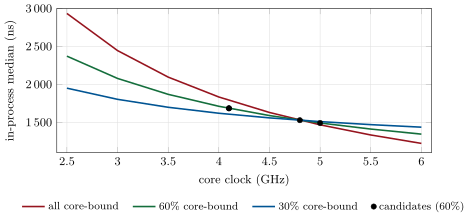
fig_servers.py.As of September 2026 — Server processors, from their vendors
AMD’s EPYC 9175F: 16 cores, a base clock of 4.2 GHz, a maximum boost of up to 5 GHz, 512 MB of level-3 cache, a default TDP of , listed at 3 703 USD in thousand-unit quantities (launched October 2024). AMD’s EPYC 9755: 128 cores at 2.7 GHz base and up to 4.1 GHz boost, 512 MB of level-3 cache, , 10 931 USD. Intel’s Xeon Gold 6544Y: 16 cores at 3.6 GHz base and 4.1 GHz maximum turbo, 45 MB of cache, (launched in the fourth quarter of 2023).
8.2 Firmware settings
The firmware (BIOS) decides many things the operating system cannot change afterwards: how the processor saves power, whether each core runs one thread or two, how memory is interleaved across sockets, and which events interrupt the processor behind the operating system’s back.
Definition 8.4 (System management interrupt)
A system management interrupt (SMI) is an interrupt handled by the platform’s firmware, not by the operating system, for functions such as temperature and fan control or legacy device emulation; it generally cannot be masked, and while it runs the operating system and every program on that processor stop.
An SMI is the one interrupt that core isolation (One Quant Book 13, chapter 13) cannot move away: Red Hat’s real-time documentation warns that a poorly written handler “may consume many milliseconds” that the operating system cannot preempt. Firms therefore ask their server vendors which SMI sources can safely be turned off, count the ones that remain through the processor’s counters, and treat an unexplained pause of the whole machine as an SMI until shown otherwise.
Method 8.5 (Firmware settings for a hot-path server)
- Power profile for maximum performance; deep idle states (C-states) off on the hot cores, so a waiting core is never slow to wake.
- A fixed turbo behaviour: either the maximum single-core boost with the other cores kept quiet, or a fixed all-core frequency, but not a clock that moves with load, which vendors describe as a source of jitter.
- Simultaneous multithreading off, or its sibling threads left idle on the hot cores.
- Memory at its maximum rated speed; interleaving across sockets off, so each socket’s memory stays local.
- Error-correction reporting and system management interrupt sources reduced to what the vendor states is safe.
- The whole list recorded as data and audited, with the operating system’s settings, before the server trades (the build).
8.3 Overclocked and liquid-cooled machines
Definition 8.6 (Overclocking)
Overclocking is running a processor, or its memory, above its vendor’s rated frequency, usually with a higher supply voltage and stronger cooling, and outside the vendor’s warranty.
A faster clock at a higher voltage dissipates more power, roughly with the frequency times the square of the voltage, which is why the specialist vendors pair overclocking with liquid cooling and oversized power supplies, and why they sell stability testing as part of the product. What they sell is a processor that runs its cores at a frequency close to or above the vendor’s single-core boost, all of them, all day, without the clock changes that a load-dependent turbo brings.
As of September 2026 — Overclocked servers, from their vendors
Blackcore Technologies describes its ICON range as “an overclocked, liquid-cooled server platform for Intel CPUs”, and its G3 SPR-M server as a tuned Intel Xeon w7-2495X “boasting 4.8GHz across all cores” with 45 MB of cache and overclocked DDR5 memory, on a custom 2 000-watt redundant power supply. Business Systems International describes its ORION HF 310 as a single-socket overclocked server whose design turns off unnecessary cores and locks the rest at up to 5.2 GHz, stating that “turbo mode creates jitter, something that traders want to avoid at all costs”.
Definition 8.7 (Burn-in test)
A burn-in test runs a new or reconfigured server at full load, often for days, with stress workloads that exercise the processor, memory and devices, and checks for errors, throttling and instability before the server is trusted with trading.
8.4 Memory, reliability and management
Definition 8.8 (Error-correcting code memory)
Error-correcting code memory (ECC) stores extra check bits with each word, so that the memory controller can correct a flipped bit and detect a double flip; server memory is almost always ECC, and overclocked memory makes its reports more important, not less.
Definition 8.9 (Baseboard management controller)
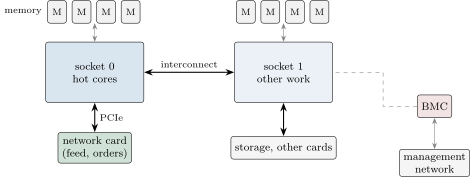
A baseboard management controller (BMC) is a small independent computer on the server’s motherboard, with its own network port, that lets an operator power the server on and off, read its sensors and logs, update its firmware and use its console remotely, whatever the state of the main processor and operating system.
A cage is often far from the firm’s engineers. The BMC is how they reach a server that has hung, on the out-of-band management network of chapter 2, and its sensors (temperatures, fan speeds, power) are the first sign that an overclocked machine is drifting out of its tested envelope. It is also a computer with firmware of its own, on a network: it is patched and isolated like one.
8.5 Racks, power and heat
Definition 8.10 (Rack unit)
A rack unit (U) is the standard height of equipment in a 19-inch rack, 1.75 inches (44.45 mm); a cabinet commonly holds about 42 of them, and servers are 1U, 2U or taller.
A colocation cabinet is sold with a power allowance in kilowatts (chapter 9), and power, not space, usually binds first. A server budgeted at its processors’ thermal design power plus for everything else draws with one EPYC 9175F: seventeen fit in . The two-socket 128-core server draws : eight fit, with 2 048 cores between them. The overclocked server, budgeted at its supply because its vendor publishes no draw, fits five times.
| Candidate | Hot clock | Path at hot | Path at base | Servers per | Cores per |
| (GHz) | clock (ns) | clock (ns) | |||
| AMD EPYC 9175F, one socket | 5.0 | 1 491 | 1 659 | 17 | 272 |
| Intel Xeon Gold 6544Y, one socket | 4.1 | 1 685 | 1 834 | 19 | 304 |
| AMD EPYC 9755, two sockets | 4.1 | 1 685 | 2 241 | 8 | 2 048 |
| Overclocked w7-2495X (all cores) | 4.8 | 1 528 | 1 528 | 5 | 120 |
nw_servers.table(), Boxes 8.1 and 8.2.Table 8.1 makes the chapter’s argument in one line each. The 16-core part with the highest boost is the fastest for a path that runs on one or two cores, as long as the other cores stay quiet enough to let it boost. The overclocked machine gives up a little of that peak for a clock that does not move, on every core, which matters when the hot path uses many cores at once. The 128-core part is the right server for research, simulation and the firm’s other work (One Quant Book 15), and the wrong one for the hot path.
8.6 Tutorial: choosing and auditing a server
Goal. Predict the hot path’s latency on candidate servers from Book 13’s measurements, fit them into a cabinet, and audit a server’s firmware settings in the same report as its operating system’s. End state: Table 8.1, Figure 8.1 and a combined audit report.
- The reference.
nw_servers.ref_ns()reads Book 13’s stage medians throughfirm.wirepath(1 528 ns). - The model.
firm.serverspec.path_nsapplies Proposition 8.2;curve()traces it andpython fig_servers.pywrites the chart’s data. - The candidates.
CANDIDATESholds the ledger’s rows;table(phi, cabinet_kw)predicts each one’s path and fits it into a cabinet. - The audit.
firmware_audit(settings)checks a server’s firmware againstFIRMWAREand returnsfirm.tuneauditfindings, sofirm_tuneaudit.reportprints them with the host’s own.
What to change next. Measure for Book 13’s path by running it on the laptop’s performance and efficiency cores (their maximum clocks are 4.8 and 3.8 GHz) and fitting Proposition 8.2; recompute the table for a cabinet.
def speedup(phi, f_ghz, f_ref_ghz):
    return 1.0 / (phi * f_ref_ghz / f_ghz + 1.0 - phi)


def path_ns(t_ref_ns, phi, f_ghz, f_ref_ghz):
    return t_ref_ns * (phi * f_ref_ghz / f_ghz + 1.0 - phi)


def per_cabinet(c, cabinet_kw, cabinet_u=42):
    by_power = int(cabinet_kw * 1000 // c.server_w)
    by_space = cabinet_u // c.rack_u
    return min(by_power, by_space)


def rank(t_ref_ns, phi, f_ref_ghz, cabinet_kw):
    rows = []
    for c in CANDIDATES:
        n = per_cabinet(c, cabinet_kw)
        rows.append({"name": c.name, "hot_ghz": c.hot_ghz, "path_ns": path_ns(t_ref_ns, phi, c.hot_ghz, f_ref_ghz),
                     "servers": n, "cores": n * c.cores * c.sockets})
return sorted(rows, key=lambda r: r["path_ns"])firm.serverspec. code/firm/serverspec/firm_serverspec.py8.7 Build: the server specification
Purpose. Server choice as data: candidates with their sources, a latency model tied to the firm’s measured path, a cabinet fit, and a firmware checklist audited with the host’s tuning, for chapter 29’s bill of materials.
Interface. firm_serverspec: Candidate, CANDIDATES, path_ns(t_ref, phi, f, f_ref), speedup, per_cabinet(c, kw, u), rank, FIRMWARE, firmware_audit(settings) returning firm_tuneaudit.Findings.
Rules. Every candidate names its ledger row; a server’s power budget is its processors’ TDP plus a stated allowance, or a vendor’s figure; a setting that the server does not report is “unknown”, never “ok”.
Acceptance tests. code/firm/serverspec/tests/: the model’s limits (all core-bound, all memory-bound), a cabinet’s fit by power and by space, the ranking, and firmware findings reported through firm.tuneaudit.
Stretch. Fit from runs at two clocks; add memory bandwidth to the model for a path whose memory-bound part depends on it.
Sources and further reading
- AMD, EPYC 9175F and EPYC 9755 product pages; Intel, Xeon Gold 6544Y and Core Ultra 7 155H specifications.
- Blackcore Technologies, G3 SPR-M product page; Business Systems International, ORION HF 310 product page.
- Red Hat, Red Hat Enterprise Linux for Real Time reference guide (“System Management Interrupts”) and tuning guide (“Setting BIOS parameters for system tuning”).
8.8 Exercises
Exercise 8.1 ★
A path takes at 3.0 GHz and is 80% core-bound. How long does it take at 5.0 GHz, and what is its limit as the clock grows?
Solution
Solution of Exercise 8.1.
; the limit is the memory-bound part, .
Exercise 8.2 ★
How many servers budgeted at fit in a cabinet of 42 units, if each takes one unit? And at and two units?
Solution
Solution of Exercise 8.2.
: 26 servers (space allows 42). servers of 2 units (space allows 21): power binds in both.
Exercise 8.3 ★
A server’s boost clock is 5.0 GHz and its base clock 4.2 GHz. Which one should a latency budget use for the hot path, and when?
Solution
Solution of Exercise 8.3.
The boost, if the hot path runs on one or two cores and the rest of the chip is kept quiet (its thermal and power headroom is what lets one core boost); the base clock if many cores are busy at once, which is when the processor cannot hold the boost on all of them.
Exercise 8.4 ★★
Why can core isolation not protect a hot core from system management interrupts, and what can the firm do instead?
Solution
Solution of Exercise 8.4.
SMIs are handled by firmware outside the operating system and cannot be masked, so no operating-system setting moves them off a core. The firm can ask the vendor which SMI sources are safe to disable, choose firmware with fewer of them, count them with the processor’s counters, and correlate unexplained pauses with them.
Exercise 8.5 ★★
In Figure 8.1, how much does raising the clock from 4.0 to 5.0 GHz save for each share of core-bound time?
Solution
Solution of Exercise 8.5.
if all core-bound, at 60%, at 30%.
Exercise 8.6 ★★
Why might a firm prefer an all-core overclocked machine to a higher single-core boost, even if its peak clock is lower?
Solution
Solution of Exercise 8.6.
A hot path that uses several cores at once (a feed handler, a strategy, a gateway on separate cores) runs at the base clock of a normal part when they are all busy, and a load-dependent clock moves its latency with the load. An all-core overclock runs every core at one fixed frequency, so the path’s latency does not depend on what else is running.
Exercise 8.7 ★★★
Coding. With firm.serverspec, find the core-bound share below which the 16-core 5.0 GHz part saves less than 1% over the laptop reference, and redo Table 8.1 for a cabinet.
Solution
Solution of Exercise 8.7.
Below 25% core-bound: . At : 35 of the 9175F servers (560 cores), 38 of the 6544Y (608), 16 of the two-socket 9755 (4 096 cores), 10 overclocked servers (240).
Exercise 8.8 ★★★
Find the flaw. “We moved the strategy from a 4.1 GHz server to a 5 GHz one and latency did not improve, so the benchmark was wrong.”
Solution
Solution of Exercise 8.8.
If the path is mostly memory- or device-bound, a faster clock changes little (Proposition 8.2); and the new server may not have been boosting (other busy cores, a power profile, deep idle states), or the path may run on the wrong socket. Measure the core-bound share and the clock the core actually ran at before blaming the benchmark.
8.9 Problem: Five Gigahertz or Fifty Cores
Problem 8.1
Weekend problem — a clock, a cabinet and a budget
A firm’s hot path takes at 4.8 GHz (One Quant Book 13’s in-process stages). It is choosing between one-socket servers with the EPYC 9175F (boost 5.0 GHz, base 4.2), two-socket servers with the EPYC 9755 (boost 4.1, base 2.7), and the overclocked server of Box 8.2 (4.8 GHz on all cores), for a cabinet, with the chapter’s power budgets.
Part I — The clock.
- At 60% core-bound, what is the path on each server’s hot clock?
- And on each one’s base clock?
- What is the speed-up of the 9175F’s boost over the 9755’s base clock?
- What is the largest speed-up any clock could give at 60%?
Part II — The cabinet.
- How many of each server fit in ?
- How many cores does each give the cabinet?
- Which binds, power or space, for each?
- The firm needs 40 hot cores and 1 000 other cores. How many cabinets of does a mix of 9175F and 9755 servers need?
Part III — The firmware.
- Which settings of the method would you check first on a new overclocked server, and why?
- What does the burn-in test protect against?
- The BMC reports rising temperatures on one server. What do you do?
- Why is SMT off on the hot cores?
Part IV — The verdict.
- State the named result: the hot path on the three servers at their hot clocks, and servers per cabinet.
- Under what core-bound share does the choice of processor stop mattering by more than 5%?
- Where would you put the 128-core servers?
- What would you measure before believing the model’s ?
- Why does the overclocked server’s clock stability matter more than its peak?
- What does the warranty question change in the purchase?
- How would you present the choice to the firm’s CTO in two sentences?
- In one sentence: what decides whether a faster clock is worth buying?
Solution
Solution of Problem 8.1.
- (9175F at 5.0 GHz), (9755 at 4.1), (overclocked, 4.8).
- , and .
- .
- : at most the memory-bound would remain.
- 17, 8 and 5.
- 272, 2 048 and 120.
- Power for all three (space would allow 42, 21 and 21).
- Three 9175F servers (48 hot cores) and four 9755 servers (1 024 cores): W, one cabinet.
- The power profile and idle states (a machine that sleeps is not the one that was tested), the turbo and frequency lock (the reason it was bought), memory speed and ECC reporting (overclocked memory), and the SMI sources.
- Failures that appear only under sustained load and heat: marginal stability of the overclock, memory errors, throttling.
- Check the fans and the liquid loop, compare with the burn-in’s envelope, move its strategies to a spare before it throttles or fails, and open a case with the vendor.
- A sibling thread shares the core’s pipeline and caches with the hot thread, adding contention and jitter; leaving it idle keeps the core to the hot thread.
- Named result. At 60% core-bound the hot path takes 1 491, 1 685 and on the 9175F, the 9755 and the overclocked server; a cabinet holds 17, 8 and 5 of them.
- Below about 6% core-bound, even the slowest clock (2.7 GHz) is within 5% of the fastest.
- In research, simulation and the firm’s other work (One Quant Book 15), in a data centre with cheap power, not in the colocation cage.
- The path on two clocks (or two cores of different clocks), fitted to Proposition 8.2, and the clock the core actually ran at.
- A clock that holds still keeps the latency distribution tight; a higher but moving clock adds variance at the times the machine is busiest.
- Failures are the vendor’s to fix, on its terms: spares, on-site support and replacement times go into the contract (chapter 15).
- “The 16-core 5 GHz servers give the hot path its best clock at the lowest power; an overclocked machine is worth its premium only if our hot path uses many cores at once. The 128-core servers belong in research, not in the cage.”
- The share of the path’s time that is core-bound.
8.10 Interview questions
Interview question 8.1 ★ developer
Why do trading firms prefer processors with fewer, faster cores for the hot path?
Solution
Solution of Interview question 8.1.
A hot path runs on a few cores; what matters is how fast each of them runs, and a part with fewer cores can boost higher and keeps more cache and power per core. Many cores add throughput the hot path does not use, and lower clocks.
What the interviewer is looking for: per-core speed against throughput.
Interview question 8.2 ★★ developer
Which BIOS settings would you change on a new trading server, and why?
Solution
Solution of Interview question 8.2.
Maximum-performance power profile, deep C-states off, a fixed turbo policy, SMT off or unused on hot cores, memory at rated speed without cross-socket interleaving, error reporting and SMI sources minimised as the vendor allows; then audit them with the OS settings.
What the interviewer is looking for: each setting with the latency mechanism it addresses.
Interview question 8.3 ★★ developer
What is a system management interrupt and why does it matter for latency?
Solution
Solution of Interview question 8.3.
An interrupt handled by firmware, invisible to and not maskable by the OS, that stops the processor for its duration (microseconds to milliseconds); core isolation cannot remove it, so it shows up as unexplained pauses.
What the interviewer is looking for: firmware, not maskable, not isolatable.
Interview question 8.4 ★★ developer, trader
Would you buy overclocked servers? What would you ask the vendor?
Solution
Solution of Interview question 8.4.
If the hot path is core-bound and uses several cores at once. Ask for the frequency under our sustained load, the stability testing and burn-in, the cooling’s failure modes, power draw, the warranty and spares, the firmware settings and SMI sources, and references from comparable users.
What the interviewer is looking for: sustained behaviour and support, not the peak number.
Interview question 8.5 ★★★ developer
How would you predict how much a faster processor will improve your path before buying it?
Solution
Solution of Interview question 8.5.
Measure the path’s core-bound share by running it at two clocks and fitting , then predict; confirm on a loan server with the firmware configured as in production.
What the interviewer is looking for: a model from measurement, then a test.
Interview question 8.6 ★★ developer
Your colocation cabinet has . How do you decide what goes in it?
Solution
Solution of Interview question 8.6.
Power first: budget each server at its real draw and fill the cabinet with hot-path servers, switches, timing and capture; everything that does not need to be close to the venue goes elsewhere. Keep a spare and headroom for growth.
What the interviewer is looking for: power as the binding constraint and a clear rule for what belongs in the cage.