Ce livre n’est pas encore disponible en Français. Éditions : English.
Primary & Middle School Computer Science · Du CP à la 3e
1What Is a Computer?
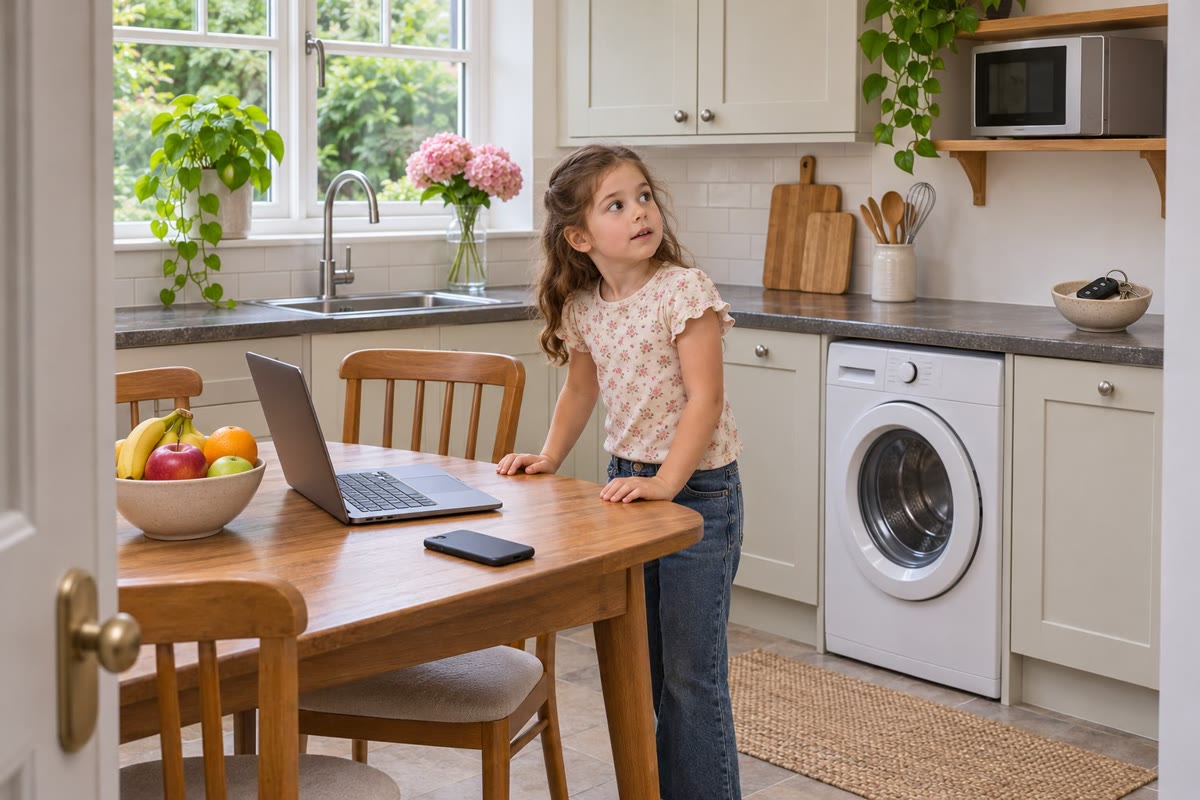
It is Saturday morning, and Mia is counting the computers in her kitchen. There is the laptop on the table: one. There is her father’s phone next to it: two. “That’s all,” says Mia.
“Not at all,” says her father. “There is a computer inside the washing machine. There is one in the oven, which knows when to stop. And there is one inside the car key in that bowl.” Mia looks again. She cannot see these computers, but they are there. What is a computer, if it can hide inside a washing machine?
1.1 Computers around us
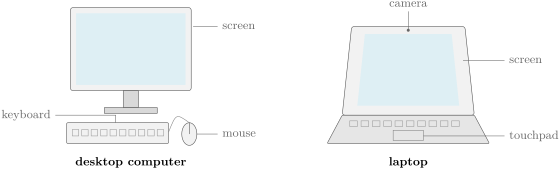
Some computers are easy to see. A desktop computer stays on a desk, with a big screen, a keyboard and a mouse. A laptop folds shut and can be carried in a bag. A tablet is a flat screen you touch with your fingers. A phone is a small computer that also makes calls.
Definition 1.1 (Computer)
A computer is a machine that follows instructions to work on information: it takes information in, changes it, keeps it, and gives information back out.
Many computers are hidden. They are small, and they live inside other machines: a washing machine, an oven, a car, a lift, a toy that talks, a traffic light. You never see their screen, because most of them have none. They are still computers: each one follows its instructions.
Example 1.2 (Computers in Mia’s kitchen)
In Mia’s kitchen there are at least five computers: the laptop, the phone, the washing machine’s computer, the oven’s computer and the car key’s computer. Only two of them have a screen. The bowl, the table and the chairs are not computers: they follow no instructions at all.
1.2 A machine that follows instructions
What do all these computers have in common? Each of them follows instructions. People write the instructions, and the computer carries them out exactly, one after the other.
A computer is very fast: it can carry out many millions of instructions in one second. It never gets tired and never gets bored. But it does nothing else than what its instructions say. If the instructions say “stop the drum after one hour”, the washing machine’s computer stops the drum after one hour, even if the clothes are still dirty.
Remark 1.3 (A computer does not think for us)
When a computer does something surprising, it is still following its instructions. Somebody wrote them, and maybe made a mistake. Finding and fixing such mistakes is part of the work of the people who write instructions for computers.
History — The first computers filled a room
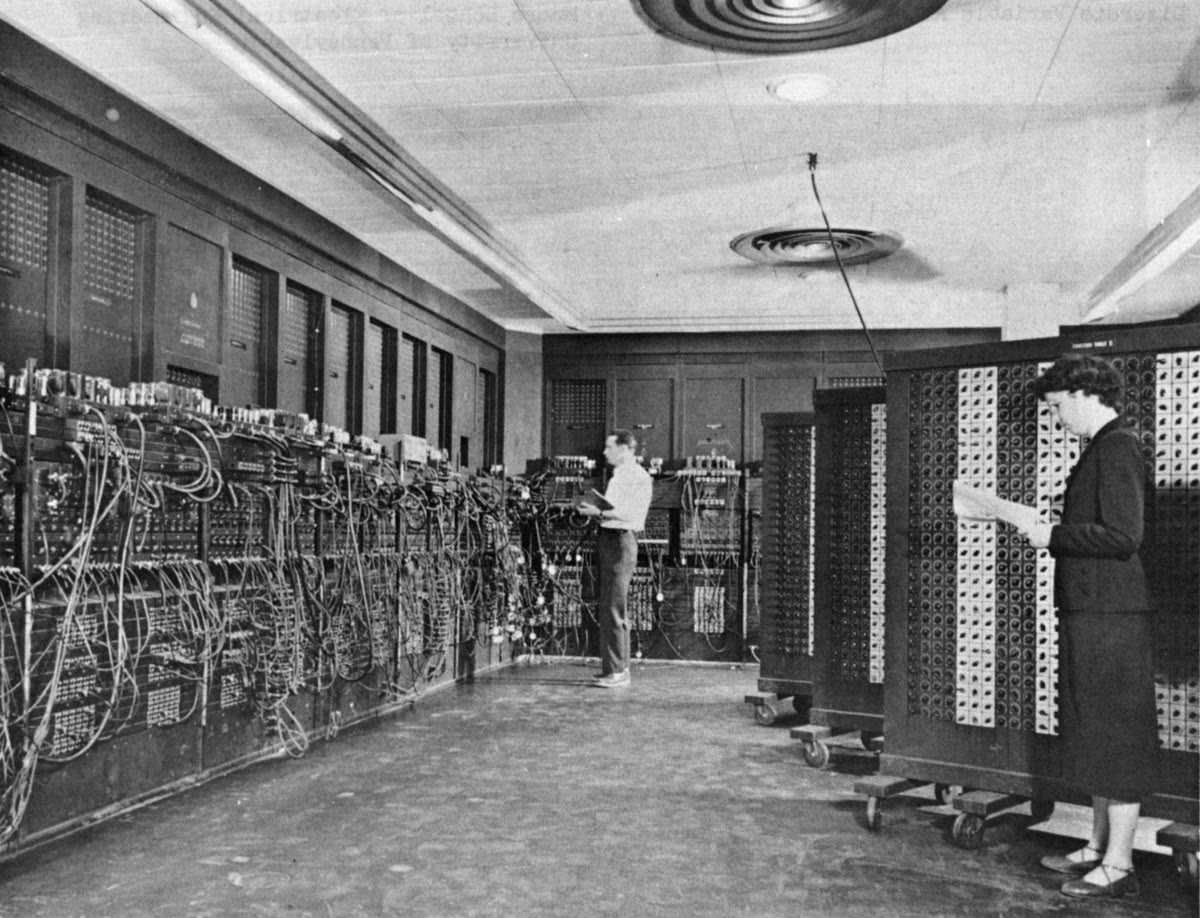
One of the first electronic computers was shown to the public in 1946. It was called ENIAC. It filled a whole room, about 9 metres by 15 metres, and weighed about 27 tonnes. It had 18 000 glass valves that lit up and grew warm. To give it new instructions, its operators plugged cables in and set switches by hand. Today a phone is millions of times faster and fits in a pocket.
1.3 What goes in and what comes out
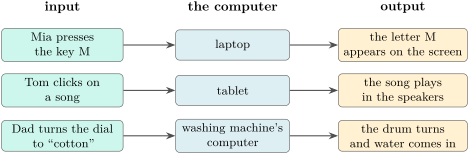
A computer works on information. Information goes in, the computer works on it, and information comes out.
Definition 1.4 (Input and output)
The input of a computer is the information that goes into it: a key pressed, a click, a word spoken, a photo taken. The output of a computer is the information that comes out of it: letters on a screen, a sound, a picture, a printed page, a motor that turns.
Example 1.5 (The washing machine)
The washing machine’s computer has several inputs. One is the turn of the dial that chooses the kind of wash. Another is the level of the water in the drum, which the machine measures by itself. Its outputs are the motor that turns the drum, the tap that lets water in, and a little beep at the end.
1.4 The parts we can see and touch
A computer is connected to the things we use to talk to it and to the things it uses to answer us.
Definition 1.6 (Input device and output device)
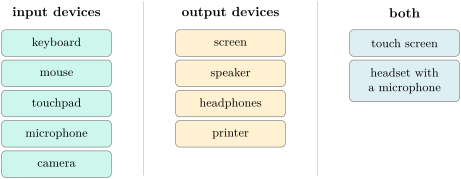
An input device is a part that brings input into a computer: a keyboard, a mouse, a touchpad, a microphone, a camera. An output device is a part that takes output out of a computer: a screen, a speaker, headphones, a printer.
Some parts do both jobs. A touch screen shows pictures, so it is an output device; when you touch it, it tells the computer where your finger is, so it is also an input device. A headset with a microphone is the same: the speakers are output, the microphone is input.
1.5 Exercises
Exercise 1.1 ★
Which of these objects contain a computer? A lamp with a plain switch, a phone, an oven that stops by itself after the cooking time, a wooden chair, a car.
Exercise 1.2 ★
Input device or output device? A keyboard, a screen, a mouse, a printer, a microphone, a speaker, a camera, headphones.
Solution
Solution of Exercise 1.2.
Input devices: the keyboard, the mouse, the microphone, the camera. Output devices: the screen, the printer, the speaker, the headphones.
Exercise 1.3 ★
Lina takes a photo with a tablet, and the photo appears on its screen. What is the input? What is the output?
Exercise 1.4 ★
Why is a touch screen both an input device and an output device?
Exercise 1.5 ★
Look at the drawing of the desktop computer and the laptop. Name three parts of the desktop computer and two parts of the laptop.
Solution
Solution of Exercise 1.5.
Desktop computer: the screen, the keyboard, the mouse. Laptop: two of the screen, the camera, the touchpad (and its keyboard).
Exercise 1.6 ★
Name three computers you could find in a school.
Exercise 1.7 ★
Tom says: “A computer always has a screen.” Is he right? Give an example.
Exercise 1.8 ★
Sami speaks to a phone: “Play my favourite song.” The song plays. What is the input, what is the output, and which devices are used?
Solution
Solution of Exercise 1.8.
Input: Sami’s spoken words, through the microphone (an input device). Output: the song, through the speaker (an output device).
Exercise 1.9 ★★
A pocket calculator: you press keys and the answer appears on a small screen. Is it a computer? Explain with the words “follows instructions”, “input” and “output”.
Exercise 1.10 ★★
Name two inputs and two outputs of a washing machine’s computer.
Exercise 1.11 ★★
Invent a toy robot that rolls on the floor and stops when it touches a wall. What goes into its computer? What comes out?
Solution
Solution of Exercise 1.11.
In: “the robot touches a wall” (and the button that starts it). Out: the motors that turn its wheels, which stop when it touches the wall.