本书暂未推出简体中文版。现有版本:English。
Primary & Middle School Computer Science · 1–9 年级
7Files and Folders
Leo wrote a poem last week, and today he wants to read it to the class. He switches on the computer and looks at the desktop: it is covered with forty icons, and most of them are called “untitled”. He opens one: a drawing. He opens another: a shopping list. The poem is somewhere in there, but where? It takes him twenty minutes to find it. In this chapter, we see how the work kept in a computer is organised, so that it can always be found again.
You already know
Saving copies the work from the memory into the storage, where it is kept when the power is off; a good name says what the work is (Chapters 4 and 6).
7.1 A file holds one piece of work
Definition 7.1 (File)
A file is one piece of work kept in the storage of a computer under a name: a story, a drawing, a song, a film, a program. Its name is the file name.
Every time you save a new piece of work, the computer makes a new file. When you open a file, the computer copies it into the memory so that you can see it and change it; when you save again, the file in the storage is replaced by the new version.
7.2 Kinds of file and their extensions
The name of a file usually ends with a dot followed by a few letters: poem.txt, cat.jpg, song.mp3.
Definition 7.2 (Extension)
The extension of a file name is the end of the name, after the last dot. It tells what kind of file it is.
| extension | kind of file |
|---|---|
.txt | text, with no colours or styles |
.png, .jpg | a picture |
.mp3 | a sound or a song |
.mp4 | a film |
.py | a program written in Python |
When you open a file, the computer looks at its extension to choose a tool that knows this kind of file: a picture viewer for .jpg, a music player for .mp3, a text editor for .txt. The extension is only a label: if you change it, the inside of the file stays exactly the same.
Example 7.3 (A picture with the wrong label)
Sami renames boat.png to boat.txt. The file still holds the same picture, but now the computer opens it with the text editor, which shows a mess of strange signs. When Sami gives back the name boat.png, the picture opens again, unchanged.
A file can also be made read-only: it can then be opened and read, but not changed. Later in this course, we see who is allowed to read or change which files.
7.3 Folders inside folders
Definition 7.4 (Folder)
A folder is a place in the storage, with a name, that holds files and other folders.
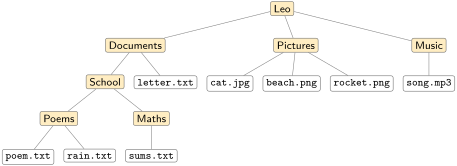
A folder can hold other folders, which can hold other folders again. Leo puts his school work in a folder School, inside his folder Documents; inside School, there is a folder for each subject. All the folders together, one inside the other, make a tree.
Definition 7.5 (Folder tree)
The folder tree of a computer is the drawing of all its folders and files, each one below the folder that holds it, with one folder at the top that holds all the others.
The folder tree is a tree drawn upside down: its root is at the top, and its branches spread downwards. The files are at the ends of the branches.
7.4 The path to a file
To tell somebody where a file is, we give the folders to open one after the other, from the top of the tree down to the file.
Definition 7.6 (File path)
The file path of a file is the list of the folders from the top of the folder tree down to the file, followed by the file name, separated by the sign /.
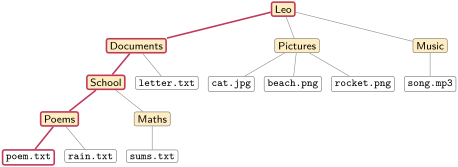
Leo/Documents/School/Poems/poem.txt The path to Leo’s poem, from the top of the tree down to the file.Method 7.7 (Reading a path)
Start at the folder at the top of the tree. Read the path from left to right: each name before a / is a folder to open, inside the one before it. The last name, after the last /, is the file.
Most computers write the paths with /; some write them with the other slant, \. File managers show the path of the open folder at the top of their window.
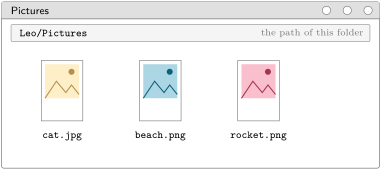
Pictures: each file as an icon, with its name and extension below it.7.5 Copying, moving, renaming, deleting
Definition 7.8 (Copy and move)
To copy a file into a folder is to make a second file, the same as the first, in that folder: then there are two. To move a file into a folder is to take it out of its folder and put it in the other one: there is still only one.
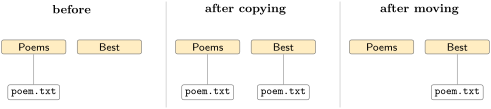
Best: now there are two poems. If he moves it instead, the poem leaves Poems: there is still only one.To rename a file is to change its name; the file stays where it is, unchanged. In a folder, two files can never have the same name, or the computer would not know which one you mean.
Definition 7.9 (Bin)
The bin is a special folder where deleted files go. A file in the bin can still be put back where it was; once the bin is emptied, its files are gone for good.
In practice — A folder plan
Before saving, choose the folder. Make one folder per subject, or per project, with a short, clear name; inside, give each file a name that says what it is, like poem-the-rain.txt. Empty the bin only when you are sure that nothing in it is needed.
7.6 Exercises
Exercise 7.1 ★
What kind of file is each one? map.png, notes.txt, dance.mp4, game.py, song.mp3, photo.jpg, list.txt, film.mp4.
Solution
Solution of Exercise 7.1.
map.png: a picture. notes.txt: text. dance.mp4: a film. game.py: a program written in Python. song.mp3: a sound. photo.jpg: a picture. list.txt: text. film.mp4: a film.
Exercise 7.2 ★
Write the path to the file sums.txt in Leo’s folder tree.
Solution
Solution of Exercise 7.2.
Leo/Documents/School/Maths/sums.txt.
Exercise 7.3 ★
Which folder holds the file Leo/Pictures/rocket.png? And the file Leo/Documents/letter.txt?
Exercise 7.4 ★
Copy or move? (a) Mia puts her story on a memory stick for her teacher, and keeps it on her computer too. (b) Tom saved a picture in the wrong folder. (c) Lina wants a spare copy of her work in another folder, just in case.
Exercise 7.5 ★
Where does a file go when you delete it? Can it come back?
Exercise 7.6 ★
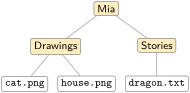
Draw the folder tree: the folder Mia holds two folders, Drawings and Stories; Drawings holds cat.png and house.png; Stories holds dragon.txt.
Solution
Solution of Exercise 7.6.
Exercise 7.7 ★
Make a folder plan for your school year: the folders you would create, and where they would go in the tree.
Exercise 7.8 ★
How many folders and how many files are there in Leo’s folder tree?
Exercise 7.9 ★★
Leo renames poem.txt to poem.jpg. What happens when he opens it? Is his poem lost?
Exercise 7.10 ★★
Two files called notes.txt can be kept in two different folders, but not in the same folder. Why?
Exercise 7.11 ★★
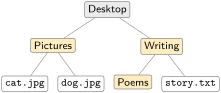
On Sami’s desktop there are three folders, Pictures, Writing and Poems, and three files, cat.jpg, dog.jpg and story.txt. He wants Poems and story.txt inside Writing, and both pictures inside Pictures. Each move moves one icon, and a folder moves with everything inside it. What is the smallest number of moves? Draw his tree afterwards.
Solution
Solution of Exercise 7.11.
Four moves: Poems into Writing (its poems go with it), story.txt into Writing, cat.jpg and dog.jpg into Pictures. Each of the four icons that must change place needs one move, so fewer is impossible.