本书暂未推出简体中文版。现有版本:English。
Primary & Middle School Computer Science · 1–9 年级
33Grids and Images
Noor zooms into a photo on her tablet, again and again, until the face of her cat turns into small coloured squares. Each square is a pixel, and each pixel is a number, or three. A photo is a table of numbers with rows and columns: a grid. This chapter builds grids in Python, and changes pictures by changing their numbers.
You already know
A list keeps values in order, each at an index from 0; a slice such as items[::-1] reads it backwards (Chapter 20). A picture is made of pixels; a grey level is a number from 0 (black) to 255 (white); a colour is three numbers, red, green and blue (Chapter 12). A text file can be read and written by a program (Chapter 27).
33.1 A list of lists as a grid
Definition 33.1 (Grid)
A grid is a list of lists of the same length: each inner list is one row, and the values at the same index in every row form a column. grid[r][c] is the value in row r, column c.
Definition 33.2 (Grid cell)
A grid cell is one place of a grid, given by its row and its column.
grid = [[3, 8, 1, 6],
        [7, 2, 9, 4],
        [5, 0, 4, 2]]
print("rows:", len(grid), " columns:", len(grid[0]))
print("grid[1][2] =", grid[1][2])
grid[1][2] = 0
print("row 1 is now", grid[1])

zeros = []
for _ in range(2):
    row = []
    for _ in range(3):
        row.append(0)
    zeros.append(row)
print(zeros)$ python grid_basics.py
rows: 3 columns: 4
grid[1][2] = 9
row 1 is now [7, 2, 0, 4]
[[0, 0, 0], [0, 0, 0]]grid[1] is the row [7, 2, 9, 4], and grid[1][2] the value at index 2 of that row. len(grid) counts the rows, len(grid[0]) the values of a row, so the columns.
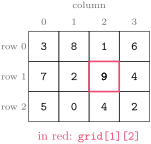
To show a grid as a table, print each row on its own line:
grid = [[3, 8, 1, 6],
        [7, 2, 9, 4],
        [5, 0, 4, 2]]
for r in range(len(grid)):
    line = ""
    for c in range(len(grid[r])):
        line = line + f"{grid[r][c]:>3}"
print(line)$ python print_grid.py
3 8 1 6
7 2 9 4
5 0 4 2A short way to build a grid of zeros looks tempting, but it holds a trap:
trap = [[0] * 3] * 3
trap[0][0] = 1
print(trap)

safe = []
for _ in range(3):
    safe.append([0] * 3)
safe[0][0] = 1
print(safe)$ python shared_rows.py
[[1, 0, 0], [1, 0, 0], [1, 0, 0]]
[[1, 0, 0], [0, 0, 0], [0, 0, 0]][[0] * 3] * 3 is the same row three times, not three rows: a change to one is a change to all. The loop builds a new row at each turn. Why Python works this way is explained in the next book; for now, build grids with a loop.
33.2 Neighbours
Definition 33.3 (Neighbour of a cell)
The neighbours of a grid cell are the cells that touch it: the four above, below, left and right of it, or the eight that also include the corners. A cell at the edge of the grid has fewer.
The eight neighbours of grid[r][c] are found by adding , 0 or 1 to the row and to the column, skipping the cell itself and the places outside the grid:
def neighbours(grid, r, c):
    """The values of the up to eight cells around grid[r][c], inside the grid."""
    found = []
    for dr in [-1, 0, 1]:
        for dc in [-1, 0, 1]:
            nr = r + dr
            nc = c + dc
            inside = 0 <= nr < len(grid) and 0 <= nc < len(grid[0])
            if (dr != 0 or dc != 0) and inside:
                found.append(grid[nr][nc])
    return found


grid = [[3, 8, 1, 6],
        [7, 2, 9, 4],
        [5, 0, 4, 2]]
print("around grid[1][1]:", neighbours(grid, 1, 1))
print("around grid[0][0]:", neighbours(grid, 0, 0))
big = 0
for value in neighbours(grid, 1, 2):
    if value >= 5:
        big = big + 1
print("neighbours of grid[1][2] that are 5 or more:", big)$ python neighbours.py
around grid[1][1]: [3, 8, 1, 7, 9, 5, 0, 4]
around grid[0][0]: [8, 7, 2]
neighbours of grid[1][2] that are 5 or more: 2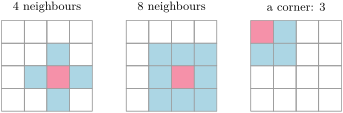
The test 0 <= nr < len(grid) checks both ends at once: nr is at least 0 and smaller than the number of rows.
33.3 A grey-level image as a grid
A grey-level image is a grid of grey levels, one per pixel: row 0 is the top of the image. A colour image is three grids of the same size, one for red, one for green, one for blue. The rest of the chapter uses grey levels, one grid.
33.4 A plain-text image file
Definition 33.4 (PGM file)
A plain PGM file is a text file that holds a grey-level image: the letters P2, then the width and the height, then the largest grey level (255), then the grey level of every pixel, row after row, separated by spaces or ends of line.
The format is one of a family of very simple image formats, made to be read and written easily by programs; its documentation asks for lines of at most 70 characters. A small file of 6 by 4 pixels, from black to white:
from pgm import pgm_text

image = []
for _ in range(4):
    row = []
    for c in range(6):
        row.append(c * 51)           # from black (0) to white (255), left to right
    image.append(row)
print(pgm_text(image))$ python make_image.py
P2
6 4
255
0 51 102 153 204 255
0 51 102 153 204 255
0 51 102 153 204 255
0 51 102 153 204 255Two functions read and write the format. read_pgm splits the whole text into words, reads the width and the height, and fills the grid; the value of row r, column c is word number r * width + c after the header. pgm_text does the reverse.
def read_pgm(filename):
    """The grey levels of a plain PGM file, as a grid of whole numbers."""
    with open(filename, encoding="utf-8") as f:
        words = f.read().split()
    width = int(words[1])
    height = int(words[2])
    values = words[4:]                   # after P2, width, height and 255
    grid = []
    for r in range(height):
        row = []
        for c in range(width):
            row.append(int(values[r * width + c]))
        grid.append(row)
    return grid


def pgm_text(grid):
    """The text of a plain PGM file holding the grid."""
    lines = ["P2", str(len(grid[0])) + " " + str(len(grid)), "255"]
    for row in grid:
        line = ""
        for value in row:
            line = line + f"{value:>4}"
        lines.append(line)
return "\n".join(lines)The chapter’s image is shape.pgm, 16 by 12 pixels: a dark background, a grey square and a white arrow. A script of the chapter writes it, and a test checks that it is written the same way every time.
from pgm import read_pgm

image = read_pgm("shape.pgm")
print(len(image[0]), "x", len(image), "pixels")
print("top left:", image[0][0], " arrow tip:", image[6][14])
print("row 6:", image[6])$ python read_pgm.py
16 x 12 pixels
top left: 40 arrow tip: 230
row 6: [40, 40, 40, 230, 230, 230, 230, 230, 230, 230, 230, 230, 230, 230, 230, 40]33.5 Changing an image
Each change below reads shape.pgm, changes the grid, and prints the text of the new PGM file; the pictures at the end of the section are drawn from that printed text. The negative replaces each grey level by :
from pgm import pgm_text, read_pgm

image = read_pgm("shape.pgm")
for r in range(len(image)):
    for c in range(len(image[r])):
        image[r][c] = 255 - image[r][c]
print(pgm_text(image))The mirror reads each row backwards, so left and right swap:
from pgm import pgm_text, read_pgm

image = read_pgm("shape.pgm")
for r in range(len(image)):
    image[r] = image[r][::-1]          # each row read backwards
print(pgm_text(image))Method 33.5 (Threshold)
To turn a grey image into pure black and white, choose a level, such as 128: every pixel at that level or above becomes white (255), every other pixel black (0).
from pgm import pgm_text, read_pgm

image = read_pgm("shape.pgm")
for r in range(len(image)):
    for c in range(len(image[r])):
        if image[r][c] >= 128:
            image[r][c] = 255
        else:
            image[r][c] = 0
print(pgm_text(image))Method 33.6 (Blur by averaging)
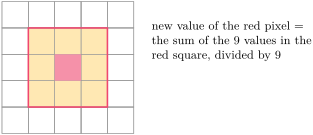
To blur an image, replace each pixel by the average of the 3 by 3 square around it: itself and its neighbours, fewer at the edges. Sharp edges become soft slopes.
from pgm import pgm_text, read_pgm


def blur(image):
    """Each pixel becomes the average of itself and its neighbours, rounded."""
    new = []
    for r in range(len(image)):
        row = []
        for c in range(len(image[0])):
            total = 0
            count = 0
            for dr in [-1, 0, 1]:
                for dc in [-1, 0, 1]:
                    if 0 <= r + dr < len(image) and 0 <= c + dc < len(image[0]):
                        total = total + image[r + dr][c + dc]
                        count = count + 1
            row.append(round(total / count))
        new.append(row)
    return new


if __name__ == "__main__":
print(pgm_text(blur(read_pgm("shape.pgm"))))The blur builds a new grid. If it changed the old one in place, each average would use pixels already blurred, and the result would depend on the order of the loops.

33.6 Exercises
Exercise 33.1 ★
In the grid of Output 33.2, what is grid[2][0]? And grid[0][3]?
Exercise 33.2 ★
Which values does neighbours(grid, 2, 3) return for the same grid?
Solution
Solution of Exercise 33.2.
[9, 4, 4]: the cell is the bottom right corner, so only three cells touch it, grid[1][2], grid[1][3] and grid[2][2].
Exercise 33.3 ★
negative.py is run on a 2 by 2 image whose rows are 0 100 and 200 255. What are the grey levels of the result?
Solution
Solution of Exercise 33.3.
Rows 255 155 and 55 0: black and white swap, and each grey goes to its opposite.
Exercise 33.4 ★
Write a function transpose(grid) that returns the grid whose rows are the columns of grid.
Solution
Solution of Exercise 33.4.
Column c of the old grid becomes row c of the new one:
def transpose(grid):
    """The grid whose rows are the columns of grid."""
    new = []
    for c in range(len(grid[0])):
        row = []
        for r in range(len(grid)):
            row.append(grid[r][c])
        new.append(row)
return newExercise 33.5 ★★
This function stops with an IndexError for the bottom right cell, and gives a wrong answer, with no error, for the top left one. Why? Fix it.
def neighbours4(grid, r, c):
return [grid[r - 1][c], grid[r + 1][c], grid[r][c - 1], grid[r][c + 1]]Solution
Solution of Exercise 33.5.
For the bottom right cell, grid[r + 1] asks for a row that does not exist. For the top left one, grid[r - 1] is grid[-1]: a negative index counts from the end, so Python quietly reads the last row, and grid[0][-1] the last column. The fix keeps only the places inside the grid:
def neighbours4(grid, r, c):
    """The values above, below, left and right of grid[r][c], inside the grid."""
    found = []
    for place in [[r - 1, c], [r + 1, c], [r, c - 1], [r, c + 1]]:
        nr = place[0]
        nc = place[1]
        if 0 <= nr < len(grid) and 0 <= nc < len(grid[0]):
            found.append(grid[nr][nc])
return foundExercise 33.6 ★★
This mirror returns image[::-1]. What does it do to the arrow of shape.pgm? Fix it.
Solution
Solution of Exercise 33.6.
image[::-1] reverses the order of the rows: the image is turned upside down. The arrow still points right, one row higher, and the grey square moves to the bottom. A mirror reverses each row, as in Listing 33.9.
Exercise 33.7 ★★
Write a function brighter(image, amount) that adds amount to every grey level, keeping each result between 0 and 255.
Solution
Solution of Exercise 33.7.
def brighter(image, amount):
    """Add amount to every grey level, kept between 0 and 255."""
    new = []
    for row in image:
        new_row = []
        for value in row:
            value = value + amount
            if value > 255:
                value = 255
            if value < 0:
                value = 0
            new_row.append(value)
        new.append(new_row)
return newA negative amount makes the image darker.
Exercise 33.8 ★★
Write a function rotate(image) that turns an image a quarter turn clockwise. What are the width and the height of the result?
Solution
Solution of Exercise 33.8.
The first row of the result is the first column, read from the bottom up:
def rotate(image):
    """The image turned a quarter turn clockwise."""
    height = len(image)
    new = []
    for c in range(len(image[0])):
        row = []
        for r in range(height):
            row.append(image[height - 1 - r][c])
        new.append(row)
return newWidth and height swap: shape.pgm becomes 12 pixels wide and 16 high.
Exercise 33.9 ★★
In a grid of 5 columns and 4 rows, add up the numbers of four-neighbours (above, below, left, right) of all the cells. Count without listing all 20 cells.
Solution
Solution of Exercise 33.9.
Count the pairs of cells side by side: in each of the 4 rows, 4 pairs; in each of the 5 columns, 3 pairs; 31 pairs in all. Each pair counts once for each of its two cells: .
Exercise 33.10 ★★★
Write a function count_white(image) that counts the pixels at 255. How many are there in the threshold of shape.pgm?
Solution
Solution of Exercise 33.10.
def count_white(image):
    """The number of pixels at 255."""
    count = 0
    for row in image:
        count = count + row.count(255)
return countThe threshold keeps the 46 pixels of the arrow, at 230; the grey square, at 120, becomes black.
Exercise 33.11 ★★★
A plain PGM file of by pixels writes each grey level with at most three digits and a separator. About how many bytes does it take, at most? Compare with one byte per pixel.
Solution
Solution of Exercise 33.11.
At most 4 characters per pixel, so about bytes, plus a dozen for the header. One byte per pixel would take : the text format is about four times larger, the price of being readable.
Exercise 33.12 ★★★
A grid of 0s and 1s changes by these rules: a cell at 1 stays at 1 if 2 or 3 of its eight neighbours are at 1, and becomes 0 otherwise; a cell at 0 becomes 1 if exactly 3 of its neighbours are at 1. Write a function step(grid) that returns the next grid. Check it on three 1s in a row in the middle of a 5 by 5 grid.
Solution
Solution of Exercise 33.12.
The new grid is built apart from the old one, as for the blur:
def step(grid):
    """One generation: a living cell (1) lives on with 2 or 3 living neighbours;
    an empty cell (0) comes to life with exactly 3."""
    new = []
    for r in range(len(grid)):
        row = []
        for c in range(len(grid[0])):
            alive = 0
            for dr in [-1, 0, 1]:
                for dc in [-1, 0, 1]:
                    nr = r + dr
                    nc = c + dc
                    inside = 0 <= nr < len(grid) and 0 <= nc < len(grid[0])
                    if (dr != 0 or dc != 0) and inside:
                        alive = alive + grid[nr][nc]
            if grid[r][c] == 1 and alive in [2, 3]:
                row.append(1)
            elif grid[r][c] == 0 and alive == 3:
                row.append(1)
            else:
                row.append(0)
        new.append(row)
return newThree 1s in a row become three 1s in a column, then a row again: the middle cell keeps 2 neighbours, the two ends have only 1 and die, and the cells above and below the middle have exactly 3 and come to life. A test of the chapter checks both steps.
33.7 Problem: The Blur That Spreads
Problem 33.1
Weekend problem — the blur that spreads
A black image holds one white pixel, 255, in its middle. What happens when it is blurred again and again? In this problem, the window always divides by 9, and the places outside the image count as 0.
Part I — By hand.
- On a 7 by 7 image with the white pixel in the middle, which pixels are not 0 after one blur? What is their value?
- After a second blur, how far from the middle does the light reach?
- Guess the number of lit pixels after blurs, far from the edges.
Part II — Decimal values.
def blur(grid, whole):
    """The 3 x 3 average of every cell (cells outside the grid count as 0)."""
    size = len(grid)
    new = []
    for r in range(size):
        row = []
        for c in range(size):
            total = 0
            for dr in [-1, 0, 1]:
                for dc in [-1, 0, 1]:
                    if 0 <= r + dr < size and 0 <= c + dc < size:
                        total = total + grid[r + dr][c + dc]
            if whole:
                row.append(round(total / 9))
            else:
                row.append(total / 9)
        new.append(row)
    return new


def lit(grid):
    """The number of cells that are not 0."""
    count = 0
    for row in grid:
        for value in row:
            if value != 0:
                count = count + 1
return countfor whole in [False, True]:
grid = []
for _ in range(15):
grid.append([0] * 15)
grid[7][7] = 255 # one white pixel in the middle
print("whole grey levels:", whole)
last_change = 0
for k in range(1, 21):
new = blur(grid, whole)
if new != grid:
last_change = k
grid = new
if k <= 6 or k == 20:
centre = f"{grid[7][7]:.2f}"
print(f" after {k:>2} blurs: {lit(grid):>3} cells lit, centre {centre}")
print(" the image last changed at blur", last_change)- What does
litcount, and what does the parameterwholechange? - Run the program. Do the counts with decimal values match your guess?
- Why are all 225 cells lit after 20 blurs, and not ?
- Does the total brightness stay the same from blur to blur?
Part III — Whole grey levels.
- A PGM file stores whole numbers only. How do the counts change with
whole=True? - Why does the light stop spreading after 5 blurs?
- After blur 16 the image no longer changes at all. Explain why a blur can leave an image unchanged.
- What does this tell you about doing a calculation many times with rounded numbers?
- State the result.
Solution
Solution of Problem 33.1.
1. The 9 pixels of the 3 by 3 square around the middle, each at .
2. Two pixels from the middle in every direction: a 5 by 5 square.
3. Each blur adds a ring one pixel wide: .
4. The pixels that are not 0; whole rounds each new value to a whole grey level, as a PGM file must.
5. Yes: 9, 25, 49, 81, 121, 169, the squares of 3, 5, 7, 9, 11, 13.
$ python spread.py
whole grey levels: False
  after  1 blurs:   9 cells lit, centre 28.33
  after  2 blurs:  25 cells lit, centre 28.33
  after  3 blurs:  49 cells lit, centre 17.14
  after  4 blurs:  81 cells lit, centre 14.03
  after  5 blurs: 121 cells lit, centre 11.23
  after  6 blurs: 169 cells lit, centre 9.54
  after 20 blurs: 225 cells lit, centre 2.99
  the image last changed at blur 20
whole grey levels: True
  after  1 blurs:   9 cells lit, centre 28.00
  after  2 blurs:  25 cells lit, centre 28.00
  after  3 blurs:  45 cells lit, centre 17.00
  after  4 blurs:  61 cells lit, centre 13.00
  after  5 blurs:  69 cells lit, centre 11.00
  after  6 blurs:  69 cells lit, centre 9.00
  after 20 blurs:  69 cells lit, centre 3.00
the image last changed at blur 166. The image is only 15 by 15: after 7 blurs, the light reaches the edges, and there are no more pixels to light.
7. Far from the edges, yes: each pixel hands out one ninth of its value to each of 9 pixels, so the total stays 255. Once the light reaches the edges, the share that would go outside is lost.
8. The same 9 and 25, then fewer: 45, 61, 69, and 69 again.
9. At the border of the lit area, a dark pixel’s window holds a few small values. When their sum is less than 4.5, the average is less than 0.5, and it rounds to 0: the pixel stays dark.
10. When every pixel’s window averages to a value that rounds back to the pixel’s own value, nothing changes, and every later blur gives the same image.
11. Rounding errors can stop a process, or keep it where it is, although the exact calculation would go on changing.
12. Result. With decimal values, after blurs exactly pixels are lit, away from the edges. With whole grey levels, the light stops spreading at 69 pixels after 5 blurs, and from blur 16 on the image no longer changes at all, its centre stuck at 3.