هذا الكتاب غير متوفر بعد باللغة العربية. النسخ المتوفرة: English.
Primary & Middle School Computer Science · الصفوف 1–9
28Searching and Sorting
To find the word otter in a paper dictionary, nobody starts at the first page and reads every word. You open it near the middle, see that you are in the ms, and go on in the second half; a few openings later the word is in front of you. That works because the words are in alphabetical order. This chapter teaches a computer both ways of searching, and two ways of putting a list in order first.
You already know
A list keeps items in order, each at a position, its index, from 0 (Chapter 20); a function takes parameters and returns a value (Chapter 19). The guessing game of Chapter 18 asks “higher or lower?” until the guess is right. bits make patterns, and each extra bit doubles their number (Chapter 25).
28.1 Searching item by item
Definition 28.1 (Linear search)
A linear search looks at the items of a list one after the other, from the first, until it finds the one it looks for or reaches the end.
The function returns the position of the target, or when it is not in the list, a position that cannot exist. It also counts its comparisons, to measure its work.
def linear_search(items, target):
    """The position of target in items, or -1; also the number of comparisons."""
    comparisons = 0
    for i in range(len(items)):
        comparisons = comparisons + 1
        if items[i] == target:
            return i, comparisons
    return -1, comparisons


if __name__ == "__main__":
    ages = [12, 9, 15, 11, 9, 14, 13, 10]
    for target in [12, 13, 7]:
print(target, linear_search(ages, target))$ python linear_search.py
12 (0, 1)
13 (6, 7)
7 (-1, 8)The function returns two values, written with a comma; Python prints them in brackets. Finding 12 takes one comparison, because it is first; 13 takes 7. Looking for 7, which is not there, takes 8: every item is looked at. This is the worst case: for a list of a million items, a million comparisons.

28.2 Searching a sorted list by halving
Definition 28.2 (Sorted list)
A list is sorted (in increasing order) when each item is smaller than or equal to the next one.
Definition 28.3 (Binary search)
A binary search looks for an item in a sorted list by comparing it with the middle item, then going on in the half where it must be, and halving again until it is found or no item is left.
This is the good strategy of the guessing game: guess 50 between 1 and 100; “higher” leaves 51 to 100, so guess 75; and so on. The program keeps two positions, low and high: the target, if it is there, lies between them.
def binary_search(items, target):
    """The position of target in the sorted list items, or -1; also the guesses."""
    low = 0
    high = len(items) - 1
    guesses = 0
    while low <= high:
        middle = (low + high) // 2
        guesses = guesses + 1
        if items[middle] == target:
            return middle, guesses
        elif items[middle] < target:
            low = middle + 1          # target is in the right half
        else:
            high = middle - 1         # target is in the left half
    return -1, guesses


if __name__ == "__main__":
    numbers = list(range(1, 101))
    for target in [50, 37, 100, 1]:
print(target, binary_search(numbers, target))low and high. code/grade-8/04-searching-and-sorting/listings/binary_search.py$ python binary_search.py
50 (49, 1)
37 (36, 3)
100 (99, 7)
1 (0, 6)// divides and drops the remainder, so middle is always a whole position. The trace below follows the search for 77 in a sorted row of 16 numbers:
items = [2, 5, 8, 12, 16, 23, 38, 41, 47, 56, 61, 72, 77, 85, 90, 98]
target = 77
low = 0
high = len(items) - 1
found = False
while low <= high and not found:
    middle = (low + high) // 2
    print("low", low, "middle", middle, "high", high, "->", items[middle])
    if items[middle] == target:
        found = True
    elif items[middle] < target:
        low = middle + 1
    else:
        high = middle - 1
print("found:", found)low, middle and high printed at each step. code/grade-8/04-searching-and-sorting/listings/binary_search_trace.py$ python binary_search_trace.py
low 0 middle 7 high 15 -> 41
low 8 middle 11 high 15 -> 72
low 12 middle 13 high 15 -> 85
low 12 middle 12 high 12 -> 77
found: True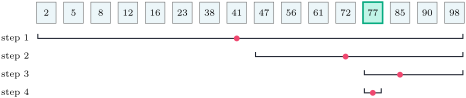
low to high, and the red dot the middle item compared. Four steps.How many guesses can binary search need? Each guess removes the middle item and at least half of the others. One guess is enough for 1 item, two for 3, three for 7: guesses are enough for items. With 100 items, 6 guesses cover only , but 7 cover : the doublings of Chapter 25, read backwards.
The halving only makes sense if the list is sorted. On an unsorted list, the program still runs, and still answers, but the answer can be wrong:
from binary_search import binary_search
from linear_search import linear_search

ages = [12, 9, 15, 11, 9, 14, 13, 10]       # not sorted
print("binary:", binary_search(ages, 15))
print("linear:", linear_search(ages, 15))$ python unsorted_binary.py
binary: (-1, 4)
linear: (2, 3)The first middle item is 11, smaller than 15, so the search goes right, where 15 is not. No error message warns about it: making sure the list is sorted is the programmer’s job.
28.3 Selection sort
Definition 28.4 (Selection sort)
Selection sort finds the smallest item of a list and swaps it to the front, then does the same on the rest of the list, one position further each time.
def selection_sort(items):
    """Sort items in place, smallest first; return the number of comparisons."""
    comparisons = 0
    for start in range(len(items) - 1):
        smallest = start
        for i in range(start + 1, len(items)):
            comparisons = comparisons + 1
            if items[i] < items[smallest]:
                smallest = i
        items[start], items[smallest] = items[smallest], items[start]   # swap the two
    return comparisons


if __name__ == "__main__":
    cards = [7, 3, 9, 1, 8, 4]
print(selection_sort(cards), "comparisons:", cards)$ python selection_sort.py
15 comparisons: [1, 3, 4, 7, 8, 9]a, b = b, a swaps two values in one line. The function changes the list it receives, in place, as append does (Chapter 20), and returns its number of comparisons.
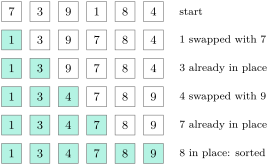
The first pass compares 5 pairs, the next 4, then 3, 2 and 1: comparisons, whatever the order of the cards.
28.4 Insertion sort
Definition 28.5 (Insertion sort)
Insertion sort takes the items one after the other and slides each one back, among those already sorted before it, until it reaches its place.
It is how many card players sort a hand: pick up the cards one at a time, and put each one where it belongs among those already held.
def insertion_sort(items):
    """Sort items in place, smallest first; return the number of comparisons."""
    comparisons = 0
    for i in range(1, len(items)):
        j = i
        moving = True
        while moving and j > 0:
            comparisons = comparisons + 1
            if items[j - 1] > items[j]:
                items[j - 1], items[j] = items[j], items[j - 1]   # swap the two
                j = j - 1
            else:
                moving = False         # in its place among the sorted ones
    return comparisons


if __name__ == "__main__":
    cards = [7, 3, 9, 1, 8, 4]
print(insertion_sort(cards), "comparisons:", cards)$ python insertion_sort.py
11 comparisons: [1, 3, 4, 7, 8, 9]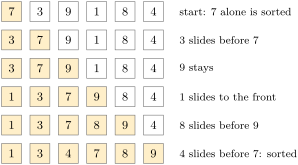
28.5 Counting comparisons to compare two methods
Both sorts give the same sorted list. Which one works less? The counters answer, on lists of 10, 100 and 1,000 numbers, already sorted, in reverse, or mixed. The mixed order is fixed in the program, so the counts are the same at every run.
from insertion_sort import insertion_sort
from selection_sort import selection_sort


def mixed(n):
    """The numbers 0 to n - 1 in a fixed mixed order: the remainders of 37 x i by n."""
    items = []
    for i in range(n):
        items.append((37 * i) % n)
    return items


if __name__ == "__main__":
    print("n      order      selection  insertion")
    for n in [10, 100, 1000]:
        for name in ["sorted", "reversed", "mixed"]:
            if name == "sorted":
                items = list(range(n))
            elif name == "reversed":
                items = list(range(n, 0, -1))
            else:
                items = mixed(n)
            by_selection = selection_sort(list(items))
            by_insertion = insertion_sort(list(items))
print(f"{n:<6} {name:<10} {by_selection:>9} {by_insertion:>10}")$ python count_comparisons.py
n order selection insertion
10 sorted 45 9
10 reversed 45 45
10 mixed 45 27
100 sorted 4950 99
100 reversed 4950 4950
100 mixed 4950 2547
1000 sorted 499500 999
1000 reversed 499500 499500
1000 mixed 499500 252747Selection sort always makes the same number of comparisons for items: , which is , so 45 for 10 items and 499,500 for 1,000. Insertion sort depends on the order. On a sorted list, each item is compared once with the one before it and stays: comparisons. On a reversed list, each item slides all the way to the front, and it makes as many comparisons as selection sort. On the mixed lists it lies in between, about half of the most.
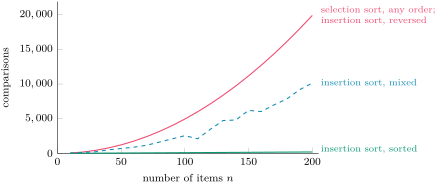
When the list doubles, is about four times larger: the top curve bends upwards. A linear search on a list twice as long only works twice as much. Book 2 makes this way of comparing methods precise.
Remark 28.6 (Sorting in practice)
Python has a sort built in: sorted(items) returns a new sorted list, and items.sort() sorts a list in place. They use a cleverer method than the two of this chapter, and are the tools to use in real programs. Writing the two sorts by hand shows what such a tool does, and how to count its work.
28.6 Exercises
Exercise 28.1 ★
Binary search looks for 37 in the sorted list [3, 8, 15, 21, 29, 37, 44, 50, 61]. Write low, middle, high and the middle item at each step.
Exercise 28.2 ★
Write the list [6, 2, 8, 5, 1] after the first two passes of selection sort.
Solution
Solution of Exercise 28.2.
Pass 1 swaps the smallest, 1, with 6: [1, 2, 8, 5, 6]. Pass 2 finds that the smallest of the rest, 2, is already in place: [1, 2, 8, 5, 6].
Exercise 28.3 ★
Write the same list [6, 2, 8, 5, 1] after the first two passes of insertion sort.
Solution
Solution of Exercise 28.3.
Pass 1 slides 2 before 6: [2, 6, 8, 5, 1]. Pass 2 leaves 8 where it is, since 6 is smaller: [2, 6, 8, 5, 1].
Exercise 28.4 ★
Write a function all_positions(items, target) that returns the list of all the positions where target appears, and an empty list if it does not.
Solution
Solution of Exercise 28.4.
A linear search that does not stop at the first match:
def all_positions(items, target):
    positions = []
    for i in range(len(items)):
        if items[i] == target:
            positions.append(i)
    return positions


print(all_positions([12, 9, 15, 11, 9, 14, 13, 9], 9), all_positions([1, 2], 5))Exercise 28.5 ★★
This version of binary search never ends when it looks for 2 in [4, 9]. Follow low and high by hand to see why, and fix it.
def binary_search(items, target):
    low = 0
    high = len(items) - 1
    while low <= high:
        middle = (low + high) // 2
        if items[middle] == target:
            return middle
        elif items[middle] < target:
            low = middle + 1
        else:
            high = middle
    return -1


print(binary_search([4, 9], 2))Solution
Solution of Exercise 28.5.
low 0, high 1, middle 0: 4 is larger than 2, so high becomes 0. Then low 0, high 0, middle 0: 4 is larger again, and high becomes 0 again. Nothing changes any more, and low <= high stays true forever. The middle item has already been compared, so it must be left out: high = middle - 1. Then each step makes the part searched smaller, and the loop ends.
Exercise 28.6 ★★
This insertion sort prints [5, 1, 3]. Which item does it forget, and how do you fix it?
def insertion_sort(items):
    for i in range(2, len(items)):
        j = i
        while j > 0 and items[j - 1] > items[j]:
            items[j - 1], items[j] = items[j], items[j - 1]
            j = j - 1


cards = [5, 1, 3]
insertion_sort(cards)
print(cards)Exercise 28.7 ★★
Write a program that uses binary_search from Listing 28.2 to find the largest number of guesses it needs for a target between 1 and 1,000, trying every target. Check the answer with powers of two.
Solution
Solution of Exercise 28.7.
Saved in the folder of Listing 28.2, the program imports its binary_search:
from binary_search import binary_search

numbers = list(range(1, 1001))
most = 0
for target in numbers:
    position, guesses = binary_search(numbers, target)
    if guesses > most:
        most = guesses
print("at most", most, "guesses for 1 to 1000")It prints at most 10 guesses for 1 to 1000. Indeed 9 guesses cover only items, and 10 cover .
Exercise 28.8 ★★
Write your own selection sort that sorts a list of words from the shortest to the longest.
Solution
Solution of Exercise 28.8.
The selection sort of the chapter, comparing len of the words:
def sort_by_length(words):
    """Selection sort, comparing the lengths of the words."""
    for start in range(len(words) - 1):
        shortest = start
        for i in range(start + 1, len(words)):
            if len(words[i]) < len(words[shortest]):
                shortest = i
        words[start], words[shortest] = words[shortest], words[start]


words = ["banana", "fig", "cherry", "kiwi", "apple"]
sort_by_length(words)
print(words)It prints ['fig', 'kiwi', 'apple', 'banana', 'cherry'].
Exercise 28.9 ★★
Count by hand the comparisons of selection sort on 5 items, pass by pass. Does it depend on the order of the items?
Solution
Solution of Exercise 28.9.
Pass 1 compares the smallest found so far with each of the 4 other items; pass 2 with the 3 after the first place, then 2, then 1: comparisons. It does not depend on the order: selection sort always looks at the whole rest of the list to be sure it has the smallest.
Exercise 28.10 ★★★
Find a list of 3 numbers that contains 5 but on which binary search does not find 5. Explain why binary search needs a sorted list.
Solution
Solution of Exercise 28.10.
[5, 1, 3]: the middle item is 1, smaller than 5, so the search goes right; it finds 3, still smaller, goes right again, and stops with . Binary search throws away a half without looking at it; that is safe only if the order guarantees that the target cannot be there.
Exercise 28.11 ★★★
Show that insertion sort makes exactly comparisons on a sorted list of items, and exactly on a reversed one. Count the comparisons of each pass, then add them up.
Solution
Solution of Exercise 28.11.
Pass (for from 1 to ) slides the item at position . On a sorted list it is compared once with the item before it, which is smaller, and stays: one comparison per pass, in all. On a reversed list it is smaller than all the items before it, so it is compared with each of them and slides to the front: comparisons. In all, . Writing this sum twice, once forwards and once backwards, gives pairs that each add up to , so the sum is .
Exercise 28.12 ★★★
Write a function sort_books(books) that sorts the records of the town’s book table (Chapter 27) by year, and by title for books of the same year, with your own insertion sort.
Solution
Solution of Exercise 28.12.
A helper function decides which of two books comes first; the insertion sort uses it in place of >:
def comes_before(a, b):
    """True when book a goes before book b: older first, then by title."""
    if int(a["year"]) != int(b["year"]):
        return int(a["year"]) < int(b["year"])
    return a["title"] < b["title"]


def sort_books(books):
    """Insertion sort of a list of book records, in place."""
    for i in range(1, len(books)):
        j = i
        while j > 0 and comes_before(books[j], books[j - 1]):
            books[j - 1], books[j] = books[j], books[j - 1]
j = j - 1A test of the chapter checks it on records with the same year.
28.7 Problem: One Word among a Million
Problem 28.1
Weekend problem — finding one word among a million
A dictionary of a million words is kept as a sorted list. How many comparisons does it take to find a word, and is it worth sorting first?
Part I — By hand.
- Between 1 and 16, guess the secret number 11 by halving: write each guess and the part left.
- Halve 1,000 again and again, keeping the larger half, until one item is left. How many halvings is that?
- Why does halving help only when the list is sorted?
Part II — The worst case, by program.
def worst_guesses(n):
    """Guesses of binary search on n items, the target always in the larger half."""
    low = 0
    high = n - 1
    guesses = 0
    while low <= high:
        middle = (low + high) // 2
        guesses = guesses + 1
        low = middle + 1            # the right half is never smaller than the left
    return guesses


n = 10
while n <= 1_000_000:
    print(f"{n:>9} items: {worst_guesses(n)} guesses at most")
n = n * 10- Why does
worst_guessesalways setlow = middle + 1? - Run the program. How do the counts grow when the size is multiplied by 10?
- Explain the 20 for a million with a power of two.
- How many comparisons would a linear search need in the worst case for a million words?
Part III — Sorting first.
from binary_search import binary_search
from count_comparisons import mixed
from insertion_sort import insertion_sort
from linear_search import linear_search
from selection_sort import selection_sort

n = 1000
words = mixed(n)            # 1,000 "words", numbered 0 to 999, in a mixed order

scan = 0
for target in range(n):
    position, comparisons = linear_search(words, target)
    scan = scan + comparisons
print("1,000 linear searches:", scan, "comparisons")

by_selection = selection_sort(list(words))
by_insertion = insertion_sort(list(words))
sorted_words = sorted(words)
halving = 0
for target in range(n):
    position, guesses = binary_search(sorted_words, target)
    halving = halving + guesses
print("selection sort:", by_selection, "+ 1,000 binary searches:", halving)
print("insertion sort:", by_insertion, "+ 1,000 binary searches:", halving)- What does the program compare?
- Run it. What do the 1,000 linear searches cost, and what do sorting plus 1,000 binary searches cost?
- With selection sort, is sorting first worth it for 1,000 searches? With insertion sort?
- What if the dictionary is searched 100,000 times, and sorted only once?
- State the result.
Solution
Solution of Problem 28.1.
1. Guess 8: higher, 9 to 16 left. Guess 12: lower, 9 to 11 left. Guess 10: higher, 11 left. Guess 11: found, in 4 guesses.
2. 1,000, 500, 250, 125, 63, 32, 16, 8, 4, 2, 1: ten halvings, so about 10 guesses.
3. Throwing away half of the list is safe only if the order says the target cannot be there.
4. Going right keeps the larger half, since // rounds down: it is the case where the most guesses are needed.
5. Each time the size is multiplied by 10, 3 or 4 more guesses are needed:
$ python worst_guesses.py
       10 items: 4 guesses at most
      100 items: 7 guesses at most
     1000 items: 10 guesses at most
    10000 items: 14 guesses at most
   100000 items: 17 guesses at most
1000000 items: 20 guesses at mostMultiplying by 10 is a little more than three doublings, since .
6. 19 guesses cover items, not enough; 20 cover , which is at least a million.
7. A million: every word is looked at when the word sought is last or absent.
8. The cost of 1,000 linear searches in a mixed list, against the cost of sorting the list once and then making 1,000 binary searches.
9.
$ python sort_or_scan.py
1,000 linear searches: 500500 comparisons
selection sort: 499500 + 1,000 binary searches: 8987
insertion sort: 252747 + 1,000 binary searches: 8987The linear searches cost 500,500 comparisons. Sorting costs 499,500 with selection sort and 252,747 with insertion sort; the 1,000 binary searches add only 8,987.
10. With selection sort, , a little more than the 500,500 of the linear searches: not worth it. With insertion sort, , about half: worth it.
11. The sort is paid once, and each binary search costs about 9 comparisons instead of about 500. 100,000 linear searches cost about 50 million comparisons; 100,000 binary searches about 900,000, plus one sort. Sorting first wins by far.
12. Result. Binary search finds any word among 1,000,000 sorted words in at most 20 comparisons, because is at least 1,000,000; a linear search may need a million. Sorting costs more than one search, but it is paid once: as soon as the list is searched many times, sorting first wins.