Buku ini belum tersedia dalam Bahasa Indonesia. Edisi: English.
Primary & Middle School Computer Science · Kelas 1–9
31Web Pages: HTML and CSS
Lina saves the library’s web page on her laptop and opens the file in a text editor instead of the browser. There is no picture of the page: only words, and many small words between angle brackets, such as <h1> and </p>. Those small words tell the browser what each part of the page is. This chapter reads them.
You already know
A web page is a file kept by a server; a browser asks for it and shows it; a link holds the address of another page (Chapter 13). A file has a name and an extension that tells what it holds (Chapter 7). A colour can be written #RRGGBB, three bytes in hexadecimal (Chapter 25).
31.1 A web page is a text file
Definition 31.1 (HTML)
HTML (HyperText Markup Language) is the language in which web pages are written. An HTML file is a text file, with the extension .html, in which marks around the text say what each part is: a heading, a paragraph, a list, a link.
Here is the whole page Lina opened:
<!DOCTYPE html>
<html>
  <head>
    <title>Brenmoor Library</title>
    <link rel="stylesheet" href="style.css">
  </head>
  <body>
    <h1>Brenmoor Library</h1>
    <p>Open every day <em>except</em> Monday.</p>
    <h2>This week</h2>
    <ul>
      <li>Story time on Wednesday</li>
      <li class="new">Chess club on Saturday</li>
    </ul>
    <p>See the <a href="books.html">list of books</a>.</p>
    <img src="library.jpg" alt="The front of the library">
  </body>
</html>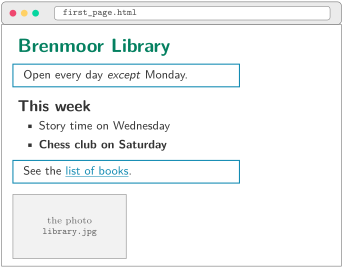
31.2 Elements and tags
Definition 31.2 (Element, tag)
An element is one part of a page. It is written as a start tag such as <p>, then its content, then an end tag such as </p>, with a slash. A few elements, such as an image, have no content and no end tag.
Definition 31.3 (Attribute)
An attribute is a name and a value written inside a start tag, such as href="books.html"; it gives more information about the element.
The elements of the library page are among the most used:
| Element | What it is |
|---|---|
h1, h2 | a heading, then a smaller heading (down to h6) |
p | a paragraph |
em | words to stress, usually shown in italics |
ul, li | a list with bullets, and one item of it |
a | a link; its attribute href gives the address |
img | an image; src names the file, alt describes it |
table, tr, th, td | a table, a row, a header cell, a cell |
html, head, body | the whole page, its information, what is shown |
The head holds information about the page: its title, shown on the browser’s tab, and a link to its style sheet. The body holds everything shown in the window. The first line, <!DOCTYPE html>, only tells the browser that the file is HTML. A table is written row by row:
<table>
  <tr>
    <th>Place</th>
    <th>Kind</th>
  </tr>
  <tr>
    <td>Library</td>
    <td>library</td>
  </tr>
  <tr>
    <td>Museum</td>
    <td>museum</td>
  </tr>
</table>The alt text of an image is read aloud to people who cannot see the screen, and shown when the image does not load: a page should always have one.
31.3 The page as a tree
Definition 31.4 (Document tree)
The elements of a page sit inside one another: html holds head and body, body holds the paragraphs, a paragraph holds a link. Drawn with each element below the one that holds it, they make the document tree of the page.
A program can find the tree. It looks for every <, cuts out the tag up to the next >, and keeps a count of the open elements, the depth: a start tag opens one more, an end tag closes one. Each element name is printed with two spaces per open element in front of it.
VOID = ["area", "base", "br", "col", "embed", "hr", "img", "input", "link",
        "meta", "source", "track", "wbr"]     # elements without an end tag


def tags(text):
    """The tags of an HTML text, in order, each without its angle brackets."""
    found = []
    start = text.find("<")
    while start != -1:
        end = text.find(">", start)
        found.append(text[start + 1:end])
        start = text.find("<", end)
    return found


def name_of(tag):
    """The element name of a tag: 'li class="new"' gives 'li', '/li' gives 'li'."""
    return tag.strip("/").split(" ")[0].lower()


def show_tree(text):
    """Print the element names, indented by their depth in the tree."""
    depth = 0
    for tag in tags(text):
        if tag.startswith("!"):
            continue                       # the DOCTYPE line is not an element
        if tag.startswith("/"):
            depth = depth - 1              # an end tag closes the open element
        else:
            print("  " * depth + name_of(tag))
            if name_of(tag) not in VOID:
                depth = depth + 1          # what follows is inside this element
return depthfrom html_tree import show_tree
with open("first_page.html", encoding="utf-8") as f:
page = f.read()
left_open = show_tree(page)
print("open at the end:", left_open)$ python show_tree.py
html
head
title
link
body
h1
p
em
h2
ul
li
li
p
a
img
open at the end: 0find returns the position of a text inside another, or when it is not there; find("<", end) starts looking at position end. continue skips the rest of the loop’s body and goes on with the next tag. link and img are void elements, with no end tag, so they do not open anything.
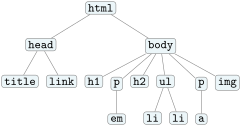
The tree only comes out right if every end tag closes the element opened last. A missing end tag shifts everything after it:
from html_tree import show_tree

page = """<body>
  <p>Open every day <em>except Monday.</p>
  <h2>This week</h2>
  <p>Chess club on Saturday.</p>
</body>"""
print("open at the end:", show_tree(page))em is never closed. code/grade-9/01-html-and-css/listings/unclosed.py$ python unclosed.py
body
p
em
h2
p
open at the end: 1The </p> closes em instead of p, so the paragraph stays open, and the heading lands inside it. Browsers try hard to guess what was meant, but a page whose tags pair up properly leaves nothing to guess. The program can also count the elements of each kind:
from html_tree import name_of, tags

with open("first_page.html", encoding="utf-8") as f:
    page = f.read()

counts = {}
for tag in tags(page):
    if not tag.startswith("/") and not tag.startswith("!"):
        name = name_of(tag)
        counts[name] = counts.get(name, 0) + 1
for name in counts:
    print(name, counts[name])
print("elements:", sum(counts.values()))$ python count_tags.py
html 1
head 1
title 1
link 1
a 1
img 1
elements: 15History — The first web page
The first web server ran at CERN at the end of 1990 (Chapter 13). Its address was info.cern.ch, and its first page described the World Wide Web project itself, with links to pages on how to set up a server of one’s own.
31.4 Content apart from appearance
Definition 31.5 (CSS, CSS rule, selector)
CSS (Cascading Style Sheets) is the language that says how the elements of a page look. A CSS rule is a selector, which says which elements it applies to, followed by properties and values between curly brackets.
Definition 31.6 (Class of an element)
The attribute class gives an element a name chosen by the author, its class; the selector li.new applies only to the li elements of class new.
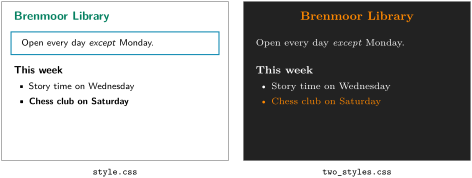
The HTML says what each part is; a separate CSS file, the style sheet, says how it looks. The link in the head of the library page names style.css:
body {
  font-family: sans-serif;
  color: #333333;
}

h1 {
  color: #2E8B57;
  font-size: 32px;
}

li.new {
  font-weight: bold;
}

p {
  width: 300px;
  padding: 10px;
  border: 2px solid #4169E1;
  margin: 20px;
}The selector body applies to the body and, unless a rule says otherwise, to everything inside it: hence the font of the whole page. The colours are the hexadecimal colours of Chapter 25; sizes are in px, pixels of the screen.
31.5 Boxes
Definition 31.7 (Box model)
In the box model, the browser draws every element as a rectangle: its content, surrounded by an inner space, the padding; then a border; then an outer space, the margin, that keeps other boxes away.
In style.css, a paragraph has content 300 pixels wide, 10 pixels of padding and a border of 2 pixels on each side: the box is pixels wide, and its margin of 20 pixels keeps the next box at a distance.
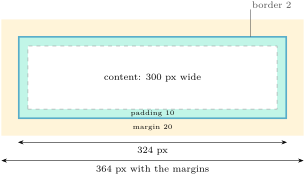
style.css: the content, the padding, the border (blue) and the margin, to scale.Changing the style sheet changes the look of the page without touching the HTML. Here is a second one, dark, with no border around paragraphs:
body {
  font-family: serif;
  background-color: #222222;
  color: #FFFFFF;
}

h1 {
  color: #FF8800;
  text-align: center;
}

li.new {
  color: #FF8800;
}

p {
  width: 300px;
  padding: 0px;
  border: none;
  margin: 10px;
}
31.6 Exercises
Exercise 31.1 ★
What does show_tree print for this HTML?
<ul><li><a href="x.html">x</a></li><li>y</li></ul>
Solution
Solution of Exercise 31.1.
ul, then li indented once, a indented twice (inside the first item), and the second li indented once. At the end, nothing is left open.
Exercise 31.2 ★
In the library page, which elements does each rule of style.css apply to?
Solution
Solution of Exercise 31.2.
body applies to the body, and so to the whole page shown; h1 to the main heading; li.new to the second item only, Chess club; p to the two paragraphs.
Exercise 31.3 ★
With two_styles.css, how wide is the box of a paragraph, border included? And with its margins?
Solution
Solution of Exercise 31.3.
No padding and no border: the box is 300 pixels wide, and with its margins.
Exercise 31.4 ★
Write a page with a title, a heading, a list of two of your favourite places and a link to https://www.example.org.
Solution
Solution of Exercise 31.4.
<!DOCTYPE html>
<html>
  <head>
    <title>My favourite places</title>
  </head>
  <body>
    <h1>My favourite places</h1>
    <ul>
      <li>The library</li>
      <li>The harbour</li>
    </ul>
    <p>More on <a href="https://www.example.org">this page</a>.</p>
  </body>
</html>
A test of the chapter checks that its tags pair up.
Exercise 31.5 ★★
<p>An <em>important</p></em> day closes its tags in the wrong order. Draw the tree it should have, and fix it.
Solution
Solution of Exercise 31.5.
em is inside p, so it must close first: <p>An <em>important</em> day</p>, with the tree p, then em below it. show_tree does not notice the mistake: it only counts the open elements, and two start tags followed by two end tags bring the count back to 0, whatever their names. Exercise 31.11 looks at the names.
Exercise 31.6 ★★
A page shows a map with <img src="map.png">. What is missing, who needs it, and how do you fix it?
Solution
Solution of Exercise 31.6.
The alt text is missing. People who listen to the page with a screen reader hear nothing about the map, and everyone sees an empty frame when the image does not load. The fix describes it: <img src="map.png" alt="Map of the town centre">.
Exercise 31.7 ★★
Write an HTML table with two columns, the name and the kind of four of the town’s places: Library, Market Hall, River Park and one more of your choice.
Solution
Solution of Exercise 31.7.
<table>
  <tr>
    <th>Place</th>
    <th>Kind</th>
  </tr>
  <tr>
    <td>Library</td>
    <td>library</td>
  </tr>
  <tr>
    <td>Market Hall</td>
    <td>market</td>
  </tr>
  <tr>
    <td>River Park</td>
    <td>park</td>
  </tr>
  <tr>
    <td>Station</td>
    <td>station</td>
  </tr>
</table>Exercise 31.8 ★★
Write a style sheet that colours every h2 heading in royal blue, #4169E1.
Solution
Solution of Exercise 31.8.
h2 {
  color: #4169E1;
}h2 in royal blue. code/grade-9/01-html-and-css/exercises/h2.cssExercise 31.9 ★★
How many elements does table.html have, and what is the depth of its tree (the number of levels, the top one counted as 1)?
Solution
Solution of Exercise 31.9.
10 elements: table, three tr, two th and four td. Depth 3: table, then tr, then the cells.
Exercise 31.10 ★★★
Write a function links(text) that returns the address of every link of a page, using tags and name_of from Listing 31.3.
Solution
Solution of Exercise 31.10.
Keep the start tags named a, and cut out the text between href=" and the next quote. The file sits next to html_tree.py (Listing 31.3), whose tags and name_of it imports:
from html_tree import name_of, tags


def links(text):
    """The address of every link (the href of every a element) of an HTML text."""
    found = []
    for tag in tags(text):
        if name_of(tag) == "a" and not tag.startswith("/"):
            start = tag.find('href="') + len('href="')
            found.append(tag[start:tag.find('"', start)])
return foundOn the library page it returns ['books.html'].
Exercise 31.11 ★★★
Show that in a page whose tags pair up properly, every end tag closes the element opened most recently and still open, as closing brackets do in . Give a page where this fails, and say what show_tree does with it.
Solution
Solution of Exercise 31.11.
Suppose an end tag </a> comes while an element b, opened after a, is still open. Then b started inside a, so all of its content, end tag included, belongs inside a, before </a>. But b is still open at </a>: its end comes after, outside a. That is impossible in a page whose elements sit inside one another; so every end tag closes the element opened most recently and still open, exactly as a closing bracket closes the last open bracket. The page of Exercise 31.5 breaks the rule: </p> comes while em is still open. To catch it, a program would keep the list of the names still open, check that each end tag has the name at the end of that list, then remove it.
Exercise 31.12 ★★★
Write a function html_table(filename) that reads a CSV file (Chapter 27) and returns the text of an HTML table, with the header row in th cells.
Solution
Solution of Exercise 31.12.
import csv


def html_table(filename):
    """The rows of a CSV file as the text of an HTML table, header row in th cells."""
    with open(filename, encoding="utf-8") as f:
        rows = list(csv.reader(f))
    text = "<table>\n"
    for i in range(len(rows)):
        cell = "td"
        if i == 0:
            cell = "th"
        text = text + "  <tr>"
        for value in rows[i]:
            text = text + "<" + cell + ">" + value + "</" + cell + ">"
        text = text + "</tr>\n"
    return text + "</table>\n"
A test turns the town’s places.csv into a table and checks that its tags pair up and that it has one row per line of the file.
31.7 Problem: The Tree of a Page
Problem 31.1
Weekend problem — the tree of a page
The weather station of Hilltop publishes a small page:
<!DOCTYPE html>
<html>
  <head>
    <title>Hilltop weather</title>
  </head>
  <body>
    <h1>Hilltop weather</h1>
    <p>Readings of <strong>2025</strong>.</p>
    <table>
      <tr>
        <th>Month</th>
        <th>Rain</th>
      </tr>
      <tr>
        <td>March</td>
        <td>84.4 mm</td>
      </tr>
    </table>
  </body>
</html>Part I — By hand.
- Draw the tree of the page.
- How many elements does it have?
- What is the depth of its tree, the top level counted as 1? Which elements are the deepest?
Part II — By program.
from html_tree import VOID, name_of, tags


def stats(text):
    """The number of elements of an HTML text, and the depth of its tree."""
    count = 0
    depth = 0          # how many elements are open
    deepest = 0
    for tag in tags(text):
        if tag.startswith("!"):
            continue
        if tag.startswith("/"):
            depth = depth - 1
        else:
            count = count + 1
            if depth + 1 > deepest:
                deepest = depth + 1      # this element's level in the tree
            if name_of(tag) not in VOID:
                depth = depth + 1
    return count, deepest


def list_page(n):
    """A page whose body holds a heading and a list of n items."""
    items = ""
    for i in range(1, n + 1):
        items = items + "<li>item " + str(i) + "</li>"
    return ("<!DOCTYPE html><html><head><title>List</title></head><body>"
            "<h1>List</h1><ul>" + items + "</ul></body></html>")


for name in ["first_page.html", "table.html", "weather_page.html"]:
    with open(name, encoding="utf-8") as f:
        count, depth = stats(f.read())
    print(f"{name:<18} {count:>3} elements, depth {depth}")
for n in range(1, 11):
    count, depth = stats(list_page(n))
print(f"list of {n:>2}: {count:>2} elements, depth {depth}")- Why is
deepestupdated withdepth + 1beforedepthitself changes? - Why does an
imgcount as an element, but never changedepth? - Run the program. Do its numbers for the weather page agree with Part I?
- What does
list_page(3)return? Write its tree.
Part III — A growing list.
- How do the count and the depth change from a list of 1 item to a list of 10?
- Write the count as a formula in , the number of items.
- Why does the depth not change?
- State the result.
Solution
Solution of Problem 31.1.
1. html holds head (with title) and body; body holds h1, p (with strong) and table; table holds two tr; the first holds two th, the second two td.
2. 14 elements.
3. Depth 5: html, body, table, tr, then the cells. The two th and the two td are the deepest.
4. The element being opened sits one level below the elements already open: its level is depth + 1.
5. An img is an element of the tree, but has no end tag: raising depth for it would leave the count one too high for the rest of the page.
6. Yes: 14 elements and depth 5.
$ python page_stats.py
first_page.html     15 elements, depth 4
table.html          10 elements, depth 3
weather_page.html   14 elements, depth 5
list of  1:  7 elements, depth 4
list of  2:  8 elements, depth 4
list of  3:  9 elements, depth 4
list of  4: 10 elements, depth 4
list of  5: 11 elements, depth 4
list of  6: 12 elements, depth 4
list of  7: 13 elements, depth 4
list of  8: 14 elements, depth 4
list of  9: 15 elements, depth 4
list of 10: 16 elements, depth 47. The text of a page with html, head, title, body, h1, ul and three li, all on one line: 9 elements, the three items side by side under ul.
8. The count goes up by one with each item, from 7 to 16; the depth stays 4.
9. : the six elements html, head, title, body, h1 and ul, plus one li per item.
10. The items sit side by side in the same ul: a longer list makes the tree wider, not deeper.
11. Result. A page with a list of items has elements, and its tree has depth 4 whatever : the six elements of the skeleton are fixed, and each item adds one element beside the others, never below them.