এই বইটি এখনো বাংলা ভাষায় পাওয়া যায় না। সংস্করণ: English।
Primary & Middle School Computer Science · শ্রেণি 1–9
27Files and Data Tables
The library of Brenmoor, the town of this series, lent books 400 times in 2025. Each loan is one line of a text file: which book, which member, when it went out, when it was due, when it came back. With a few lines of Python, that file answers questions that would take an afternoon by hand: which books are still out, who borrows the most, which loans came back late.
You already know
A file keeps data in storage, under a name with an extension, in a folder (Chapter 7); storage keeps it when the computer is off, unlike the memory (Chapter 8). A record is a dictionary whose keys are field names (Chapter 26). split cuts a string and strip removes the spaces at its ends (Chapter 21).
27.1 Text files
Definition 27.1 (Text file)
A text file is a file that holds characters, read and written as text, line after line.
Definition 27.2 (End of line)
Each line of a text file ends with an invisible character, the end of line, written "\n" in Python.
open(name, "w", encoding="utf-8") opens a file for writing (it is created, or emptied if it exists); open(name, encoding="utf-8") opens it for reading. encoding="utf-8" says how the characters are stored as bytes. The with block closes the file at its end, so that everything written is safely in storage.
with open("notes.txt", "w", encoding="utf-8") as f:
    f.write("Buy milk\n")
    f.write("Return the library book\n")

with open("notes.txt", encoding="utf-8") as f:
    for line in f:
        print(line)

with open("notes.txt", encoding="utf-8") as f:
    for line in f:
print(line.strip(), "has", len(line), "characters")$ python write_notes.py
Buy milk
Return the library book
Buy milk has 9 characters
Return the library book has 24 charactersThe first loop prints each line with its own end of line, and print adds another one: hence the blank lines. strip removes it, and len shows that it counts as a character: "Buy milk" has 8 letters and spaces, the line has 9 characters. After the program ends, the file notes.txt is still there, in storage.
27.2 A table saved as text
Definition 27.3 (Data table, CSV file, header row)
A data table is a list of records that all have the same fields. A CSV file (for comma-separated values) keeps a data table as text: one record per line, the fields separated by commas. Its first line, the header row, gives the names of the fields.
The CSV format was written down in 2005, in a public document that the whole internet uses as a reference. Here are the first lines of the library’s book table, books.csv:
with open("books.csv", encoding="utf-8") as f:
    lines = f.readlines()
print(len(lines), "lines")
for line in lines[:4]:
print(line.strip())$ python read_lines.py
81 lines
book_id,title,author,year,genre,pages
1,The Silent Code,Fatou Dalewell,2002,mystery,65
2,The Paper Forest,Zoe Stoneton,1996,sport,133
3,A Year by the Island,Milo Pineton,2009,comics,65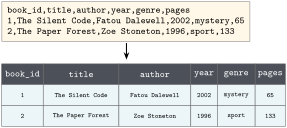
A line can be cut at its commas with split(","). But a field may itself hold a comma, such as the title Salt, Sand and Sea; the CSV format then puts the field between double quotes, and split cuts it in two. The csv module of Python knows the rule:
import csv

line = "1,The Silent Code,Fatou Dalewell,2002,mystery,65"
print(line.split(","))

tricky = '81,"Salt, Sand and Sea",Mara Quill,2019,nature,210'
print(tricky.split(","))
for fields in csv.reader([tricky]):
print(fields)split against the csv module. code/grade-8/03-files-and-data-tables/listings/split_line.py$ python split_line.py
['1', 'The Silent Code', 'Fatou Dalewell', '2002', 'mystery', '65']
['81', '"Salt', ' Sand and Sea"', 'Mara Quill', '2019', 'nature', '210']
['81', 'Salt, Sand and Sea', 'Mara Quill', '2019', 'nature', '210']csv module gets six.27.3 Loading a table as a list of records
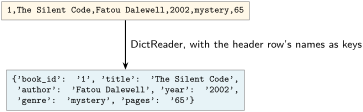
csv.DictReader reads a CSV file line by line and turns each line into a dictionary, whose keys come from the header row: a record, as in Chapter 26. list(...) collects them into a list.
import csv

with open("books.csv", encoding="utf-8") as f:
    books = list(csv.DictReader(f))

print(len(books), "books")
print(books[0])
print(books[0]["pages"], type(books[0]["pages"]))
pages = int(books[0]["pages"])
print(pages + 1, type(pages))$ python load_books.py
80 books
{'book_id': '1', 'title': 'The Silent Code', 'author': 'Fatou Dalewell', 'year': '2002', 'genre': 'mystery', 'pages': '65'}
65 <class 'str'>
66 <class 'int'>str.A file holds characters, so "65" is two characters, not a number: int or float converts it before any calculation.
27.4 Questions about a table
Most questions about a table are a walk through its records (Chapter 20): selecting the records that pass a test, counting them, keeping the largest, adding up a column. Which loans are still out? Those whose return date is empty:
import csv

with open("loans.csv", encoding="utf-8") as f:
    loans = list(csv.DictReader(f))

out = []
for loan in loans:
    if loan["return_date"] == "":
        out.append(loan)
print(len(loans), "loans,", len(out), "still out")
for loan in out[:3]:
print("book", loan["book_id"], "lent on", loan["out_date"], "due", loan["due_date"])$ python still_out.py
400 loans, 22 still out
book 28 lent on 2025-01-01 due 2025-01-22
book 12 lent on 2025-01-29 due 2025-02-19
book 45 lent on 2025-02-03 due 2025-02-24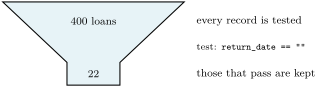
The longest book keeps the best record so far, comparing pages as numbers:
import csv

with open("books.csv", encoding="utf-8") as f:
    books = list(csv.DictReader(f))

longest = books[0]
for book in books:
    if int(book["pages"]) > int(longest["pages"]):
        longest = book
print(longest["title"], "by", longest["author"], "-", longest["pages"], "pages")$ python longest_book.py
The Paper River by Quinn Colefield - 513 pagesThe weather table holds one row per day and per station. The mean temperature at Hilltop adds the temperatures and divides by their number, as in a mathematics lesson. But some values are missing: the field is empty, and float("") would stop the program, so the program skips them and counts them.
import csv

with open("weather.csv", encoding="utf-8") as f:
    rows = list(csv.DictReader(f))

total = 0
count = 0
skipped = 0
for row in rows:
    if row["station"] == "Hilltop":
        if row["temp_c"] == "":
            skipped = skipped + 1
        else:
            total = total + float(row["temp_c"])
            count = count + 1
print("Hilltop:", count, "temperatures,", skipped, "missing")
print("mean temperature:", round(total / count, 2), "degrees")$ python mean_temp.py
Hilltop: 362 temperatures, 3 missing
mean temperature: 10.63 degreesRemark 27.4 (Data with holes)
Real tables have mistakes: values missing, values typed twice, numbers that mean “the sensor failed” rather than a measurement. The weather table has all three, and the weekend problem finds them. This chapter only skips the empty values; cleaning a table properly is a topic of the next book.
A program can also write its answers to a file, as a report that stays after it ends:
import csv

with open("loans.csv", encoding="utf-8") as f:
    loans = list(csv.DictReader(f))

returned = 0
for loan in loans:
    if loan["return_date"] != "":
        returned = returned + 1

with open("report.txt", "w", encoding="utf-8") as f:
    f.write("Brenmoor library, loans of 2025\n")
    f.write("loans: " + str(len(loans)) + "\n")
    f.write("returned: " + str(returned) + "\n")
    f.write("still out: " + str(len(loans) - returned) + "\n")

with open("report.txt", encoding="utf-8") as f:
print(f.read(), end="")$ python report.py
Brenmoor library, loans of 2025
loans: 400
returned: 378
still out: 22report.txt.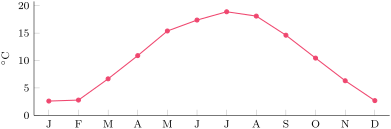
27.5 The same table in a spreadsheet
Definition 27.5 (Spreadsheet and formula)
A spreadsheet is a program that shows a table as a grid of cells, with lettered columns and numbered rows. A cell can hold a value or a formula, a calculation on other cells whose result the cell shows and keeps up to date.
A CSV file opens in any spreadsheet program: each field lands in a cell. A formula such as =SUM(F2:F81) adds the pages of the 80 books; clicking a column header sorts the rows by that column, and a filter hides the rows that do not pass a test, like the selection of still-out loans.
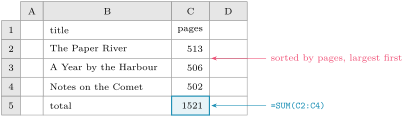
A spreadsheet keeps every step visible and is quick for one table. A program does the same steps the same way every time, and on a thousand files as easily as on one. Both read the same CSV file.
27.6 Exercises
Exercise 27.1 ★
books.csv is replaced by a file of three lines. What does Listing 27.2 print?
Solution
Solution of Exercise 27.1.
3 lines, then the three lines, each without its end of line: lines[:4] simply stops at the end of the list.
Exercise 27.2 ★
What does "a,b,,c".split(",") give? How many fields is that?
Solution
Solution of Exercise 27.2.
['a', 'b', '', 'c']: four fields, the third one empty. Two commas side by side mean an empty field, like a missing temperature in the weather table.
Exercise 27.3 ★
What is the type of book["year"] for a record read with DictReader? How do you get the year as a number?
Solution
Solution of Exercise 27.3.
str: everything read from a text file is text. int(book["year"]) gives the number.
Exercise 27.4 ★
Write a function count_genres(books) that returns a dictionary giving the number of books of each genre.
Solution
Solution of Exercise 27.4.
The counting pattern of Chapter 26, on one field of each record:
def count_genres(books):
    """How many books of each genre, in a list of records read with DictReader."""
    counts = {}
    for book in books:
        counts[book["genre"]] = counts.get(book["genre"], 0) + 1
return countsExercise 27.5 ★★
This function stops with a TypeError. Why? Fix it.
def total_pages(books):
    total = 0
    for book in books:
        total = total + book["pages"]
return totalSolution
Solution of Exercise 27.5.
book["pages"] is text, and Python cannot add a number and a text. The fix converts it: total = total + int(book["pages"]).
Exercise 27.6 ★★
The town’s table of places names a Lighthouse Café. Opened with open("places.csv"), without encoding, the file reads well on one computer but shows Café on another. Why? How do you make the program read it the same way everywhere?
Solution
Solution of Exercise 27.6.
Without encoding, Python 3.12 uses the encoding that the computer is set up with, which differs from one computer to another. The file is stored in UTF-8, where é takes two bytes; a computer set up with another encoding reads those two bytes as two characters, é. Writing open("places.csv", encoding="utf-8") reads it the same way everywhere.
Exercise 27.7 ★★
Write a function most_loans(loans) that returns the member who borrowed the most books, and how many.
Solution
Solution of Exercise 27.7.
Count the loans per member, then keep the largest count; the function returns two values:
def most_loans(loans):
    """The member_id with the most loans, and its number of loans."""
    counts = {}
    for loan in loans:
        counts[loan["member_id"]] = counts.get(loan["member_id"], 0) + 1
    best = ""
    for member in counts:
        if best == "" or counts[member] > counts[best]:
            best = member
return best, counts[best]Exercise 27.8 ★★
Write a function late_returns(loans) that counts the loans returned after their due date. The dates are written YYYY-MM-DD, as text: why can they be compared with > without converting them?
Solution
Solution of Exercise 27.8.
def late_returns(loans):
    """Loans returned after their due date; dates are compared as YYYY-MM-DD text."""
    late = 0
    for loan in loans:
        if loan["return_date"] != "" and loan["return_date"] > loan["due_date"]:
            late = late + 1
return lateText is compared character by character from the left, like words in a paper dictionary. In YYYY-MM-DD the year comes first, then the month, then the day, each with a fixed number of digits: the first character that differs belongs to the largest unit that differs, exactly as when comparing dates. Loans still out, with an empty return date, are left out.
Exercise 27.9 ★★
How many lines does a CSV file of 400 records have? And how many end-of-line characters, if every line ends with one?
Solution
Solution of Exercise 27.9.
401 lines: the header row and one line per record. With an end of line after each, 401 end-of-line characters too.
Exercise 27.10 ★★★
Write a function write_genre(books, genre, filename) that writes the books of one genre to a new CSV file with the same header row. Use csv.DictWriter, the writing twin of DictReader.
Solution
Solution of Exercise 27.10.
import csv


def write_genre(books, genre, filename):
    """Write the books of one genre to a new CSV file, with the same header row."""
    with open(filename, "w", encoding="utf-8", newline="") as f:
        writer = csv.DictWriter(f, fieldnames=list(books[0].keys()))
        writer.writeheader()
        for book in books:
            if book["genre"] == genre:
writer.writerow(book)newline="" lets the csv module write the ends of line itself. A test of the chapter writes the poetry books and reads them back.
Exercise 27.11 ★★★
Comparing dates as text works for 2025-01-09 and 2025-01-10. Show with an example that it fails for dates written DD-MM-YYYY, and explain why the order YYYY-MM-DD makes it work.
Solution
Solution of Exercise 27.11.
"09-02-2025" (9 February) is smaller as text than "10-01-2025" (10 January), because 0 comes before 1; yet 9 February is later. With the day first, the first characters compared are the days, which matter least. With YYYY-MM-DD and a fixed number of digits, the characters are compared in the order of the units, from the largest to the smallest.
Exercise 27.12 ★★★
Write a function rainiest_week(rows, station) that finds the 7 days in a row with the most rain at a station, and returns the first day and the total. Count a date only once if it appears twice.
Solution
Solution of Exercise 27.12.
Keep the dates and the rain of the station, each date once; then try every starting day and add 7 values with a slice:
def rainiest_week(rows, station):
    """The first day and the rain of the rainiest 7 days in a row at one station."""
    days = []
    rain = []
    for row in rows:
        if row["station"] == station and row["date"] not in days:
            days.append(row["date"])
            rain.append(float(row["rain_mm"]))
    best = 0
    for start in range(len(rain) - 6):
        if sum(rain[start:start + 7]) > sum(rain[best:best + 7]):
            best = start
return days[best], round(sum(rain[best:best + 7]), 1)At Riverside it returns ('2025-01-13', 36.9): 36.9 millimetres from 13 to 19 January.
27.7 Problem: A Year of Weather
Problem 27.1
Weekend problem — a year of weather in Brenmoor
The file weather.csv holds the readings of 2025 at the town’s two weather stations, Hilltop and Riverside: the date, the station, the temperature in degrees, the rain in millimetres and the wind in kilometres per hour.
Part I — By hand.
- The first two lines after the header row are
2025-01-01,Hilltop,3.9,0.0,15.3and2025-01-01,Riverside,4.3,0.0,10.4. What do they say? - How many lines should the file have for two stations over a year of 365 days, header row included?
- The file has 732 lines. What might explain the difference?
Part II — Hilltop.
import csv

with open("weather.csv", encoding="utf-8") as f:
    rows = list(csv.DictReader(f))

rain = {}
warm = 0
for row in rows:
    if row["station"] == "Hilltop":
        month = row["date"][5:7]
        rain[month] = rain.get(month, 0) + float(row["rain_mm"])
        if row["temp_c"] != "" and float(row["temp_c"]) > 20:
            warm = warm + 1

wettest = "01"
for month in rain:
    print(month, round(rain[month], 1), "mm")
    if rain[month] > rain[wettest]:
        wettest = month
print("wettest month:", wettest, "with", round(rain[wettest], 1), "mm")
print("days above 20 degrees:", warm)- What are the keys of the dictionary
rain, and how are they cut out of the date? - Why does the test of a warm day check
row["temp_c"] != ""first? - Run the program. Which month is the wettest, and how many days are above 20 degrees?
- Why does the search for the wettest month start from
"01"?
Part III — Riverside’s holes.
import csv

with open("weather.csv", encoding="utf-8") as f:
    rows = list(csv.DictReader(f))

missing = 0
codes = 0
all_values = []
good_values = []
dates = []
twice = []
for row in rows:
    if row["station"] == "Riverside":
        if row["date"] in dates:
            twice.append(row["date"])
        dates.append(row["date"])
        if row["temp_c"] == "":
            missing = missing + 1
        else:
            value = float(row["temp_c"])
            all_values.append(value)
            if value == -99.0:
                codes = codes + 1
            else:
                good_values.append(value)

print("Riverside:", len(dates), "rows,", missing, "missing,", codes, "codes")
print("dates seen twice:", twice)
print("mean with the codes:   ", round(sum(all_values) / len(all_values), 2))
print("mean without the codes:", round(sum(good_values) / len(good_values), 2))- Which three kinds of defect does the program look for?
- Run it. How many of each are there?
- A thermometer at Riverside never shows degrees. What could that value mean?
- By how much do the two codes pull the year’s mean temperature down?
- Explain why two values out of more than 360 make such a difference.
- State the result.
Solution
Solution of Problem 27.1.
1. On 1 January 2025, Hilltop had 3.9 degrees, no rain and a wind of 15.3 kilometres per hour; Riverside had 4.3 degrees, no rain and 10.4.
2. rows, plus the header row: 731 lines.
3. One line too many: a day read twice, for instance.
4. The months "01" to "12", cut out of the date by the slice [5:7]: the two characters after 2025-.
5. An empty field cannot be converted: float("") stops the program. Python checks the left side of and first, and skips the right side when the left is false.
6. March is the wettest, with 84.4 millimetres; 17 days are above 20 degrees:
$ python weather_year.py
01 56.3 mm
02 32.6 mm
03 84.4 mm
wettest month: 03 with 84.4 mm
days above 20 degrees: 177. Any month will do as a starting point, as long as it is a key of rain; the walk then replaces it by any wetter month.
8. Missing temperatures, the error code , and dates seen twice.
9.
$ python defects.py
Riverside: 366 rows, 3 missing, 2 codes
dates seen twice: ['2025-06-14']
mean with the codes:    11.43
mean without the codes: 12.04366 rows for 365 days, because 14 June appears twice; 3 temperatures are missing and 2 are the code .
10. An error code: the sensor failed, and the station wrote a number that no real temperature can be, so that people notice.
11. From 12.04 to 11.43 degrees: about 0.6 degrees lower.
12. Each code is about 111 degrees below a normal value. Spread over 363 values, two such errors move the mean by about degrees.
13. Result. The wettest month at Hilltop in 2025 was March, with 84.4 millimetres of rain. At Riverside, the two error codes of pull the year’s mean temperature from 12.04 down to 11.43 degrees, about 0.6 degrees. (These means still count the reading of 14 June twice. Without the copy they would be 12.02 and 11.40: the code matters, the copy hardly does.)