本书暂未推出简体中文版。现有版本:English。
Primary & Middle School Computer Science · 1–9 年级
5Typing with Ten Fingers
Noor is typing a story for school. She uses two fingers, one on each hand. Her eyes go down to the keys to find a letter, up to the screen to check it, down again for the next letter. Her big sister Lina, at the other end of the table, types with all ten fingers. Her eyes never leave the screen, and she types twice as fast as Noor, with fewer mistakes. Lina is not magic: she learned a technique, and anybody can learn it.
You already know
Shift is held down while another key is pressed, to type a capital or the sign drawn at the top of a key. Sit with your back against the chair, your feet flat and your forearms level (Chapter 3).
5.1 The home row
Definition 5.1 (Touch typing)
Touch typing is typing with all ten fingers without looking at the keys: each finger always strikes the same keys and finds them by touch.
For touch typing, the hands always start from the same place and come back to it after each key.
Definition 5.2 (Home row)
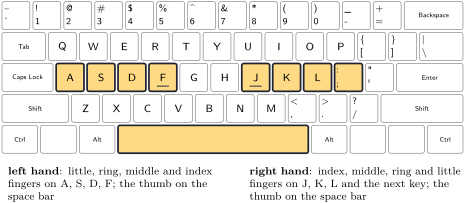
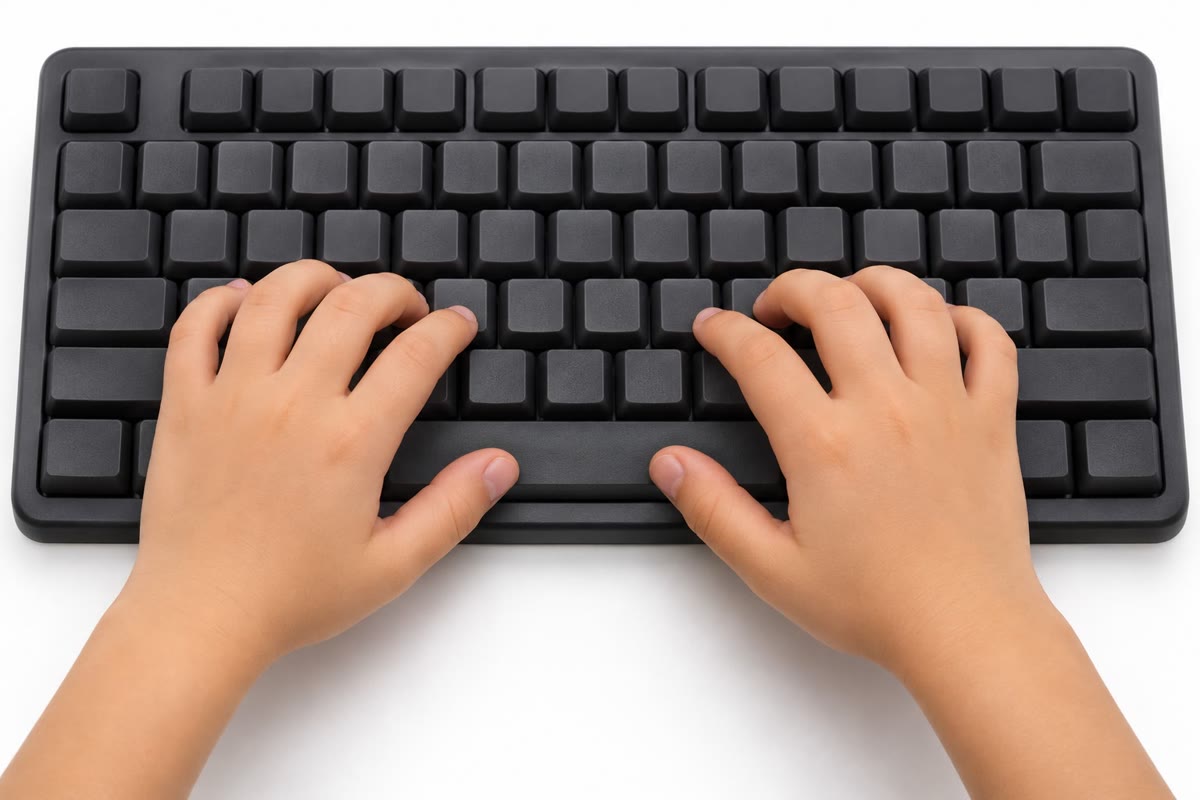
The home row is the middle row of letter keys, where the fingers rest between two keys: on a QWERTY keyboard, the left hand rests on A S D F and the right hand on J K L and the key after L; the thumbs rest on the space bar.
How can the hands find the home row without looking? Feel the F and J keys: on most keyboards, each carries a small bump. Put your index fingers on the two bumps, and the other fingers fall into place beside them.
5.2 Which finger strikes which key
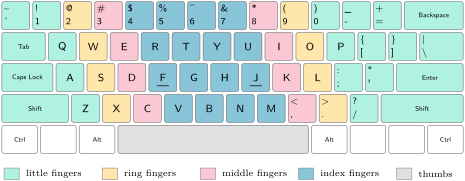
Each finger owns a slanted column of keys: the key of the home row where it rests, the key above it and a little to the left, and the key below it and a little to the right. The index fingers are the strongest, so each owns two columns: its own and the one next to it, towards the middle of the keyboard. The little fingers own the keys at the edges: Shift, Enter, Backspace, Tab.
Method 5.3 (Striking a key)
Start with all fingers on the home row. Move only the finger that owns the key, strike the key lightly and quickly, and bring the finger straight back to its home key. The other fingers stay where they are.
Example 5.4 (Typing the word “dog”)
D is on the home row, under the left middle finger: strike it. O is above L, in the column of the right ring finger: the ring finger reaches up, strikes O and comes back to L. G is next to F, in the second column of the left index finger: the index finger slides one key to the right, strikes G and comes back to F.
5.3 Eyes on the screen
At the start, the fingers do not know where the keys are, and it is tempting to look down. But every time the eyes go down to the keys and back up to the screen, we lose time and lose our place in the text. A touch typist looks at the screen, or at the page being copied, and lets the fingers find the keys. The eyes are then free to catch mistakes as soon as they appear.
Learning this takes some weeks of short daily practice. The appendix at the end of this book, Typing drills, gives lines to practise, one finger and one row at a time.
5.4 Capitals, digits and signs
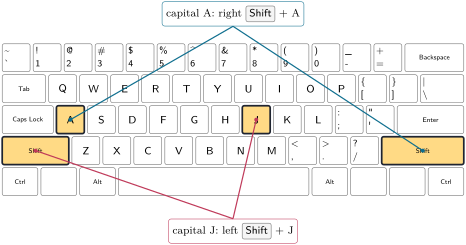
To type a capital, one little finger holds Shift while a finger of the other hand strikes the letter: always the Shift of the other hand. For a capital J (right hand), the left little finger holds the left Shift; for a capital A (left hand), the right little finger holds the right Shift.
The digits are on the top row. Each finger reaches up two rows, from its home key, to the digit of its column, and comes back. The signs (full stop, comma, question mark) are typed by the finger that owns their key, with Shift when the sign is drawn at the top of the key.
Definition 5.5 (Keyboard layout)
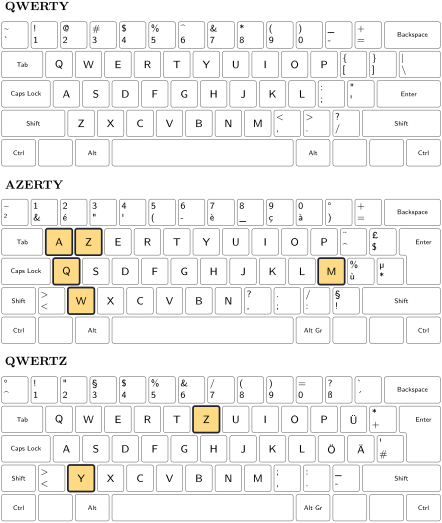
The keyboard layout is the order in which the letters, digits and signs are placed on the keys of a keyboard. A layout is named after the first six letters of its top row of letters: QWERTY, AZERTY, QWERTZ.
Different countries use different layouts, so that the letters of their own language are easy to reach. The technique is the same everywhere: the same home position, the same fingers, the same columns. Only a few letters sit under other fingers. On an AZERTY keyboard, the digits are typed with Shift; without it, the top row types signs and accented letters.
History — Why the letters are in this order
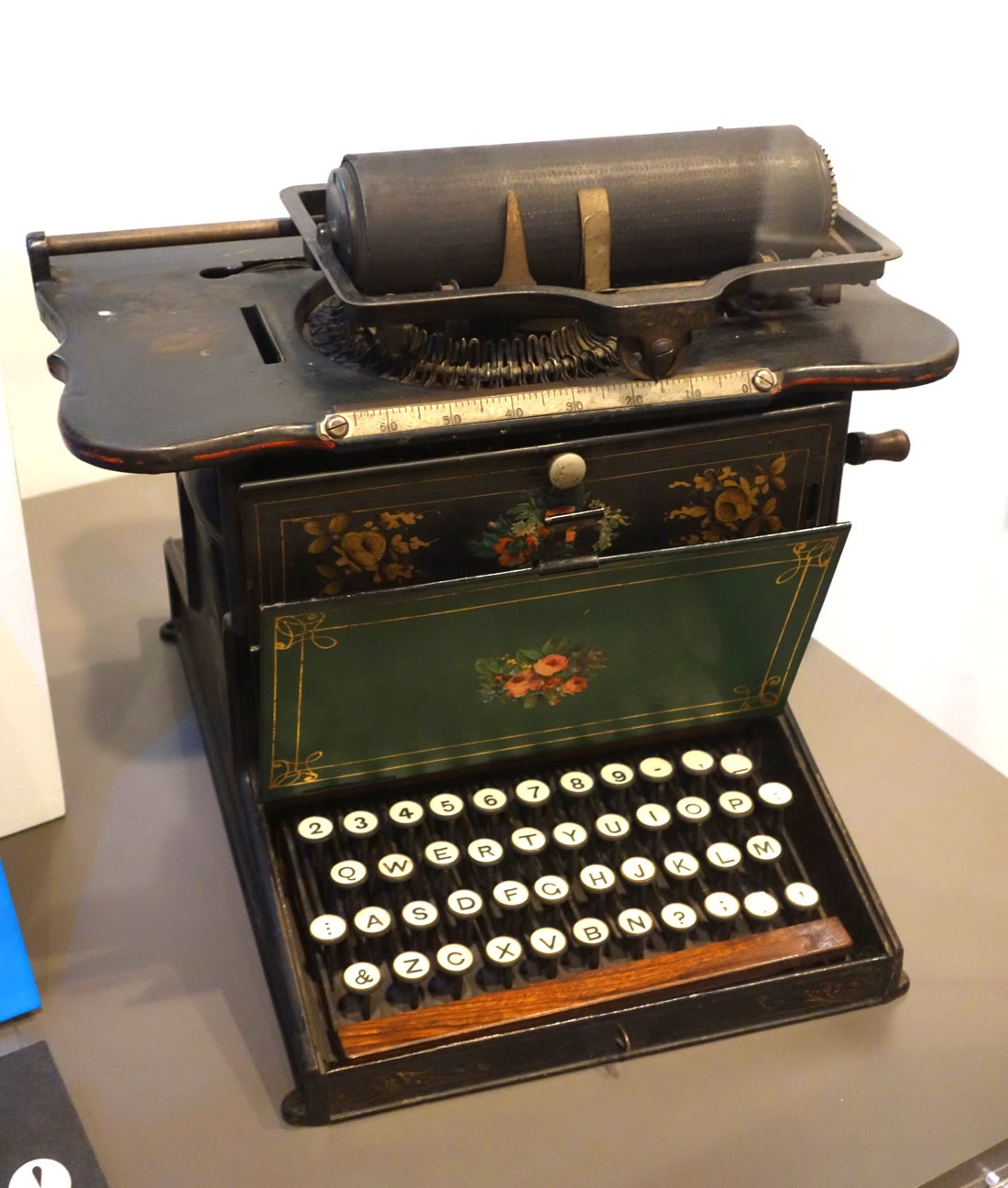
The order of the letters is older than computers. It comes from the typewriters of Christopher Sholes, the first of which was offered for sale in 1874. The letters of its top row already began almost like ours, and within a few years they read Q, W, E, R, T, Y. One reason often given is that letters often typed together were placed apart, so that the metal arms that printed them would not get stuck together. People still discuss whether that was the main reason. Computers kept the order that typists already knew.
5.5 Accuracy before speed
When you learn, type slowly and without mistakes. Speed comes by itself with practice; mistakes learned at the start are hard to unlearn. A mistake also costs time: the letter must be rubbed out and typed again.
Definition 5.6 (Words per minute)
The speed of typing is counted in words per minute: the number of characters typed, divided by five, divided by the number of minutes. Every five characters, spaces and signs included, count as one word.
Example 5.7 (A timed test)
Noor copies a text for 2 minutes and types 200 characters. That makes words in 2 minutes, so words per minute. A month later she types 300 characters in 2 minutes: words, words per minute.
Remark 5.8 (Why five characters)
Words have different lengths: “a” has one letter, “computer” has eight. Counting characters and dividing by five makes the count fair for every text, whatever the length of its words.
5.6 Exercises
Exercise 5.1 ★
On a QWERTY keyboard, which finger types each of these letters: A, S, E, R, T, J, O, P?
Solution
Solution of Exercise 5.1.
A: left little finger. S: left ring finger. E: left middle finger. R and T: left index finger. J: right index finger. O: right ring finger. P: right little finger. (On an AZERTY keyboard the A is on the top row, still under the left little finger; on a QWERTZ keyboard these eight letters do not move.)
Exercise 5.2 ★
Which Shift do you hold for a capital A? For a capital L? With which finger?
Solution
Solution of Exercise 5.2.
Capital A: the right Shift, with the right little finger. Capital L: the left Shift, with the left little finger.
Exercise 5.3 ★
What are the small bumps on the F and J keys for?
Solution
Solution of Exercise 5.3.
They let the index fingers find the home row by touch, without looking at the keys; the other fingers then fall into place.
Exercise 5.4 ★
Sami types 150 characters in 2 minutes. How many words per minute is that?
Exercise 5.5 ★
Lina types at 30 words per minute for 3 minutes. How many characters does she type?
Solution
Solution of Exercise 5.5.
words, and characters.
Exercise 5.6 ★
Give three habits that make typing slow.
Solution
Solution of Exercise 5.6.
For example: looking down at the keys; typing with two fingers only; leaving the home row and searching for it again; making mistakes that must be rubbed out.
Exercise 5.7 ★
Look at the drawing of the three layouts. Which letters are not in the same place on a QWERTY and an AZERTY keyboard? On a QWERTY and a QWERTZ keyboard?
Solution
Solution of Exercise 5.7.
QWERTY and AZERTY: A, Q, Z, W and M are not in the same place (A and Q are swapped, Z and W are swapped, M moves to the home row). QWERTY and QWERTZ: Y and Z are swapped.
Exercise 5.8 ★★
List the fingers that type the word “home” on a QWERTY keyboard, in order.
Solution
Solution of Exercise 5.8.
H: right index finger (second column); o: right ring finger; m: right index finger; e: left middle finger.
Exercise 5.9 ★★
In one minute, Tom types 120 characters with 6 mistakes, and Mia types 100 characters with no mistake. Who practises in the better way? Why?
Solution
Solution of Exercise 5.9.
Mia: she types accurately, and speed will come. Tom’s 6 mistakes must each be rubbed out and typed again, and mistakes made while learning become habits.
Exercise 5.10 ★★
Leo practises typing 10 minutes a day. How many days does he need to practise 15 hours in all?
Solution
Solution of Exercise 5.10.
15 hours are minutes, and days.
Exercise 5.11 ★★
Why do the index fingers own two columns of keys each, and the little fingers the keys at the edges?
Solution
Solution of Exercise 5.11.
The index fingers are the strongest and the easiest to move, so they take the two middle columns. The little fingers are at the edges of the hands, so they take the keys at the edges of the keyboard.