本书暂未推出简体中文版。现有版本:English。
Primary & Middle School Computer Science · 1–9 年级
13Networks and the Internet: A First Look
Noor has drawn a cat for her grandmother, who lives two countries away. She takes a photo of the drawing with the family tablet and sends it. One second later, her grandmother’s phone rings with a small sound, and there is the cat. The photo crossed hundreds of kilometres, through cables under the ground and perhaps under the sea, and through many computers on the way. How did it find its way?
You already know
Everything a computer keeps, text, pictures or sound, is numbers, and so bits (Chapter 12); a file holds one piece of work (Chapter 7); an application is a program made for one task (Chapter 9).
13.1 A network
Definition 13.1 (Network)
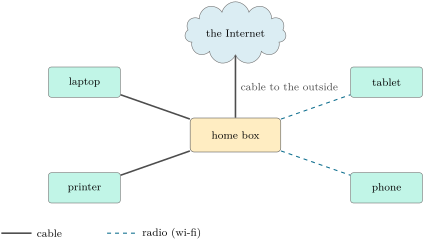
A network is a group of computers and devices linked together, by cables or by radio, so that they can send data to each other.
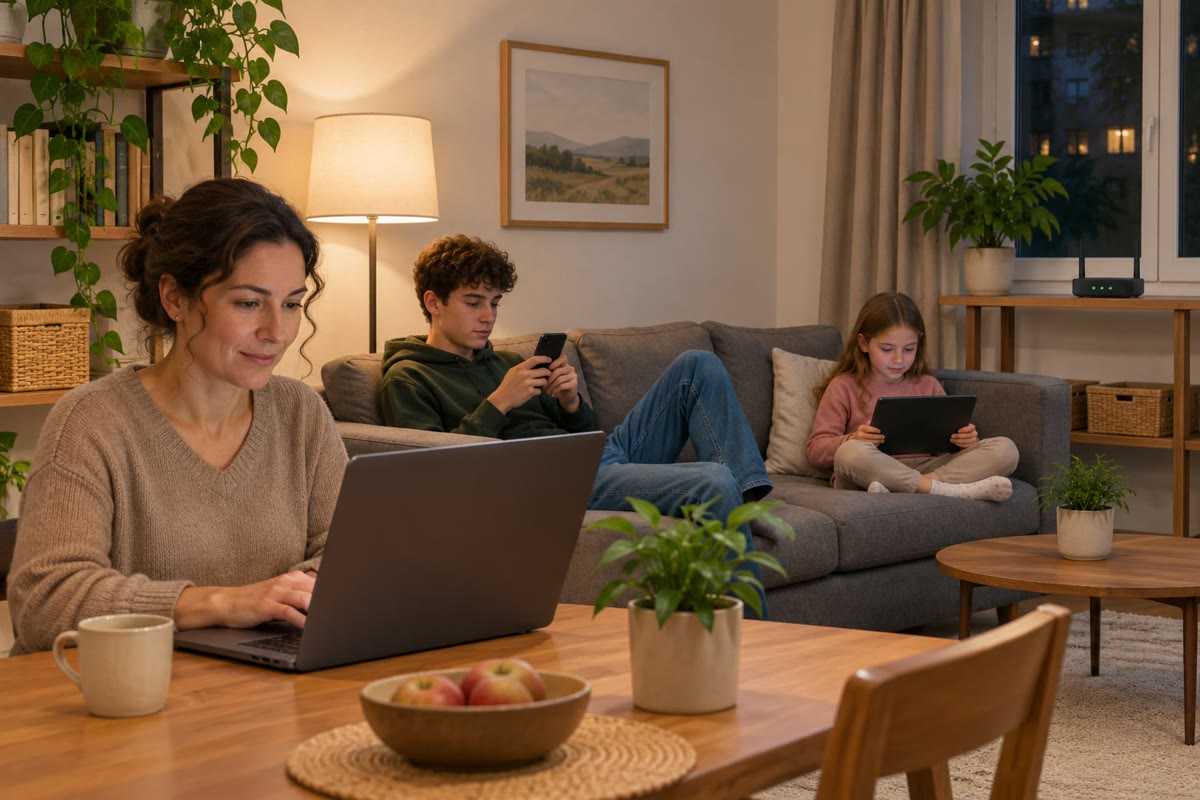
At home, the laptop, the tablet, the phones and the printer usually form a small network. They are linked to a small box, often on a shelf, which passes the data from one device to another and links the home network to the outside world. Some devices are linked to the box by a cable; others by radio, without a cable: this is called wi-fi. The school has its own network too, with many more computers.
13.2 The Internet is a network of networks
Definition 13.2 (Internet)
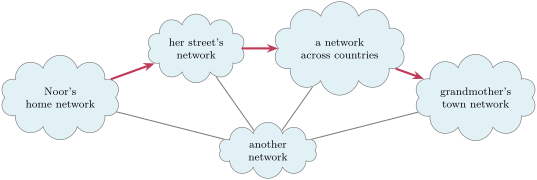
The Internet is the worldwide network made of millions of networks linked to each other: home networks, school networks, the networks of companies, and the large networks that join them across countries and under the seas.
No single computer is the Internet, and nobody owns all of it. Noor’s photo leaves her home network, goes through the network of the company that brings the Internet to her street, then through large networks that cross the countries, then through the network that serves her grandmother’s town, and at last into her grandmother’s phone. At each step, a computer reads where the data must go and passes it on.
13.3 The web
Definition 13.3 (Server)
A server is a computer, linked to the Internet, that keeps files and programs and sends them to the other computers that ask for them.
Definition 13.4 (Web page and browser)
A web page is a file kept on a server, made to be shown on a screen: text, pictures, and links to other pages. A browser is the application that asks a server for a web page and shows it.
Definition 13.5 (Web address)
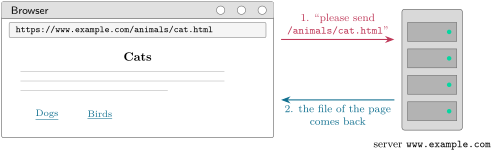
The web address of a page tells the browser which server to ask and which file to ask for. It is typed in the address bar of the browser.
Take the address
https://www.example.com/animals/cat.html
The part www.example.com names the server, and /animals/cat.html is the path of the file on that server, written like a path on our own computer (Chapter 7). (The name example.com is kept free for examples like this one: it belongs to nobody.)
Definition 13.6 (Link and World Wide Web)
A link is a word or a picture on a web page that holds the address of another page: clicking it makes the browser ask for that page. The World Wide Web is all the web pages of all the servers of the Internet, joined by their links.
History — The web was born in a laboratory
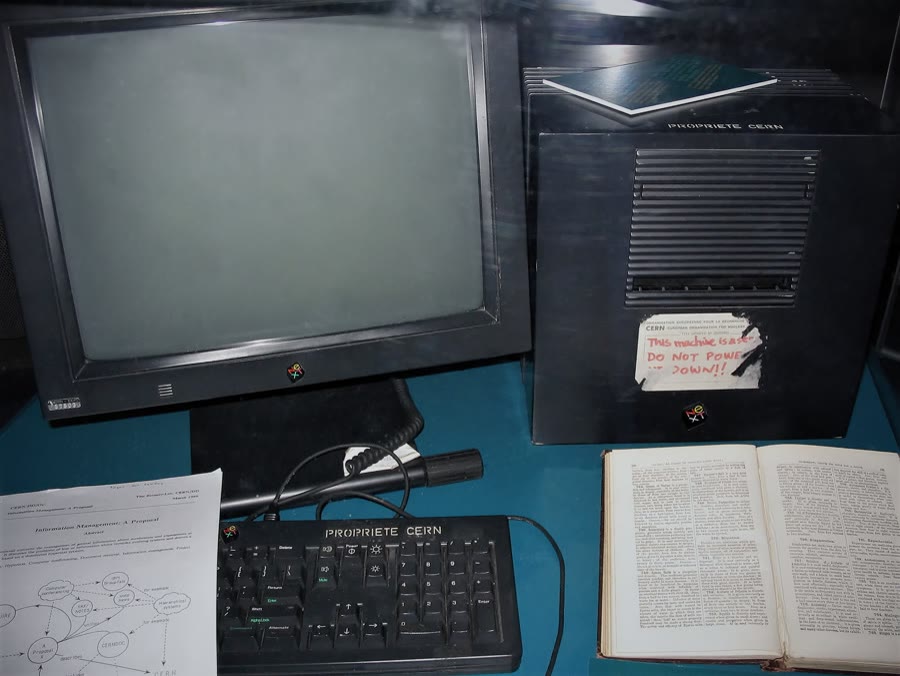
In March 1989, Tim Berners-Lee, who worked at CERN, a large physics laboratory near Geneva, wrote a first proposal for a way of linking documents across computers. By the end of 1990, the first web server and the first browser were running at CERN, on a NeXT computer. On 30 April 1993, CERN made the web software free for everyone to use, and the web spread across the world.
13.4 Search engines
How do we find a page when we do not know its address? We ask a search engine, a website that answers a few words with a list of pages. It does not read the whole web when we ask: that would take far too long. Long before, its programs visited billions of pages, following their links one after another, and noted which words appear on which page. When we search, it looks in that list and answers at once. The order of the answers is chosen by the search engine, with its own rules: the first answer is not always the best one.

13.5 A password is a key
Our messages, photos and accounts are kept on servers, which anybody on the Internet can try to reach. How does a server know that it is really Noor who asks for Noor’s photos?
Definition 13.7 (Password and authentication)
Authentication is proving to a computer who we are. A password is a secret word or phrase used for it: whoever knows the password can open the account, as whoever has the key can open the door.
A password is strong if it is hard to guess, even by a computer that tries millions of passwords. Let us count. A code of 4 digits has 10 choices for the first digit, 10 for the second, and so on: codes. A computer tries them all in a moment. A password of 12 characters, each a small letter or a digit, has 36 choices for each character: 36 multiplied by itself, 12 times over, makes more than four billion billion passwords. Each extra character multiplies the number of possibilities, so a long password is much stronger than a short one.
Safe use
Make your passwords long: three random words put together, like “kettle-giraffe-snowstorm”, are long, easy to remember and hard to guess. Never use your name, your birthday or “1234”. Use a different password for each important account. Never tell a password to anyone, even a friend; only a parent or a teacher may help you with it.
13.6 Exercises
Exercise 13.1 ★
Name three devices of a home network. How is each one linked to the home box?
Solution
Solution of Exercise 13.1.
For example: a laptop (by cable or by radio), a phone (by radio, wi-fi), a printer (by cable or by radio).
Exercise 13.2 ★
Sami says: “The Internet is a very big computer somewhere.” Is he right?
Exercise 13.3 ★
What does a browser do?
Exercise 13.4 ★
What does a server keep, and what does it do with it?
Exercise 13.5 ★
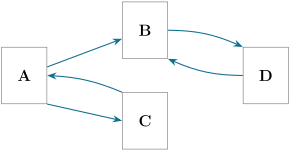
In the drawing of the four pages, find a way to go from page A to page D by clicking links. Can you then go from D back to A?
Exercise 13.6 ★
Strong or weak? “1234”, “anna”, “purple-tractor-moonlight”, “qwerty”, “Tom2015”, “giraffe kettle snowstorm”.
Solution
Solution of Exercise 13.6.
Weak: “1234”, “anna”, “qwerty” (a row of the keyboard) and “Tom2015” (a name and a year). Strong: “purple-tractor-moonlight” and “giraffe kettle snowstorm” (long, three random words).
Exercise 13.7 ★
How many different codes of 3 digits are there?
Solution
Solution of Exercise 13.7.
codes, from 000 to 999.
Exercise 13.8 ★
How many different passwords of 4 small letters are there? Write the multiplication, then compute it.
Exercise 13.9 ★★
Why should you use a different password for each important account?
Exercise 13.10 ★★
Adding one character to a password multiplies the number of possible passwords. By how much, if the characters are digits? If they are small letters?
Solution
Solution of Exercise 13.10.
By 10 for digits (each new place has 10 choices), and by 26 for small letters.
Exercise 13.11 ★★
A search engine answers in less than a second. What has it done before you searched, so that it can answer so fast?