本书暂未推出简体中文版。现有版本:English。
Primary & Middle School Computer Science · 1–9 年级
15Variables and Input
Noor is playing a game on the tablet. At the top of the screen, a word and a number: score 0. She catches a star: score 10. Another one: score 20. The number keeps changing, but its name stays the same, and the game always knows where to find it. Programs keep their numbers and words in the same way, under names.
You already know
print shows text and the results of calculations; Python knows +, -, *, /, // and %; the lines of a program run from top to bottom; an error message names the line and the kind of problem (Chapter 14).
15.1 A name for a value
Definition 15.1 (Value and variable)
A value is a piece of data a program works with: a number such as 25 or 2.5, or a text such as "Noor". A variable is a name that a program gives to a value, to keep it and use it later.
Definition 15.2 (Assignment)
An assignment is an instruction that gives a value to a variable. It is written with the sign =: the name on the left, the value on the right, as in score = 0.
score = 0
print(score)
bonus = 25
print(score + bonus)
print("Noor's score:", score)$ python score.py
0
25
Noor's score: 0A variable is like a box with a label: the label is the name, and the box holds one value. A name is made of letters, digits and the sign _, starts with a letter, and is best chosen so that it says what the value means: score is better than s. Capital and small letters make different names: Score is not score.
15.2 Assignment is not equality
In mathematics, is never true. In Python, score = score + 10 is a perfectly good instruction, because = does not say that two things are equal: it says put into. Python first computes the right side, with the value the variable has now, then puts the result in the box. The old value is gone.
score = 0
score = score + 10
score = score + 10
score = score + 10
print(score)$ python update.py
30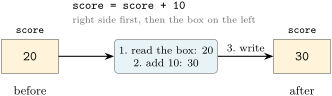
score = score + 10, step by step: the value in the box is read, 10 is added, and the result replaces the old value.To exchange the values of two variables, a third box is needed to keep a copy, just as two glasses of juice cannot be swapped without a third glass.
left = "apple"
right = "pear"
spare = left    # keep a copy of the left value
left = right
right = spare
print(left, right)$ python swap.py
pear apple15.3 Types
Not all values are of the same kind. Python tells them apart.
Definition 15.3 (Type)
The type of a value is the kind of value it is. Whole numbers have the type int (for integer), decimal numbers the type float, and texts in quotes the type str. The instruction type(...) gives the type of a value.
print(type(12))
print(type(12.5))
print(type("twelve"))
print(type("12"))$ python kinds.py
<class 'int'>
<class 'float'>
<class 'str'>
<class 'str'>"12" in quotes is a text, not a number.
+ does different things with them.The type decides what the operations do. Between two numbers, + adds; between two texts, it glues them end to end.
print(3 + 4)
print("3" + "4")
print("ice" + "cream")$ python glue.py
7
34
icecream"3" and "4" make the text "34".15.4 Input and conversions
The instruction input(...) prints a question, waits until the user has typed an answer and pressed Enter, and gives the answer as a value. In the outputs of this book, what the user typed appears right after the question.
name = input("What is your name? ")
print("Hello,", name)
print(f"Nice to meet you, {name}!")$ python greet.py
What is your name? Noor
Hello, Noor
Nice to meet you, Noor!Line 3 shows a handy way to build a sentence: a text with the letter f just before its quotes is an f-string, and each name between curly brackets {} is replaced by its value.

input always gives a text, even when the user types digits. Adding two typed numbers then glues them:
first = input("First number: ")
second = input("Second number: ")
print("The sum is", first + second)$ python add_wrong.py
First number: 12
Second number: 30
The sum is 1230Definition 15.4 (Type conversion)
A type conversion makes, from a value, the value of another type that stands for the same thing: int("12") gives the whole number 12, float("2.5") the decimal number 2.5, and str(12) the text "12".
first = int(input("First number: "))
second = int(input("Second number: "))
print("The sum is", first + second)$ python add_right.py
First number: 12
Second number: 30
The sum is 42A program that asks, computes and answers is now within reach:
# The area and the perimeter of a rectangle, from its two sides.
length = float(input("Length in metres: "))
width = float(input("Width in metres: "))
area = length * width
perimeter = 2 * (length + width)
print(f"Area: {area} square metres")
print(f"Perimeter: {perimeter} metres")$ python rectangle.py
Length in metres: 7.5
Width in metres: 4
Area: 30.0 square metres
Perimeter: 23.0 metres15.5 Following a program by hand
To understand a program, or to find a mistake in it, we can run it by hand, like the interpreter, writing down the value of each variable after each line.
Definition 15.5 (Trace table)
A trace table is a table that follows a program by hand: one column for each variable, one row for each line run, holding the values of the variables after that line.
a = 5
b = a + 3
a = b * 2
b = b - a
print(a, b)Example 15.6 (Tracing five lines)
A dash means that the variable has no value yet.
| line | instruction | a | b |
|---|---|---|---|
| 1 | a = 5 | 5 | – |
| 2 | b = a + 3 | 5 | 8 |
| 3 | a = b * 2 | 16 | 8 |
| 4 | b = b - a | 16 | |
| 5 | print(a, b) | 16 |
The program should print 16 -8. Running it confirms the table:
$ python trace_me.py
16 -8Method 15.7 (Tracing a program)
Draw one column per variable. Go through the program line by line, in the order Python runs it; for each line, write a new row: copy the values that do not change, and write the new value of the variable that is assigned. Compute the right side of an assignment with the values of the row above.
15.6 Exercises
Exercise 15.1 ★
What does this program print?
a = 4
a = a * 3
a = a - 5
print(a)Solution
Solution of Exercise 15.1.
7: a is 4, then , then .
Exercise 15.2 ★
What does print(type(4.0)) print? And print(type(4))?
Solution
Solution of Exercise 15.2.
<class 'float'>: the point makes 4.0 a decimal number, even though it is equal to 4. For 4, it prints <class 'int'>.
Exercise 15.3 ★
Try print("5" * 3) and print(5 * 3). What do you see?
Solution
Solution of Exercise 15.3.
"5" * 3 is the text "5" repeated three times: 555. The number 5 times 3 is 15.
Exercise 15.4 ★
Write a program that asks for a name and an age, then prints a sentence such as Sami will be 12 next year.
Solution
Solution of Exercise 15.4.
The age is converted with int so that 1 can be added to it.
name = input("Your name: ")
age = int(input("Your age: "))
print(f"{name} will be {age + 1} next year.")Exercise 15.5 ★★
Tom’s program asks for two numbers and prints their sum, but for 5 and 7 it prints 57. What did he forget?
Solution
Solution of Exercise 15.5.
He forgot to convert the answers of input into numbers: "5" + "7" glues two texts into "57". With int(input(...)), as in Listing 15.8, the program prints 12.
Exercise 15.6 ★★
Write a program that asks for a number of minutes and prints it in hours and minutes: 135 gives 2 hours and 15 minutes.
Solution
Solution of Exercise 15.6.
total = int(input("Minutes: "))
print(f"{total // 60} hours and {total % 60} minutes")For 135: .
Exercise 15.7 ★★
Make the trace table of Listing 15.3, with the three variables left, right and spare.
Solution
Solution of Exercise 15.7.
| line | left | right | spare |
|---|---|---|---|
| 1 | apple | – | – |
| 2 | apple | pear | – |
| 3 | apple | pear | apple |
| 4 | pear | pear | apple |
| 5 | pear | apple | apple |
After line 4 the value "apple" survives only in spare; line 5 brings it back into right.
Exercise 15.8 ★★
A notebook costs 2.50 euros. Write a program that asks how many notebooks are bought and prints the price.
Solution
Solution of Exercise 15.8.
count = int(input("How many notebooks? "))
print(f"Price: {count * 2.5} euros")For 6 notebooks it prints Price: 15.0 euros.
Exercise 15.9 ★★
Lina’s program starts with size = int(input("Size: ")). When she types 2.5, it stops with a ValueError. Why? How can she fix it?
Solution
Solution of Exercise 15.9.
int converts only texts that are written as whole numbers: "2.5" is not one, so int("2.5") fails. The fix is float(input("Size: ")), which accepts both 2.5 and 3.
Exercise 15.10 ★★★
How many assignments does this program carry out? What does it print?
x = 1
y = x + 1
print(x, y)
x = y
y = 10
print(x + y)Solution
Solution of Exercise 15.10.
Four assignments: lines 1, 2, 4 and 5 (the print lines assign nothing). After line 2, x is 1 and y is 2, so line 3 prints 1 2; then x becomes 2 and y becomes 10, so line 6 prints 12.
Exercise 15.11 ★★★
Write a program that asks for a number of seconds and prints it in days, hours, minutes and seconds. What does it print for one million seconds?
Solution
Solution of Exercise 15.11.
A day has seconds.
total = int(input("Seconds: "))
days = total // 86400
hours = total % 86400 // 3600
minutes = total % 3600 // 60
seconds = total % 60
print(f"{days} days, {hours} h, {minutes} min, {seconds} s")For 1,000,000 seconds it prints 11 days, 13 h, 46 min, 40 s: .
Exercise 15.12 ★★★
Tom wants to exchange the values of a and b without a spare variable, so he writes a = b, then b = a. Make the trace table for a = 3 and b = 8, and explain what went wrong.
Solution
Solution of Exercise 15.12.
| line | instruction | a | b |
|---|---|---|---|
| 1 | a = 3 | 3 | – |
| 2 | b = 8 | 3 | 8 |
| 3 | a = b | 8 | 8 |
| 4 | b = a | 8 | 8 |
The program prints 8 8. Line 3 wrote 8 over the 3, and nothing kept a copy of it: line 4 copies back the 8. A spare variable must save the first value before it is overwritten.
15.7 Problem: The Clock of the Day
Problem 15.1
Weekend problem — seconds, minutes and hours
A stopwatch counts only seconds. We want to read its number as a time of day, written h:m:s: hours, minutes and seconds.
Part I — By hand.
- How many seconds are there in one minute? In one hour? In one day?
- Write 5,000 seconds in hours, minutes and seconds. Show each division with its remainder.
- Do the same for 50,000 seconds.
Part II — Two programs. The first program turns seconds into h:m:s, the second does the opposite.
# A number of seconds written as hours, minutes and seconds.
total = int(input("Seconds: "))
hours = total // 3600
rest = total % 3600
minutes = rest // 60
seconds = rest % 60
print(f"{hours}:{minutes}:{seconds}")h:m:s. code/grade-6/02-variables-and-input/listings/clock.py# Hours, minutes and seconds turned back into seconds.
hours = int(input("Hours: "))
minutes = int(input("Minutes: "))
seconds = int(input("Seconds: "))
print("Seconds:", hours * 3600 + minutes * 60 + seconds)h:m:s back to seconds. code/grade-6/02-variables-and-input/listings/back.py- Make the trace table of Listing 15.13 when the user types 50000. Does it agree with your answer to question 3?
- What does Listing 15.14 print when the user types 13, 53 and 20? Why?
- What does the first program print for 3,599 seconds? For 3,600?
- The first program prints 13:53:20 in the same way it would print a time with a minute such as 7, without a 0 in front:
13:7:5. Which real time is13:7:5?
Part III — Why it always works.
- Explain why the minutes and the seconds printed by the first program are always less than 60.
- Explain why the second program always gives back the number typed into the first one.
- Using the times printed for 0 and for the last second of a day, say which values
h,mandscan take during one day. - How many different
h:m:stimes does one day hold? Count them by hand, then let Python do the multiplication with the program below, and state the result.
# How many different h:m:s times does one day hold?
print("times in a day:", 24 * 60 * 60)
print("last second:", 24 * 60 * 60 - 1)Solution
Solution of Problem 15.1.
1. 60 seconds in a minute; in an hour; in a day.
2. , then : 1 hour, 23 minutes and 20 seconds, 1:23:20.
3. , then : 13:53:20.
4. The table, one row per line run (line 1 is a comment):
| line | total | hours | rest | minutes | seconds |
|---|---|---|---|---|---|
| 2 | 50000 | – | – | – | – |
| 3 | 50000 | 13 | – | – | – |
| 4 | 50000 | 13 | 3200 | – | – |
| 5 | 50000 | 13 | 3200 | 53 | – |
| 6 | 50000 | 13 | 3200 | 53 | 20 |
Line 7 prints 13:53:20, as in question 3:
$ python clock.py
Seconds: 50000
13:53:205. It prints 50000: . It undoes the first program.
$ python back.py
Hours: 13
Minutes: 53
Seconds: 20
Seconds: 500006. 0:59:59 for 3,599 seconds (one second short of an hour), and 1:0:0 for 3,600.
7. 13 hours, 7 minutes and 5 seconds, usually written 13:07:05.
8. The minutes are rest // 60, where rest is a remainder by 3600, so it is at most 3599, and . The seconds are rest % 60, a remainder by 60: a remainder is always less than the number we divide by.
9. The first program writes total as , then as , so . That is exactly what the second program computes.
10. The first second, 0, gives 0:0:0; the last, 86,399, gives 23:59:59. So goes from 0 to 23, and and from 0 to 59.
11. can take 24 values, 60 and 60: times, one for each second of the day.
$ python day.py
times in a day: 86400
last second: 86399Result. A day holds 86,400 seconds, and each is written in exactly one way as h:m:s with , and : the first program gives a different time to each second, and the second program gives back the second from its time.