Primary & Middle School Computer Science · Grades 1–9
14A First Python Program
Sami’s family is going shopping, and the list is long, with a price next to each item. Sami starts adding them up with a pencil. His sister types one line on the laptop and presses Enter: the total appears before Sami has added the first three prices. She did not use a calculator. She wrote a tiny program. From this chapter on, we write programs ourselves, in a language called Python.
You already know
A program is a list of instructions for a computer, kept as a file (Chapter 9); instructions are carried out one after another, in order (Chapter 2); an algorithm is a precise method that always ends (Chapter 10).
14.1 A language precise enough for a machine
People understand a sentence even when it is not quite right. A computer cannot guess: it needs instructions written with a few words and strict rules.
Definition 14.1 (Programming language)
A programming language is a language for writing programs: a small set of words and signs, with strict rules saying what each one means, so that the computer can carry out the program exactly.
There are hundreds of programming languages. This book uses Python, which is easy to read and used all over the world, by beginners and by experts. A Python program gives the same result on every computer that runs it.
History — A language named after a comedy show
Python was begun by Guido van Rossum during the Christmas holidays of 1989 and first shared with other programmers in February 1991. He was reading the scripts of a British comedy series of the 1970s, Monty Python’s Flying Circus, and wanted a name that was short and a little mysterious.
14.2 The editor and the interpreter
Definition 14.2 (Source file)
A source file is the text file in which a program is written. Python source files end with the extension .py.
A source file is written in a text editor, like any other text. To run it, we give it to another program.
Definition 14.3 (Interpreter)
The Python interpreter is the program that reads a Python source file and carries out its instructions, one after another.
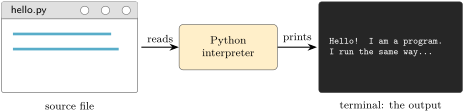
Here is our first program. Every program in this book is printed like this, with its line numbers on the left and its file name under it.
print("Hello! I am a program.")
print("I run the same way on every computer.")To run it, we type a command in a terminal: the word python, then the name of the file. Every output in this book starts with that command, after a $ sign, then shows what the program printed.
$ python hello.py
Hello! I am a program.
I run the same way on every computer.Python can also be used without a file: typing python alone opens an interactive prompt, where each line is run as soon as Enter is pressed. It is handy for trying a calculation; for programs, we always use files, so that they can be saved, corrected and run again.

14.3 print and numbers
The instruction print shows on the screen what is between its brackets. Text is written between double quotes; a calculation is written without quotes, and print shows its result. This is how Sami’s sister added up the prices:
# The prices of the items on Sami's shopping list, added up.
print(3.5 + 1.25 + 2.75 + 4 + 0.5 + 6.25 + 1.5 + 2)$ python prices.py
21.75The first line starts with #: it is a sentence for people, which Python skips (more about this below). Python knows the four operations of arithmetic, written +, -, * (times) and / (divided by). The point, not a comma, separates the whole part of a number from its decimals.
print(7 + 5)
print(7 - 5)
print(7 * 5)
print(7 / 5)
print(10 / 2)$ python operations.py
12
2
35
1.4
5.0Look at the last line: prints 5.0, not 5. The sign / always gives a decimal number. For sharing things that cannot be cut, Python has two more operations: // gives the whole number of times (the quotient of the division with a remainder), and % gives what is left over (the remainder).
# 23 sweets shared between 5 friends
print(23 // 5)  # sweets for each friend
print(23 % 5) # sweets left over$ python share.py
4
3
14.4 From top to bottom
Python carries out the lines of a program one after another, from the first to the last, like the robot following its cards. Inside one line, a calculation follows the rules of mathematics: multiplications and divisions before additions and subtractions, unless brackets say otherwise.
print("First line")
print(2 + 3 * 4)
print((2 + 3) * 4)
print("Last line")$ python order.py
First line
14
20
Last lineOn line 2, is computed first, then is added: 14. On line 3, the brackets are computed first: .
14.5 Reading an error message
If a program breaks a rule of the language, the interpreter stops and prints an error message. Here, print is misspelt on line 2.
print("Hello")
pritn("Goodbye")
print("Is this line reached?")$ python typo.py
Hello
Traceback (most recent call last):
File "~/session/typo.py", line 2, in <module>
pritn("Goodbye")
^^^^^
NameError: name 'pritn' is not defined. Did you mean: 'print'?
[exit status 1]Definition 14.4 (Error message)
An error message is the text the interpreter prints when it cannot go on: it tells where the problem is (the file and the line number) and, on its last line, what kind of problem it is.
Method 14.5 (Reading an error message)
Read the last line first: it names the kind of error and says what went wrong. Then find the line number just above, open the source file at that line and look at the part marked by the little ^ signs. Correct only that, and run the program again.
Here the last line says that the name pritn is not defined, and even suggests print. Some mistakes are found before the program starts: a text without its closing quote is not a sentence of the language at all, so nothing runs, not even line 1.
$ cat quote.py
print("Hello")
print("Goodbye)
$ python quote.py
  File "~/session/quote.py", line 2
    print("Goodbye)
          ^
SyntaxError: unterminated string literal (detected at line 2)
[exit status 1]cat shows the file; the interpreter refuses it at once: a SyntaxError.14.6 Comments
Definition 14.6 (Comment)
A comment is a note for people written in a program: everything from a # sign to the end of the line. The interpreter skips it.
# This program prints a poster for the school fair.
# Python skips every line that starts with #.
print("School fair")         # the title
print("Saturday at 10")      # the day and the time
# print("Cancelled")         # this line is skipped too
print("Come and play!")$ python comments.py
School fair
Saturday at 10
Come and play!A comment can also turn a line off without deleting it, as on line 5.
Facts as of 2026
Every program of this book was run with Python 3.12. Python changes a little with each new version, mostly by adding things; the programs of this book work the same with the versions that follow.
14.7 Exercises
Exercise 14.1 ★
What does print(7 + 3 * 2) print? Check by running it.
Solution
Solution of Exercise 14.1.
13: the multiplication comes first, then .
Exercise 14.2 ★
What do print(17 // 3) and print(17 % 3) print?
Solution
Solution of Exercise 14.2.
5 and 2: .
Exercise 14.3 ★
Predict the output of this program, line by line, then run it.
print("3")
print("2")
print(3 - 2)
print("Go!")Solution
Solution of Exercise 14.3.
Four lines, in the order of the program: 3, 2, 1 (the result of , computed because there are no quotes), and Go!.
Exercise 14.4 ★
Write a program poster.py that prints a poster of three lines for a lost cat.
Solution
Solution of Exercise 14.4.
For example:
print("Lost cat!")
print("Grey, with white paws")
print("Please call the school")Exercise 14.5 ★★
Lina writes print("Hello" and gets a SyntaxError. What is missing?
Solution
Solution of Exercise 14.5.
The closing bracket: print("Hello"). Every opening bracket needs its closing bracket.
Exercise 14.6 ★★
Tom writes Print("Hi"). What does the last line of the error message say, and how is it fixed?
Solution
Solution of Exercise 14.6.
The last line says that the name Print is not defined (a NameError) and asks whether print was meant. Python makes a difference between capital and small letters: the fix is print("Hi"), with a small p.
Exercise 14.7 ★★
Write a program weeks.py that prints how many whole weeks there are in 100 days, then how many days are left.
Solution
Solution of Exercise 14.7.
print(100 // 7, "weeks")
print(100 % 7, "days")It prints 14 weeks and 2 days: .
Exercise 14.8 ★★
What do print(10 / 4) and print(10 // 4) print? Why are they different?
Solution
Solution of Exercise 14.8.
2.5 and 2. The sign / gives the exact quotient as a decimal number; // gives only the whole number of times 4 goes into 10.
Exercise 14.9 ★★
A museum ticket costs 4.50 euros. Write a program that prints the price of 7 tickets.
Solution
Solution of Exercise 14.9.
print(7 * 4.50)It prints 31.5: the tickets cost 31.50 euros.
Exercise 14.10 ★★★
How many lines does this program print? Count them before running it.
# How many lines does this program print?
print("one")
# print("two")
print("three", "four")
print()
print("five")Solution
Solution of Exercise 14.10.
Four lines: one; then three four (a print with two things prints them on one line, with a space between); then an empty line, printed by print(); then five. Line 3 is a comment and prints nothing.
Exercise 14.11 ★★★
This program should share 50 cards between 6 players and print how many each gets, then how many are left over. Its second line prints 42. Find the mistake and fix it.
# 50 cards shared between 6 players: cards each, cards left over
print(50 // 6)
print(50 - 50 // 6)Solution
Solution of Exercise 14.11.
Line 3 computes : the cards not given to one player, which means nothing here. The leftover is the remainder of the division:
# 50 cards shared between 6 players: cards each, cards left over
print(50 // 6)
print(50 % 6)It prints 8 and 2: .
Exercise 14.12 ★★★
For a whole number , compute (n // 5) * 5 + n % 5 for ten numbers of your choice, with a program. What do you notice? Explain why it always happens.
Solution
Solution of Exercise 14.12.
The program exercises/give_back.py prints, for ten numbers, n // 5, n % 5 and the whole expression; for example 23 gives 4, 3 and 23, and 137 gives 27, 2 and 137. The expression always gives back . The reason is the division with a remainder: n // 5 is the number of whole fives in , n % 5 is the remainder , and is exactly fives plus : .
14.8 Problem: The School Trip
Problem 14.1
Weekend problem — how many buses?
The 137 pupils of a school go to a museum by bus. Each bus has 50 seats, and the museum lets pupils in by groups of at most 12.
Part I — By hand.
- How many buses are full if 50 pupils sit in each? How many pupils are still waiting? How many buses are needed in all?
- How many seats stay empty in those buses?
- How many groups of 12 can be made, and how many pupils are left for a last, smaller group? How many groups are there in all?
- Write as and as , and say which Python operations give each number.
Part II — A program. The program below does the same computations. Its first line gives the name pupils to the number 137 (the next chapter explains such names); change the number to try another school.
pupils = 137   # change this number and run the program again

print("pupils:", pupils)
print("buses:", (pupils + 49) // 50)
print("empty seats:", (pupils + 49) // 50 * 50 - pupils)
print("museum groups:", (pupils + 11) // 12)- Run the program. Do its answers agree with yours?
- Change 137 to 150, then to 151. Write down the answers each time. What changes between 150 and 151, and why?
- Tom suggests
pupils // 50 + 1for the number of buses. For which numbers of pupils does Tom’s way give a wrong answer? Try 137, then 150. - On line 6, why
+ 11for groups of 12?
Part III — Is the rule always right? The program buses_table.py of this chapter prints, for every number of pupils from 1 to 200, the number of buses given by (pupils + 49) // 50. Its loop, on line 2, is explained in a later chapter; you only need to run it.
# For every number of pupils from 1 to 200: the number of buses.
for pupils in range(1, 201):
print(pupils, (pupils + 49) // 50)- Run it. For which numbers of pupils does the number of buses change?
- Explain why adding 49 before dividing by 50 gives “divide, then round up”. Look at what happens for 100, 101 and 150 pupils.
- The program
buses_check.pycompares the rule with “divide by 50 and round up” for every number from 1 to 200. Run it: how many values disagree? State the result: how many buses are needed for 137 pupils, and from which numbers of pupils on does a school need 2, 3 and 4 buses?
Solution
Solution of Problem 14.1.
1. : 2 buses are full and 37 pupils are still waiting, so a third bus is needed: 3 buses.
2. seats for 137 pupils: 13 seats stay empty.
3. : 11 groups of 12, and a last group of 5: 12 groups in all.
4. . 137 // 50 gives 2 and 137 % 50 gives 37; 137 // 12 gives 11 and 137 % 12 gives 5.
5. The program prints 137 pupils, 3 buses, 13 empty seats and 12 museum groups, as found by hand.
$ python trip.py
pupils: 137
buses: 3
empty seats: 13
museum groups: 126. For 150: 3 buses, 0 empty seats, 13 groups. For 151: 4 buses, 49 empty seats, 13 groups. With 150 pupils the three buses are exactly full; one more pupil needs a fourth bus, almost empty.
7. pupils // 50 + 1 is right for 137 (3), but gives 4 for 150, where 3 buses are enough. It is wrong exactly when the number of pupils is a multiple of 50: 50, 100, 150, 200, …, where it orders one bus too many.
8. Adding pushes any number of pupils that is not a multiple of 12 to or past the next multiple, so the last, smaller group is counted; a multiple of 12 does not reach the next one. It is the same trick as for the buses.
9. The number of buses goes from 1 to 2 at 51 pupils, from 2 to 3 at 101 and from 3 to 4 at 151, and stays 4 up to 200:
$ python buses_table.py
49 1
50 1
51 2
52 2
99 2
100 2
101 3
102 3
149 3
150 3
151 4
152 4
200 410. If the number of pupils is a multiple of 50, adding 49 does not reach the next multiple: , and 149 // 50 is 2, the exact number of buses. If it is not a multiple of 50, there is a remainder of at least 1, and adding 49 carries the number to or past the next multiple: gives 3. Adding 49 means: every pupil left over asks for one more bus; and still gives 3.
11. No value disagrees:
$ python buses_check.py
values that disagree: 0137 pupils need 3 buses; a school needs 2 buses from 51 pupils on, 3 from 101 and 4 from 151 (up to 200).