هذا الكتاب غير متوفر بعد باللغة العربية. النسخ المتوفرة: English.
Primary & Middle School Computer Science · الصفوف 1–9
23Finding and Fixing Bugs
Leo wrote a function for the average of his five marks. They are 12, 10, 11, 9 and 11, all between 9 and 12, and his program prints 13.25. Python gave no warning: it did exactly what Leo wrote, which is not what he meant. Every programmer writes programs that go wrong; good programmers have a method for finding out why.
You already know
Python stops with an error message when it cannot carry out a line (Chapter 14). A trace table follows the values of the variables, one row per step (Chapter 15). A function call runs the function’s body and comes back with a value (Chapter 19); a list has indices from 0 to its length minus 1 (Chapter 20).
23.1 Three kinds of error
Definition 23.1 (Bug)
A bug is a mistake in a program that makes it behave differently from what its author meant.
Definition 23.2 (Syntax error, runtime error, logic error)
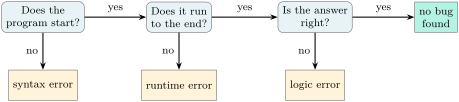
A syntax error breaks the rules of the language: Python refuses to start the program at all. A runtime error happens while the program runs: it starts, then stops at a line that cannot be carried out. A logic error lets the program run to the end, but with a wrong result.
A colon forgotten at the end of a for line is a syntax error. Python reads the whole file before running anything, so not even the first line runs:
$ python missing_colon.py
  File "~/session/missing_colon.py", line 2
    for mark in marks
                     ^
SyntaxError: expected ':'
[exit status 1]Dividing by zero is a runtime error: the first two lines run, and the third stops the program.
total = 53
count = 0
print("average:", total / count)$ python zero_division.py
Traceback (most recent call last):
File "~/session/zero_division.py", line 3, in <module>
print("average:", total / count)
~~~~~~^~~~~~~
ZeroDivisionError: division by zero
[exit status 1]Leo’s average is a logic error, the hardest kind: nothing warns, and the wrong answer looks like any other number. Only a person who knows what to expect can see that 13.25 is impossible.
23.2 Reading an error report from the bottom
When a runtime error happens inside a function, Python reports the whole path that led there.
Definition 23.3 (Traceback)
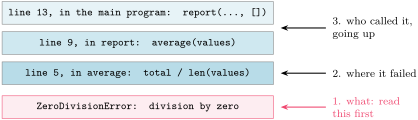
A traceback is the error report of a runtime error: it lists the calls that were under way when the error happened, from the top of the program down to the failing line, and ends with the name of the error.
def average(values):
    total = 0
    for value in values:
        total = total + value
    return total / len(values)


def report(name, values):
    print(name, "average:", average(values))


report("Leo", [12, 10, 11, 9, 11])
report("Mia", [])$ python two_calls.py
Leo average: 10.6
Traceback (most recent call last):
File "~/session/two_calls.py", line 13, in <module>
report("Mia", [])
File "~/session/two_calls.py", line 9, in report
print(name, "average:", average(values))
^^^^^^^^^^^^^^^
File "~/session/two_calls.py", line 5, in average
return total / len(values)
~~~~~~^~~~~~~~~~~~~
ZeroDivisionError: division by zero
[exit status 1]Read a traceback from the bottom. The last line says what went wrong: a division by zero. The lines just above say where: line 5, in average. Going up, each pair of lines is one step back along the path: average was called from line 9, in report, which was called from line 13, the main program, with an empty list.
23.3 Tracing
A trace table by hand (Chapter 15) works for a few steps. For more, the program can trace itself: extra print lines show the values as it runs. Here is Leo’s function, then the same function with tracing lines:
def average(marks):
    total = 0
    for mark in marks:
        total = total + mark
    return total / 4


print(average([12, 10, 11, 9, 11]))$ python average_bug.py
13.25def average(marks):
total = 0
for mark in marks:
total = total + mark
print(" trace: mark", mark, "total", total)
print(" trace: dividing", total, "by 4")
return total / 4
print(average([12, 10, 11, 9, 11]))$ python average_trace.py
trace: mark 12 total 12
trace: mark 10 total 22
trace: mark 11 total 33
trace: mark 9 total 42
trace: mark 11 total 53
trace: dividing 53 by 4
13.25The total, 53, is right, so the walk is not to blame. The trace shows the mistake at once: Leo divides by 4, the number of marks he had last week, not by the number of marks in the list. len(marks) always counts them:
def average(marks):
    total = 0
    for mark in marks:
        total = total + mark
    return total / len(marks)


print(average([12, 10, 11, 9, 11]))$ python average_fixed.py
10.6Once the bug is fixed, the tracing lines are removed: they were scaffolding, not part of the program. Starting them with " trace:" makes them easy to find.
23.4 The smallest input that shows the bug
Definition 23.4 (Debugging)
Debugging is finding the cause of a bug and fixing it.
The first step of debugging is to make the bug happen again, on purpose. The second is to make the input as small as possible: a bug seen on a list of a thousand items is hard to follow, the same bug on a list of one item is easy. This function should return the first word of a sentence:
def first_word(sentence):
    end = sentence.find(" ")
    return sentence[:end]


for sentence in ["The fox ran", "Hello there", "Stop", "a"]:
print("[" + first_word(sentence) + "]")$ python first_word_bug.py
[The]
[Hello]
[Sto]
[]It fails on "Stop", a sentence of one word, and on "a", the smallest such sentence: one letter, and the answer is empty. With no space, find returns , and sentence[:-1] is everything except the last character. The fix handles the case with no space:
def first_word(sentence):
    end = sentence.find(" ")
    if end == -1:            # no space: the sentence is one word
        return sentence
    return sentence[:end]


for sentence in ["The fox ran", "Hello there", "Stop", "a"]:
print("[" + first_word(sentence) + "]")$ python first_word_fixed.py
[The]
[Hello]
[Stop]
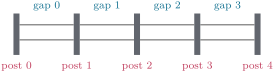
[a]Many bugs hide at the edges: an empty list, a list of one item, the first or the last index. A fence of posts has gaps between them, and counting posts when you mean gaps, or the other way round, is so common that it has a name: an off-by-one mistake.
23.5 Changing one thing at a time
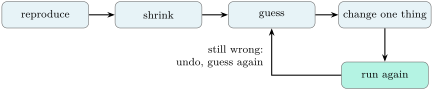
Method 23.5 (Debugging, one step at a time)
- Reproduce: find an input that shows the bug every time.
- Shrink: make that input as small as you can.
- Guess: read the error report or a trace, and guess the cause.
- Change one thing, and run again on the same input.
- If the bug is gone, keep the change and run the other inputs too; if not, undo the change and go back to step 3.
Changing two things at once seems faster, but if the program then works, or fails differently, you cannot tell which change did it.
History — A real bug
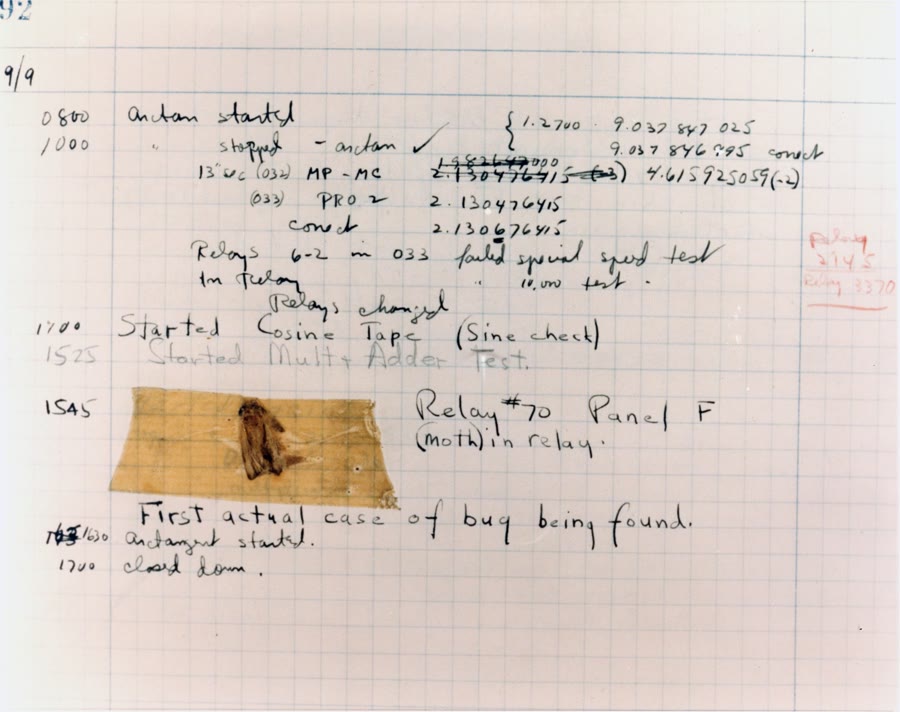
Engineers already called a fault a “bug” long before computers. On 9 September 1947, at Harvard, in Cambridge, Massachusetts, the operators of the Mark II, a computer built from electrical switches called relays, found a moth caught in one of them. They taped it into the machine’s log book with the words “First actual case of bug being found”.
23.6 Exercises
Exercise 23.1 ★
Which kind of error is each of these: (a) a missing bracket; (b) a list index past the end; (c) a price total that is 10 times too big; (d) a word spelt pritn, on a line that runs; (e) a loop that counts one item too few; (f) a while loop with whle?
Solution
Solution of Exercise 23.1.
(a) syntax error; (b) runtime error; (c) logic error; (d) runtime error: the program starts, and stops with a NameError when it reaches that line; (e) logic error; (f) syntax error.
Exercise 23.2 ★
Here is a traceback. What went wrong, on which line, and inside which function?
$ python last_item.py
Traceback (most recent call last):
  File "~/session/last_item.py", line 5, in <module>
    print(last([4, 8, 15]))
          ^^^^^^^^^^^^^^^^
  File "~/session/last_item.py", line 2, in last
    return values[len(values)]
           ~~~~~~^^^^^^^^^^^^^
IndexError: list index out of range
[exit status 1]Exercise 23.3 ★
In Output 23.5, which lines come from the tracing lines? What remains once they are removed?
Solution
Solution of Exercise 23.3.
The six lines that start with trace:. Only the last line, 13.25, remains.
Exercise 23.4 ★
Tom’s program stops with SyntaxError: '(' was never closed on the line print("count:", len(marks). Fix it.
Solution
Solution of Exercise 23.4.
Each opening bracket needs its closing bracket; print opens one and len opens another, so two are needed at the end: print("count:", len(marks)).
Exercise 23.5 ★★
This program should add the first five marks, but prints 67. Why? Fix it.
marks = [12, 10, 11, 9, 11, 14, 8, 13]
total = 0
for i in range(6):
    total = total + marks[i]
print("total of the first five marks:", total)Solution
Solution of Exercise 23.5.
range(6) gives the indices 0 to 5: six marks, the sixth being 14 (). Write range(5), and the program prints 53.
Exercise 23.6 ★★
This function should count the values above limit; it has a tracing line. It answers 0 for [3, 9, 7] and 5. Read the trace and find the bug.
def count_above(values, limit):
    count = 0
    for value in values:
        if value > limit:
            count = count + 1
        print("  trace: value", value, "count", count)
        return count


print(count_above([3, 9, 7], 5))$ python count_above_trace.py
trace: value 3 count 0
0Exercise 23.7 ★★
Add a tracing line to Listing 23.6 that prints end for each sentence. What does it print for "Stop"?
Solution
Solution of Exercise 23.7.
The line print(" trace: end", end), just after end is computed, prints 3, 5, and ; for "Stop" it prints , which shows that find found no space.
Exercise 23.8 ★★
Noor writes if mark =< 10:. Which kind of error is it, and how is it written in Python?
Solution
Solution of Exercise 23.8.
A syntax error: Python reports invalid syntax and runs nothing. The comparison is written <=, the < first, as it is said: “less than or equal to”.
Exercise 23.9 ★★
This function should say whether a list is in order from small to large, equal neighbours allowed. Find the smallest list on which it is wrong, then fix it.
def is_sorted(values):
    """True when every item is at least as large as the one before it."""
    for i in range(len(values) - 1):
        if not values[i] < values[i + 1]:
            return False
    return True


print(is_sorted([1, 2, 3]), is_sorted([3, 1]), is_sorted([2, 5, 5, 8]))Solution
Solution of Exercise 23.9.
values[i] < values[i + 1] is false for two equal neighbours, so a list with equal neighbours is called not in order. The smallest such list is [1, 1]. The comparison must be <=:
def is_sorted(values):
    """True when every item is at least as large as the one before it."""
    for i in range(len(values) - 1):
        if not values[i] <= values[i + 1]:
            return False
    return True


print(is_sorted([1, 2, 3]), is_sorted([3, 1]))
print(is_sorted([2, 5, 5, 8]), is_sorted([1, 1]))It prints True False and True True.
Exercise 23.10 ★★★
Change the function average of Listing 23.2 so that it returns 0 for an empty list instead of stopping the program.
Solution
Solution of Exercise 23.10.
A test before the division, which is never reached for an empty list:
def average(values):
    if len(values) == 0:
        return 0
    total = 0
    for value in values:
        total = total + value
    return total / len(values)


print(average([12, 10, 11, 9, 11]), average([]))It prints 10.6 0.
Exercise 23.11 ★★★
This program should add the even numbers from 1 to 10, which makes 30. It prints 25 and has two bugs. Fix them one at a time, running after each fix, in both orders. Is the final program the same? Then why fix one at a time?
n = 10
total = 0
for i in range(1, n):
    if i % 2 == 1:
        total = total + i
print("sum of the even numbers up to", n, ":", total)Solution
Solution of Exercise 23.11.
The two bugs: range(1, n) stops at 9, so it must be range(1, n + 1); and i % 2 == 1 picks the odd numbers, so it must be i % 2 == 0. Fixing the test first gives , then 30; fixing the range first gives again, then 30. Both orders end with the same program, which prints 30:
n = 10
total = 0
for i in range(1, n + 1):
    if i % 2 == 0:
        total = total + i
print("sum of the even numbers up to", n, ":", total)Running after each fix tells you what each change did: in the second order, the first fix leaves the answer at 25, and only running shows that it was still needed. With both changes at once, a wrong result would not say which change was wrong.
Exercise 23.12 ★★★
This function is right on most lists of marks. Find a list on which it is wrong, the smallest one, and fix it.
def largest(values):
    best = 0
    for i in range(1, len(values)):
        if values[i] > best:
            best = values[i]
return bestSolution
Solution of Exercise 23.12.
The loop starts at index 1, so the first mark is never looked at, and best starts at 0. The function is wrong when the largest mark is the first one: [9, 3, 4] gives 4. The smallest such list is a list of one mark, [5], which gives 0. Starting with best = values[0] fixes both: the program then prints 9 9 5 for [3, 9, 4], [9, 3, 4] and [5].
23.7 Problem: The Bug Hunt
Problem 23.1
Weekend problem — four bugs in a grader
A teacher’s program gives a quiz score from 0 to 99 a letter (A from 90, B from 75, C from 50, D below) and a comment from its tens digit (poor below 50, fair in the 50s and 60s, good in the 70s and 80s, great from 90). It has four bugs: one syntax error, one runtime error and two logic errors.
# grader.py -- a letter and a comment for a quiz score from 0 to 99
WORDS = ["poor", "poor", "poor", "poor", "poor",
         "fair", "fair", "good", "good"]


def letter(score):
    if score > 90:
        return "A"
    elif score >= 75:
        return "B"
    elif score >= 50:
        return "C"
    else:
        return "D"


def comment(score)
    tens = score % 10
    return WORDS[tens]


def grade(score):
    return letter(score) + " (" + comment(score) + ")"


if __name__ == "__main__":
    for score in [45, 50, 75, 90, 99]:
print(score, grade(score))Part I — The errors that stop the program.
- Before running it, find the syntax error by reading.
Here is the program run as it is, then run again with the colon added (the file
grader_v1.py). Which line does each report point to?$ python grader.py File "~/session/grader.py", line 17 def comment(score) ^ SyntaxError: expected ':' $ python grader_v1.py 45 D (fair) 50 C (poor) 75 B (fair) 90 B (poor) Traceback (most recent call last): File "~/session/grader_v1.py", line 28, in <module> print(score, grade(score)) ^^^^^^^^^^^^ File "~/session/grader_v1.py", line 23, in grade return letter(score) + " (" + comment(score) + ")" ^^^^^^^^^^^^^^ File "~/session/grader_v1.py", line 19, in comment return WORDS[tens] ~~~~~^^^^^^ IndexError: list index out of range [exit status 1]Output 23.11. Two runs, two reports. - Read the second report from the bottom. Which function failed, and with which score? Which value did
tenshave? Fix the runtime error.
Part II — Checking a hundred scores. The files grader_v2.py, grader_v3.py and grader_v4.py are the grader after one, two and three more fixes. A checking program works out the expected grade another way and counts the wrong answers:
import grader_v2
import grader_v3
import grader_v4


def expected(score):
    """The grade worked out another way: from the score's tens digit."""
    tens = score // 10
    words = ["poor"] * 5 + ["fair"] * 2 + ["good"] * 2 + ["great"]
    if score >= 90:
        letter = "A"
    elif score >= 75:
        letter = "B"
    elif score >= 50:
        letter = "C"
    else:
        letter = "D"
    return letter + " (" + words[tens] + ")"


for name, module in [("v2", grader_v2), ("v3", grader_v3), ("v4", grader_v4)]:
    wrong = []
    for score in range(100):
        if module.grade(score) != expected(score):
            wrong.append(score)
print(name, len(wrong), "wrong answers out of 100, first ones:", wrong[:5])- Why is it safer to check against a second, simpler way of working out the grade than against answers typed by hand?
- Run it. How many wrong answers does each version give?
- Which logic error was fixed between
v2andv3, and which one betweenv3andv4? - In Part I, the scores 45 and 75 got the comment “fair”. Was that a sign of a bug?
Part III — The smallest inputs.
- Which is the smallest score that shows the comment bug? Why that one?
- Which scores show the letter bug? Which line of the output of Part I already showed it?
- Had the letter bug been fixed first, how many wrong answers would remain? Why not 65?
- State the result.
Solution
Solution of Problem 23.1.
1. Line 17, def comment(score), has no colon at the end.
2. The first report points to line 17, the missing colon; the second, read from the bottom, to line 19, return WORDS[tens].
3. comment failed, called by grade for the score 99. tens was 9, and WORDS has only nine items, with indices 0 to 8: the word "great" is missing. Adding it fixes the runtime error.
4. Answers typed by hand can be mistyped, and there would be a hundred of them; a second program written another way is unlikely to make the same mistake as the first.
5.
$ python check_grader.py
v2 66 wrong answers out of 100, first ones: [5, 6, 7, 8, 9]
v3 1 wrong answers out of 100, first ones: [90]
v4 0 wrong answers out of 100, first ones: []6. Between v2 and v3, score % 10 became score // 10: the comment used the units digit instead of the tens digit. Between v3 and v4, score > 90 became score >= 90.
7. Yes: 45 should be “poor” and 75 “good”. Their units digit is 5, and WORDS[5] is “fair”.
8. The score 5: for 0 to 4 the units digit and the tens digit both pick “poor”, and 5 is the first score whose units digit picks another word.
9. Only 90, which gets a B. Part I’s output already showed it: the line 90 B (poor).
10. 66 still: the score 90 also has a wrong comment, so fixing its letter alone does not make its answer right.
11. Result. Among the scores 0 to 99, the grader gives 66 wrong answers once it runs, 1 after the comment is fixed and 0 after the letter is fixed.