本书暂未推出简体中文版。现有版本:English。
Primary & Middle School Computer Science · 1–9 年级
19Functions
Lina’s family is repainting the house, and her program computes the area of each of the five rooms: the same three lines, copied five times with other numbers. Then she notices a mistake in those three lines. Now she must correct it five times, and hope she has not missed one. If the three lines had a name, she could write them once and use them five times, and a mistake would be fixed in one place.
You already know
A variable is a name for a value (Chapter 15); print shows a value on the screen (Chapter 14); if chooses between blocks (Chapter 17).
19.1 Defining and calling a function
Definition 19.1 (Function and function call)
A function is a block of instructions with a name, written once and run whenever it is needed. It is defined with def, the name, brackets and a colon, followed by an indented block, its body. A function call is the name followed by brackets: it runs the body.
def say_hello():
    print("Hello!")
    print("Welcome to the club.")


print("Before the calls")
say_hello()
say_hello()
say_hello()$ python greet.py
Before the calls
Hello!
Welcome to the club.
Hello!
Welcome to the club.
Hello!
Welcome to the club.Lines 1 to 3 only define the function: Python remembers it and prints nothing. That is why Before the calls comes first. A function runs only when it is called. Two empty lines after a function are the custom in Python: they make each function easy to see.
19.2 Parameters and arguments
Most functions need values to work on. The area of a room needs its width and its length.
Definition 19.2 (Parameter and argument)
A parameter is a variable named between the brackets of a function’s definition. An argument is the value given for it in a call: in area(3, 4), the parameter width takes the argument 3, and length takes 4.
Definition 19.3 (Return value)
The instruction return ends the call and gives a value back to the place where the function was called: the return value. The call can then be used like that value, in a calculation or an assignment.
def area(width, length):
    return width * length


kitchen = area(3, 4)
print("Kitchen:", kitchen)
print("Bedroom:", area(3.5, 4))
print("Both:", kitchen + area(3.5, 4))$ python area.py
Kitchen: 12
Bedroom: 14.0
Both: 26.0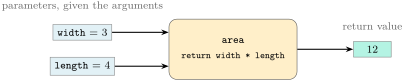
Arguments are given to parameters in order: the first argument to the first parameter, and so on. Swapping them is not an error for Python, but the result is wrong:
def introduce(name, age):
    print(f"{name} is {age} years old.")


introduce("Noor", 11)
introduce(11, "Noor") # the arguments in the wrong order$ python two_params.py
Noor is 11 years old.
11 is Noor years old.name and "Noor" to age.A function can call another function. Here, largest3 finds the largest of three numbers with two calls to largest2. A return inside an if ends the call at once, so line 4 runs only when a > b is false.
def largest2(a, b):
    if a > b:
        return a
    return b


def largest3(a, b, c):
    return largest2(largest2(a, b), c)


print(largest2(4, 9))
print(largest3(4, 9, 2))
print(largest3(7, 3, 5))$ python largest.py
9
9
7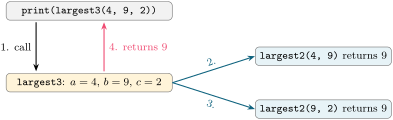
largest3 runs; largest3 itself waits for each call to largest2. Each value comes back to the place where its call was written.19.3 return is not print
print shows a value to the person in front of the screen. return gives a value to the program. A function that prints its result instead of returning it shows the right number, but the program cannot use it:
def area(width, length):
    print(width * length)     # shows the area, but gives nothing back


total = area(3, 4) + 1
print(total)$ python print_not_return.py
12
Traceback (most recent call last):
File "~/session/print_not_return.py", line 5, in <module>
total = area(3, 4) + 1
~~~~~~~~~~~^~~
TypeError: unsupported operand type(s) for +: 'NoneType' and 'int'
[exit status 1]A function without return gives back the special value None, which means “nothing”. Adding 1 to nothing makes no sense: the error message names the type of None, NoneType. The rule of thumb: a function that computes something returns it, and the caller decides whether to print it.
19.4 Local variables
Definition 19.4 (Local variable)
A local variable is a variable created inside a function: a parameter, or a name assigned in the body. It exists only while the call runs, and the rest of the program cannot see it.
def area(width, length):
    result = width * length
    return result


print(area(3, 4))
print(result)$ python local.py
12
Traceback (most recent call last):
File "~/session/local.py", line 7, in <module>
print(result)
^^^^^^
NameError: name 'result' is not defined
[exit status 1]result was local to area: after the call, it is gone.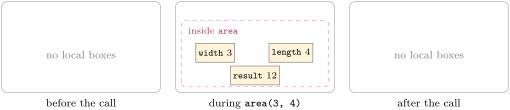
Local variables are a good thing: a function can use any names it likes without spoiling the variables of the rest of the program, and two functions can both have a variable called total without mixing them up.
19.5 Cutting a problem into functions
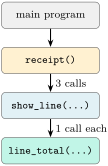
A long task is easier to write, read and correct when it is cut into small functions, each with one job. This receipt printer has three: one computes the price of a line, one prints a line, and one prints the whole receipt.
def line_total(price, quantity):
    return price * quantity


def show_line(name, price, quantity):
    total = line_total(price, quantity)
    print(f"{name:10} {quantity} x {price:5.2f} = {total:6.2f}")
    return total


def receipt():
    total = 0
    total = total + show_line("bread", 1.80, 2)
    total = total + show_line("apples", 0.45, 6)
    total = total + show_line("milk", 1.10, 3)
    print(f"{'TOTAL':22} {total:6.2f}")


receipt()$ python receipt.py
bread 2 x 1.80 = 3.60
apples 6 x 0.45 = 2.70
milk 3 x 1.10 = 3.30
TOTAL 9.60In the f-strings, the sign : after a value gives its layout: :10 gives a text 10 places, and :5.2f writes a number 5 places wide with 2 decimals.
show_line prints, which seems to break the rule of thumb above. Printing a line is its job, and it also returns the line’s total, so that receipt can add the totals up.
Each function should be checked before it is used by the others. The method: work out a few answers by hand, then call the function with the same arguments and compare. Choose examples that reach every branch, and the special cases (zero, two equal numbers).
def area(width, length):
    return width * length


def largest2(a, b):
    if a > b:
        return a
    return b


# Each answer is worked out by hand first, then compared with the call.
print("expected 12, got", area(3, 4))
print("expected 0, got", area(0, 7))
print("expected 9, got", largest2(4, 9))
print("expected 9, got", largest2(9, 4))
print("expected 5, got", largest2(5, 5))$ python check_examples.py
expected 12, got 12
expected 0, got 0
expected 9, got 9
expected 9, got 9
expected 5, got 5Remark 19.5 (Programs that are also toolboxes)
A file of functions can be used by another program, which takes its functions with from area import area, as we took forward from turtle. The lines of the file that are not in a function then run as well, which is not wanted. Python programmers therefore put them under if __name__ == "__main__":. Those lines run when the file itself is run, and not when another program takes its functions:
def area(width, length):
    return width * length


if __name__ == "__main__":
print(area(3, 4))$ python guarded.py
1219.6 Exercises
Exercise 19.1 ★
What does this program print?
def shout(word):
    print(word + "!")


shout("Hello")
print("between")
shout("Bye")Solution
Solution of Exercise 19.1.
Hello!, then between, then Bye!: the body of shout runs at each call, in the order of the program.
Exercise 19.2 ★
With def f(x): return 2 * x + 1, what does print(f(2) + f(3)) print?
Solution
Solution of Exercise 19.2.
and , so it prints 12.
Exercise 19.3 ★
What appears on the screen?
def double(n):
    print("doubling", n)
    return 2 * n


result = double(5)
print(result + 1)Solution
Solution of Exercise 19.3.
doubling 5, printed during the call, then 11: the call returned 10, kept in result, and 1 was added.
Exercise 19.4 ★
Write a function perimeter(width, height) that returns the perimeter of a rectangle.
Solution
Solution of Exercise 19.4.
def perimeter(width, height):
    return 2 * (width + height)


print(perimeter(3, 4))
print(perimeter(10, 0.5))It prints 14 and 21.0.
Exercise 19.5 ★★
Tom’s function average(a, b) ends with print((a + b) / 2). His program then does print(average(8, 12) * 2) and stops with a TypeError. Explain, and fix the function.
Solution
Solution of Exercise 19.5.
average prints the average but returns nothing, so average(8, 12) is None, and None * 2 is refused. Replace the print by return (a + b) / 2; the program then prints 20.0.
Exercise 19.6 ★★
With the function area of Listing 19.2, Noor calls area(4, 3) for a room 3 wide and 4 long. Is the answer wrong? Now take introduce of Listing 19.3: why does the order matter there and not for area?
Solution
Solution of Exercise 19.6.
No: area(4, 3) gives 12, like area(3, 4), because . For introduce, the two parameters play different parts in the sentence, so swapping the arguments gives a wrong sentence. The order of the arguments always decides which parameter gets which value; it only happens not to change the result of area.
Exercise 19.7 ★★
Write a function is_even(n) that returns True or False.
Solution
Solution of Exercise 19.7.
def is_even(n):
    return n % 2 == 0


print(is_even(10), is_even(7), is_even(0))The comparison is itself True or False: no if is needed. It prints True False True.
Exercise 19.8 ★★
Write a function minutes_to_hours(m) that returns a number of minutes in hours (90 gives 1.5) and prints nothing.
Solution
Solution of Exercise 19.8.
def minutes_to_hours(m):
    return m / 60


print(minutes_to_hours(90))
print(minutes_to_hours(45) + minutes_to_hours(15))Because it returns its value, the results can be added: .
Exercise 19.9 ★★
How many times does the body of square run? What does the program print?
def square(n):
    print("computing", n)
    return n * n


total = 0
for i in range(1, 5):
    total = total + square(i)
print(total)Solution
Solution of Exercise 19.9.
4 times, once for each turn of the loop: it prints computing 1 to computing 4, then .
Exercise 19.10 ★★★
Write a function price(age) that returns the cinema ticket price of Listing 17.3, and check it on the four ages of Listing 17.7.
Solution
Solution of Exercise 19.10.
Each branch returns its price, so the function ends as soon as a case matches.
def price(age):
    if age < 12:
        return 5
    elif age < 65:
        return 9
    else:
        return 6


for age in [11, 12, 64, 65]:
print(age, price(age))It prints 5, 9, 9 and 6 for 11, 12, 64 and 65.
Exercise 19.11 ★★★
To check largest3 of Listing 19.4, which calls would you make so that the largest number is once in each of the three places? Add the cases with equal numbers. How many calls is that, at least?
Solution
Solution of Exercise 19.11.
Three calls put the largest number in each place: largest3(9, 2, 4), largest3(2, 9, 4) and largest3(2, 4, 9), all expected to give 9. They reach both branches of each call to largest2. Then the equal cases: largest3(5, 5, 1), largest3(1, 5, 5), largest3(5, 1, 5) and largest3(5, 5, 5), all expected to give 5. That makes at least seven calls.
Exercise 19.12 ★★★
Write a function digit_sum(n) that returns the sum of the digits of n, and check it on five examples worked out by hand first.
Solution
Solution of Exercise 19.12.
def digit_sum(n):
    total = 0
    while n > 0:
        total = total + n % 10
        n = n // 10
    return total


# expected values worked out by hand
print("expected 10, got", digit_sum(2026))
print("expected 0, got", digit_sum(0))
print("expected 7, got", digit_sum(7))
print("expected 1, got", digit_sum(1000))
print("expected 45, got", digit_sum(123456789))
The examples cover an ordinary number, zero (the loop does not run at all), a single digit, zeros inside a number, and a long number.
19.7 Problem: The Check Digit of a Barcode
Problem 19.1
Weekend problem — catching typing mistakes
The 13-digit number under a barcode ends with a check digit. It is chosen so that the weighted sum of the 13 digits is a multiple of 10: counting from the right, the digits are multiplied by 1, 3, 1, 3, … in turn, and the products are added. A cashier who types a number with a mistake usually gets a weighted sum that is not a multiple of 10, and the till refuses it.
Part I — By hand. The number 5901234123457 is a valid example.
- Compute its weighted sum. Is it a multiple of 10?
- The first twelve digits of another number are
400638133393. Find its check digit. - The cashier types
5901234123487: one digit is wrong. Show that the till refuses it. - Why is the weight of the check digit 1, and not 3, convenient for computing it?
Part II — Functions. The number is kept as a whole number; its digits are taken off from the right with % 10 and // 10. The text in triple quotes under a def line is a docstring: a sentence that says what the function does.
def weighted_sum(code):
    """The digits of code, from the right, times 1, 3, 1, 3, ..."""
    total = 0
    weight = 1
    while code > 0:
        total = total + weight * (code % 10)
        code = code // 10
        weight = 4 - weight          # 1 becomes 3, 3 becomes 1
    return total


def check_digit(first12):
    """The digit that makes the weighted sum of the 13 digits a multiple of 10."""
    return (10 - weighted_sum(first12 * 10) % 10) % 10


def is_valid(code):
    return weighted_sum(code) % 10 == 0


if __name__ == "__main__":
    print(weighted_sum(5901234123457))
    print(check_digit(590123412345))
print(is_valid(5901234123457), is_valid(5901234123458))- In
weighted_sum, explain line 8: why does4 - weightswitch between 1 and 3? - In
check_digit, why multiplyfirst12by 10 before computing the weighted sum? Why is there a second% 10at the end? - Check
check_digiton your answer to question 2, andis_validon the numbers of questions 1 and 3. - Write down how you would check
check_digiton examples, in the style of Listing 19.8.
Part III — Which mistakes are caught?
from barcode import is_valid

code = 5901234123457
caught = 0
changes = 0
place = 1                            # 1, 10, 100, ...: the place of a digit
for _ in range(13):
    digit = code // place % 10
    for new in range(10):
        if new != digit:
            changes = changes + 1
            wrong = code + (new - digit) * place
            if not is_valid(wrong):
                caught = caught + 1
    place = place * 10
print(caught, "caught out of", changes)- How many numbers does Listing 19.14 try? Run it: how many are refused?
- Explain why changing one digit with weight 3 always changes the weighted sum by an amount that is not a multiple of 10.
- Another common mistake is to swap two neighbouring digits. One of them has weight 1 and the other weight 3. If they are and , by how much does the weighted sum change?
The program
swaps.pytries all 90 pairs of different digits . Run it: how many swaps are caught, and which are missed?# Two neighbouring digits a, b (weights 1 and 3) swapped to b, a. caught = 0 for a in range(10): for b in range(10): if a != b: change = (b * 1 + a * 3) - (a * 1 + b * 3) if change % 10 != 0: caught = caught + 1 else: print("missed:", a, b) print(caught, "caught out of 90")Listing 19.15. Every swap of two neighbouring digits. code/grade-7/01-functions/listings/swaps.py - State the result.
Solution
Solution of Problem 19.1.
1. From the right, the digits 7, 5, 4, 3, 2, 1, 4, 3, 2, 1, 0, 9, 5 are multiplied by 1, 3, 1, 3, …: , a multiple of 10.
2. With a check digit 0, the weighted sum would be 89. The check digit has weight 1, so it must add 1: the check digit is 1, and the number is 4006381333931.
3. The second digit from the right is 8 instead of 5. Its weight is 3, so the sum grows by : 99, not a multiple of 10. Refused.
4. With weight 1, the check digit is simply the amount missing to reach the next multiple of 10. With weight 3, we would have to find a digit whose triple fills the gap.
5. When weight is 1, 4 - weight is 3; when it is 3, it is 1. So the weights alternate.
6. Multiplying by 10 adds a 0 on the right: a place for the check digit, with weight 1, and every other digit moves to the weight it will have in the full number. If the sum ends in 0, 10 - 0 gives 10, and the second % 10 turns it into the digit 0.
7. check_digit(400638133393) returns 1; is_valid returns True for 5901234123457 and False for 5901234123487.
8. Work out the answers by hand first, then print them beside the calls:
check_digit(590123412345): expected 7 (question 1);check_digit(400638133393): expected 1 (question 2);check_digit(100000000003): expected 0; the sum is already a multiple of 10 (), which tests the second% 10;check_digit(100000000000): expected 9 (the sum is 1).
9. 13 places with 9 other digits each: 117 numbers. All 117 are refused:
$ python one_digit.py
117 caught out of 11710. Changing a digit by (between and 9, not 0) changes the sum by . For that to be a multiple of 10, would have to end in 0; but are 3, 6, 9, 12, 15, 18, 21, 24, 27: none ends in 0. The same holds for negative . With weight 1, the change itself is between and 9 and not 0, so it is not a multiple of 10 either.
11. Before: ; after: . The change is .
12. 80 of the 90 swaps are caught:
$ python swaps.py
missed: 0 5
missed: 1 6
missed: 2 7
missed: 3 8
missed: 4 9
missed: 5 0
missed: 6 1
missed: 7 2
missed: 8 3
missed: 9 4
80 caught out of 90is a multiple of 10 only when is 5 or : the missed swaps are exactly the pairs of digits that differ by 5.
13. Result. Every single wrong digit is caught. Of the 90 swaps of two different neighbouring digits, 80 are caught, and the 10 that are missed are exactly those where the two digits differ by 5.