本书暂未推出简体中文版。现有版本:English。
Primary & Middle School Computer Science · 1–9 年级
22How a Processor Runs a Program
A processor understands neither Python nor English. It is a chip of silicon that can do a few very simple things, very fast. So how does 3 + 4 become 7 inside it? This chapter opens the processor of a small computer, the toy machine of this series, and follows it step by step.
You already know
The processor carries out instructions, and the memory holds the programs and the data it works on (Chapter 6); memory is counted in bytes (Chapter 8). A byte is eight bits and holds a whole number from 0 to 255 (Chapter 11). Python programs are carried out by an interpreter (Chapter 14), and a loop goes back to repeat its block (Chapter 18).
22.1 Instructions are numbers in memory
Definition 22.1 (Memory cell and memory address)
The memory is a long row of memory cells, each holding one byte. The cells are numbered from 0; the number of a cell is its memory address.
The toy machine has 256 memory cells, with addresses 0 to 255. A real computer has billions, but they work the same way. The program and its data sit side by side in that same memory: the instructions themselves are numbers.
Definition 22.2 (Machine instruction and machine language)
A machine instruction is one instruction that the processor carries out directly, written as numbers in memory. The instructions a processor understands, with their numbers, are its machine language.
Every toy instruction takes two bytes. The first holds the number of the operation, its operation code, together with the number of a register (next section): the byte is . The second byte is a number, an address or a second register. People write instructions with short names instead of numbers; this chapter uses nine of them.
| code | written | what it does |
|---|---|---|
| 0 | HALT | stop |
| 1 | LOADI R, n | put the number in register R |
| 4 | ADD R, S | R becomes R + S |
| 5 | SUB R, S | R becomes R - S; notes whether the result is zero |
| 13 | CMP R, S | computes R - S only to note whether it is zero or negative |
| 16 | JNZ a | if the last result was not zero, jump to address |
| 17 | JN a | if the last result was negative, jump to address |
| 19 | IN R | read a number typed by the user into R |
| 20 | OUT R | print the number in R |
22.2 Registers and the program counter
Definition 22.3 (Register)
A register is a small storage place inside the processor, where it keeps the numbers it is working on.
Definition 22.4 (Program counter)
The program counter is a register that holds the address of the next instruction to carry out.
The toy machine has four registers, R0 to R3, of one byte each, and a program counter, PC, which starts at 0. Three one-bit flags remember things about the last result; this chapter only needs Z, which is 1 when the last result was zero.
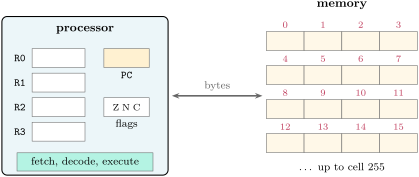
Here is a first program. A ; starts a comment, as # does in Python.
; add_two.toy -- reads two numbers, prints their sum
        IN    R0          ; R0 = the first number
        IN    R1          ; R1 = the second number
        ADD   R0, R1      ; R0 = R0 + R1
        OUT   R0          ; print R0
HALTGiven 3 and 4 to read, it prints 7. In memory, these five instructions are ten bytes, from address 0 to address 9. A short Python program, using the book’s toy machine as a module, shows them in decimal and in binary:
from toymachine import assemble

code = assemble(open("add_two.toy").read())
for address in range(0, 10, 2):
    first, second = code[address], code[address + 1]
print(f"{address:3}: {first:3} {second:3} {first:08b} {second:08b}")$ python encode.py
0: 76 0 01001100 00000000
2: 77 0 01001101 00000000
4: 16 1 00010000 00000001
6: 80 0 01010000 00000000
8: 0 0 00000000 00000000IN R0 is , IN R1 is 77, ADD R0, R1 is followed by the second register, 1; HALT is two zeros.

22.3 Fetch, decode, execute
Definition 22.5 (Fetch–decode–execute cycle)
The processor repeats the same three steps, the fetch–decode–execute cycle: fetch the instruction at the address in the program counter and move the program counter to the next one; decode it, that is find which operation and which registers it names; execute it.
On the toy machine, fetching reads the two bytes at PC and PC + 1, then adds 2 to PC. A jump simply puts a new address in PC, so the next fetch happens there: that is how a loop goes back.
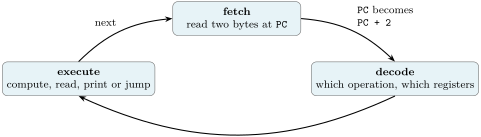
HALT.Definition 22.6 (Clock and core)
The clock of a processor is a signal that ticks at a steady rate and sets the pace of its work. A core is one part of a processor that runs its own fetch–decode–execute cycle; a processor with several cores runs several programs, or several parts of one program, at the same time.
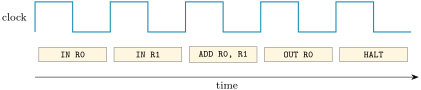
Facts as of 2026
A desktop processor on sale in 2026 runs its clock at up to 5.7 gigahertz, 5.7 billion ticks a second, and has 24 cores. Each core carries out billions of instructions a second.
22.4 Tracing a program by hand
To trace a program is to play the processor: write a table with one row per step, the program counter and the registers. The toy machine can print that table itself with --trace. Each row shows the machine before the step, so the effect of an instruction appears on the next row.
$ python -m toymachine run --trace add_two.toy < add_two.stdin
step  PC  instruction       R0  R1  R2  R3  Z N C
   1   0  IN R0              0   0   0   0  0 0 0
   2   2  IN R1              3   0   0   0  0 0 0
   3   4  ADD R0, R1         3   4   0   0  0 0 0
   4   6  OUT R0             7   4   0   0  0 0 0
7
   5   8  HALT               7   4   0   0  0 0 0
halted after 5 stepsOUT prints.The next program adds . It is a loop: loop: is a label, a name for the address of the instruction after it, and JNZ loop jumps back there while R0 has not reached zero.
; sum.toy -- reads n, prints 1 + 2 + ... + n
        IN    R0          ; R0 = n
        LOADI R1, 0       ; R1 = the running total
        LOADI R2, 1       ; R2 = the constant 1
loop:   ADD   R1, R0      ; total = total + n
        SUB   R0, R2      ; n = n - 1 (Z is set when n reaches 0)
        JNZ   loop        ; if n is not 0, go back to loop
        OUT   R1
HALT$ python -m toymachine run --trace sum.toy < sum.stdin
step PC instruction R0 R1 R2 R3 Z N C
1 0 IN R0 0 0 0 0 0 0 0
2 2 LOADI R1, 0 4 0 0 0 0 0 0
3 4 LOADI R2, 1 4 0 0 0 0 0 0
4 6 ADD R1, R0 4 0 1 0 0 0 0
5 8 SUB R0, R2 4 4 1 0 0 0 0
6 10 JNZ 6 3 4 1 0 0 0 0
7 6 ADD R1, R0 3 4 1 0 0 0 0
8 8 SUB R0, R2 3 7 1 0 0 0 0
9 10 JNZ 6 2 7 1 0 0 0 0
10 6 ADD R1, R0 2 7 1 0 0 0 0
11 8 SUB R0, R2 2 9 1 0 0 0 0
12 10 JNZ 6 1 9 1 0 0 0 0
13 6 ADD R1, R0 1 9 1 0 0 0 0
14 8 SUB R0, R2 1 10 1 0 0 0 0
15 10 JNZ 6 0 10 1 0 1 0 0
16 12 OUT R1 0 10 1 0 1 0 0
10
17 14 HALT 0 10 1 0 1 0 0
halted after 17 stepsloop has become the address 6; when R0 reaches 0, Z becomes 1 and JNZ lets the program go on.Each turn of the loop takes three steps (ADD, SUB, JNZ). The same kind of loop counts down:
; countdown.toy -- prints 3, 2, 1
        LOADI R0, 3
        LOADI R1, 1
again:  OUT   R0
        SUB   R0, R1
        JNZ   again
HALT22.5 Machine language, and why Python needs an interpreter
The processor’s only language is its numbered instructions. A Python program is text, which no processor can carry out. The interpreter of Chapter 14 is a program in machine language that reads the Python text and does what it says: print(3 + 4) becomes, inside it, many machine instructions not so different from Listing 22.1. A real processor has hundreds of instructions instead of nine, and registers of eight bytes instead of one, but it runs the same cycle. The next book uses every instruction of the toy machine and writes programs that let people type instructions by name.
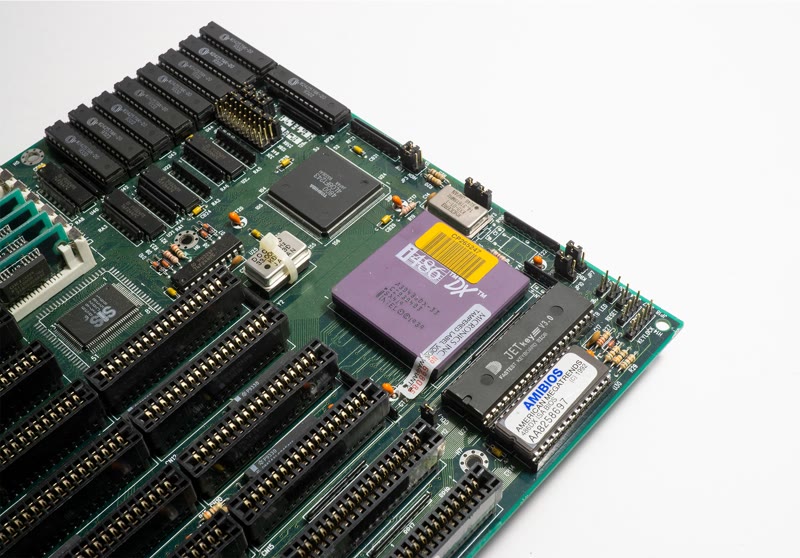
History — Programs as wiring, then programs in memory
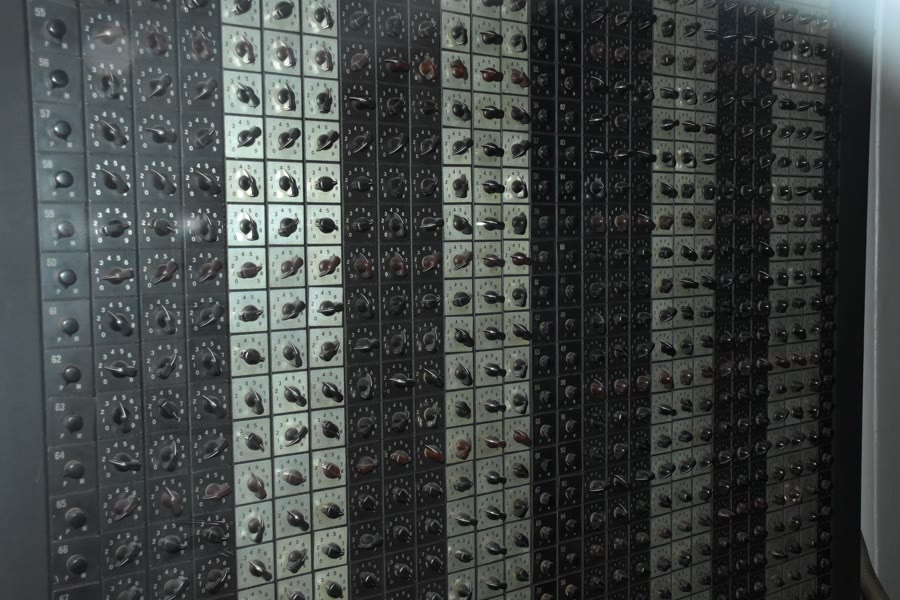
ENIAC, the computer of Chapter 1, kept no program in its memory: its operators set it up for each job by plugging in cables and setting switches, which could take days. A report dated 30 June 1945, on the design of its successor EDVAC, described a computer with one large memory holding the instructions as well as the data. Changing the program then meant changing numbers in memory, and almost every computer since has worked that way.
22.6 Exercises
Exercise 22.1 ★
All registers start at 0. What do R0 and R1 hold when this program halts?
        LOADI R0, 5
        LOADI R1, 2
        SUB   R0, R1
HALTHALT. code/grade-7/04-how-a-processor-runs-a-program/exercises/three_steps.toySolution
Solution of Exercise 22.1.
R0 holds 5, then R1 holds 2, then R0 becomes : R0 is 3 and R1 is 2.
Exercise 22.2 ★
In Listing 22.3, what does PC hold after each of the first four steps?
Solution
Solution of Exercise 22.2.
Each fetch adds 2: after the steps PC holds 2, 4, 6 and 8 (the fourth step is the first ADD, which does not jump).
Exercise 22.3 ★
What does Listing 22.4 print?
Solution
Solution of Exercise 22.3.
$ python -m toymachine run countdown.toy
3
2
1OUT comes before SUB, so 3 is printed first; when R0 reaches 0 the jump is not taken, and 0 is never printed.
Exercise 22.4 ★
Write a toy program that reads two numbers and prints their sum plus 1.
Solution
Solution of Exercise 22.4.
        IN    R0
        IN    R1
        ADD   R0, R1
        LOADI R2, 1
        ADD   R0, R2
        OUT   R0
HALTWith 3 and 4 it prints 8. There is no instruction to add a number directly in the table, so the 1 goes first into a register.
Exercise 22.5 ★★
This program should print 3, 2, 1. Here is what happens when it runs; the machine stops it after 10 000 steps. What is wrong? Fix it.
; never_ends.toy -- should print 3, 2, 1
again:  LOADI R0, 3
        LOADI R1, 1
        OUT   R0
        SUB   R0, R1
        JNZ   again
HALT$ python -m toymachine run never_ends.toy > printed.txt
$ wc -l printed.txt
2001 printed.txt
$ tail -n 3 printed.txt
3
3
error: no HALT after 10000 stepswc -l counts its lines and tail shows the last ones.Solution
Solution of Exercise 22.5.
JNZ again jumps back to LOADI R0, 3, which puts 3 back in R0 at every turn: R0 never reaches 0, and the program prints 3 forever (2 000 times before the machine stops it). The label belongs on the OUT line, after the two LOADI, as in Listing 22.4.
Exercise 22.6 ★★
Noor forgot the HALT at the end of Listing 22.1. Her program still prints 7 and stops. Why? Why is it still a bug?
Solution
Solution of Exercise 22.6.
After OUT R0 the processor fetches the next two cells, 8 and 9. Every cell the program did not fill holds 0, and the two bytes 0, 0 are the instruction HALT: the machine stops by luck. If anything were stored after the program, data or another part of the program, the processor would run it as instructions.
Exercise 22.7 ★★
Write a toy program that prints 5, 4, 3, 2, 1.
Solution
Solution of Exercise 22.7.
        LOADI R0, 5
        LOADI R1, 1
again:  OUT   R0
        SUB   R0, R1
        JNZ   again
HALTExercise 22.8 ★★
Using the table of operation codes, write the two bytes of LOADI R1, 7 in decimal and in binary.
Exercise 22.9 ★★
Without the trace, count the steps that Listing 22.3 takes for ; then check your answer on Output 22.3.
Solution
Solution of Exercise 22.9.
Three steps before the loop (IN and two LOADI), three per turn for 4 turns, then OUT and HALT: , as the trace says.
Exercise 22.10 ★★★
The toy memory has 256 cells and each instruction takes two. How many instructions can the longest program have? Why would a real program be shorter still?
Solution
Solution of Exercise 22.10.
instructions. A real program also needs cells for its data, and the last instruction must be HALT, so fewer instructions do useful work.
Exercise 22.11 ★★★
Find an expression for the number of steps Listing 22.3 takes for any , and check it with a Python program that runs the toy machine for to 10.
Solution
Solution of Exercise 22.11.
Three steps before the loop, three per turn for turns, two at the end: steps.
from toymachine import Machine, assemble

code = assemble(open("sum.toy").read())
for n in range(1, 11):
    machine = Machine(code, inputs=[n])
    machine.run()
print(f"n = {n:2} total = {machine.outputs[0]:2} steps: {machine.steps}")$ python sum_steps.py
n = 1 total = 1 steps: 8
n = 2 total = 3 steps: 11
n = 3 total = 6 steps: 14
n = 4 total = 10 steps: 17
n = 5 total = 15 steps: 20
n = 6 total = 21 steps: 23
n = 7 total = 28 steps: 26
n = 8 total = 36 steps: 29
n = 9 total = 45 steps: 32
n = 10 total = 55 steps: 35Exercise 22.12 ★★★
Write a toy program that reads two numbers below 128 and prints the larger one. Use CMP and JN from the table.
Solution
Solution of Exercise 22.12.
CMP R0, R1 computes ; it is negative exactly when R0 is the smaller one, and then the program jumps to print R1.
        IN    R0
        IN    R1
        CMP   R0, R1      ; compute R0 - R1, set the flags, keep R0
        JN    second      ; negative: R0 is smaller than R1
        OUT   R0
        HALT
second: OUT   R1
HALTWith 9 and 14 it prints 14. (Numbers of 128 or more would need the flag C, which the next book explains.)
22.7 Problem: Multiplying on a Machine That Cannot Multiply
Problem 22.1
Weekend problem — multiplying with additions
The toy machine can add and subtract, but it has no instruction to multiply. Yet is .
Part I — By hand.
- Write and as sums. Which one has fewer additions?
- Here is a program that reads and and adds to a total, times. Trace it by hand for and , in a table with the columns step,
PC,R0,R1,R2.
; multiply.toy -- reads a and b, prints a x b by adding a, b times
        IN    R0          ; R0 = a
        IN    R1          ; R1 = b (how many additions are left)
        LOADI R2, 0       ; R2 = the total
        LOADI R3, 1       ; R3 = the constant 1
again:  ADD   R2, R0      ; total = total + a
        SUB   R1, R3      ; one addition fewer to do
        JNZ   again
        OUT   R2
HALT- How many steps did your trace take? Which register holds the answer?
- What does
R1count?
Part II — Counting the steps.
from toymachine import Machine, assemble

code = assemble(open("multiply.toy").read())
for b in range(1, 11):
    machine = Machine(code, inputs=[6, b])
    machine.run()
print(f"6 x {b:2} = {machine.outputs[0]:3} steps: {machine.steps}")- Run the program. Does it agree with your trace for ?
- By how much does the number of steps grow when grows by 1? Why?
- Which steps are done only once, whatever is? How many are they?
Part III — The cost of a multiplication.
- Write the number of steps as an expression in .
- Predict the steps for and for , then run them.
- To multiply two numbers, which one should be read second, as ?
- A register holds one byte, at most 255. What goes wrong with ?
- State the result.
Solution
Solution of Problem 22.1.
1. (three additions to a first 6, or four to a total starting at 0); , with more additions.
2. The first four rows read , and set up R2 = 0 and R3 = 1 (PC 0, 2, 4, 6). Then each turn runs ADD, SUB, JNZ at addresses 8, 10 and 12: R2 goes 6, 12, 18, 24 while R1 goes 3, 2, 1, 0. Finally OUT at 14 and HALT at 16.
3. steps; the answer is in R2, and the program prints 24.
4. R1 counts the additions that are still to be done.
5. It agrees: 18 steps for .
$ python multiply_steps.py
6 x  1 =   6   steps: 9
6 x  2 =  12   steps: 12
6 x  3 =  18   steps: 15
6 x  4 =  24   steps: 18
6 x  5 =  30   steps: 21
6 x  6 =  36   steps: 24
6 x  7 =  42   steps: 27
6 x  8 =  48   steps: 30
6 x  9 =  54   steps: 33
6 x 10 = 60 steps: 366. By 3 each time: one more turn of the loop, which is three instructions.
7. The four instructions before the loop and the two after it: 6 steps.
8. steps.
9. steps for , and for :
$ python orders.py
3 x 50 = 150   steps: 156
50 x 3 = 150   steps: 15
7 x 30 = 210   steps: 96
30 x 7 = 210   steps: 27
7 x 200 = 120 steps: 60610. The smaller one, since the number of turns is .
11. does not fit in one byte. The machine prints 120 instead: it kept only what fits in a byte, . The next book explains what happens when a number goes past 255.
12. Result. The multiplication of by takes steps: the same 3 more for each extra unit of , so takes 156 steps and only 15. A one-byte register cannot hold a product above 255.