এই বইটি এখনো বাংলা ভাষায় পাওয়া যায় না। সংস্করণ: English।
Primary & Middle School Computer Science · শ্রেণি 1–9
8Memory and Storage
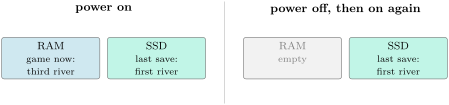
Mia has been playing a game for an hour. She has crossed three rivers and opened two castles. Suddenly the lights go out: the power is cut in the whole street. When it comes back and she starts the game again, she is back at the first river, where the game last saved her progress. The computer forgot everything since then. Why does a computer forget some things and keep others?
You already know
The processor carries out the instructions; the memory holds the work in progress and forgets it when the power goes off; the storage keeps the saved work (Chapter 6).
8.1 RAM: fast, and emptied when the power goes
Definition 8.1 (RAM)
RAM (random-access memory) is the memory of a computer: chips on small boards that hold the information the processor is working on. The processor can read and change any part of it very fast, in any order (this is what “random access” means), but everything in it is lost when the power goes off.
RAM keeps information as tiny electric charges, which must be refreshed many times a second. When the electricity stops, the charges leak away within a moment, and the RAM is empty. That is what happened to Mia’s game: her progress since the last save was only in the RAM.
8.2 Storage that keeps everything
A computer also needs a place where information stays without electricity. There are two main kinds.
Definition 8.2 (Hard disk)
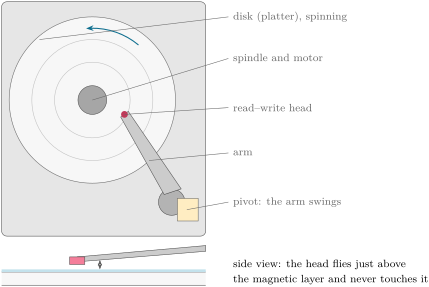
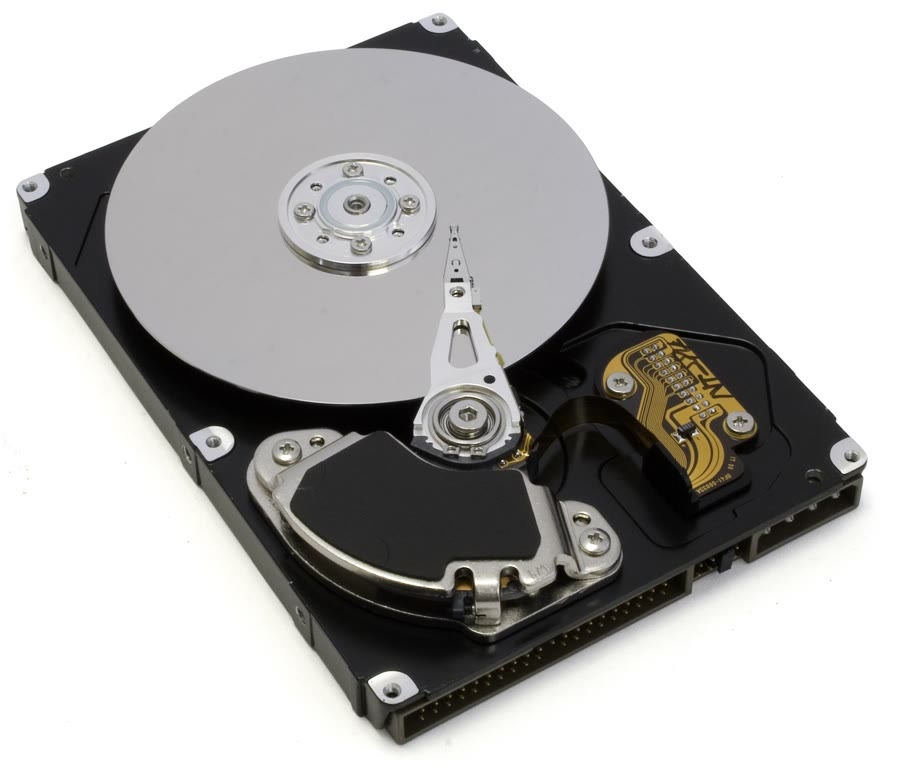
A hard disk stores information on spinning metal disks covered with a thin magnetic layer. A read–write head, at the end of a moving arm, flies just above the surface: it writes by making tiny areas magnetic in one direction or the other, and reads them back.
The head never touches the disk: it floats on a cushion of air thinner than a hair. The disks turn thousands of times a minute, so a hard disk hums and gets warm, and a hard knock while it is running can make the head scratch the disk.
Definition 8.3 (Flash memory and SSD)
Flash memory keeps information as electric charges trapped in tiny cells of a chip, so tightly that they stay without electricity for years. An SSD (solid-state drive) is a storage made of flash memory chips, with no moving part.
USB sticks and the memory cards of cameras and phones are made of flash memory too. Phones, tablets and most new laptops have an SSD instead of a hard disk.
| hard disk | SSD, USB stick, memory card | |
|---|---|---|
| how it keeps information | magnetic layer on spinning disks | charges trapped in chips |
| moving parts | yes: disks and an arm | none |
| speed | slower: the head must move | faster |
| noise | a soft hum | silent |
| if dropped while running | the disk can be scratched | usually no harm |
8.3 Measuring size in bytes
How much work can a storage hold? We count it in bytes.
Definition 8.4 (Byte)
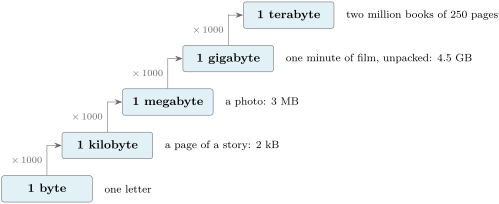
The byte is the unit used to measure the size of information in a computer: one byte holds one letter of plain text.
Definition 8.5 (Kilobyte, megabyte, gigabyte, terabyte)
A kilobyte (kB) is bytes. A megabyte (MB) is kilobytes. A gigabyte (GB) is megabytes. A terabyte (TB) is gigabytes.
Each unit is a thousand times the one before, as a kilometre is a thousand metres. Let us compute a few sizes.
Example 8.6 (A page, a photo, a film)
- A page of a story has about letters and spaces: about bytes, so about 2 kilobytes.
- A photo of by coloured dots has dots. If each dot is kept as 3 bytes (one for each of three colours), the photo takes bytes: 3 megabytes.
- A film shows 25 pictures every second. If each picture were kept like that photo, one second would take megabytes, and one minute megabytes: 4.5 gigabytes. Real films are packed much more tightly; how this works comes in a later year.
Remark 8.7 ( instead of )
Some programs count a kilobyte as bytes instead of , for reasons we meet in a later year. The difference is small, but it is why a storage sold as 500 gigabytes may be shown by the computer as a little less. The careful name for bytes is a kibibyte (KiB).
History — Five million letters on fifty disks
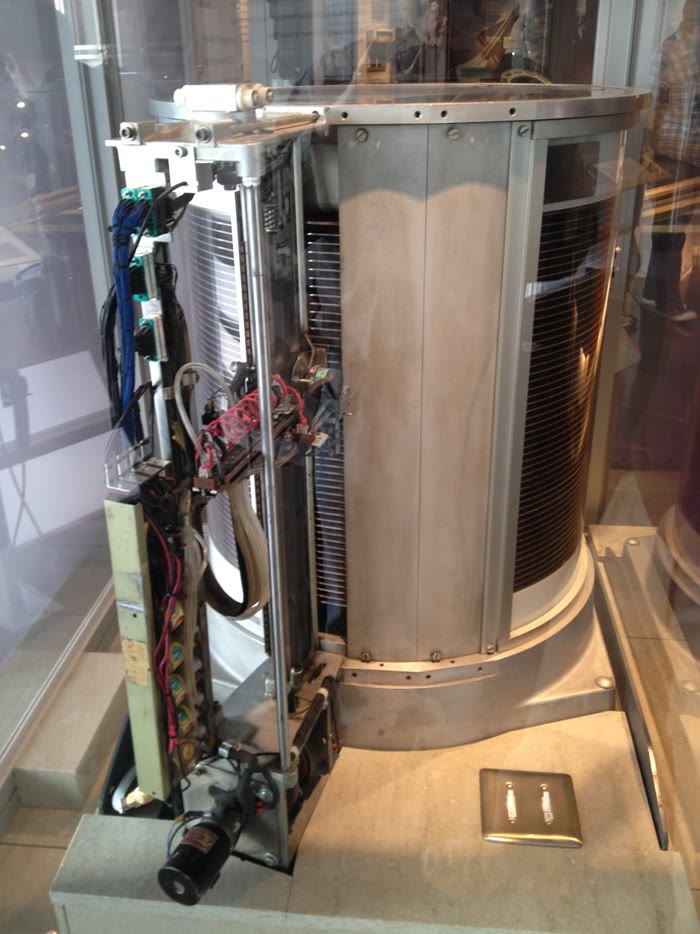
The first hard disk sold for a computer was shipped in June 1956. It was a cabinet about high and wide that weighed, with its air pump, more than a tonne. Inside, 50 metal disks, each about across, turned times a minute. All together they held five million letters: less than 4 megabytes, the size of a single photo today.
8.4 Why keep a backup
Storage keeps work when the power is off, but it is not safe forever. A hard disk can wear out, a laptop can be dropped, lost or stolen, a file can be deleted by mistake.
Definition 8.8 (Backup)
A backup is a second copy of files, kept on another storage, in another place, so that they can be brought back if the first copy is lost.

Safe use
Keep a backup of the work you care about, on another device and in another place (a disk kept at home for a school laptop, for example). Update it often: a backup only holds what was there on the day it was made.
8.5 Exercises
Exercise 8.1 ★
The power goes off. Which keeps the work: the RAM or the SSD?
Exercise 8.2 ★
Exercise 8.3 ★
Exercise 8.4 ★
A page of text takes 2 kilobytes. How many such pages fit in 1 megabyte?
Exercise 8.5 ★
Put these sizes in order, from the smallest to the largest: 3 GB, 500 kB, 2 TB, 40 MB, 900 bytes.
Exercise 8.6 ★
Why should a backup be kept in another place than the computer it copies?
Solution
Solution of Exercise 8.6.
If the computer is lost, stolen, or broken by a fire or a flood, a copy kept next to it may be lost at the same time. A copy kept elsewhere survives.
Exercise 8.7 ★
Read the ladder of sizes: how big is one photo? About how many such photos fit in 1 gigabyte?
Exercise 8.8 ★
A USB stick holds 64 gigabytes. Each photo takes 4 megabytes. How many photos fit on the stick?
Exercise 8.9 ★★
A story has letters and spaces. How many kilobytes does it take?
Exercise 8.10 ★★
In the story at the start of this chapter, which part of the computer forgot Mia’s progress? Where was the progress she found again?
Exercise 8.11 ★★
The class keeps all its work on one school computer. Make a plan of backups: on what, where, and how often.
Solution
Solution of Exercise 8.11.
Many plans are good. For example: every Friday, the teacher copies the class folder onto an external disk; there are two such disks, used in turn, and one of them is always kept in another room or at home. A good plan says on what the copy is made, where it is kept (not next to the computer), and how often (at least once a week).