এই বইটি এখনো বাংলা ভাষায় পাওয়া যায় না। সংস্করণ: English।
Primary & Middle School Computer Science · শ্রেণি 1–9
29How the Internet Works
Sami takes a photo of a fox in the garden and sends it to his cousin on the other side of the world. Moments later, she sees it. On the way, the photo was cut into about two thousand pieces, which did not all travel the same way, passed through many machines that had never heard of Sami, and were put back together in the right order. This chapter follows those pieces.
You already know
A network joins computers so that they can exchange data; the Internet joins networks across the world; a server keeps pages and sends them to the browsers that ask; a web address names a server and a file (Chapter 13). A byte is 8 bits, and holds a number from 0 to 255; bits make patterns (Chapter 25). A dictionary gives the value of a key (Chapter 26).
29.1 Messages cut into packets
Definition 29.1 (Packet, packet header)
A packet is a small piece of the data sent over a network, with a packet header: a few bytes in front that say where the packet comes from, where it goes, and which piece it is.
A network never sends a big file in one go. It cuts it into packets that travel one by one, each on its own, like the pages of a long letter posted in separate envelopes. The machine that receives them puts the pieces back in the order of their numbers. The program below does the same with a short message, with packets of 6 characters; the packets arrive in a mixed order, fixed in the program.
def cut(message, size, source, destination):
    """Cut a message into packets of at most size characters, each with a header."""
    packets = []
    number = 0
    for start in range(0, len(message), size):
        packets.append({"from": source, "to": destination, "number": number,
                        "data": message[start:start + size]})
        number = number + 1
    return packets


def rebuild(packets):
    """Put the pieces back in the order of their numbers."""
    pieces = {}
    for packet in packets:
        pieces[packet["number"]] = packet["data"]
    message = ""
    for number in range(len(pieces)):
        message = message + pieces[number]
    return message


if __name__ == "__main__":
    packets = cut("A fox in the garden at dusk!", 6, "192.0.2.15", "203.0.113.40")
    first = packets[0]
    print(len(packets), "packets; from", first["from"], "to", first["to"])
    arrived = [packets[3], packets[0], packets[4], packets[1], packets[2]]
    for packet in arrived:
        print(packet["number"], repr(packet["data"]))
print(rebuild(arrived))$ python packets.py
5 packets; from 192.0.2.15 to 203.0.113.40
3 'n at d'
0 'A fox '
4 'usk!'
1 'in the'
2 ' garde'
A fox in the garden at dusk!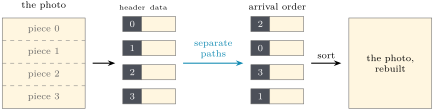
What if a packet is lost on the way? The rebuilt message has a hole:
from packets import cut

packets = cut("A fox in the garden at dusk!", 6, "192.0.2.15", "203.0.113.40")
arrived = [packets[3], packets[0], packets[4], packets[2]]       # number 1 is lost

pieces = {}
for packet in arrived:
    pieces[packet["number"]] = packet["data"]
message = ""
for number in range(len(packets)):
    message = message + pieces.get(number, "______")     # a hole for a lost piece
print(message)$ python lost_packet.py
A fox ______ garden at dusk!The receiving machine sees which number is missing and asks for that packet again. Only the lost piece is sent twice, not the whole photo: that is one reason for cutting it up.
29.2 An address for every machine
Definition 29.2 (IP address)
An IP address is the number that identifies a machine on the Internet. In its common form it is four bytes, written as four numbers from 0 to 255 separated by dots, such as 192.168.1.20.
Four bytes are 32 bits. The program cuts an address at its dots and writes each part in binary on 8 digits, with the f-string layout 08b: b for binary, 08 for 8 digits with zeros in front.
address = "192.168.1.20"
parts = address.split(".")
bits = ""
for part in parts:
    byte = int(part)
    print(part.rjust(3), "->", f"{byte:08b}")
    bits = bits + f"{byte:08b}"
print(len(parts), "bytes,", len(bits), "bits:", bits)$ python ip_bytes.py
192 -> 11000000
168 -> 10101000
1 -> 00000001
20 -> 00010100
4 bytes, 32 bits: 11000000101010000000000100010100
192.168.1.20 as 32 bits: four bytes, each written in decimal between the dots.How many such addresses exist? :
print("4 bytes:", 2**32, "addresses")
print("16 bytes:", 2**128, "addresses")
print("people on Earth: about 8,000,000,000")$ python count_addresses.py
4 bytes: 4294967296 addresses
16 bytes: 340282366920938463463374607431768211456 addresses
people on Earth: about 8,000,000,000About 4.3 billion addresses are fewer than the people on Earth, and many people own several machines. The newer addresses therefore use 16 bytes, 128 bits: is a number of 39 digits, enough for every grain of sand many times over. Both kinds are in use today.
Definition 29.3 (Network interface)
A network interface is the part of a machine that connects it to a network: a socket for a cable, or a radio for wi-fi. A machine has an address for each of its network interfaces.
Definition 29.4 (Network switch)
A network switch is a box with many sockets that joins the machines of one local network, such as those of a home, a school or an office, and passes each packet to the machine it is for.
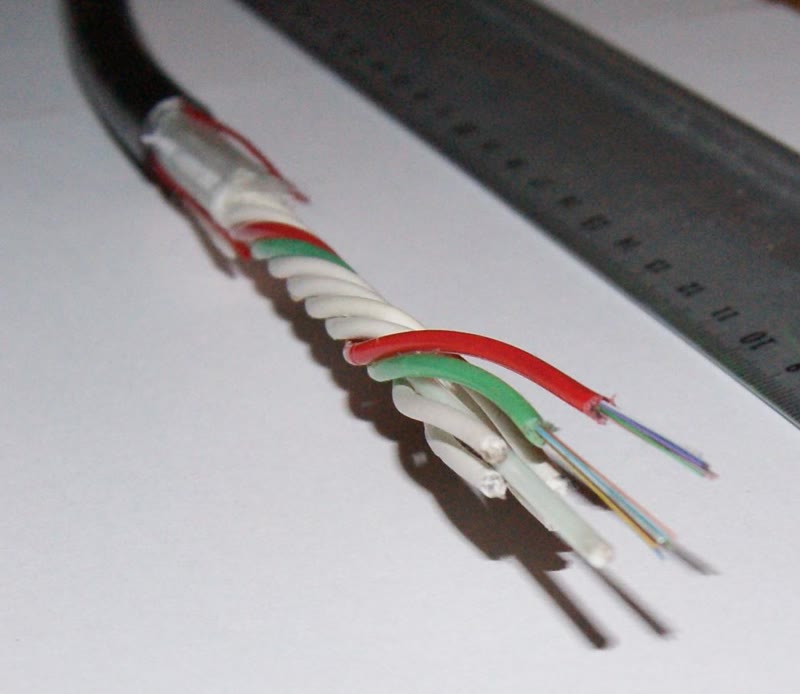
At home, the box from the Internet provider usually contains a small switch and a wi-fi radio: the laptop, the phone and the printer of the house are on one local network. Over long distances, the packets travel as flashes of light in optical fibres, glass threads thinner than a hair.
29.3 Routers
Definition 29.5 (Router)
A router is a machine that joins networks. For each packet it receives, it reads the destination address in the header and passes the packet one step closer to it, to the next router or to the local network of the destination.
No router knows the whole Internet. Each one keeps a table of directions: “for these addresses, pass to that neighbour”. The packet hops from router to router, each choosing only the next step. The program below uses a toy network of six routers, A to F, with a dictionary that gives each router’s next step towards F.
# For a packet going to router F, each router knows only the next router to pass it to.
next_step = {"A": "B", "B": "C", "C": "F", "D": "E", "E": "F"}

router = "A"
path = [router]
while router != "F":
    router = next_step[router]
    path.append(router)
print(" -> ".join(path), "in", len(path) - 1, "steps")$ python path.py
A -> B -> C -> F in 3 steps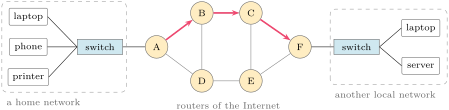
If a link breaks, the routers change their tables, and the next packets go round the break: the packets of one message may well take different paths.
History — The first network of networks
The ancestor of the Internet, the ARPANET, was switched on in late October 1969 in the United States. It was the first large network built to connect different kinds of computers together.
29.4 Names turned into addresses
Definition 29.6 (Domain name, domain name system)
A domain name is a name for a machine on the Internet, made of words separated by dots, such as library.brenmoor.example. The domain name system (DNS) is a service, spread over many servers, that answers the question “which IP address does this name have?”.
People remember names; routers need numbers. Before anything else, a browser asks the name system for the address of the name in the web address. The toy version is a dictionary:
names = {
    "library.brenmoor.example": "203.0.113.7",
    "weather.brenmoor.example": "203.0.113.12",
    "school.brenmoor.example": "198.51.100.30",
}


def look_up(name):
    """The address of a name, as the name system answers it, or None."""
    return names.get(name)


for name in ["weather.brenmoor.example", "pool.brenmoor.example"]:
print(name, "->", look_up(name))$ python names.py
weather.brenmoor.example -> 203.0.113.12
pool.brenmoor.example -> NoneThe names ending in .example and the addresses starting with 192.0.2, 198.51.100 and 203.0.113 are kept for examples in books like this one: they belong to no real machine.
29.5 From typing an address to seeing the page
Definition 29.7 (Client)
A client is a program that asks a server for something, such as a browser asking for a page. The client asks; the server answers.
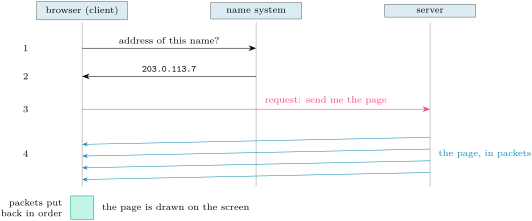
Typing library.brenmoor.example in the address bar sets off the whole chain of this chapter: the name becomes an address; the request travels in packets, through switches and routers, to the server; the page comes back in packets, maybe by other paths; the browser puts them in order and draws the page. It usually takes less than a second.
29.6 Speed and delay
Definition 29.8 (Bit rate)
The bit rate of a connection is the number of bits it can send each second, in bits per second; a megabit per second (Mbit/s) is a million of them.
Definition 29.9 (Latency)
The latency of a connection is the time a bit takes to reach the other end: the delay before anything arrives, however fast the bits follow each other after that.
Bit rate is the width of a pipe, latency its length. Part of the latency is the travel of the light itself: in a glass fibre, light covers about 200,000 kilometres each second, two thirds of its speed in empty space.
speed = 300_000 * 2 / 3            # light in a glass fibre: about 200,000 km per second

for km in [10, 1_000, 20_000]:
    seconds = km / speed
    print(f"{km:>6} km: {seconds * 1000:.2f} ms")

photo_bits = 3_000_000 * 8         # a photo of 3 megabytes
rate = 10_000_000                  # 10 megabits per second
print("sending the photo:", photo_bits / rate, "s")$ python delay.py
10 km: 0.05 ms
1000 km: 5.00 ms
20000 km: 100.00 ms
sending the photo: 2.4 sAcross a town, the light travel is nothing; across half the world, it is a tenth of a second, and no faster connection can shorten it. Sending the 3 megabytes of a photo, million bits, at 10 megabits per second takes 2.4 seconds: there, a faster connection helps.
Facts as of 2026
In the United Kingdom, the telecoms regulator reported that the home connections in use could reach 285 megabits per second on average in 2025, against 223 in 2024; most homes with optical fibre chose a plan of 300 megabits per second or less. Fast home plans reach 1,000 megabits per second, a gigabit.
The data centres that hold the servers of the Internet used about 415 terawatt-hours of electricity in 2024, about 1.5 % of the world’s electricity, according to the International Energy Agency.

29.7 Exercises
Exercise 29.1 ★
What does Listing 29.3 print for the address 10.0.0.255?
Solution
Solution of Exercise 29.1.
The four parts, then the 32 bits: 10 -> 00001010, 0 -> 00000000, 0 -> 00000000, 255 -> 11111111, and 4 bytes, 32 bits: 00001010000000000000000011111111.
Exercise 29.2 ★
Four packets arrive in this order: (2, "ld"), (0, "Hel"), (3, "!"), (1, "lo wor"). What is the rebuilt message?
Solution
Solution of Exercise 29.2.
In the order of the numbers 0, 1, 2, 3: "Hel", "lo wor", "ld", "!", which make "Hello world!".
Exercise 29.3 ★
What does Listing 29.5 print if the packet starts at router D?
Solution
Solution of Exercise 29.3.
D -> E -> F in 2 steps: the dictionary gives E after D, and F after E.
Exercise 29.4 ★
Write a function cut(text, size) that cuts a text into pieces of at most size characters, numbered from 1, each a dictionary with the keys "number", "of" (how many pieces there are in all, so that the receiver knows when every piece has come) and "data".
Solution
Solution of Exercise 29.4.
The number of pieces is known before cutting: it is the length divided by the size, rounded up, the trick of the buses of Chapter 14. The number of a new piece is one more than the number of pieces made so far:
def cut(text, size):
    """Cut text into pieces numbered from 1, each one knowing how many there are."""
    total = (len(text) + size - 1) // size
    pieces = []
    for start in range(0, len(text), size):
        data = text[start:start + size]
        pieces.append({"number": len(pieces) + 1, "of": total, "data": data})
    return pieces


for piece in cut("Meet me at the lighthouse at six.", 10):
print(piece)With "Meet me at the lighthouse at six." (33 characters) and 10, (33 + 9) // 10 is 4: four pieces, "Meet me at", " the light", "house at s" and "ix.", numbered 1 to 4, each "of": 4.
Exercise 29.5 ★★
This rebuild keeps the numbers as text. With 12 packets of one letter, from "a" to "l", it returns "abklcdefghij". Why? Fix it.
def rebuild(packets):
    pieces = {}
    for packet in packets:
        pieces[str(packet["number"])] = packet["data"]
    message = ""
    for number in sorted(pieces):
        message = message + pieces[number]
return messageSolution
Solution of Exercise 29.5.
sorted puts texts in the order of a dictionary, character by character: "10" and "11" start with 1, so they come right after "1" and before "2". The pieces 10 and 11, k and l, land after b. Keeping the numbers as numbers sorts them by value:
def rebuild(packets):
    pieces = {}
    for packet in packets:
        pieces[packet["number"]] = packet["data"]       # numbers stay numbers
    message = ""
    for number in sorted(pieces):
        message = message + pieces[number]
return messageExercise 29.6 ★★
This function accepts "192.168.300.1". (isdigit() is true when a string is made of digits only.) What is wrong with that address? Add the missing check.
def is_valid(address):
    """True when address is four whole numbers separated by dots."""
    parts = address.split(".")
    if len(parts) != 4:
        return False
    for part in parts:
        if not part.isdigit():
            return False
return TrueSolution
Solution of Exercise 29.6.
Each part is one byte, so it cannot be above 255, and 300 is. The fix adds that check:
def is_valid(address):
    """True when address is four numbers from 0 to 255 separated by dots."""
    parts = address.split(".")
    if len(parts) != 4:
        return False
    for part in parts:
        if not part.isdigit() or int(part) > 255:
            return False
return TruePython checks not part.isdigit() first, so int(part) is only reached when the part is made of digits.
Exercise 29.7 ★★
In many homes, the machines of the local network share the first three bytes of their addresses. Write a function same_network(a, b) that tells whether two addresses do.
Solution
Solution of Exercise 29.7.
Compare the lists of the first three parts:
def same_network(a, b):
    """True when the two addresses share their first three bytes."""
return a.split(".")[:3] == b.split(".")[:3]Exercise 29.8 ★★
Write a function sending_time(size_bytes, rate) that returns the time, in seconds, to send a file of size_bytes bytes at rate bits per second. How long does a 5-megabyte file take at 20 megabits per second?
Exercise 29.9 ★★
How many different addresses of four bytes are there? Write the number in full.
Solution
Solution of Exercise 29.9.
, a little more than four billion.
Exercise 29.10 ★★★
How long does light take to cross 6,000 kilometres of glass fibre, in milliseconds? Use the speed of the weekend problem’s program.
Solution
Solution of Exercise 29.10.
The speed is kilometres per second, so seconds: about 29 milliseconds.
Exercise 29.11 ★★★
A file of 1,000,000 bytes is sent in packets of 1,500 bytes, 40 of which are header. How many packets are needed, and how many bytes are sent in all?
Exercise 29.12 ★★★
Packets may arrive twice. Write a function reassemble(packets, count) that rebuilds a message of count packets, keeps one copy of each number, and also returns the list of the numbers that are missing.
Solution
Solution of Exercise 29.12.
A dictionary keeps one value per key, so a second copy of a piece simply replaces the first:
def reassemble(packets, count):
    """Rebuild a message from packets that may come twice; list the missing numbers."""
    pieces = {}
    for packet in packets:
        pieces[packet["number"]] = packet["data"]    # a copy replaces the same piece
    message = ""
    missing = []
    for number in range(count):
        if number in pieces:
            message = message + pieces[number]
        else:
            missing.append(number)
return message, missing29.8 Problem: A Photo to the Other Side of the World
Problem 29.1
Weekend problem — a photo to the other side of the world
Sami’s photo weighs 3 megabytes, 3,000,000 bytes. It goes to his cousin 20,000 kilometres away, half way round the Earth.
Part I — Packets.
A packet on most networks holds at most 1,500 bytes, and at least 40 of them are headers: 20 for the address part and 20 for the part that numbers the pieces.
- How many bytes of the photo fit in one packet?
- How many packets does the photo need? Is the last one full?
- How many bytes of header are sent, and what fraction of the whole is that?
Part II — The program.
For the speed of light in a fibre, the program uses a figure from a fibre maker’s data sheet: light in its fibre is 1.468 times slower than in empty space, where it covers 300,000 kilometres per second.
photo = 3_000_000                  # bytes
packet = 1_500                     # bytes in a packet, header included
header = 40                        # bytes of header in each packet
data = packet - header             # bytes of the photo in each packet

packets = photo // data
if photo % data != 0:
    packets = packets + 1          # one more packet for the end of the photo
total = photo + packets * header
print(packets, "packets,", packets * header, "bytes of headers,", total, "bytes in all")

speed = 300_000 / 1.468            # km per second in a glass fibre
propagation = 20_000 / speed
print(f"propagation over 20,000 km: {propagation:.3f} s")

for rate in [10_000_000, 100_000_000, 1_000_000_000]:
    sending = total * 8 / rate
    print(f"{rate // 1_000_000:>5} Mbit/s: sending {sending:.3f} s,"
f" in all {sending + propagation:.3f} s")- What do lines 6 to 8 compute, and why the
if? - Run the program. What is the propagation time over 20,000 kilometres?
- What is the sending time at 10 megabits per second? At 100?
- Why does the sending time use
total, notphoto?
Part III — What matters.
- At 10 megabits per second, which part of the time is larger, sending or propagation?
- What does a ten times faster connection change, from 10 to 100 megabits per second? And from 100 to 1,000?
- Can any connection bring the photo in less than 0.098 seconds? Why?
- The routers on the way add a little delay each. Does that change the answer to the previous question?
- State the result.
Solution
Solution of Problem 29.1.
1. bytes.
2. : 2,054 full packets carry bytes, and a 2,055th carries the last 1,160 bytes. It is not full.
3. bytes of header, out of bytes in all: about 2.7 %.
4. The number of packets: the whole number of full packets, plus one if some bytes are left over. Without the if, the end of the photo would be lost.
5. 0.098 seconds, about a tenth of a second:
$ python photo_trip.py
2055 packets, 82200 bytes of headers, 3082200 bytes in all
propagation over 20,000 km: 0.098 s
   10 Mbit/s: sending 2.466 s, in all 2.564 s
  100 Mbit/s: sending 0.247 s, in all 0.344 s
1000 Mbit/s: sending 0.025 s, in all 0.123 s6. 2.466 seconds at 10 megabits per second, 0.247 at 100.
7. The headers travel too: every byte sent takes time, not only the bytes of the photo.
8. Sending: 2.466 seconds against 0.098, twenty-five times more.
9. From 10 to 100 megabits per second, the whole trip goes from 2.564 to 0.344 seconds, more than seven times faster. From 100 to 1,000, it only goes from 0.344 to 0.123 seconds: the sending time shrinks, but the 0.098 seconds of propagation stay.
10. No. Even with an endless bit rate, the first bit needs 0.098 seconds to cover 20,000 kilometres of fibre: nothing travels in a fibre faster than its light.
11. The routers only add time, so the answer stays no; the real trip is a little longer than 0.098 seconds.
12. Result. The photo travels in 2,055 packets, with 82,200 bytes of headers. Crossing 20,000 kilometres of fibre takes 0.098 seconds whatever the connection, against 2.466 seconds of sending at 10 megabits per second and 0.247 at 100: past a certain speed, only the distance matters.