本书暂未推出简体中文版。现有版本:English。
Primary & Middle School Computer Science · 1–9 年级
9Programs and the Operating System
Lina wants to play on her tablet, but its screen shows only a bar that fills slowly, and the word “updating”. She cannot do anything but wait, so she picks up a book. What is being changed inside the tablet? Who decided to change it? And what is the tablet doing during all that time?

You already know
The processor carries out instructions; the memory holds the work in progress; the storage keeps files (Chapters 6 and 7). Each piece of work is opened in a window (Chapter 4).
9.1 A program is a list of instructions
Definition 9.1 (Program)
A program is a list of instructions for a computer, written by people and kept as a file. The processor carries out its instructions one after another.
A program is kept in the storage, like any other file. To run it, the computer copies it into the memory, because the processor reads its instructions from the memory, where they can be reached quickly. A game, a text editor and a drawing tool are all programs. A photo or a story is not a program: it is not a list of instructions, it is information that a program works on.
9.2 Applications
Definition 9.2 (Application)
An application is a program made for one task of its user: drawing, writing, playing a game, listening to music, visiting web pages.
One application can be opened in several windows at once: two stories in two windows of the same word processor, for example. Several applications can also run at the same time: music plays while you write.
9.3 The operating system
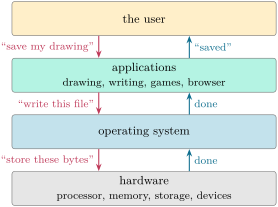
When Lina saves a drawing, the drawing application does not drive the storage itself. It asks another program to do it.
Definition 9.3 (Operating system)
The operating system is the program that starts first when a computer is switched on and runs all the others. It looks after the files, shares the memory and the processor between the programs, drives the devices, and keeps the users apart.
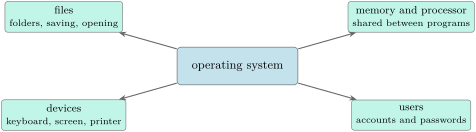
A computer used by several people keeps their work apart.
Definition 9.4 (User account)
A user account is the place an operating system keeps for one person: a name, a password, the person’s own folders and settings. The operating system lets each person open only their own account.
Facts as of 2026
The main families of operating systems in 2026: Windows, macOS, Linux and ChromeOS on desktop computers and laptops; Android, iOS and iPadOS on phones and tablets. Each family keeps changing: the makers bring out new versions and send updates.
9.4 Starting up
Definition 9.5 (Start-up)
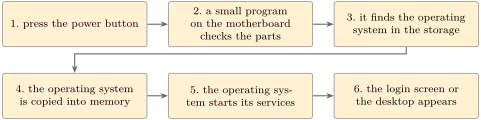
The start-up of a computer is what happens between pressing the power button and the moment the computer is ready to use: a small program kept on the motherboard checks the parts and starts the operating system from the storage.
9.5 Installing and updating
Definition 9.6 (Installing and updating)
To install a program is to copy its files into the storage of a computer and to tell the operating system about it, so that it can be started. To update a program is to replace some of its files by newer ones.
Programs are written by people, and people make mistakes. Some mistakes make a program stop or give wrong results; others leave a hole that a stranger could use to get into the computer. When the makers find a mistake, they send an update that fixes it. This is what Lina’s tablet was doing: its operating system was replacing some of its own files by better ones, and the tablet could not be used while those files were being changed.
Safe use
Accept the updates of your operating system and your applications: many of them close holes that strangers could use. Install programs only from the places your device or your school trusts, never from a message or a website that offers one out of nowhere.
9.6 Exercises
Exercise 9.1 ★
Is it a program? A recipe card, a game, a photo, a text editor.
Solution
Solution of Exercise 9.1.
A recipe card: no, its instructions are for a cook, not for a computer. A game: yes. A photo: no, it is information, not instructions. A text editor: yes.
Exercise 9.2 ★
Give three things the operating system looks after.
Exercise 9.3 ★
Exercise 9.4 ★
Put the steps of a start-up in order: (a) the operating system is copied into memory; (b) the power button is pressed; (c) the login screen appears; (d) a small program on the motherboard checks the parts; (e) the operating system is found in the storage.
Solution
Solution of Exercise 9.4.
(b), (d), (e), (a), (c).
Exercise 9.5 ★
Give two reasons to accept updates.
Exercise 9.6 ★
Follow the drawing of the layers for “print this page”: what does each layer ask the one below?
Solution
Solution of Exercise 9.6.
The user asks the application to print the page; the application asks the operating system to send the page to the printer; the operating system drives the printer (a device). The answer “printed” comes back up the same way.
Exercise 9.7 ★
Application or operating system? (a) Drawing a cat. (b) Sharing the memory between two programs. (c) Checking the spelling of a story. (d) Showing the login screen. (e) Sending bytes to the printer.
Solution
Solution of Exercise 9.7.
(a) Application. (b) Operating system. (c) Application. (d) Operating system. (e) Operating system.
Exercise 9.8 ★★
Lina and her brother use the same computer, each with a user account. What does the operating system keep apart? Why is that useful?
Exercise 9.9 ★★
Why is a program copied from the storage into the memory before it runs?
Exercise 9.10 ★★
While Tom visits a website, a window appears: “Your computer is slow! Download this update now.” What should he do, and why?
Solution
Solution of Exercise 9.10.
Close the window without downloading anything, and tell an adult. Real updates come from the operating system or from the places the device trusts, not from a window that appears on a website; such a window may try to install a harmful program.